
How to Pair: Soundcore P2 Mini True Wireless Earbuds User Guide
Content
Soundcore P2 Mini True Wireless Earbuds
Introduction
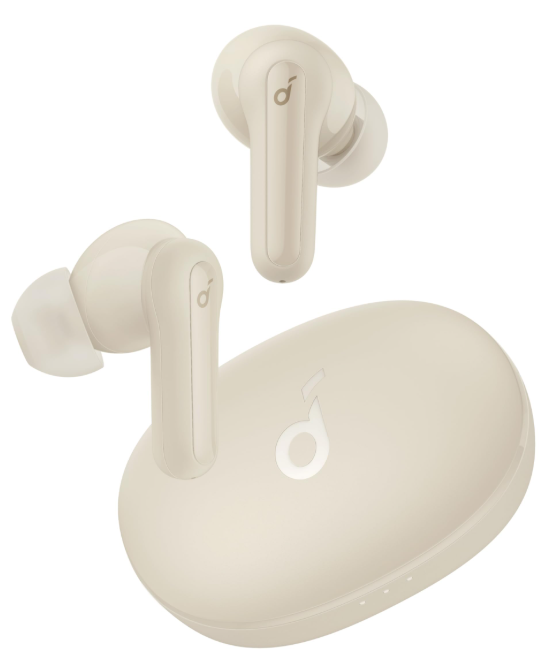
The Soundcore P2 Mini True Wireless Earbuds are designed for those who demand big sound in a compact, lightweight package. These earbuds stand out with their oversized triple-layer 10mm drivers, delivering powerful audio and 50% more bass than standard models—perfect for music lovers who crave immersive listening experiences. With three customizable EQ modes—Soundcore Signature (balanced), Bass Booster (for heavy bass), and Podcast (for clear vocals)—you can tailor your sound to any genre or activity. Switching modes is easy: just tap the right earbud three times.
Weighing just 0.16 oz (4.6g) per earbud, the P2 Mini is 10% lighter than most competitors, ensuring a featherlight, comfortable fit even during extended use. The earbuds are IPX5 water-resistant, making them suitable for workouts and outdoor adventures. Built-in microphones with AI-enhanced noise reduction ensure crystal-clear calls, while Bluetooth 5.2 provides stable, low-latency connectivity.. Battery life is impressive, with up to 8 hours of playtime per charge and a compact charging case that extends total usage to 32 hours. Fast charging delivers an hour of playback from just 10 minutes in the case.
The soSoundcore2 Mini True Wireless Earbuds are ideal for commuters, students, fitness enthusiasts, and anyone seeking affordable, reliable wireless audio. Available in select regions for around €29.99–£35.99, they offer exceptional value for everyday use. Whether you’re listening to music, taking calls, or catching up on podcasts, the P2 Mini delivers premium features without the premium price tag.
Wearing
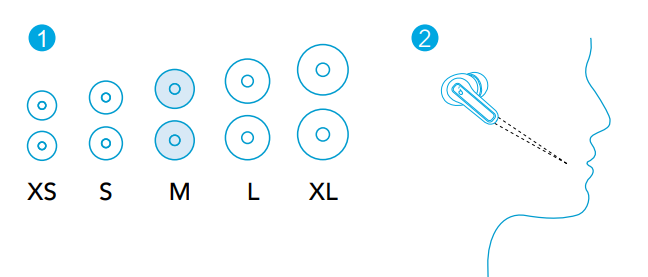
- Choose the EarTips that fit your ears best.
- Insert the earbuds into the inner canal of your ears and turn gently until you find the most comfortable and secure position.
Your earbuds come with 5 pairs of EarTips, among which the Medium-sized are pre-installed.
Bluetooth Pairing
- Tear off the insulation sticker on the earbuds before first use.
- Place the earbuds in the charging case and close it.
- Open the charging case (no need to take out the earbuds), and the earbuds will automatically enter Bluetooth pairing mode.
- The 3 LED indicators on the charging case will flash white in sequence continuously.
- Select “Soundcore P2 Mini” on your device’s Bluetooth list to connect. When successfully connected, the 3 LED indicators will turn white for 3 seconds and then turn off.
- Pairing with another device: Place the earbuds in the charging case and leave the case open. To enter pairing mode, press and hold the button on the charging case for 3 seconds until the 3 LED indicators flash white in sequence continuously.
- Each time you power on your Soundcore earbuds, they will automatically connect to your last successfully connected device if available within the Bluetooth range.
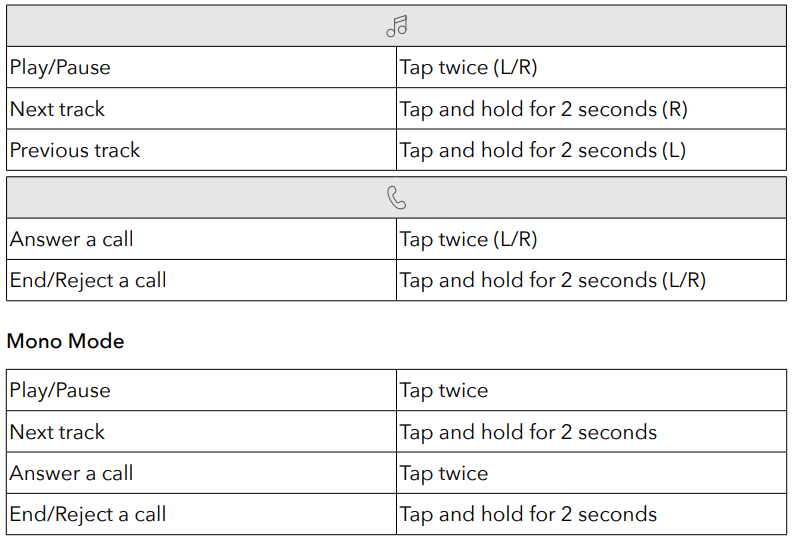
- Mono mode: When Bluetooth is connected, you can use either one of the earbuds only by placing the other one into the charging case and closing it.
- When powered on and connected, if either one of the earbuds is out of battery and powered off, you can keep using the other one.
- When you are on a call, place either one of the earbuds into the charging case, and the microphone in the other earbud will be activated.
Controls
Soundcore App
- Download the Soundcore app to enhance your experience. User interface customization: In stereo mode, all of the controls (e.g.,, adjust volume, control playback, activate Siri) can be customized in the app.
- EQ settings: There are more than 20 EQ settings you can choose from in the app to optimize your experience while enjoying different music genres.
- Earbuds firmware update: You will be informed once the new version of firmware is detected when you connect the earbuds to the app. Ensure the earbuds are out of the charging case and continuously connected with your device until the firmware upgrade is completed. During the upgrade, ensure the earbuds are close to your device and avoid any operation.
Specifications
Specifications are subject to change without notice.
- Input: 5 V 0.5 A
- Rated output: power 5 mW
- Battery capacity: 60 mAh x 2 (earbuds); 540 mAh (charging case)
- Charging time :2 hours
- Playtime (varies by volume level and content : Up to 8 hours (Total 32 hours with the charging case)
- Driver size: 10 mm
- Frequency response :20 Hz - 20 kHz
- Impedance :16 Ω
- Waterproof level: (Earbuds) IPX5
- Bluetooth version :5.3
- Bluetooth range: 10 m / 33 ft
Troubleshooting
Even the best earbuds can encounter issues. Below are common problems, solutions, and preventive measures for your Soundcore True Wireless Earbuds.
- Earbuds Not Pairing: Ensure the sticker on the earbuds is removed before first use. Place them back in the case, then reopen to enter pairing mode.. If issues persist, reset the earbuds by holding the touchpad for 10 seconds.
- Poor Audio Quality or Connectivity: Make sure your device supports the AAC codec for optimal performance. Keep the earbuds and device within 10 meters (33 feet) for best results.. Avoid areas with heavy wireless interference.
- Short Battery Life: Fully charge the case and earbuds before first use. If battery life drops over time, clean the charging contacts with a dry cloth.
- Microphone Issues: Ensure the earbuds are seated properly in your ears. Test in a quiet environment—background noise can affect call quality despite AI noise reduction
- Touch Controls Unresponsive: Clean the touch area and ensure your fingers are dry. Refer to the manual for correct gesture mapping.
Preventive Measures: Store earbuds in the case when not in use, avoid exposure to liquids beyond the IPX5 rating, and update your device’s Bluetooth drivers regularly.
Warranty & Support: The Soundcore Soundcore comes with a standard manufacturer’s warranty. For further assistance, visit the official Soundcore website or contact customer support via their help center. Always keep your proof of purchase for warranty claims.
Pros & Cons
- Pros
- Exceptional Value: Delivers premium sound and features at a budget-friendly price, making the Soundcore i True Wireless Earbuds a standout in its class
- Lightweight Comfort: At just 4.6g per earbud, they’re among the lightest available, ideal for all-day wear
- Long Battery Life: Up to 8 hours per charge, with 32 hours total using the case. Fast charging adds an hour of playtime in just 10 minutes. e.s
- Customizable Sound: Three EQ modes let you optimize for music, podcasts, or bass-heavy tracks
- Reliable Connectivity: Bluetooth 5.2 ensures stable pairing and low latency..
- IPX5 Water Resistance: Withstands sweat and light rain, perfect for workouts and commutes
- Clear Calls: Dual microphones with AI noise reduction improve call clarity
- Cons
- No Volume Control: You must adjust volume on your connected device.
- Muffled Bass in Boost Mode: Bass Booster can sometimes compromise overall sound clarity
- No Battery Indicator: The case lacks a charge level indicator
- No Wireless Charging: Charging is via USB-C only
- No App Support: Cannot customize settings via a smartphone app
Compared to alternatives, the Soundcoreless Earbuds offer a compelling mix of sound quality, comfort, and battery life for the price. While they lack some premium features like wireless charging and app integration, their performance and value are hard to beat for everyday use
Customer Reviews
User feedback for the Soundcore i True Wireless Earbuds is overwhelmingly positive, with many praising their lightweight design, comfortable fit, and impressive battery life. Customers highlight how easy they are to set up and use, with stable Bluetooth connectivity and clear call quality thanks to AI-enhanced microphones. The three EQ modes are a popular feature, allowing users to tailor sound to their preferences.
Common complaints include the lack of volume control on the earbuds, occasional muffled sound in Bass Booster mode, and the absence of a battery indicator on the case. Some users also wish for wireless charging and app support, though most agree these are reasonable trade-offs at this price poin.TSPoint ratings typically range from 4 to 5 stars, with users recommending the P2 Mini for commuting, workouts, and everyday listening. Testimonials often mention the earbuds’ value for money and reliability, making them a smart choice for budget-conscious buyers seeking quality wireless audio.
If you want affordable, lightweight, and feature-rich true wireless earbuds,, the Soundcoreundcorei is a strong contender. They’re especially recommended for those prioritizing comfort, battery life, and clear calls over advanced customization options.
More soundcore manuals
- How to Use: Soundcore Life Note-E True Wireless Earbuds User Guide
- How to Pair: Soundcore Life Note 3 Wireless Earbuds User Guide
- Usage & Pairing: Soundcore Liberty Neo Wireless Earbuds User Guide
- How to Pair: Soundcore Liberty 3 Pro True Wireless Earbuds User Guide
- How to Pair: Soundcore R50i/P20i/P25i True Wireless Earbuds User Manual
- How to Pair: Soundcore Life A2 NC Wireless Earbuds User Guide
Leave a Comment