
How to Pair: Soundcore Liberty True-Wireless Earbuds User Manual
Content
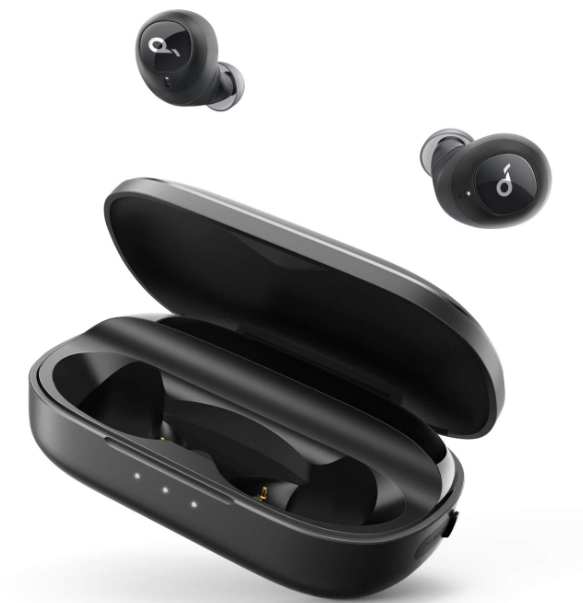
Soundcore Liberty True-Wireless Earbuds
Introduction
The Soundcore Liberty True-Wireless Earbuds deliver a premium audio experience with advanced noise cancellation and customizable sound profiles, making them ideal for music lovers, commuters, and active users alike. These earbuds stand out with their adaptive ANC 2.0 technology, which reduces ambient noise by up to 98.5%, allowing users to fully immerse themselves in high-fidelity sound. They feature custom-tuned 11mm drivers with Hi-Res Wireless and LDAC support, ensuring crystal-clear, balanced audio for all genres.
Designed for daily use, the earbuds offer a comfortable, secure fit with Cloud Comfort™ ear tips available in multiple sizes, and an IPX4 rating to resist water splashes and sweat, making them suitable for workouts and outdoor activities. With a substantial battery life of 10 hours per charge and up to 50 hours total with the charging case, users can enjoy uninterrupted listening throughout the day.
Equipped with Bluetooth 5.3 for fast, stable connections and multipoint pairing for seamless switching between devices, the Soundcore Liberty earbuds meet the needs of modern multitaskers. Available at an estimated price range of around $100, they offer excellent value compared to higher-end alternatives. These earbuds are widely available through online retailers and authorized stores, providing an accessible solution for anyone seeking true wireless freedom with noise cancellation and customizable sound.
Technical Specifications of Soundcore Liberty True-Wireless Earbuds
- Driver Size: 11mm custom-tuned drivers delivering Hi-Fi sound
- Noise Cancellation: Adaptive ANC 2.0, reducing noise by up to 98.5%
- Bluetooth Version: 5.3 for fast, reliable connectivity
- Battery Life: 10 hours per charge, 50 hours total with charging case
- Charging: Fast charging—10 10-minute charge provides 4 hours of playback
- Water Resistance: IPX4 rating, splash and sweat resistant
- Microphones: 6 mics with AI noise reduction for clear calls
- Controls: Touch controls for playback, calls, and ANC modes
- Special Features: HearID 2.0 personalized EQ, multipoint Bluetooth connection, 360° spatial audio modes
- Weight: Approx. 5.2 grams per earbud
Compared with similar models, such as the Liberty 5 and Liberty 4 Pro, the Liberty True-Wireless Earbuds offer slightly longer battery life than the Liberty 4 Pro, with a robust ANC system, though the Liberty 5 provides enhanced water resistance (IP55) and Dolby Audio support. The Liberty 4 NC stands out with excellent noise cancellation and personalized sound tuning at a competitive price point.
Charging
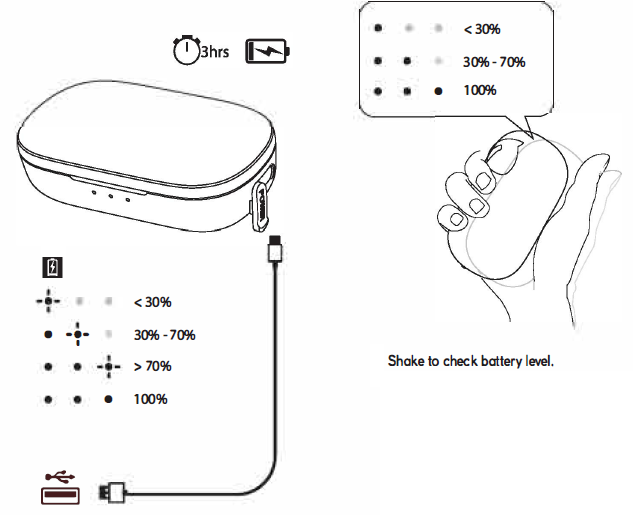
Fully charge the earbuds along with the charging case before the first use. Please check the battery level and charging status as indicated left.
Pairing with Your Device
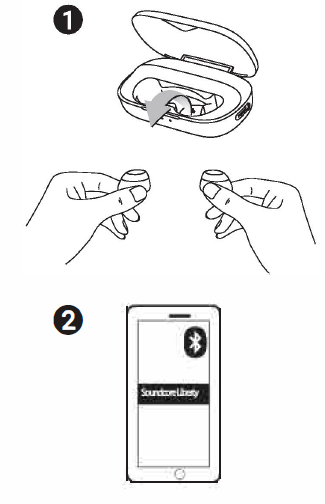
- Open the charging case and take the eorbuds out. Soundcore Liberty turns on automatically.
- Enable Bluetooth® on your device and select "Soundcore Liberty·. You will hear the pairing chime once connected.
Note: The earbuds turn off automatically when you put them back in the charging case. To manually turn the power on, press and hold the earbud button for one second. To manually turn the power off, press and hold the earbud button for 5 seconds.
Wearing
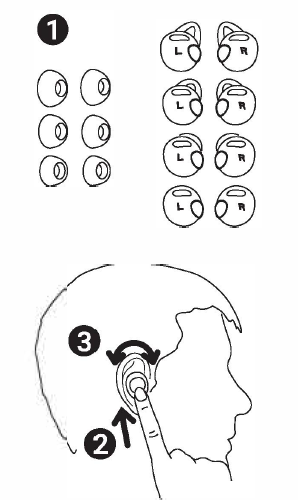
If the GripFit™ Jackets don't fit your ears, Liberty can be used without a jacket.
Controls
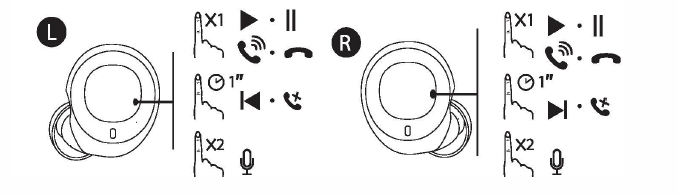
- Tap to answer/end a call or pause/resume music.
- Long-press for 1 second to skip to the previous track (L) / next track (R).
- Long-press for 1 second to reject a call, to transfer a call between earbuds and phone, or to switch between held call and active call.
- Double-tap to activate Siri or other voice assistants.
- Control volume by adjusting the volume on the connected Bluetooth device.
Reset
How to reset the earbuds if you can only hear one side:
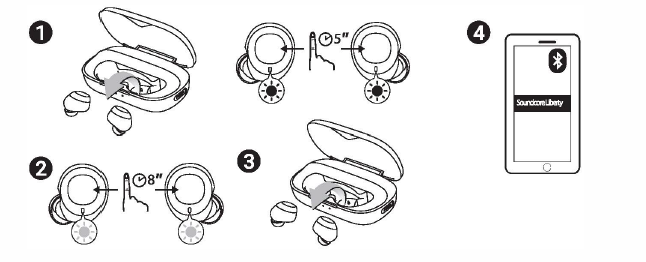
- Take the earbuds out of the charging case, press and hold the earbud button on both earbuds for 5 seconds until the LED indicator flashes red.
- Press and hold the earbud button again for about 8 seconds until the LED indicator turns pink.
- Put the earbuds back in the charging case, then take them out again. The right earbud will automatically connect to the left earbud.
- Open the Bluetooth list on your device, delete "Soundcore Liberty", then connect again.
Common Troubleshooting Tips for Soundcoree Liberty True-Wireless Earbuds
- Issue: Earbuds not pairing — Ensure Bluetooth is enabled; reset earbuds by placing both in the case and holding the button for 10 seconds; try reconnecting via the Soundcore app.
- Problem: Poor call quality — Clean microphone ports gently; check for firmware updates in the app; ensure a quiet environment or switch to transparency mode.
- Battery drains quickly — Disable ANC when not needed; avoid extreme temperatures; fully charge both earbuds and the case before usage.
- No sound from one earbud — Reset the earbuds; check if single-earbud mode is active; clean earbud contacts and re-pair to the device.
- Error codes — Consult the Soundcore app for specific error notifications; common resets and firmware updates resolve most errors.
To prevent issues, regularly update the earbuds' firmware through the Soundcore app and keep the charging contacts clean. The earbuds come with an 18-month warranty covering manufacturing defects. For further assistance, contact Soundcore customer support via their official website or authorized retail points.
Pros & Cons of Soundcore Liberty True-Wireless Earbuds
- Pros:
- Excellent noise cancellation with Adaptive ANC 2.0 technology
- Long battery life: up to 50 hours with the charging case
- Customizable sound with HearID 2.0 personalized EQ
- The fast charging feature provides 4 hours of playback in just 10 minutes
- Water resistance (IPX4) suitable for workouts and outdoor use
- Stable Bluetooth 5.3 connection with multipoint device pairing
- Cons:
- IPX4 rating is less water resistant compared to some competitors with IP55 or higher ratings
- No support for voice assistants like Alexa or Google Assistant built in
- Touch controls may require some learning curve for beginners
- Sound profile may require customization for optimal experience, depending on user preferences
Compared to alternatives such as the Liberty 5 or Liberty 4 Pro, these earbuds offer a balanced combination of features and price, making them ideal for users seeking quality noise cancellation and sound without paying premium prices for advanced water resistance or Dolby Audio.
Customer Reviews of Soundcore Liberty True-Wireless EEarbuds
Users frequently praise the Soundcore Liberty True-Wireless Earbuds for their effective noise cancellation and clear, rich audio quality. Many highlight the impressive battery life and fast charging as major benefits for their daily routines. The customizable HearID EQ feature receives positive remarks for enhancing personal listening preferences.
Common criticisms include the occasional difficulty with touch controls and limited water resistance for intense workouts. Some users note that connectivity drops are rare but present under certain conditions. Overall, the earbuds maintain a strong 4.5-star rating across major retailers, with recommendations for commuters, remote workers, and casual listeners who value noise isolation and sound quality.
Several testimonials emphasize the value-for-money aspect, calling the Soundcore Liberty True-Wireless Earbuds “a top choice in the mid-price segment” with performance often rivaling more expensive models.
Faqs
How do I set up soundcore Liberty True-Wireless Earbuds for the first time?
What should I do if one earbud of my soundcore Liberty True-Wireless Earbuds is quieter than the other?
How can I troubleshoot connection or pairing issues with soundcore Liberty True-Wireless Earbuds?
What are the key features of soundcore Liberty True-Wireless Earbuds that enhance sound quality?
Are soundcore Liberty True-Wireless Earbuds compatible with both Android and iOS devices?
How can I maximize the battery life and playtime of my soundcore Liberty True-Wireless Earbuds?
What maintenance tips should I follow to keep soundcore Liberty True-Wireless Earbuds in good condition?
How do I use the touch controls on soundcore Liberty True-Wireless Earbuds to manage calls and music?
More soundcore manuals
- Pair & Setup: Soundcore Spirit X2 True Wireless Earbuds User Guide
- Pairing: Soundcore Life P2 Wireless earbuds User Manual
- How to Pair: Soundcore Life Dot 2 True Wireless Earbuds Owner Guide
- How to Pair: Soundcore Select Pro Bluetooth Speaker User Manual
- How to Pair: Soundcore Life A2 NC Wireless Earbuds User Guide
- How to Pair: Soundcore Boom 3i Portable Bluetooth Speaker User Manual
Leave a Comment