
How to Pair: Soundcore Liberty 4 NC True-Wireless Earbuds User Manual
Content
Soundcore Liberty 4 NC True-Wireless Earbuds
Introduction
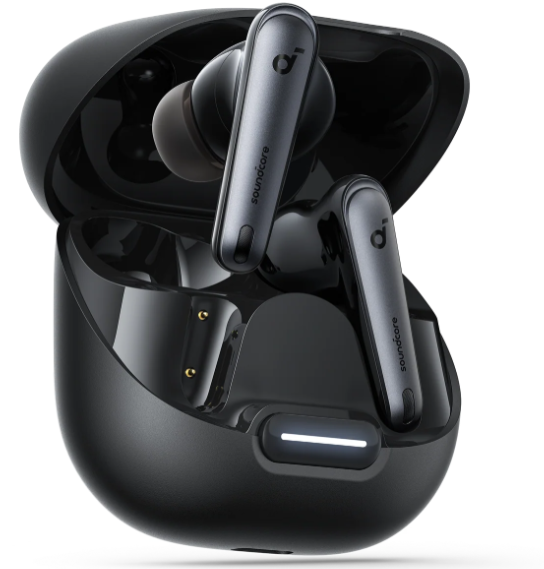
The Soundcore Liberty 4 NC True-Wireless Earbuds represent a cutting-edge solution for users seeking premium audio performance combined with advanced noise cancellation technology. These earbuds feature adaptive Active Noise Cancelling (ANC 2.0), which can reduce ambient noise by up to 98.5%, making them ideal for commuters, travelers, remote workers, and audiophiles who want immersive sound without distractions. Equipped with 11mm custom-tuned drivers and Hi-Res LDAC wireless audio support, the Liberty 4 NC delivers crisp, clear sound with rich bass and balanced mids, tailored further through the HearID 2.0 personalized EQ.
Designed for comfort and durability, the earbuds include Cloud Comfort™️ silicone ear tips available in multiple sizes, an IPX4 splash-resistant rating suitable for workouts or rainy conditions, and a lightweight form factor weighing just 5.2 grams each. The battery life is impressive, offering up to 10 hours on a single charge and 50 hours total with the portable charging case. Fast charging technology provides 4 hours of playback from just a 10-minute charge, ensuring minimal downtime.
Targeted at users who demand both excellent sound quality and noise isolation—whether for daily music listening, conference calls, or outdoor activities—the Soundcore Liberty 4 NC True-Wireless Earbuds are competitively priced around $100, positioning them as a high-value option in the true wireless market. They are widely available online and in electronics stores, with flexible payment plans offered by the manufacturer.
Specifications
- Input: 5V 0.8A
- Rated output power: 5mW
- Battery capacity: 53mAh x 2 (earbuds); 800mAh (charging case)
- Charging time: Up to 3 hours
- Playtime (with ANC off): Up to 10 hours (50 hours in total with the charging case)
- Playtime (with ANC on): Up to 8 hours (40 hours in total with the charging case)
- Driver unit: 11mm dynamic driver
- Frequency response: 20Hz - 40kHz
- Impedance: 10 Ω
- Waterproof rating (earbuds): IPX4
- Bluetooth version: 5.3
- Bluetooth range: 10m / 33ft
LED LIGHT GUIDE

CONTROLS
MANUAL PAIRING
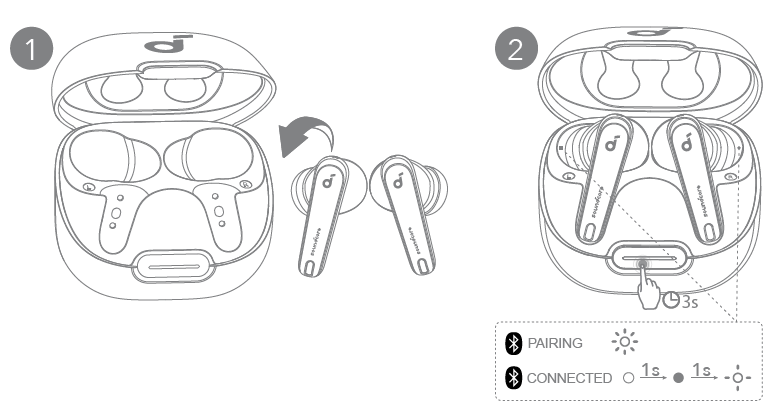
To manually enter Bluetooth pairing mode, place the earbuds in the charging case and leave the case open. Press and hold the charging case button all the way down for 3 seconds until the LED indicators flash white rapidly.
DUAL CONNECTIONS
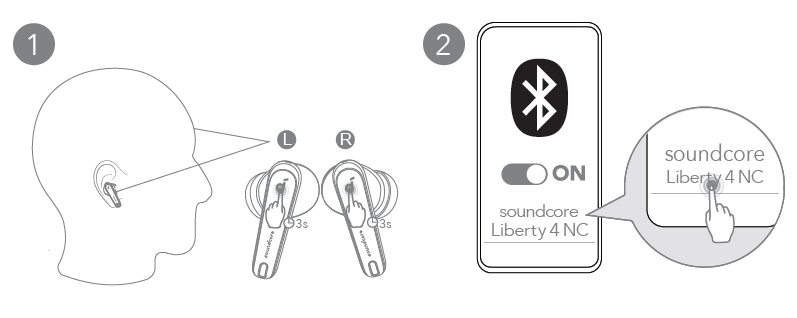
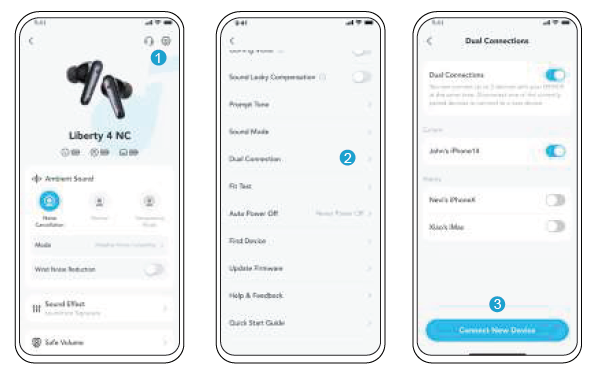
There are two ways to connect the earbuds to two Bluetooth devices at the same time.
Option A: To pair with another device, wear the earbuds, then press and hold the touchpad on both earbuds for 3 seconds simultaneously.
Option B: In the Soundcore app, go to settings and select Dual Connections > Connect New Device.
POWERING ON & PAIRING
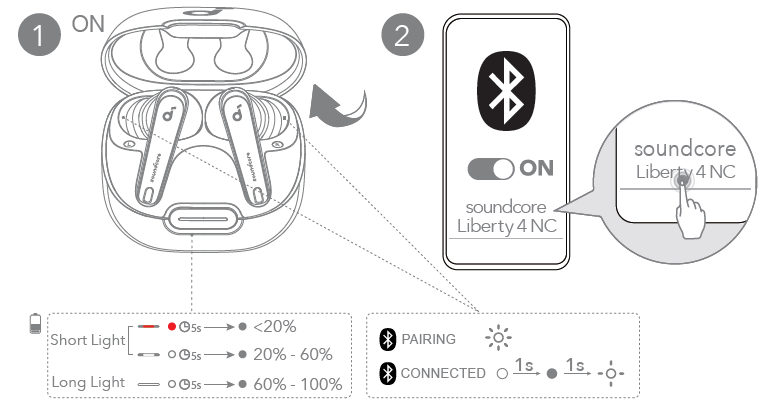
Open the charging case, and the earbuds will automatically power on and enter Bluetooth pairing mode. Select "Soundcore Liberty 4 NC" from your device's Bluetooth list when connecting for the first time.
CHARGING
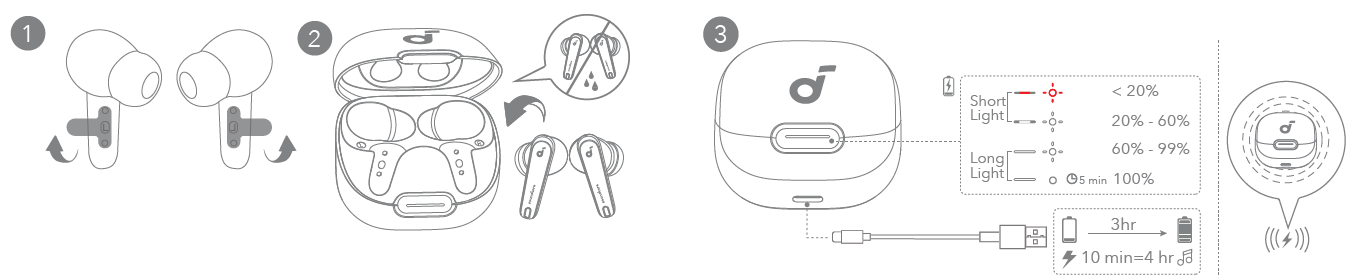
- Tear off the insulation sticker on the earbuds before first use.
- Place the earbuds in the charging case and close it.
Fully dry off the earbuds and the USB-C charging port before charging. - Connect the charging case to the power supply by using a certified USB-C charging cable. Alternatively, position the charging case at the center of your wireless charger for wireless charging.
Fully charge both the earbuds and the charging case before the first use.
WEARING
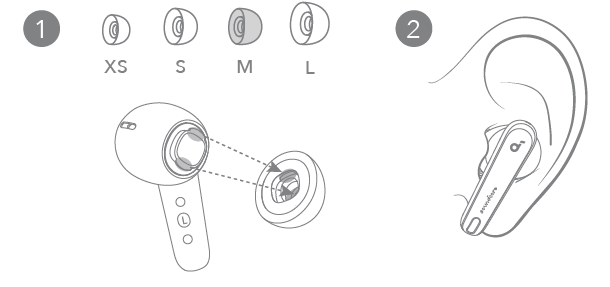
Choose the ear tips that fit your ears best and take a fit test in the Soundcore app to ensure you get the best ANC performance.
FIRMWARE UPDATE
Troubleshooting for Soundcore Liberty 4 NC True-Wireless Earbuds
Users might encounter some common issues with the Soundcore Liberty 4 NC earbuds, such as connection drops, audio imbalance, or charging problems. If your earbuds fail to pair, ensure Bluetooth 5.3 is enabled on your device and try resetting the earbuds by placing them back in the case and holding the button for 10 seconds. For audio imbalance or one earbud not producing sound, check the ear tips’ fit and clean any debris from the speaker mesh.
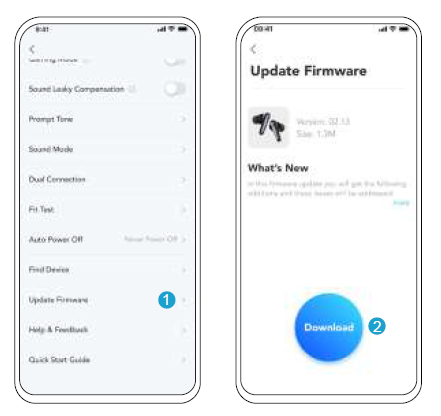
Error codes are rare, but if the earbuds fail to charge, verify the USB-C cable and charging port for dust or damage and try wireless charging if available. Preventive measures include regularly cleaning the earbuds, avoiding exposure to extreme moisture beyond the IPX4 rating, and updating firmware through the Soundcore app to ensure optimal performance.
The Liberty 4 NC comes with a 12-month limited warranty covering manufacturing defects. For technical support, users can contact Anker’s customer service via the official Soundcore website or the app’s built-in support feature. In-app FAQ and how-to videos provide step-by-step guidance on pairing, controls, and troubleshooting.
Pros & Cons of Soundcore Liberty 4 NC True-Wireless Earbuds
Pros
- Advanced Adaptive Noise Cancelling: ANC 2.0 reduces noise up to 98.5%, ideal for noisy environments.
- Hi-Res Audio & LDAC Support: Enhanced audio clarity and quality with 11mm drivers and customizable EQ.
- Long Battery Life: Up to 10 hours per charge, 50 hours with case, plus fast charging (10 mins = 4 hours).
- Comfort & Fit: Multiple ear tip sizes and Cloud Comfort™️ design ensure all-day wearability.
- Multipoint Bluetooth 5.3: Connects to two devices simultaneously with fast pairing.
- Water Resistance: IPX4 rating protects against sweat and splashes.
Cons
- Microphone Quality: Calls can sound bassy and muffled, not ideal for noisy surroundings.
- Sound Profile: Bass boost may overwhelm mids slightly, which may not suit all listeners.
- Price Point: Slightly higher than some competitors, but justified by features and build quality.
- App Complexity: EQ presets in the Soundcore app can be overwhelming for casual users.
Overall, the Soundcore Liberty 4 NC True-Wireless Earbuds offer excellent value for money, especially for users prioritizing noise cancellation and audio customization over pure microphone fidelity, making them strong alternatives to more expensive models with similar features.
Customer Reviews of Soundcore Liberty 4 NC True-Wireless Earbuds
Customers consistently praise the Soundcore Liberty 4 NC True-Wireless Earbuds for their exceptional noise-cancelling and comfortable fit. Many users highlight the crisp sound quality and the convenience of fast charging. One verified buyer commented, “The ANC is surprisingly effective for the price, perfect for my daily commute.”
Common complaints focus on microphone performance during calls, which some find unclear in windy or crowded environments. A few users mentioned challenges with initial Bluetooth pairing, though the majority found the connection stable after setup. The earbuds often receive 4 to 4.5 stars out of 5 on major retail platforms, with recommendations especially from music enthusiasts and remote workers.
Frequent reviewers recommend these earbuds to anyone who wants a solid balance of noise cancelling, sound quality, and battery life without breaking the bank, while advising those who prioritize call clarity to consider alternatives.
Faqs
How do I set up the soundcore Liberty 4 NC True-Wireless Earbuds for the first time?
What should I do if the squeeze controls on my soundcore Liberty 4 NC earbuds are not working properly?
Can I connect the soundcore Liberty 4 NC True-Wireless Earbuds to multiple devices simultaneously?
How can I manually enter Bluetooth pairing mode on the soundcore Liberty 4 NC earbuds?
What are the best practices for maintaining and cleaning soundcore Liberty 4 NC True-Wireless Earbuds?
How do I optimize the Active Noise Cancellation (ANC) feature on soundcore Liberty 4 NC earbuds?
Are the soundcore Liberty 4 NC True-Wireless Earbuds compatible with Windows 11 computers?
What should I do if my soundcore Liberty 4 NC earbuds frequently disconnect or lose sound?
More soundcore manuals
- How to Pair: Soundcore H30i wireless on-ear headphones User Manual
- Pairing & Usage: Soundcore R50i/P20i/P25i Earbuds User Manual
- Pairing & Usage: Soundcore K20i wireless earbuds User Manual
- How to Pair: Soundcore Life A3i Earbuds User Manual
- Pairing & Usage: Soundcore Life P3i Hybrid Active Earbuds User Manual
- Setup: Soundcore A20i/A25i True Wireless Earbuds User Manual
Leave a Comment