
Setup: Soundcore A20i/A25i True Wireless Earbuds User Manual
Content
soundcore A20i/A25i True Wireless Earbuds
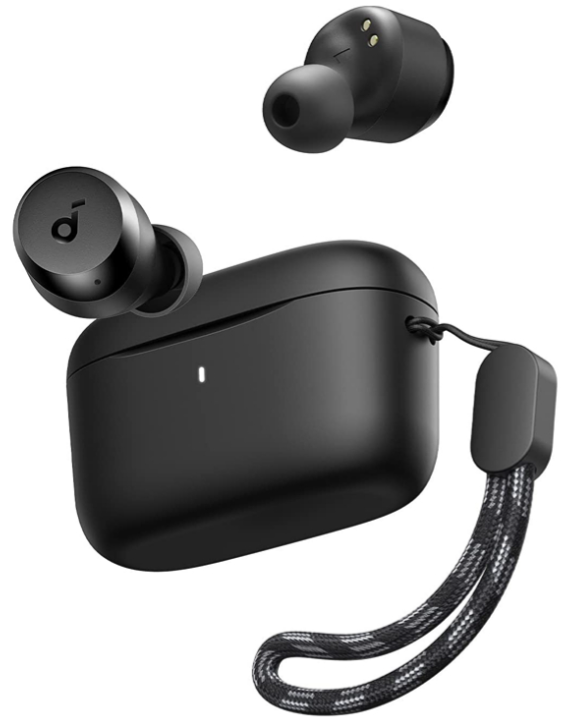
Introduction
The Soundcore A20i/A25i True Wireless Earbuds by Anker deliver an exceptional blend of portability, sound customization, and long-lasting battery life, designed for everyday users seeking quality audio on the go. These earbuds feature Bluetooth 5.3 connectivity for a fast, stable wireless experience, making them ideal for workouts, commuting, and casual listening.
Key benefits include up to 9 hours of continuous playtime on a single charge and a total of 28 hours with the compact charging case, complemented by fast charging that provides 2 hours of playback after just 10 minutes. The earbuds come with 22 preset EQ profiles and BassUp technology accessible via the Soundcore app, allowing users to tailor sound profiles to their preferences for an enhanced listening experience.
Perfectly suited for active individuals and casual listeners alike, the earbuds offer AI-powered noise reduction with dual microphones to ensure clear calls even in noisy environments. The ergonomic, lightweight design coupled with an IPX5 rating provides comfort and durability against sweat and splashes. Available in an affordable price range of approximately $50, these earbuds balance value and features, widely available through online retailers and select stores.
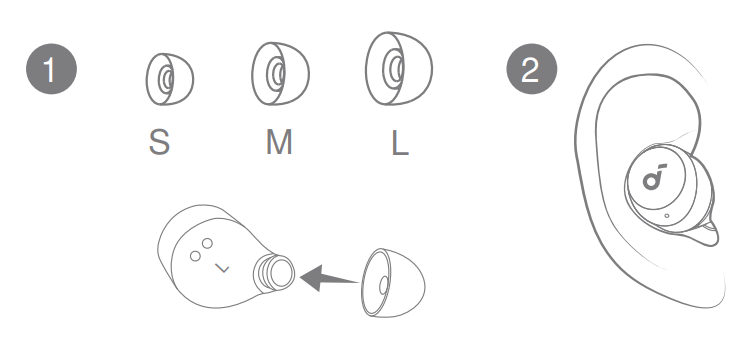
WEARING
CHARGING

- Tear off the insulation sticker on the earbuds before first use.
- Place the earbuds in the charging case and close it.
Fully dry off the earbuds and the USB-C charging port before charging. - Connect the charging case to a power supply by using a certified USB-C charging cable.
- Fully charge both the earbuds and the charging case before first use.
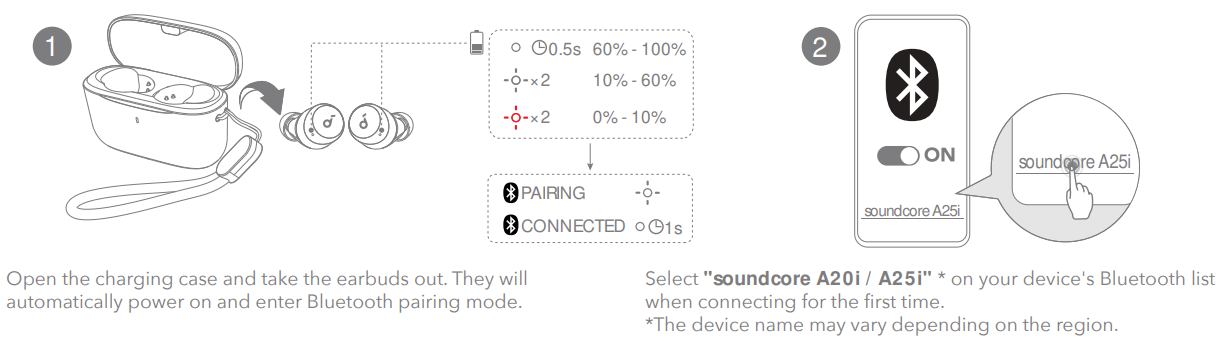
POWERING ON & PAIRING
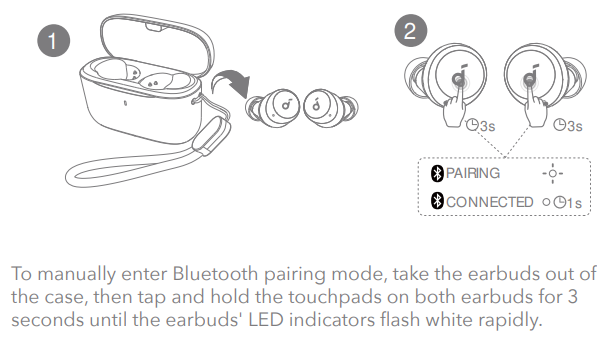
MANUAL PAIRING
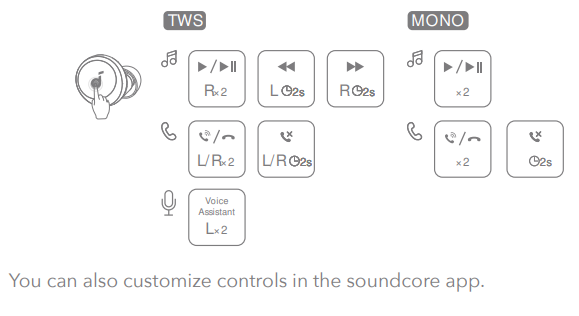
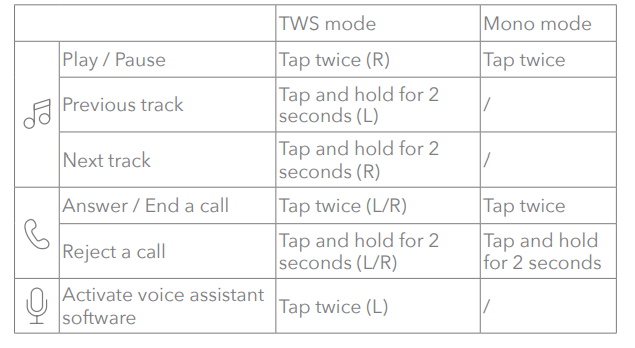
CONTROLS
RESET
SPECS
Specifications are subject to change without notice.
- Input :5V 0.5A
- Rated output power: 5mW
- Battery capacity; 60mAh × 2 (earbuds); 350Ah (charging case)
- Charging time: Up to 2 hours
- Playtime (varies by volume level and content):
- Up to 9 hours (up to 28 hours with the charging case)
- Driver unit : "6mm dynamic driver
- Frequency response: 20Hz - 20kHz
- Impedance :16Ω
- Waterproof level (earbuds) :IPX5
- Bluetooth version :5.3
- Bluetooth range: 10m / 33ft
Troubleshooting common issues with Soundcore A20i/A25i True Wireless Earbuds
Users may encounter occasional problems such as connectivity interruptions, audio imbalance, or charging difficulties with the Soundcore A20i/A25i True Wireless Earbuds. Here are common solutions:
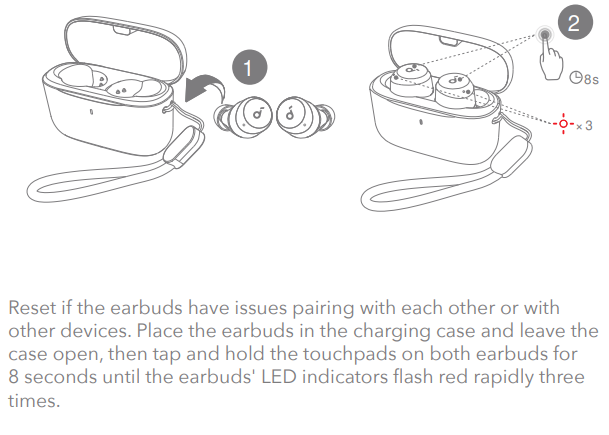
- Bluetooth pairing issues: Reset the earbuds by placing them in the case and holding the button for 10 seconds. Re-pair the device via Bluetooth settings.
- Audio imbalance or one earbud not working: Clean the earbuds and charging contacts. Ensure the battery is charged and reconnect the earbuds.
- Charging problems: Use the included USB-C cable and confirm the case’s battery level. Avoid using damaged cables or incompatible chargers.
- Low call quality or microphone issues: Make sure firmware is updated via the Soundcore app and test in quieter environments to confirm AI noise reduction is active.
Preventive measures include regular cleaning, keeping firmware updated, and using the earbuds within the recommended Bluetooth range of 10 meters. The product comes with a standard warranty from Anker, typically covering manufacturing defects for one year. For additional support, contact Anker’s official customer service through their website or authorized retailers.
Pros & Cons of soundcore A20i/A25i True Wireless Earbuds
Pros
- Long Battery Life: Up to 9 hours per charge and 28 hours total with the charging case.
- Customizable Sound: 22 EQ presets and BassUp technology for tailored audio experiences via the app.
- AI-Enhanced Calls: Dual microphones with AI noise reduction ensure clear voice quality.
- Comfort & Durability: Lightweight, ergonomic design with IPX5 water resistance for active use.
- Affordable Price Point: Around $50, offering solid value compared to similarly priced alternatives.
Cons
- Audio Quality Limitations: Suitable for casual listening but may not satisfy audiophiles seeking premium sound.
- Case Not Water Resistant: Unlike earbuds, the charging case lacks an IP rating, requiring careful handling.
- Control Customization Complexity: Tap controls may require app configuration for optimal use, which may confuse some users initially.
- Potential Bluetooth Interference: Some users report occasional connection dips, possibly due to device compatibility.
Customer Reviews of Soundcore A20i/A25i True Wireless Earbuds
Customers generally praise the Soundcore A20i/A25i True Wireless Earbuds for their impressive battery life and customizable sound options. Many highlight the comfort and stable Bluetooth 5.3 connection as strong points for daily use. Typical user ratings average around 4 out of 5 stars, reflecting solid satisfaction.
Common praises include the AI-powered call clarity and fast charging feature, which users find convenient for on-the-go lifestyles. However, some complaints focus on the earbuds’ audio quality not meeting high-end expectations and occasional connectivity hiccups. Several reviewers recommend these earbuds as an excellent budget-friendly option for casual listeners and fitness enthusiasts who value convenience and customization.
Faqs
How do I set up soundcore A20i/A25i True Wireless Earbuds for the first time?
What should I do if my soundcore A20i/A25i True Wireless Earbuds are not pairing with my device?
Can I use soundcore A20i/A25i True Wireless Earbuds with both Android and iOS devices?
How can I optimize the sound quality and performance of my soundcore A20i/A25i True Wireless Earbuds?
What are the main touch controls on soundcore A20i/A25i True Wireless Earbuds, and can they be customized?
How do I maintain and clean my soundcore A20i/A25i True Wireless Earbuds to ensure longevity?
What should I do if the battery life on my soundcore A20i/A25i True Wireless Earbuds is shorter than expected?
How can I use the Soundcore app to enhance my experience with soundcore A20i/A25i True Wireless Earbuds?
More soundcore manuals
- How to Pair: Soundcore Life A3i Earbuds User Manual
- How to Wear: Soundcore Liberty 3 Pro User Manual
- Pairing & Usage: Soundcore R50i/P20i/P25i Earbuds User Manual
- How to Pair: Soundcore Liberty 4 NC True-Wireless Earbuds User Manual
- How to Pair: Soundcore H30i wireless on-ear headphones User Manual
- Pairing & Usage: Soundcore K20i wireless earbuds User Manual
Leave a Comment