
How to Pair: Soundcore Life A3i Earbuds User Manual
Content
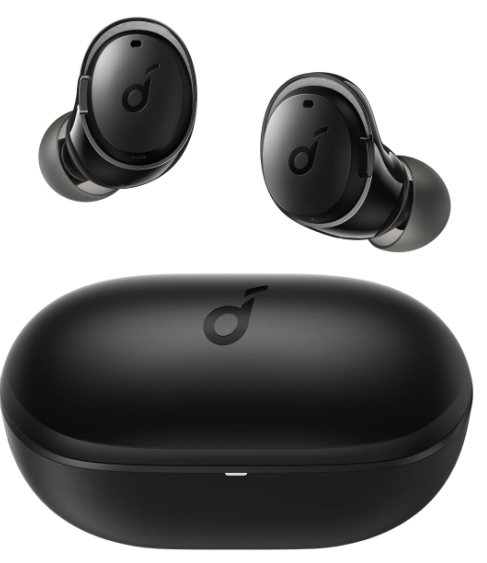
Soundcore Life A3i Earbuds
Introduction
The Soundcore Life A3i earbuds are designed to provide an immersive audio experience with their hybrid active noise cancellation (ANC) technology, reducing ambient noise by up to 35dB. These earbuds are ideal for those seeking a balance between sound quality, comfort, and affordability, making them suitable for daily use, workouts, and travel. The Life A3i earbuds are equipped with 10mm dynamic drivers, offering powerful bass and clear vocals, perfect for genres like pop and electronic music. With a price range around $50, they are an excellent option for anyone looking for budget-friendly noise-canceling earbuds. Available at major retailers, these earbuds are a great choice for anyone seeking high-quality sound without breaking the bank.
Specifications of Soundcore Life A3i Earbuds
Below are the key specifications of the Soundcore Life A3i earbuds:
- Input: 5 V 0.5 A
- Rated output power: 5 mW (@1% THD)
- Battery capacity: 50 mAh x 2 (earbuds); 470 mAh (charging case)
- Charging time: 2 hours
- Playtime (with ANC off): Up to 10 hours (40hours in total with the charging case)
- Playtime (with ANC on): Up to 8 hours (32 hours in total with the charging case)
- Driver size: 10 mm x 2
- Frequency response: 20 Hz - 20 kHz
- Impedance: 16 Ω
- Waterproof level (Earbuds): IPX5
- Bluetooth version: 5.2
- Bluetooth range: 10 m / 33 ft
Charging
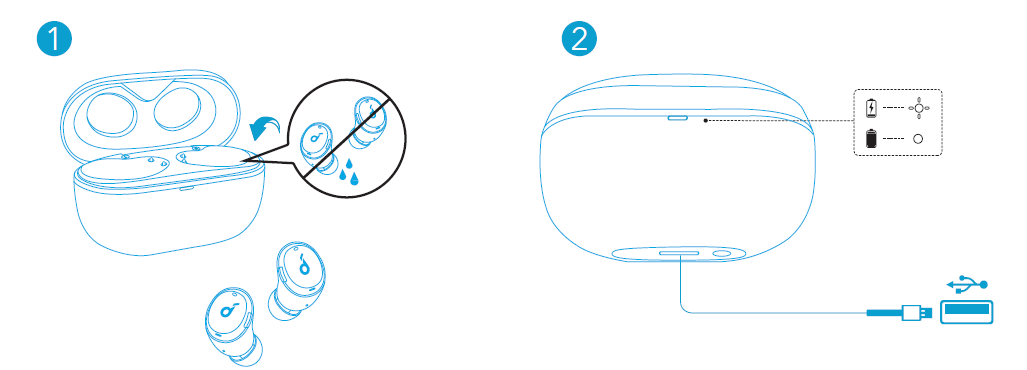
- Fully dry off the earbuds and the USB port before charging.
- Use a certified USB-C charging cable and charger to prevent any damage.
- Fully charge both the earbuds and the charging case before the first use.
- Place the earbuds in the charging case and close it.
- Connect the charging case to the power supply by using a USB-C charging cable.
The LED indicator on the charging case indicates the charging status.
Wearing
- Choose the Ear Tips that fit your ears best.
- Insert the earbuds into the inner canal of your ears and turn gently until you find the most comfortable and secure position.
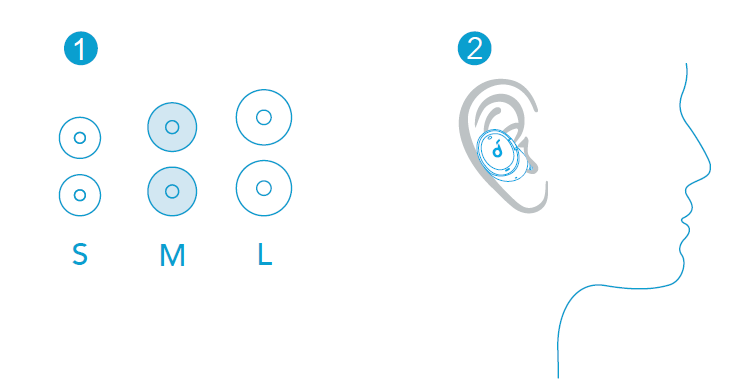
Your earbuds come with 3 pairs of Ear Tips, among which the Medium-sized are pre-installed.
Powering On/Off
- Open the charging case, and the earbuds will automatically power on.
To power off, place the earbuds into the charging case and close it.
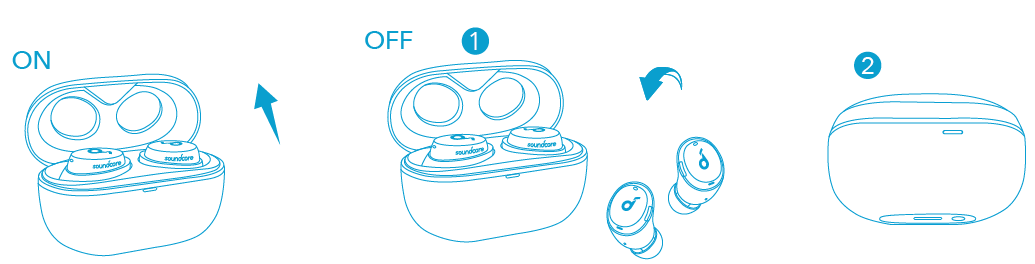
- The earbuds will automatically power off after 10 minutes if no device is connected.
- To manually power on, press and hold the multi-function button on both earbuds for 3 seconds.
Bluetooth Pairing
- Open the charging case, and the earbuds will automatically enter Bluetooth pairing mode.
The LED indicator on the charging case will flash white. - Select “Soundcore Life A3i” on your device’s Bluetooth list to connect.
When successfully connected, the LED indicator on the charging case will turn off.
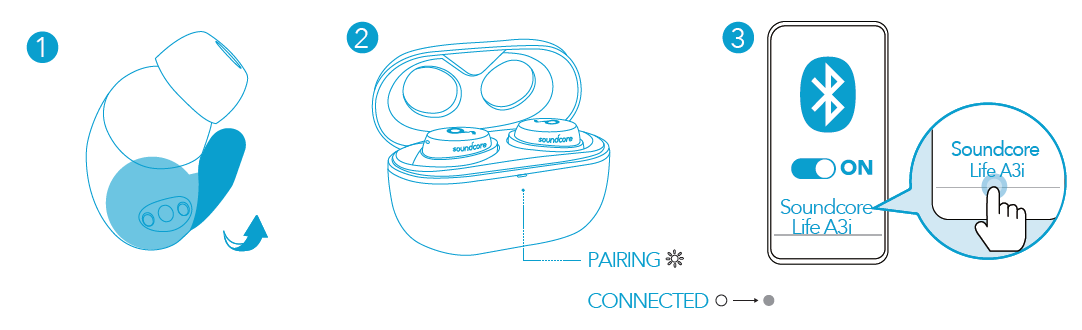
- Pairing with another device: Place the earbuds in the charging case and leave the case open. To enter pairing mode, press and hold the button on the case for 3 seconds until the LED indicator on the charging case flashes white.
- Each time you power on your Soundcore earbuds, they will automatically connect to your last successfully connected device if available within the Bluetooth range.
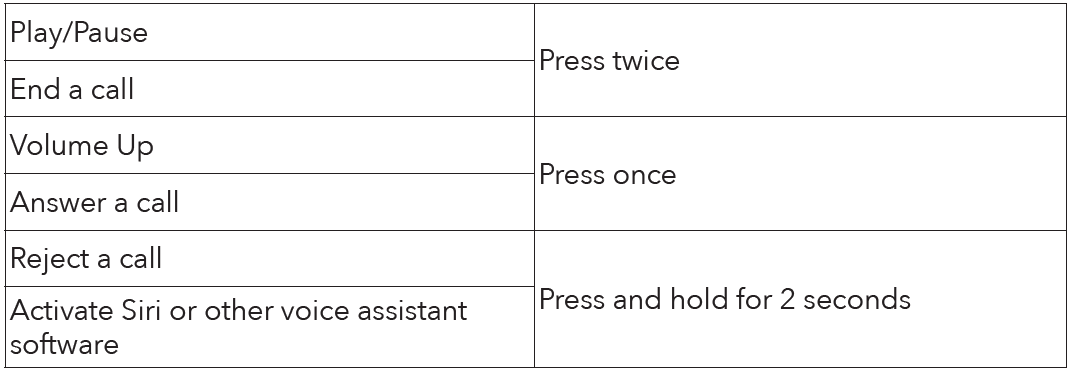
- Mono mode: When Bluetooth is connected, you can use either one of the earbuds only by placing the other one into the charging case.
- When powered on and connected, if either one of the earbuds is out of battery and powered off, you can keep using the other one.
- When you are on a call, place either one of the earbuds into the charging case, and the microphone in the other earbud will be activated.
Dual Connections
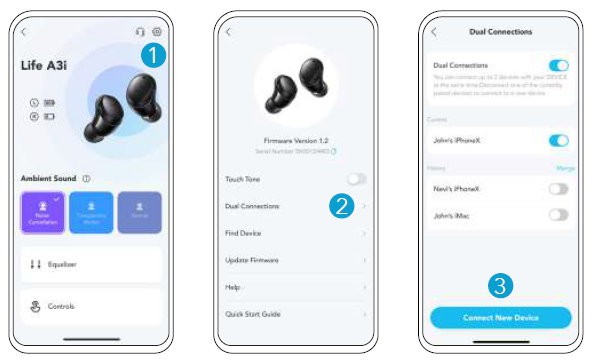
There are two ways to connect the earbuds to two Bluetooth devices at the same time.
- In the Soundcore app, go to settings and select Dual Connections > Connect New Device.
- Alternatively, wear the earbuds, then press and hold the button on both earbuds for 3 seconds simultaneously. You can then connect to the earbuds from your second device's Bluetooth settings.
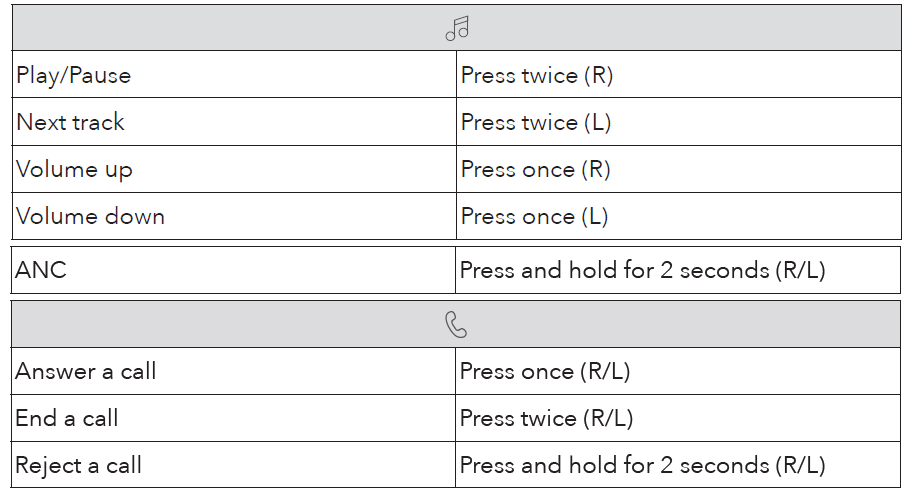
Controls
Mono Mode
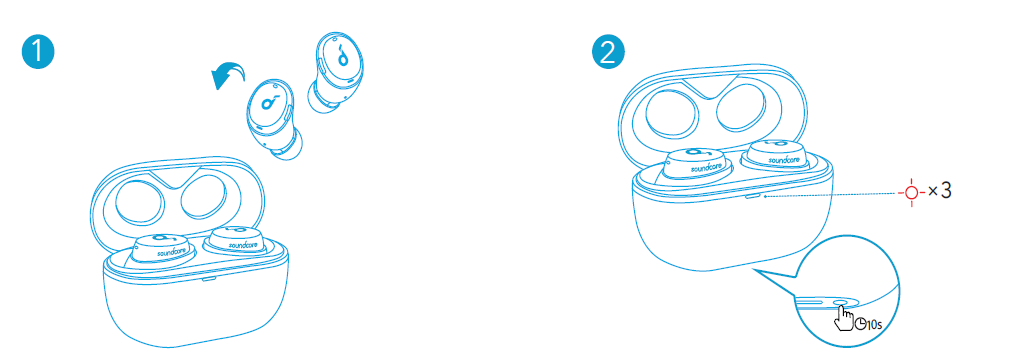
Reset
You might need to reset the earbuds if you experience any connectivity problems or function issues.
- Place the earbuds into the charging case and keep the case open.
- Press and hold the button on the case for 10 seconds until the LED indicator on the charging case flashes red 3 times. This confirms that the reset was successful and your earbuds can be connected normally.
Troubleshooting and Support
Common issues and their solutions for the Soundcore Life A3i earbuds include:
- Connection Issues: Restart both earbuds and the paired device.
- Audio Distortion: Adjust volume levels and EQ settings for better sound quality.
- Noise Cancellation Issues: Ensure proper fit and check for debris in the earbuds.
- Warranty and Support: The Soundcore Life A3i earbuds come with an 18-month warranty. For support, visit the official Soundcore website or contact their customer service team.
Pros and Cons of Soundcore Life A3i Earbuds
Pros
- Affordable Price: Offers great value for money at around $50.
- Hybrid ANC: Effective noise cancellation for its price range.
- Comfortable Fit: Lightweight and compact design for extended wear.
- Customizable EQ: Offers 22 EQ settings for personalized sound.
Cons
- Call Quality: While decent, call quality can be thin in loud environments.
- Distortion at High Volumes: Some users report distortion when playing at high volumes.
- No Water Submersion: IPX5 rating means they are not designed for submersion.
Customer Reviews and Feedback
Users praise the Soundcore Life A3i earbuds for their impressive sound quality and effective noise cancellation. However, some note that call quality can be improved and that high-volume playback may introduce distortion. With an average star rating of around 4 out of 5, these earbuds are highly recommended for those seeking a budget-friendly option with robust features.
For those considering purchasing, the Soundcore Life A3i earbuds are a great choice if you value powerful bass, customized sound settings, and hybrid ANC without breaking the bank.
Faqs
How do I set up soundcore Life A3i Earbuds for the first time?
What should I do if soundcore Life A3i Earbuds are not working properly?
Can I customize the controls on soundcore Life A3i Earbuds?
How do I use Transparency Mode on soundcore Life A3i Earbuds?
Are soundcore Life A3i Earbuds compatible with all devices?
How often should I clean soundcore Life A3i Earbuds?
What are the benefits of using hybrid ANC on soundcore Life A3i Earbuds?
How do I optimize battery life for soundcore Life A3i Earbuds?
More soundcore manuals
- Pairing & Usage: Soundcore R50i/P20i/P25i Earbuds User Manual
- Setup: Soundcore A20i/A25i True Wireless Earbuds User Manual
- How to Pair: Soundcore Liberty 4 NC True-Wireless Earbuds User Manual
- How to Wear: Soundcore Liberty 3 Pro User Manual
- How to Pair: Soundcore H30i wireless on-ear headphones User Manual
- Pairing & Usage: Soundcore K20i wireless earbuds User Manual
Leave a Comment