
Pairing & Setup: Soundpeats Air3-Deluxe Wireless Earbuds User Manual
Content
Soundpeats Air3 Deluxe HS Wireless Earbuds
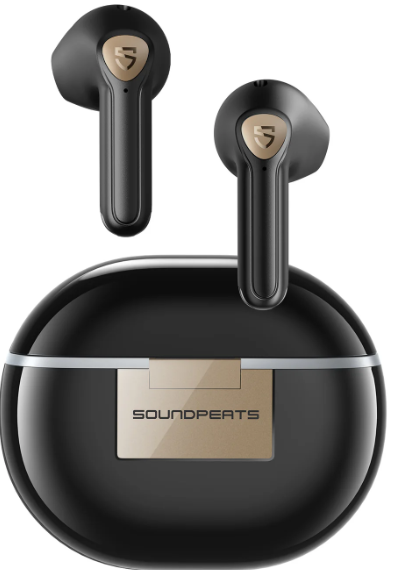
Introduction to SoundPEATS Air3 Deluxe HS Earbuds
The SoundPEATS Air3 Deluxe HS wireless earbuds represent a breakthrough in affordable, high-quality audio technology. As the world's first certified Hi-Res Audio semi-in-ear true wireless earbuds authorized by the Japan Audio Society, these earbuds deliver professional-grade sound quality at a budget-friendly price point. The SoundPEATS Air3 Deluxe HS combines cutting-edge audio features with exceptional comfort, making it an ideal choice for music enthusiasts, gamers, professionals, and everyday listeners who demand superior sound without premium pricing.
These wireless earbuds are engineered for versatility across multiple use cases. Whether you're enjoying high-fidelity music, taking crystal-clear business calls, gaming with low-latency precision, or staying active during workouts, the SoundPEATS Air3 Deluxe HS delivers consistent performance. The earbuds feature Hi-Res audio certification with LDAC codec technology, ensuring that you experience music exactly as artists intended, with stunning clarity and detailed soundstage. The lightweight, semi-in-ear design provides all-day comfort without ear fatigue, while the impressive battery life ensures your music never stops.
Available at major retailers including Amazon and Walmart, the SoundPEATS Air3 Deluxe HS wireless earbuds are priced competitively to deliver maximum value. The complete package includes the earbuds, charging case with wireless charging capability, three sizes of interchangeable ear tips for a custom fit, USB-C charging cable, and comprehensive user documentation. This manual provides everything you need to maximize your experience with these exceptional wireless earbuds.
Key Features and Benefits
The SoundPEATS Air3 Deluxe HS stands out in the wireless earbuds market through several distinctive advantages. Hi-Res audio certification delivers frequencies from 20Hz to 40kHz with 24-bit/96kHz depth, compared to standard earbuds limited to 20Hz-20kHz. The LDAC codec transfers information content up to three times more efficiently than standard SBC codecs, achieving maximum transfer rates of 990kbps for superior sound quality. Dual microphones with environmental noise cancellation reduce up to 80% of external noise, ensuring your calls sound professional even in busy environments. The gaming mode reduces latency to just 60 milliseconds, providing lag-free performance for competitive gaming and video streaming.
Technical Specifications
Audio and Driver Technology
- 14.2mm bio-diaphragm dynamic drivers for immersive, detailed sound
- Hi-Res Audio certification with LDAC codec support
- Frequency response: 20Hz to 40kHz (24-bit/96kHz depth)
- Maximum bit rate: 990kbps for high-fidelity audio transmission
- 10-band equalizer via companion app for personalized sound tuning
Connectivity and Compatibility
- Bluetooth 5.2 for a stable, fast wireless connection
- Qualcomm QCC3040 chipset for advanced processing
- Gaming mode with 60ms low-latency performance
- Compatible with iOS and Android devices via a dedicated app
Battery and Charging
- Single charge playtime: 5 hours of continuous listening
- Total playtime with charging case: 20-22 hours
- Charging case capacity: Holds approximately 3-3.5 full charges
- Earbud charging time: Approximately 90 minutes
- Case charging time: Approximately 90 minutes
- Wireless charging case support for convenient charging
- Li-ion Polymer rechargeable battery technology
Physical Design and Durability
- Weight per earbud: 4.2 grams for lightweight comfort
- Case weight: 36 grams
- Water resistance rating: IPX4 protection against splashes and light rain
- Semi-in-ear ergonomic design for secure fit during active use
- Three sizes of interchangeable ear tips (small, medium, large)
- Touch-sensitive controls on both earbuds
Audio Features and Controls
- Dual-microphone noise cancellation (ENC technology)
- Automatic in-ear detection for smart pause/resume
- Touch controls for play, pause, volume, and track navigation
- Voice assistant access via touch controls
- Dedicated game mode for reduced latency
- Customizable sound presets and manual EQ adjustments
Getting Started with Your SoundPEATS Air3 Deluxe HS
- Initial Setup and Pairing
Begin by fully charging both earbuds and the charging case using the included USB-C cable. To enter pairing mode, remove the earbuds from the case and hold the pairing button on the back of the case for 3-5 seconds until the LED indicator flashes blue and red alternately. On your smartphone or device, open Bluetooth settings and select "SoundPEATS Air3 Deluxe HS" from the available devices list. Once paired, download the official SoundPEATS app from your device's app store to unlock advanced features,, including the 10-band equalizer, game mode settings, and firmware updates. - Proper Fit and Ear Tip Selection
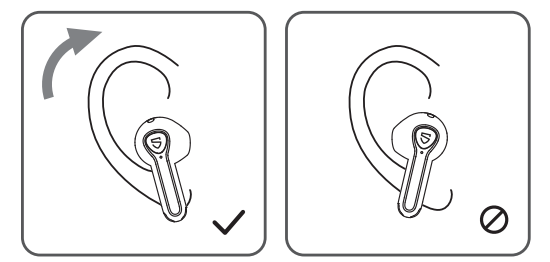
The SoundPEATS Air3 Deluxe HS comes with three sizes of interchangeable ear tips to ensure optimal comfort and sound quality. Select the size that fits most comfortably in your ear canal proper fit is crucial for both comfort during extended wear and for maintaining the earbuds' acoustic properties. Insert the earbuds at a slight angle, twisting gently until they sit securely. The semi-in-ear design means the earbuds should rest partially in your ear canal while the outer portion sits against your ear's natural contours.
Pairing
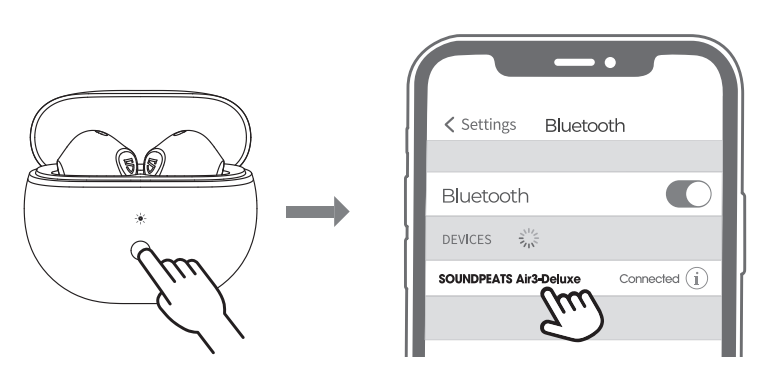
- Open the charging case lid while the case has enough power left, press and hold the button on the charging case for 3 seconds until the white light flashes, both earbuds will turn on and enter pairing mode.
- Activate the Bluetooth on your device and choose "SOUNDPEATS Air3-DeIuxe" to connect.
Reset
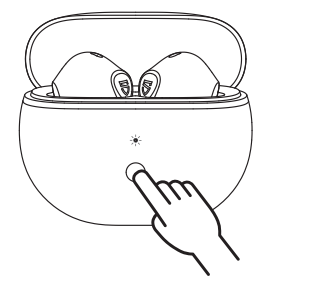
- Place both earbuds back the white light on the charging case flashes twice, and he earbuds start charging..
- With the case lid open, press and hold the charging case button for 10 seconds until the white light flashes 2 times, reset complete.
- Close the case lid and reopen it to activate the earbuds.
Wearing
Product Diagram
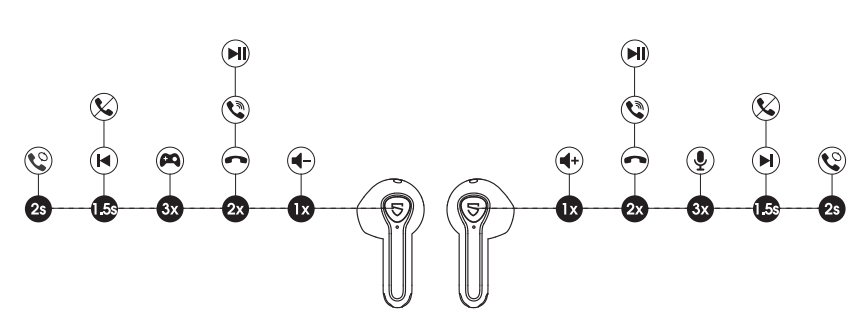
Touch Control
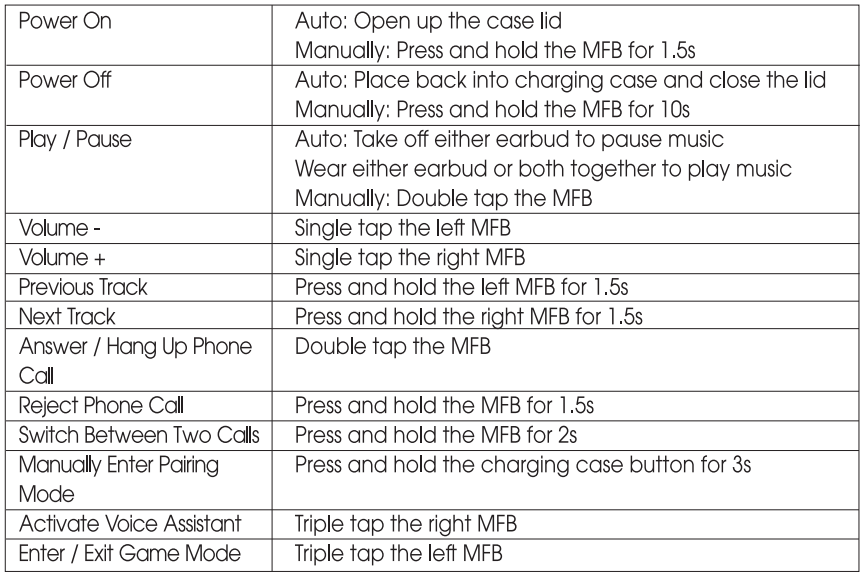
Game Mode
SOUNDPEATS Air3-Deluxe adopts the latest technology to ensure low latency in game mode and make sure the sound syncs with the image. Triple-tap on the left to activate the game mode with a voice prompt "Game Mode" and deactivate the mode with a prompt "Exit Game Mode"
Troubleshooting Common Issues
- Connection Problems
If your SoundPEATS Air3 Deluxe HS wireless earbuds fail to connect, first ensure Bluetooth is enabled on your device and you're within 10 meters of the earbuds. Reset the earbuds by placing them in the charging case for 10 seconds, then remove and attempt pairing again. Ithe f the connection remains unstable, forget the device from your Bluetooth settings and perform a fresh pairing. Persistent connection issues may indicate interference from other 2.4GHz devices like routers or microwaves—try moving away from these sources. For advanced troubleshooting, access the SoundPEATS app's settings menu to check for available firmware updates, which often resolve connectivity issues. - Battery and Charging Issues
If earbuds don't charge properly, inspect the charging contacts on both earbuds and the charging case for debris or corrosion. Clean gently with a dry, lint-free cloth. Ensure the USB-C charging cable is functioning by testing with another device. If the charging case isn't holding a charge, try a complete discharge cycle by using the earbuds until they power off, then charge the case fully. Note that wireless charging requires proper alignment with compatible wireless charging pads. If one earbud drains faster than the other, this may indicate uneven usage. Rotate which earbud you use for calls to balance battery wear. - Audio Quality Concerns
If you experience distorted or muffled sound, first check that the ear tips are properly seated in your ear canal. Incorrect fit is the most common cause of poor audio quality. Access the SoundPEATS app and reset the equalizer to default settings, then gradually adjust to your preference. If specific frequencies sound off, use the 10-band equalizer to fine-tune. Ensure the LDAC codec is enabled in the app settings for optimal Hi-Res audio quality. If audio cuts out intermittently, move closer to your connected device and away from interference sources. Persistent audio issues may require a factory reset: place earbuds in the case, hold the pairing button for 15 seconds until the LED flashes rapidly, then re-pair with your device. - Microphone and Call Quality Issues
For unclear call quality, ensure both microphones on the earbuds are unobstructed and clean. The dual-microphone design requires both to function properly for noise cancellation. Test the microphone input in the SoundPEATS app's settings. If callers report background noise, enable noise cancellation in the app and ensure you're not in excessively loud environments. The earbuds reduce up to 80% of external noise, but extreme environments may still affect quality. For the best call performance, keep your device within 5 meters of the earbuds and ensure a clear line of sight when possible. - Touch Control Responsiveness
If touch controls aren't responding, ensure your fingers are dry; moisture can interfere with capacitive touch sensors. Tap directly on the center of each earbud where the touch-sensitive area is located. If controls remain unresponsive, clean the touch surfaces gently with a dry cloth. Recalibrate touch sensitivity through the SoundPEATS app if available. Avoid wearing gloves while using touch controls, as most standard gloves don't support capacitive sensing. - Warranty and Support
The SoundPEATS Air3 Deluxe HS wireless earbuds come with manufacturer warranty coverage. For warranty claims, technical support, or additional assistance, contact SoundPEATS customer service through the official website or app. Keep your proof of purchase for warranty purposes. Third-party marketplace sellers may offer different warranty terms, so verify coverage details before purchasing from retailers other than the official SoundPEATS store.
Advantages of SoundPEATS Air3 Deluxe HS Earbuds
- Superior Audio Quality
The SoundPEATS Air3 Deluxe HS wireless earbuds deliver Hi-Res audio certification with LDAC codec technology, providing frequency response from 20Hz to 40kHz compared to standard earbuds limited to 20Hz-20kHz. This extended range captures the subtle details that separate good audio from exceptional audio. The 14.2mm bio-diaphragm drivers reproduce heavy bass with precision while maintaining clarity in midrange and treble frequencies. Professional musicians and audiophiles appreciate the accurate sound reproduction that preserves the artist's original intent. - Extended Battery Life
With 5 hours of playtime per charge and 20-22 hours total with the charging case, the SoundPEATS Air3 Deluxe HS provides all-day listening without constant recharging. This battery's performance exceeds many competitors in this price range. The wireless charging case adds convenience for users who want cable-free charging options. Whether you're traveling, working, or enjoying outdoor activities, you'll have reliable power throughout your day. - Gaming Performance
The dedicated game mode reduces latency to just 60 milliseconds, providing lag-free performance for competitive gaming and video streaming. This low-latency capability makes the SoundPEATS Air3 Deluxe HS an excellent choice for mobile gamers who demand responsive audio synchronization. Reviewers specifically praise the gaming experience, noting that the audio stays perfectly synchronized with on-screen action. - Clear Communication Features
Dual microphones with environmental noise cancellation reduce up to 80% of external noise, ensuring your calls sound professional and clear even in busy environments. The ENC technology amplifies your voice while suppressing background interference, making these earbuds ideal for remote work, virtual meetings, and professional communication. - Budget-Friendly Pricing
The SoundPEATS Air3 Deluxe HS wireless earbuds deliver premium features at an affordable price point, offering exceptional value for money. You get Hi-Res audio certification, LDAC codec support, gaming mode, and extensive battery life without premium pricing. This makes them an excellent choice for budget-conscious consumers who refuse to compromise on quality. - Comfort and Lightweight Design
At just 4.2 grams per earbud, the semi-in-ear design provides all-day comfort without ear fatigue. The lightweight construction combined with ergonomic shaping ensures a secure fit during active use while remaining comfortable during extended listening sessions. Three sizes of interchangeable ear tips allow customization for different ear shapes and sizes.
Disadvantages and Limitations
- Water Resistance Rating
With an IPX4 rating, the SoundPEATS Air3 Deluxe HS earbuds offer protection against splashes and light rain but aren't fully waterproof. This means they're suitable for workouts and light rain but shouldn't be submerged or used during swimming. Users requiring higher water resistance may need to consider alternatives with IPX7 or IPX8 ratings. - Semi-In-Ear Design Trade-offs
While the semi-in-ear design provides comfort, it may not deliver the same level of passive noise isolation as fully in-ear designs. Users in extremely loud environments might experience some background noise bleed-through. The design also means the earbuds may feel less secure during vigorous activities compared to fully in-ear alternatives, though most users report satisfactory fit stability. - Touch Control Sensitivity
Touch controls require dry fingers and direct contact with the earbud surface, which can be less intuitive than physical buttons. Users wearing gloves or with wet hands may experience responsiveness issues. The learning curve for precise touch control placement takes some adjustment for new users. - Limited Active Noise Cancellation
Unlike premium earbuds with dedicated ANC technology, the SoundPEATS Air3 Deluxe HS relies on passive noise isolation and ENC (Environmental Noise Cancellation) for calls rather than active noise cancellation for music listening. While the passive isolation is adequate for most situations, users seeking aggressive noise cancellation for flights or loud environments may find this limiting. - Case Design Considerations
The glossy finish on the charging case, while aesthetically pleasing, can be prone to fingerprints and may feel slippery. Some users prefer matte finishes or rubberized cases for better grip and durability. The case's compact size is convenient for portability but may feel cramped when removing earbuds.
Customer Reviews and Real-World Feedback
- Positive User Experiences
Customers consistently praise the SoundPEATS Air3 Deluxe HS wireless earbuds for their exceptional sound quality and value proposition. Users highlight "great sound quality, good bass, brilliant customer support,," and note that they're “lightweight, good sound, and long battery life.” Reviewers specifically appreciate the Hi-Res audio certification and LDAC codec, with many noting that the sound quality rivals earbuds costing significantly more. Gamers praise the low-latency game mode for seamless gaming experiences. Professional users commend the clear call quality and effective dual-microphone noise cancellation, making them suitable for remote work and virtual meetings. - Common Praise Points
Users consistently mention the excellent battery life as a standout feature, with many noting they rarely need to charge the earbuds during typical daily use. The lightweight, semi-in-ear design receives universal praise for all-day comfort. The inclusion of multiple ear tip sizes and the free companion app with a 10-band equalizer are frequently mentioned as valuable additions. Budget-conscious consumers particularly appreciate getting premium features like Hi-Res audio at an affordable price point. - Noted Concerns
Some users mention that the semi-in-ear design, while comfortable, doesn't provide as much passive noise isolation as fully in-ear alternatives. A few users report touch control sensitivity issues in certain conditions. The glossy charging case finish receives occasional complaints about fingerprint visibility and grip. Some users note that while audio quality is excellent, the earbuds may not be ideal for competitive swimmers due to IPX4 rating limitations. - Overall Recommendation
The SoundPEATS Air3 Deluxe HS wireless earbuds are recommended for users seeking high-quality audio at budget-friendly prices, gamers wanting low-latency performance, professionals requiring clear call quality, and anyone valuing comfort during extended use. They represent an excellent choice for those upgrading from standard earbuds who want to experience Hi-Res audio without premium pricing. The earbuds are particularly suitable for people who appreciate customizable audio through the companion app's 10-band equalizer and those who value extended battery life for all-day listening.
Comparison with Similar Wireless Earbuds
| Feature | SoundPEATS Air3 Deluxe HS | Standard Hi-Res Earbuds | Budget Competitors |
|---|---|---|---|
| Hi-Res Audio Certification | Yes (LDAC) | Yes (LDAC/LHDC) | No |
| Frequency Response | 20Hz-40kHz | 20Hz-40kHz+ | 20Hz-20kHz |
| Battery Life (Total) | 20-22 hours | 24-30 hours | 15-20 hours |
| Game Mode Latency | 60ms | 40-60ms | 100ms+ |
| Water Resistance | IPX4 | IPX4-IPX7 | IPX3-IPX4 |
| Earbud Weight | 4.2g each | 4-6g each | 5-7g each |
| Price Range | Budget-Friendly | Mid-Range to Premium | Budget |
Maintenance and Care Tips
- Regular Cleaning
To maintain optimal performance of your SoundPEATS Air3 Deluxe HS wireless earbuds, clean them regularly with a soft, dry, lint-free cloth. Gently wipe the earbuds, charging contacts, and case surface to remove dust and debris. Never use liquid cleaners, solvents, or abrasive materials that could damage the earbuds' finish or internal components. For ear tips, remove them periodically and clean with a dry cloth to prevent earwax buildup, which can affect sound quality and comfort. - Storage and Protection
Always store your SoundPEATS Air3 Deluxe HS earbuds in the provided charging case when not in use. The case protects the earbuds from physical damage, dust, and moisture. Store in a cool, dry location away from direct sunlight, extreme heat, or humidity. Avoid storing near magnets or electronic devices that could cause interference. Keep the earbuds away from water sources, though they can withstand splashes and light rain thanks to their IPX4 rating. - Battery Health Optimization
To maximize battery lifespan, charge your SoundPEATS Air3 Deluxe HS earbuds regularly rather than allowing them to completely drain. The Li-ion Polymer battery performs best with regular charging cycles. Avoid leaving the earbuds in the charging case for extended periods without use. Charge them at least monthly if storing long-term. Use only the included USB-C cable or certified chargers to prevent damage to the battery or charging circuitry. - Firmware Updates
Periodically check the SoundPEATS app for available firmware updates. These updates often include performance improvements, bug fixes, and new features. Connect your earbuds to the app and follow the on-screen instructions to install updates. Ensure your earbuds have adequate battery before starting any update to prevent interruption.
Maximizing Your SoundPEATS Air3 Deluxe HS Experience
- Customizing Audio with the Equalizer
Download the official SoundPEATS app to access the 10-band equalizer, which allows you to customize sound characteristics to match your preferences and music genres. The app includes preset configurations for various listening styles, or you can manually adjust each frequency band for precise control. Experiment with different settings to find your ideal sound profile. Save your custom presets for quick switching between different listening modes. - Optimizing Game Mode Performance
When gaming, enable game mode through the app to activate the 60-millisecond low-latency performance. This ensures audio synchronization with on-screen action for a competitive gaming advantage. Test game mode with different games to appreciate the responsive audio feedback that enhances immersion and gameplay precision. - Using In-Ear Detection Effectively
The automatic in-ear detection feature pauses playback when you remove the earbuds and resumes when you put them back in. This convenient feature saves battery and ensures you don't miss important moments. The detection is particularly useful during work calls when you need to step away briefly. - Voice Assistant Integration
Configure voice assistant access through touch controls to activate Siri, Google Assistant, or Alexa directly from your earbuds. This hands-free capability is convenient for navigation, messaging, and smart home control while keeping your device in your pocket.
Faqs
How do I set up soundpeats Air3-Deluxe Wireless Earbuds for the first time?
What should I do if my soundpeats Air3-Deluxe Wireless Earbuds are not charging properly?
Can soundpeats Air3-Deluxe Wireless Earbuds connect with both Android and iOS devices?
How can I optimize sound quality on my soundpeats Air3-Deluxe Wireless Earbuds?
What are the main features of the soundpeats Air3-Deluxe Wireless Earbuds that improve call quality?
How do I use touch controls on the soundpeats Air3-Deluxe Wireless Earbuds?
What maintenance steps should I follow to keep my soundpeats Air3-Deluxe Wireless Earbuds in good condition?
Why is the soundpeats Air3-Deluxe Wireless Earbuds’ game mode useful and how do I activate it?
More soundpeats manuals
- Pairing & Setup: Soundpeats Mini Pro HS Wireless Earbuds User Manual
- Pairing: Soundpeats True Air2 Wireless Earbuds User Manual
- Pairing: Soundpeats Mini HS Wireless Earbuds User Manual
- Pairing & Setup: Soundpeats Life Wireless Earbuds User Manual
- Pairing: Soundpeats Air5 Wireless Earbuds User Manual
- Pairing & Setup: Soundpeats Watch Pro 1 User Manual
Leave a Comment