
Pairing & Setup: Soundpeats Life Wireless Earbuds User Manual
Content
SoundPEATS Life Wireless Earbuds
Introduction
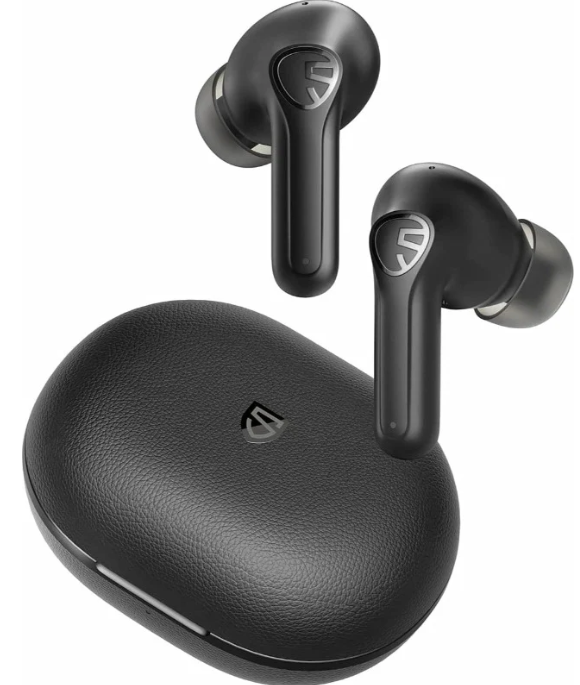
The SoundPEATS Life Wireless Earbuds offer an exceptional blend of premium features and affordability, making them an outstanding choice in the budget true wireless earbuds market. Designed with an ergonomic half-in-ear style and a sleek laser-engraved finish, these earbuds provide comfort for extended wear and a stylish look that balances luxury with simplicity. The standout feature is their advanced Active Noise Cancellation (ANC) technology, which effectively reduces ambient noise up to 25dB, delivering an immersive audio experience comparable to higher-end models.
Equipped with large 12mm dynamic drivers, SoundPEATS Life earbuds deliver rich, clear stereo sound with resonant bass and crisp treble, suitable for various music genres and multimedia. Their Bluetooth 5.2 connectivity ensures a fast, stable wireless connection with a working range of up to 33 feet (10 meters). Additional benefits include a low-latency game mode for synchronized audio-visual performance, perfect for gaming and video watching.
With a total playtime of up to 25 hours (5 hours per charge plus 4 recharges from the USB-C charging case), these earbuds are ideal for daily commuters, remote workers, fitness enthusiasts, and casual listeners seeking high-quality sound without breaking the bank. The SoundPEATS Life Wireless Earbuds are widely available online and in selected retail stores, typically priced under $50, offering remarkable value for money.
Specifications of SoundPEATS Life Wireless Earbuds
- Bluetooth Version: 5.2 with TWS200 chipset for stable, low-latency connection
- Drivers: 12mm dynamic drivers delivering rich bass and clear highs
- Active Noise Cancellation: Up to 25dB ANC to reduce ambient noise effectively
- Battery Life: Approx. 5 hours per charge at 60% volume, plus 20 hours additional from charging case (total 25 hours)
- Charging: USB-C port with earbuds charging time approx. 1.5 hours; case charging time approx. 2 hours
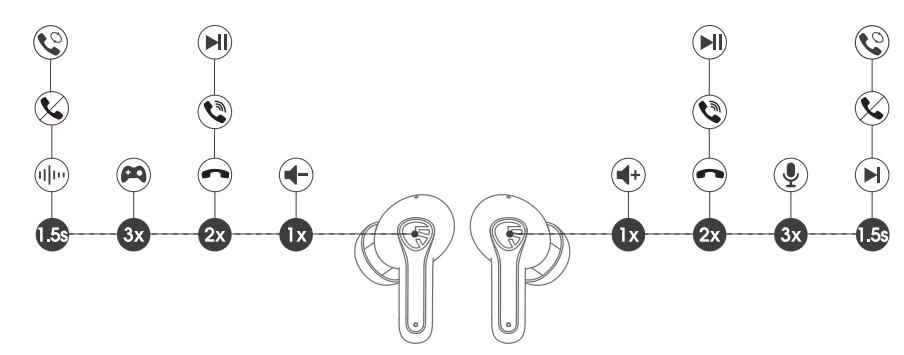
- Controls: Touch control for play/pause, volume, ANC modes, voice assistant, and game mode
- Frequency Response: 20Hz – 20,000Hz for wide sound spectrum
- Microphones: Four microphones for clear voice calls and noise reduction
- Water Resistance: IPX4 rating, suitable for sweat and light rain
- Weight: Single earbud approx. 4.5g; charging case with earbuds approx. 51g
- Connectivity Range: Up to 10 meters (33 feet) without obstacles
- Additional Features: Game mode with approx. 60ms latency, transparency mode, voice assistant activation
Compared to similar budget earbuds like the QCY T13 or Soundcore Life P2i, the SoundPEATS Life offers superior ANC performance, a larger driver size, and longer overall playtime, positioning it as a leading contender in the under $50 ANC wireless earbuds category.
First Start & Re-Pairing
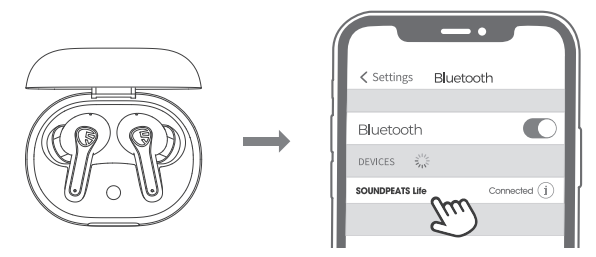
- Please make sure the charging case has remaining power. Open the charging case lid, and both earbuds will automatically enter TWS pairing mode. After successfully pairing with each other, the indicator on the main earphone will flash in red and white, the indicator of the second earphone will stay white, and then the earphones will enter pairing mode.
- Find and click "SOUNDPEATS Life" in the Bluetooth list of your device to connect. The indicators of both earphones will stay on after being successfully connected.
- SOUNDPEATS Life Bluetooth earphones can remember previously paired devices. When you make the second connection, simply activate the Bluetooth in your device and take out both earbuds from the charging case at the same time. These earphones will automatically connect to each other and pair with your device. If the earphones can't pair with your device automatically, please activate the Bluetooth in your device and choose "SOUNDPEATS Life" to connect.
Reset
Please try to reset the earphones according to the following steps if the earphones fail to build a connection or re-pair with your devices.
- Clean the pairing record of the earphones in all your devices.
- Place both earphones back into the charging case and make sure they are in charging status. The indicator of the charging case will flash once when the earphones are successfully put in.
- Keep the charging case lid open, press and hold the button of the charging case for 110 seconds until the white light flashes twice, reset complete.
- Close the lid and open it again to activate the earphones.
Wearing
- Identify the left and right earbuds according to the “L” and "R" logos on each side of the earphones.
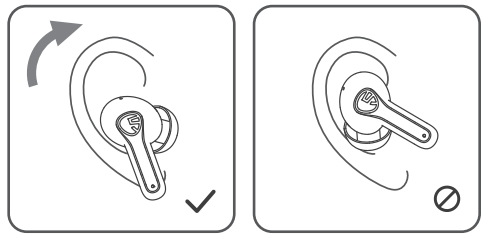
- Rotate the earphones and find the most comfortable position.
Product Diagram
Touch Control
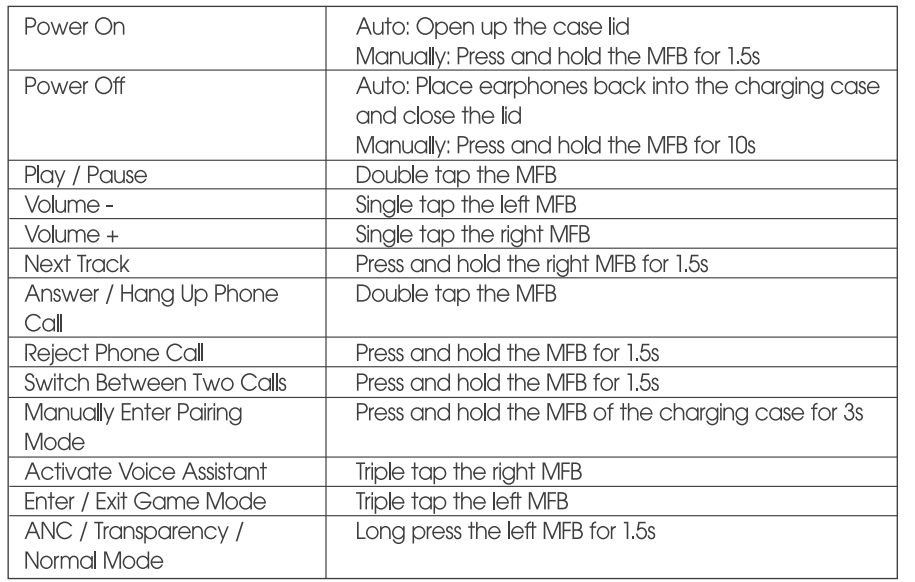
Troubleshooting for SoundPEATS Life Wireless Earbuds
- Issue: Earbuds not pairing or connecting.
Solution: Ensure Bluetooth is enabled on your device, reset the earbuds by placing them in the case and holding the touch controls for 10 seconds, then try pairing again. - Issue: One earbud is not producing sound.
Solution: Check battery level, clean charging contacts, and reinsert earbuds into the case for proper charging. - Issue: ANC not activating or weak noise cancellation.
Solution: Toggle ANC modes via touch controls; ensure earbuds fit snugly in ears to maximize ANC effect. - Issue: Calls have background noise or low voice clarity.
Solution: Use in quieter environments; microphones are optimized for voice clarity but may pick up ambient noise in very loud areas. - Preventive Measures: Keep earbuds and charging case clean, avoid exposing them to extreme temperatures or water beyond the IPX4 rating, and update firmware if available.
SoundPEATS provides a 12-month warranty on the Life Wireless Earbuds. For unresolved issues, contact the official customer service team via their website or authorized sellers for repair, replacement, or refund options.
Pros & Cons of SoundPEATS Life Wireless Earbuds
- Pros:
- Effective Active Noise Cancellation for budget earbuds
- Long battery life with up to 25 hours total playtime
- Large 12mm drivers deliver rich, balanced sound
- Bluetooth 5.2 ensures stable connectivity and low latency
- Comfortable ergonomic half-in-ear design suitable for extended use
- IPX4 water resistance is suitable for workouts and light rain
- Cons:
- No customizable controls or EQ adjustments due to a lack of dedicated app support
- Volume adjustment requires a connected device, as earbuds lack onboard volume control.
- LED light cannot be disabled, which may annoy some users during idle time
- Mono listening mode does not auto-pause music when an earbud is removed
- Latency, while low for budget earbuds, may not satisfy competitive gamers requiring ultra-low delay
Overall, the SoundPEATS Life Wireless Earbuds offer excellent value for money, especially considering their ANC feature and sound quality at a sub-$50 price point, outperforming many alternatives in the same category.
Customer Reviews and Feedback on SoundPEATS Life Wireless Earbuds
Customers consistently praise the SoundPEATS Life Wireless Earbuds for their strong noise cancellation capabilities and robust sound quality, highlighting the impressive bass and clear vocal reproduction. Common compliments include the comfortable fit and reliable Bluetooth connection. Many users appreciate the long battery life and compact charging case.
Some recurring complaints involve the inability to adjust volume directly on the earbuds and the absence of an app for deeper customization. A few users mention that the LED indicator light can be distracting when idle. Call quality is generally rated as good, with voice clarity maintained well in outdoor environments, though a slight ambient noise pickup can occur.
Star ratings average around 4 to 4.5 out of 5, with many reviewers recommending the SoundPEATS Life for budget-conscious buyers seeking ANC-enabled earbuds for everyday use, gaming, and commuting.
Faqs
How do I set up soundpeats Life Wireless Earbuds for the first time?
What should I do if soundpeats Life Wireless Earbuds are not connecting to my phone?
Can I use soundpeats Life Wireless Earbuds with both Android and iOS devices?
How do the active noise cancellation (ANC) and transparency modes work on soundpeats Life Wireless Earbuds?
What is the average battery life and charging time for soundpeats Life Wireless Earbuds?
How can I optimize the sound performance of my soundpeats Life Wireless Earbuds?
What maintenance steps are recommended to keep soundpeats Life Wireless Earbuds in good condition?
What should I do if the soundpeats Life Wireless Earbuds have a problem not covered in the manual?
More soundpeats manuals
- Pairing: Soundpeats True Air2 Wireless Earbuds User Manual
- Pairing & Setup: Soundpeats Watch Pro 1 User Manual
- Pairing & Setup: Soundpeats Air3-Deluxe Wireless Earbuds User Manual
- Pairing: Soundpeats Watch 2 User Manual
- Pairing & Setup: Soundpeats Mini Pro HS Wireless Earbuds User Manual
- Pairing & Setup: Soundpeats Air3 Deluxe HS Wireless Earbuds User Manual
Leave a Comment