
Pairing & Setup: Soundpeats Watch Pro 1 User Manual
Content
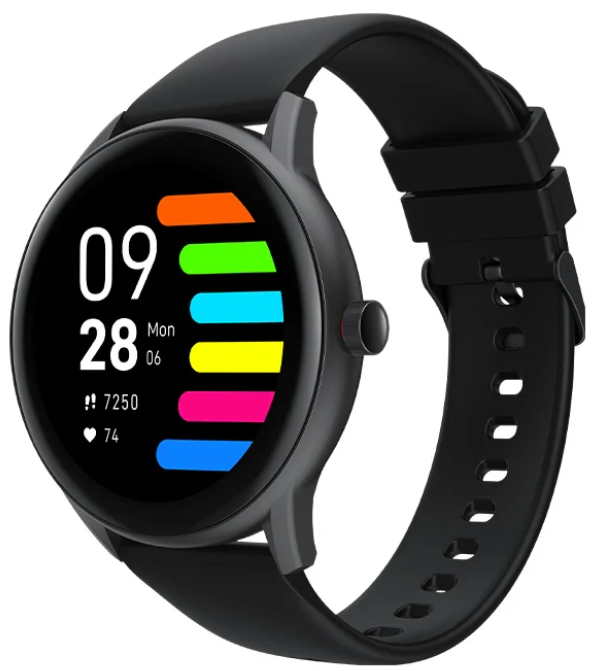
Soundpeats Watch Pro 1
Introduction
The Soundpeats Watch Pro 1 is a feature-packed smartwatch designed for fitness enthusiasts, busy professionals, and anyone seeking a reliable, affordable wearable. With its sleek design, 1.28-inch LCD touchscreen, and IP68 waterproof rating, this smartwatch is built to keep up with your active lifestyle. Whether you're tracking workouts, monitoring your heart rate, or simply staying connected with notifications, the Soundpeats Watch Pro 1 delivers impressive functionality at a budget-friendly price.
Key benefits include 13 sports modes, heart rate and sleep monitoring, music control, and up to 10 days of battery life. The watch is compatible with both Android and iOS devices, making it a versatile choice for a wide audience. With a price range of approximately £49.99, the Soundpeats Watch Pro 1 is available on major online retailers like Amazon and Sharaf DG, offering excellent value for money.
Specifications
- Display: 1.28-inch LCD touchscreen, 240x240 resolution, 265 PPI
- Bluetooth: Version 5.0
- Battery: 285mAh, up to 10 days of normal use, 3.5 hours charging time
- Waterproof: IP68 rating (up to 5 meters)
- Wristband: Adjustable, fits 5.9 to 9.0 inches
- Weight: 36g
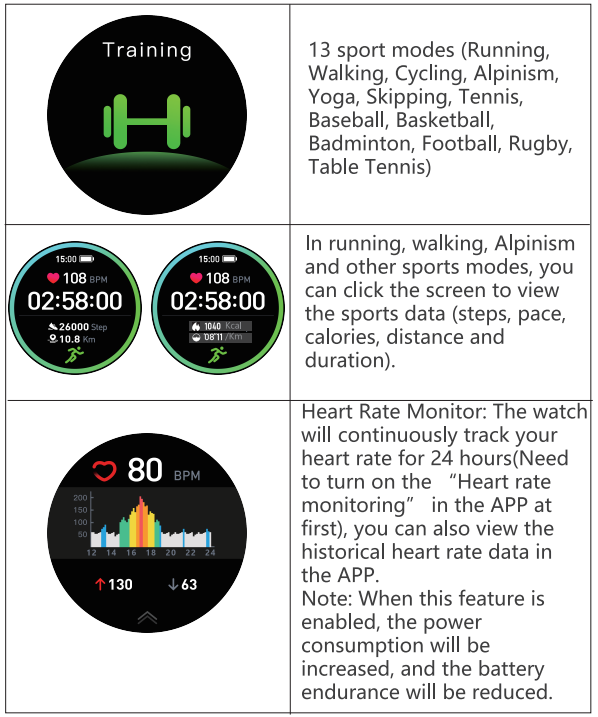
- Sports Modes: 13 modes,, including jogging, biking, yoga, and more
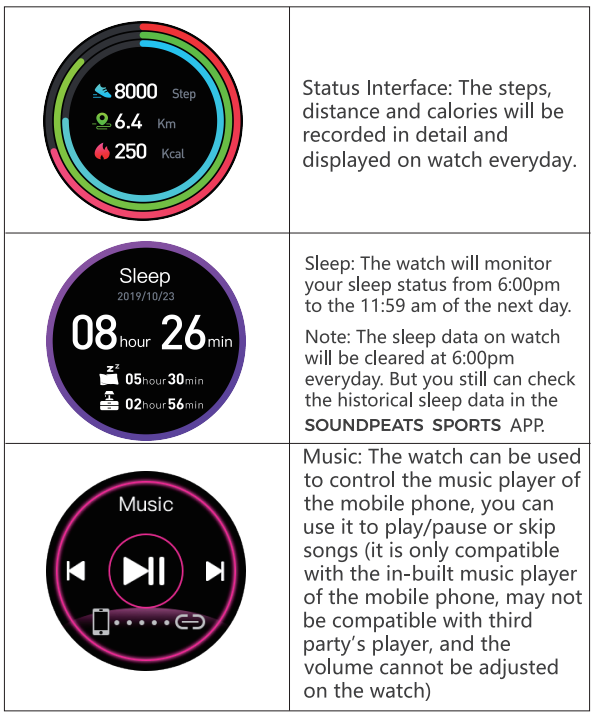
- Health Tracking: Heart rate monitor, sleep tracker, step counter, distance, calories
- Connectivity: Compatible with Android 4.4 and iOS 8.0 and above
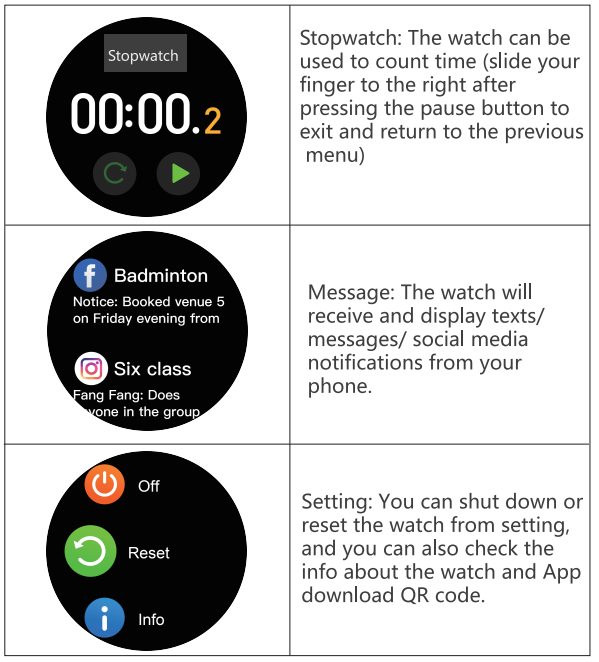
- Additional Features: Music control, call and message reminders, customizable watch faces, stopwatch, and find my phone
Compared to similar smartwatches in its price range, the Soundpeats Watch Pro 1 stands out with its long battery life, robust health tracking, and user-friendly interface.
Overview
Wearing
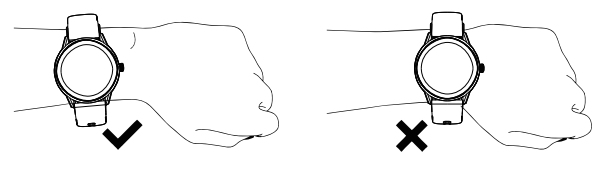
Wear the wristband about one finger away from the wrist bone and adjust the tightness of the wristband to a comfortable position.
Tip: If you wear the strap too loosely, the data acquisition of the heart rate sensor may be affected.
Connection and binding
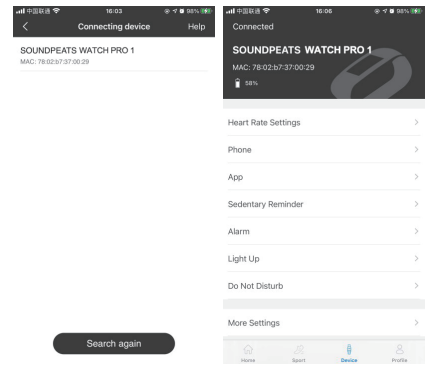
Scan the QR code on the watch display (Settings-APP Download) with your mobile phone, and then install the APP SOUNDPEATS SPORTS. You can also scan the QR code below to download and install SOUNDPEATS SPORTS from the mobile APP store .

After installing the APP, open and log in to SOUNDPEATS SPORTS, then select (device WATCH Pro 1 to be added) on the device page to connect it.
Operation
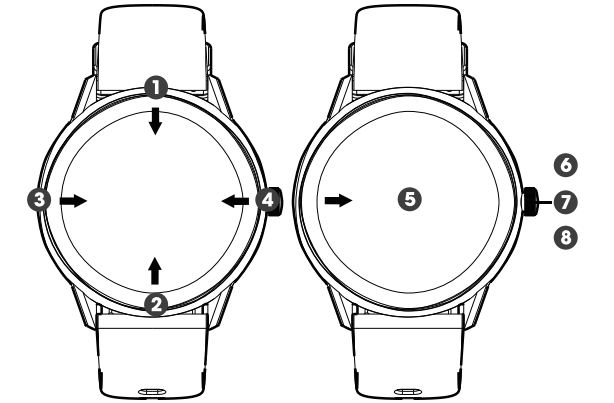
- Open the control panel: Swipe the screen on the main interface downwards from the top..
- Open the messages/notifications: Swipe the screen on the main interface upwards from the bottom.
- Open the main menu: Swipe the screen on the main interface from left to right (Note: On other interfaces, slide your finger from left to right to return to the previous interface)
- Open the status interface: Swipe the screen on the main interface from right to left..
- Quick dial change: Press and hold the dial interface for 3 seconds, and the watch vibrates once; then you can slide your finger to the left or right to select the dial.
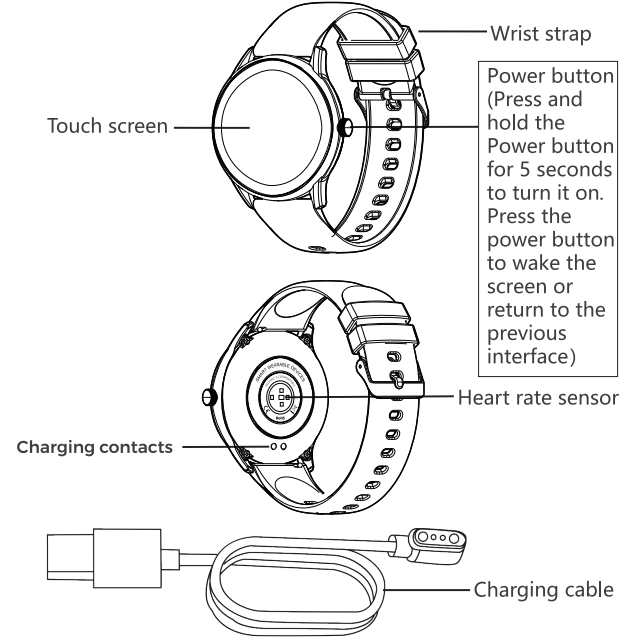
- Power on: Press and hold the Power button for 5 seconds to switch it on (Power off: You need to press and hold the button for 3 seconds when the display is on to select whether to power off)
- Quick sports pause/continue: Press the power button.
- Press the power button to return to the homepage..
(Note: If you are on the level 2 interface, you will return to the level 1 interface.)
Features
Charging
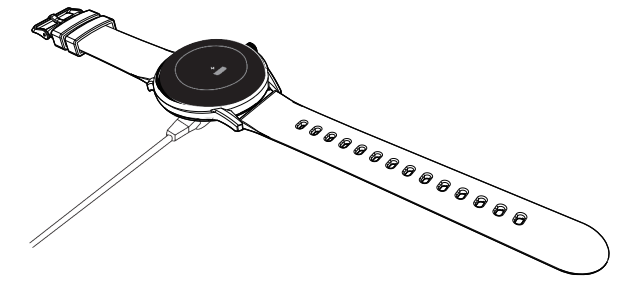
- Place the watch on the magnetic charging cable and make sure the charging contacts on the back of the watch are fully attached to the metal contacts of the charging cable. It can be fully charged within about 3.5 hours.
- Plug the charging cable into a standard USB-Cger purchased via official channels. The output voltage is SV, and the output current is 1 A.
If the watch can't be turned on after being left for a long time, please wipe the charging contacts of the charging cable when using it again to remove the sweat or moisture residue
Note: (If you do not use the watch often, please charge it once every month.)
Troubleshooting
- Watch not turning on: Charge the device for at least 30 minutes. If it still doesn’t turn on, try a different charging cable.
- Heart rate not accurate: Ensure the watch is snug on your wrist and not too loose. Clean the sensor regularly.
- Bluetooth connection issues: Restart both the watch and your phone. Make sure Bluetooth is enabled on your phone.
- Notifications not working: Check the SOUNDPEATS SPORTS app settings and ensure notifications are enabled.
- Water damage: The watch is IP68 waterproof, but avoid exposing it to hot water or chemicals.
Preventive measures include regular cleaning, avoiding extreme temperatures, and keeping the device updated. For warranty and support, contact the retailer or visit the official Soundpeats website. Customer support is available via email and online chat.
Warranty regulations
When purchasing products from the original buyer, we begin to guarantee watches for a period of 12 months, and the warranty scope is limited to manufacturing defects.
Pros & Cons
Pros
- Long battery life (up to 10 days)
- Comprehensive health and fitness tracking
- Customizable watch faces
- IP68 waterproof rating
- Affordable price point
Cons
- Screen resolution could be higher
- Limited to one custom watch face at a time
- No call or message reply from the watch
The Soundpeats Watch Pro 1 offers excellent value for money, especially for those seeking a reliable fitness tracker without breaking the bank. It compares favorably to other budget smartwatches with its robust feature set and user-friendly design.
Customer Reviews
Users consistently praise the Soundpeats Watch Pro 1 for its comfort, battery life, and ease of use. Many highlight the customizable watch faces and accurate heart rate monitoring as standout features. The watch has received positive feedback for its value for money, with most customers rating it 4.5 out of 5 stars. Common complaints include the screen brightness and the inability to store multiple custom watch faces. Overall, the Soundpeats Watch Pro 1 is highly recommended for anyone looking for a budget-friendly, feature-rich smartwatch.
Faqs
How do I set up the soundpeats Watch Pro 1 for the first time?
What should I do if the soundpeats Watch Pro 1 is not syncing with my smartphone?
What are the key fitness tracking features of the soundpeats Watch Pro 1?
Is the soundpeats Watch Pro 1 compatible with all smartphones?
How can I optimize battery life on my soundpeats Watch Pro 1?
What maintenance is required to keep my soundpeats Watch Pro 1 in good condition?
How do I customize watch faces on the soundpeats Watch Pro 1?
What should I do if my soundpeats Watch Pro 1 screen is unresponsive or frozen?
More soundpeats manuals
- Pairing & Setup: Soundpeats Life Wireless Earbuds User Manual
- Pairing: Soundpeats Watch 2 User Manual
- Pairing: Soundpeats True Air2 Wireless Earbuds User Manual
- Pairing & Setup: Soundpeats Air3 Deluxe HS Wireless Earbuds User Manual
- Pairing & Setup: Soundpeats Air3-Deluxe Wireless Earbuds User Manual
- Setup & Pairing: Soundpeats Pop Clip Wireless Earbuds User Manual
Leave a Comment