
Setup & Pairing: Soundpeats Pop Clip Wireless Earbuds User Manual
Content
SoundPEATS Pop Clip Wireless Earbuds
Introduction
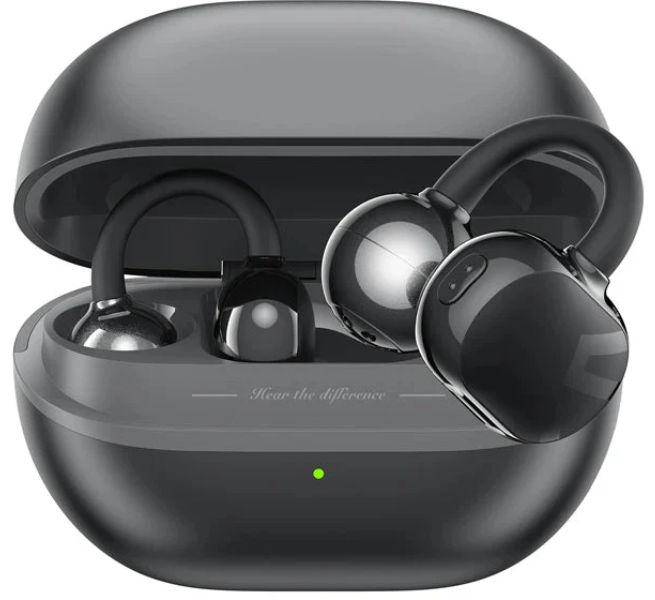
The SoundPEATS Pop Clip Wireless Earbuds introduce a revolutionary clip-on design that combines comfort, durability, and high-quality sound for users seeking a secure fit without traditional in-ear plugs. Weighing just 4.73 grams per earbud, these earbuds feature a flexible TPU material with nickel-titanium memory wire, ensuring they stay firmly clipped onto your ear during workouts, commutes, or daily activities. Ideal for fitness enthusiasts, outdoor adventurers, and anyone who prefers an open-ear experience, the Pop Clip earbuds offer an innovative alternative to conventional wireless earbuds.
Highlighted by 10.8mm dual-magnet drivers, these earbuds deliver clear highs, balanced mids, and deep, punchy bass, enriched further by selectable EQ presets and an exclusive open-space sound effect that simulates a surround sound environment. Equipped with physical button controls for tactile reliability and quick access, the Pop Clip supports Bluetooth 5.4 connectivity, providing stable wireless performance with a range of up to 20 meters.
With up to 8 hours of playback on a single charge and a total playtime of approximately 30 hours using the included charging case, the SoundPEATS Pop Clip Wireless Earbuds are designed for extended use. Fast charging capabilities allow 15 minutes of charging to yield 3 hours of playtime, perfect for on-the-go users. These IPX5-rated sweat and water-resistant earbuds are available globally, typically found in the $50 to $70 price range, offering excellent value for sporty, active, and casual listeners alike.
Specifications of SoundPEATS Pop Clip Wireless Earbuds
- Model Name: SoundPEATS Pop Clip Open Ear Earbuds
- Connectivity: Bluetooth 5.4 (supports SBC and AAC codecs)
- Design: Clip-on open-ear style with flexible TPU and nickel-titanium memory wire
- Weight: 4.73 grams per earbud
- Drivers: 10.8mm dual-magnet dynamic driver with PU+LCP composite diaphragm
- Battery Life: Up to 8 hours per single charge; 30 hours total with charging case
- Charging: USB Type-C port; 15-minute quick charge for 3 hours of playback
- Water Resistance: IPX5 rating for sweat and water resistance
- Controls: Physical button controls for play, pause, calls, and volume
- Latency: Low latency gaming mode with 80ms audio delay
- Additional Features: Automatic left/right channel adaptation, bidirectional wind noise cancellation, open-space "movie mode" sound effect, PeatsAudio app support for EQ customization and earbuds tracking
Comparison with Similar Products: Unlike many in-ear wireless earbuds, the Pop Clip’s clip-on open-ear design offers a unique wearing comfort, especially suited for users who dislike ear canal insertion. It competes favorably with other active lifestyle earbuds by combining extended battery life and physical controls, a feature often missing on ultra-compact touch-based earbuds.
BLUETOOTH CONNECTION AND USAGE
Power On/Off
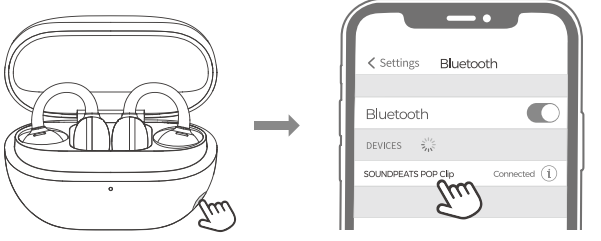
When the earbuds are in the charging case, opening the case lid will automatically power them on. Closing the case lid will power them off.
Standard Pairing
Place the earbuds in the charging case. Open the charging case lid and press and hold the case button for 2 seconds until the white status indicator light flashes continuously. The earbuds are now in pairing mode.
- Newly manufactured SOUNDPEATS POP Clip earbuds will automatically enter pairing mode when powered on for the first time.
- The earbuds will automatically enter pairing mode after a factory reset.
- Open your device's Bluetooth settings, search for 'SOUNDPEATS POP Clip,' and select it to connect.
Dual Device Connection
To connect to a second device while already connected to one, place the earbuds in the charging case and follow the ·standard Pairing· instructions.
Factory Reset
- Place the earbuds in the charging case with the lid open.
- Press and hold the function button on the charging case for 10 seconds until the red light flashes quickly three times. This will reset the earbuds to factory settings.
- After a factory reset, the earbuds will automatically enter pairing mode, with the white indicator light flashing continuously.
Auto-Adaptation for Left and Right Channels
- Place the earbuds in the charging case, close the lid for 10 seconds, and then open it. The left and right
FUNCTION OPERATIONS
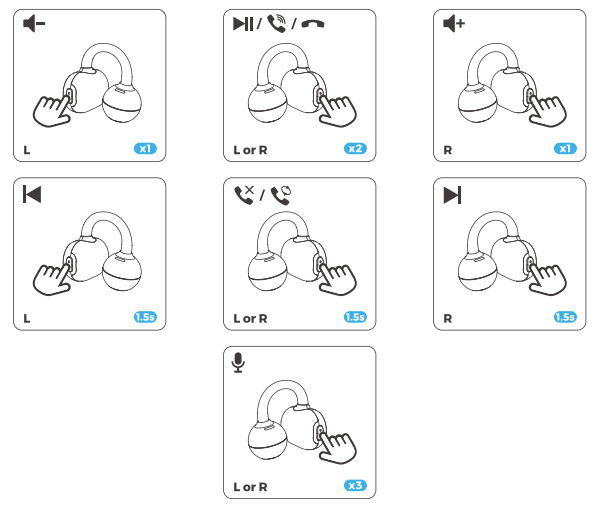
- xl: Single tap
- 1.5s: Long press for 1.5s
CHARCING
Battery Indicator
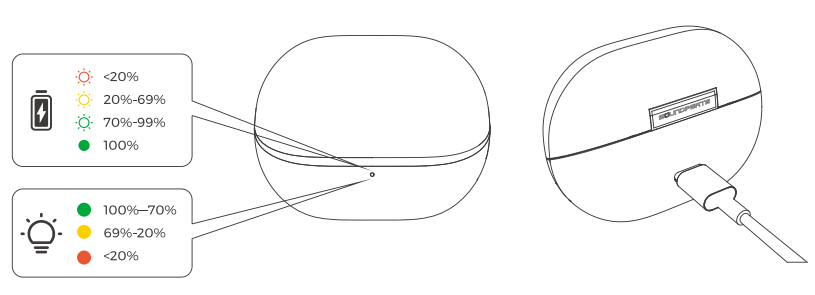
- With the charging case lid closed, the status indicator shows the case's battery level.
- When the charging case is open and there are earbuds inside, the status indicator light displays the battery level of the earbuds. When the left/right earbud is removed, the status indicator light displays the battery level of the left/right earbud (steady on for some seconds).
- Battery Indicator Status: 100%-70%: Green light ; 69%-20%: Yellow light ; Below 20%: Red light.
Charging the Case
- You can charge the case using the provided charging cable.
- Charging Indicators: 100%: Green light on steadily ; 99%-70%: Green light pulsing ; 69%-20%: Yellow light pulsing ; Below 20%: Red light pulsing.
Troubleshooting SoundPEATS Pop Clip Wireless Earbuds
- Problem: Earbuds not pairing - Solution: Ensure Bluetooth is enabled on your device, turn off and on the earbuds, and try re-pairing. Reset earbuds by placing both into the case and holding the button for 10 seconds.
- Problem: One earbud not producing sound - Solution: Check battery level of both earbuds, clean charging contacts, and ensure earbuds are correctly seated in the charging case for charging.
- Problem: Buttons unresponsive - Solution: Make sure earbuds are fully charged. Avoid pressing buttons too quickly; use firm, deliberate presses for the best response.
- Problem: Audio latency or dropouts - Solution: Keep device within 20 meters, avoid interference from other wireless devices, and update firmware via PeatsAudio app if available.
- Error Codes: SoundPEATS Pop Clip does not display error codes but uses LED indicators for battery and connectivity status.
- Preventive Measures: Regularly clean earbuds and charging contacts, avoid exposure to excessive moisture beyond the IPX5 rating, and store in case when not in use.
The product includes a 12-month warranty covering manufacturing defects. For support, users can contact SoundPEATS customer service via their official website or consult the included user manual and PeatsAudio app for additional troubleshooting assistance.
Pros & Cons of SoundPEATS Pop Clip Wireless Earbuds
- Pros:
- Unique clip-on design offers excellent comfort without ear canal insertion
- Lightweight at only 4.73g per earbud, suitable for extended wear
- Strong audio quality with 10.8mm dual drivers and customizable EQ
- Long battery life: 8 hours per charge, 30 hours with charging case
- Physical button controls provide reliable, tactile operation
- IPX5 water resistance allows sweat and rain protection
- Fast charging with 15 minutes for 3 hours of playback
- Cons:
- Clip-on style may feel unusual initially and requires adjustment
- The microphone quality is average, not ideal for noisy environments
- Physical buttons can be less intuitive than touch controls for some users
- Open-ear design may allow more ambient noise than in-ear models
Compared to alternatives like traditional in-ear wireless earbuds, the Pop Clip offers unparalleled comfort for users sensitive to ear canal pressure, though it trades some noise isolation and mic clarity. Its value for money is strong, especially for active users prioritizing fit and battery longevity.
Customer Reviews of SoundPEATS Pop Clip Wireless Earbuds
Users consistently praise the SoundPEATS Pop Clip Wireless Earbuds for their comfort and secure fit, especially noting the innovative clip-on design that stays in place during workouts and daily activities. Many reviewers highlight the impressive battery life and clear sound quality with deep bass, enhanced further by the app’s EQ customization features. The physical buttons receive positive remarks for providing a tactile and reliable control experience.
Common critiques include the initial adjustment period to get used to the clip-on fit and some dissatisfaction with microphone clarity during calls. Ambient noise leakage due to the open-ear design is occasionally mentioned, though most users appreciate the safety and comfort trade-off.
Overall, the earbuds receive an average of 4.3 out of 5 stars across major platforms, with strong recommendations for fitness enthusiasts and those seeking comfortable all-day wireless earbuds that do not block ear canals.
Faqs
How do I set up soundpeats Pop Clip Wireless Earbuds for the first time?
What should I do if my soundpeats Pop Clip Wireless Earbuds won’t connect to Bluetooth?
Can I use soundpeats Pop Clip Wireless Earbuds with Android and iPhone devices?
How do I use the physical button controls on soundpeats Pop Clip Wireless Earbuds?
What is the battery life and charging time for soundpeats Pop Clip Wireless Earbuds?
How do I clean and maintain my soundpeats Pop Clip Wireless Earbuds?
How does the open-ear design of soundpeats Pop Clip Wireless Earbuds affect sound quality and comfort?
Can I customize the sound settings on soundpeats Pop Clip Wireless Earbuds?
More soundpeats manuals
- Pairing & Setup: Soundpeats Air3 Deluxe HS Wireless Earbuds User Manual
- Pairing: Soundpeats Air5 Lite Wireless Earbuds User Manual
- Pairing: Soundpeats Watch 2 User Manual
- Setup & Pairing: Soundpeats Air5 Pro Wireless Earbuds User Manual
- Pairing & Setup: Soundpeats Watch Pro 1 User Manual
- Setup & Pairing: Soundpeats Capsule3 Pro+ Earbuds User Manual
Leave a Comment