
Setup & Pairing: Soundpeats Capsule3 Pro+ Earbuds User Manual
Content
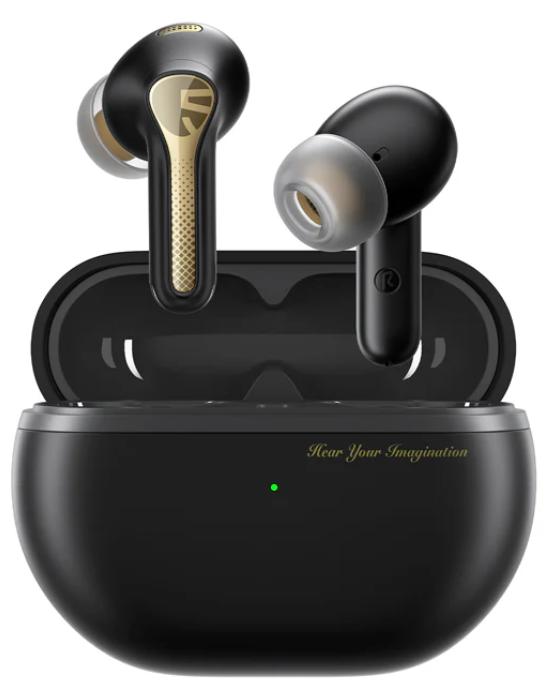
soundpeats Capsule3 Pro+ Earbuds
Introduction
The Soundpeats Capsule3 Pro+ Earbuds represent a state-of-the-art wireless audio solution designed for discerning listeners seeking premium sound quality combined with advanced noise cancellation. Featuring AI Adaptive Active Noise Cancellation (ANC) that can reduce ambient noise by up to 45dB, these earbuds are ideal for commuters, remote workers, gamers, and audiophiles who want immersive sound without distractions. Their unique xMEMS speaker technology, paired with a robust 12mm dynamic drive,r delivers rich, hi-res certified audio with an extended frequency response reaching up to 40kHz. This wide range allows deeper lows and crisper highs, elevating music, podcasts, and calls alike.
The earbuds also integrate Bluetooth 5.3 connectivity with LDAC support for high-resolution wireless streaming, ensuring stable and energy-efficient connections. Comfort is prioritized with a h lightweight design at approximately 4.5 grams per earbud and an ergonomic fit suitable for prolonged use. Additional features such as Transparency Mode, low-latency game mode, and touch controls make these earbuds highly versatile for different environments and activities.
Targeted at tech-savvy consumers looking for high-performance earbuds under $100, the Capsule3 Pro+ offers a compelling balance of quality and affordability. They are widely available through online retailers,s including Amazon and the official SoundPEATS website, typically priced around $79 to $90, depending on promotions. Whether for daily podcasts, intense gaming sessions, or immersive music listening, these earbuds deliver premium sound with professional-grade noise control.
Technical Specifications
- Model Name: SoundPEATS Capsule3 Pro Plus Earbuds
- Connectivity: Bluetooth 5.3 with profiles A2DP, AVRCP, HFP, HSP
- Audio Driver: 12 mm xMEMS dynamic driver for enhanced spatial audio imaging
- Frequency Response: 20Hz to 40kHz (wider than typical 20Hz-20kHz range)
- Noise Cancellation: AI Adaptive Hybrid ANC with up to 45dB noise reduction
- Battery Life: Up to 6.5 hours per single charge (normal mode), total 43 hours with charging case
- Charging Time: Earbuds approx. 1.5 hours, case approx. 2 hours (Type-C USB)
- Latency: 70 milliseconds with a dedicated game mode for low-latency audio
- Water Resistance: IPX4, sweat and splash resistant
- Controls: Touch-sensitive controls supporting playback, volume, ANC modes, and gaming mode
- Microphones: Six microphones with advanced noise cancellation for clear calls
- Additional Features: Transparency mode, multi-point connection, smartphone app support with 10-band EQ
Compared to similar earbuds in the mid-tier market segment, the Capsule3 Pro+ notably excel in noise cancellation depth and frequency response range, surpassing many competitors that offer 20-30dB ANC and standard 20Hz-20kHz audio ranges. The integration of xMEMS speaker technology further distinguishes them by providing superior sound clarity and spatial imaging.
DUAL DEVICE CONNECTION
- Please open PeatsAudio and find the 'Dual Device Connection" feature to enable it.
- Follow these steps:
- Pair the headsets with Device A first. After successful pairing, turn off the Bluetooth function on Device A.
- Repeat the pairing process to connect the headsets with Device B. Keep the headsets connected to Device B.
- Turn on the Bluetooth function on Device A.
- The headset will automatically connect with two devices next time after the first time dual device connection.
- Dual device connection cannot be used with LDAC at the same time.
CHARGING
How to charge the charging case?
- Connect the Type-C charging adapter to charge it (charging current does not exceed 1A),
- When not in use for a long time, charge it at least once every three months.
APP

FIRST TIME OF USE
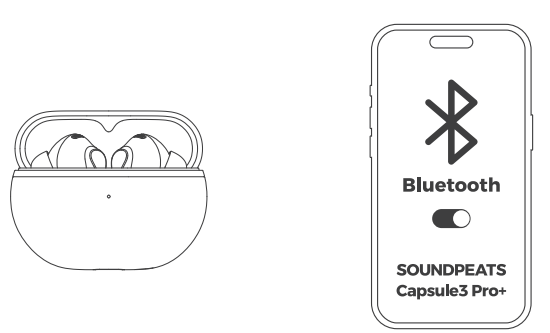
- Keep the earphones in the charging case, open the charging case lid to turn them on automatically.
Close the charging case lid to turn them off automatically. - After the earphones are turned on, search and select the name of the Bluetooth device on your cell phone to connect the SOUNDPEATS Capsule3 Pro+ successfully.
CONTROL
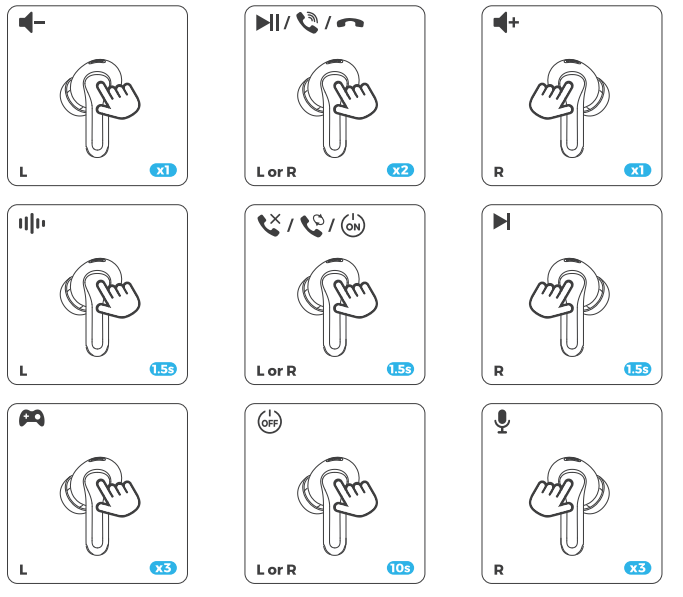
RESET & ENTER PAIRING MODE MANUALLY
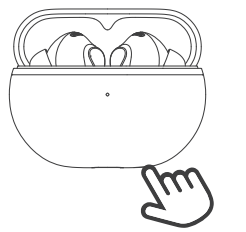
- Keep the earphones in the charging case and open the charging case lid.
- Reset: Long-press the charging case button for 10 seconds until the indicator light flashes white and red twice.
- Enter pairing mode manually: Long-press the charging case button for 3s, and the indicator light flashes white until the earphones are connected successfully.
WEARING
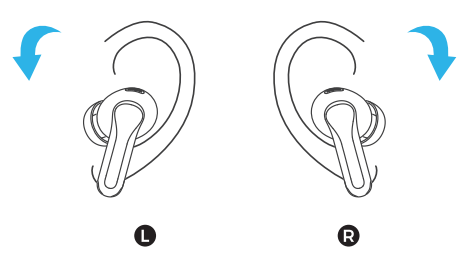
- Identify left and right earphones.
- Rotate the headset and find the most comfortable position.
WHAT DOES THE INDICATOR LIGHT OF THE CHARGING CASE DISPLAY?
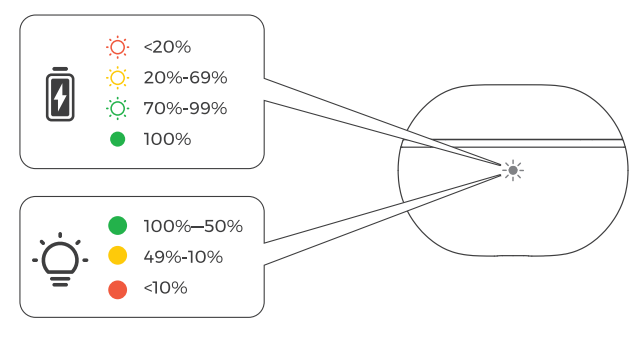
- The Green light flashes slowly.
- The Green light stays on.
Troubleshooting Soundpeats Capsule3 Pro+ Earbuds: Common Issues and Solutions.
- Issue: Earbuds not pairing or connecting via Bluetooth
Solution: Ensure Bluetooth 5.3 compatibility on your device, reset earbuds by holding touch sensors for 10 seconds, and re-pair. Confirm no other devices are interfering. - Issue: Audio latency or lag during gaming
Solution: Activate the dedicated low-latency game mode via touch control or the SoundPEATS app for a reduced 70ms audio delay. - Issue: Poor noise cancellation or ANC not activating
Solution: Toggle ANC modes (ANC, Transparency, Normal) via touch controls; ensure firmware is up to date in the companion app. - Issue: Charging issues or earbuds not charging properly
Solution: Check charging contacts for dirt, use the included Type-C cable and charger, and confirm the charging case battery level. - Preventive Measures: Keep earbuds clean, avoid exposure to extreme temperatures, and regularly update firmware.
The Soundpeats Capsule3 Pro+ Earbuds come with a standard 12-month warranty covering manufacturing defects. For technical support or warranty claims, contact SoundPEATS customer service via their official website or through the Amazon product page under seller contact options.
Pros and Cons of Soundpeats Capsule3 Pro+ Earbuds
Pros
- Exceptional Noise Cancellation: Up to 45dB ANC with a broad frequency bandwidth for clear, distraction-free audio.
- Hi-Res Audio Quality: Wide 20Hz-40kHz frequency response and LDAC codec support enhance sound detail and clarity.
- Long Battery Life: Up to 6.5 hours per charge, 43 hours total with case, supporting extended use without frequent recharging.
- Comfort and Design: Lightweight earbuds (4.5g each) with ergonomic fit ideal for prolonged wear.
- Advanced Features: Six microphones for clear calls, low-latency game mode, and customizable touch controls through the app.
- Good Value: Competitive pricing under $100 with premium features typically seen in higher-end models.
Cons
- Learning Curve for Touch Controls: Some users report initial difficulty adjusting to the touch gesture system.
- No In-Ear Detection: Lacks automatic play/pause when removing earbuds, a feature found in some rivals.
- Transparency Mode Quality: While effective, it may not be as natural-sounding as premium models.
- LDAC Support Device Requirement: Hi-Res audio via LDAC requires compatible Android devices (Android 8.0+), limiting full benefit for some users.
Customer Reviews and Feedback on Soundpeats Capsule3 Pro+ Earbuds
Users consistently praise the Soundpeats Capsule3 Pro+ Earbuds for their superb noise cancellation and sound quality, often highlighting the clarity of calls and the immersive listening experience. The battery longevity and comfortable fit receive positive mentions, making them favored for daily commutes and long gaming sessions.
Common complaints include the sensitivity and complexity of touch controls, which new users find unintuitive initially. Some users also reported minor connectivity hiccups, though these are often resolved with firmware updates. The lack of in-ear detection is noted but not widely seen as a dealbreaker given the price point.
On average, these earbuds receive approximately 4.3 out of 5 stars across major retail platforms, with reviewers recommending them as an excellent mid-range option for those valuing noise cancellation and hi-res audio without the premium price.
More soundpeats manuals
- Setup & Pairing: Soundpeats Air5 Pro Wireless Earbuds User Manual
- Pairing: Soundpeats Breezy Wireless Earbuds User Manual
- Pairing: Soundpeats Air5 Lite Wireless Earbuds User Manual
- Setup & Pairing: Soundpeats Opera Erabuds User Manual
- Setup & Pairing: Soundpeats Pop Clip Wireless Earbuds User Manual
- Setup & Pairing: Soundpeats Air4 Lite Earbuds User Manual
Leave a Comment