
Setup & Pairing: Soundpeats Air4 Lite Earbuds User Manual
Content
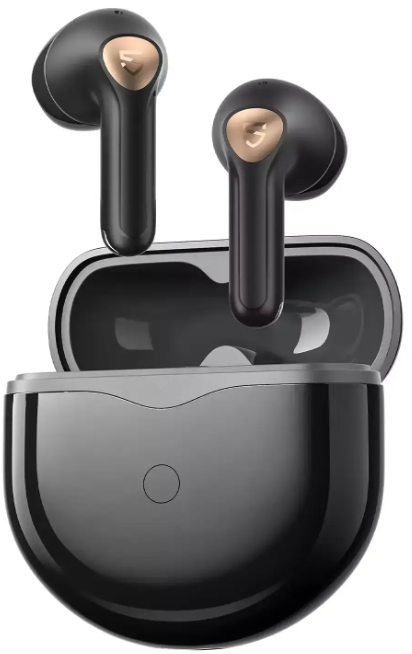
SoundPEATS Air4 Lite Earbuds
Introduction
The SoundPEATS Air4 Lite Earbuds deliver an exceptional wireless audio experience tailored for music lovers and on-the-go professionals seeking high-quality sound without breaking the bank. With official Hi-Res Audio certification and support for the LDAC codec, these earbuds reproduce audio at a superior bit rate and sampling rate, capturing intricate details and vibrant soundscapes, making them ideal for immersive music listening, podcasts, and clear voice calls.
Designed with a semi-in-ear semi in-ear fit, the Air4 Lite earbuds cater to daily commuters, remote workers, and fitness enthusiasts who value convenience and durability. Equipped with six microphones and AI noise reduction, they provide crystal-clear call quality by effectively minimizing ambient noise and wind interference. Additionally, the advanced Bluetooth 5.3 chip ensures a stable connection with multipoint support, allowing seamless switching between devices like smartphones, tablets, and laptops.
With an estimated price range of around $40-$50, the SoundPEATS Air4 Lite offers great value and is widely available through online retailers and authorized sellers globally. Its long-lasting battery life—up to 7 hours per charge and 30 hours with the charging case—makes it perfect for extended use, whether during work sessions or leisure activities.
Specifications of SoundPEATS Air4 Lite Earbuds
- Driver: 13mm large dynamic driver for rich bass and clear mids
- Audio Codec: LDAC, AAC, SBC supported; Hi-Res Audio certified
- Frequency Response: 20 Hz –a a 40 kHz for broad sound spectrum
- Bluetooth Version: 5.3, offering faster transmission and greater stability
- Battery Life: Up to 7 hours per charge; total 30 hours with charging case
- Charging Time: ≤1.5 hours for earbuds; charging case via USB Type-C
- Microphones: 6 mics with AI noise reduction for clear calls even in noisy environments
- Water Resistance: IPX4 splash-proof rating
- Weight: Approx. 4g per earbud; 38.8g with charging case
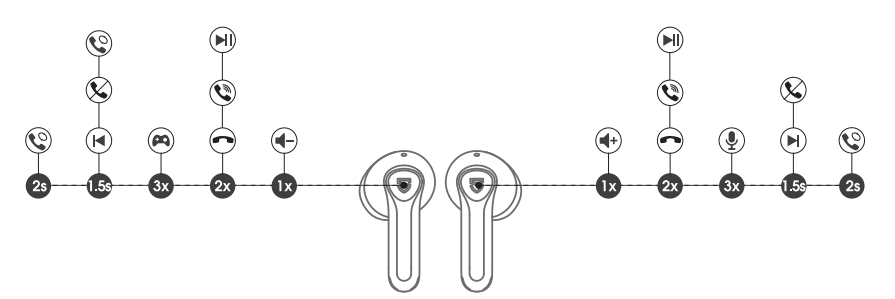
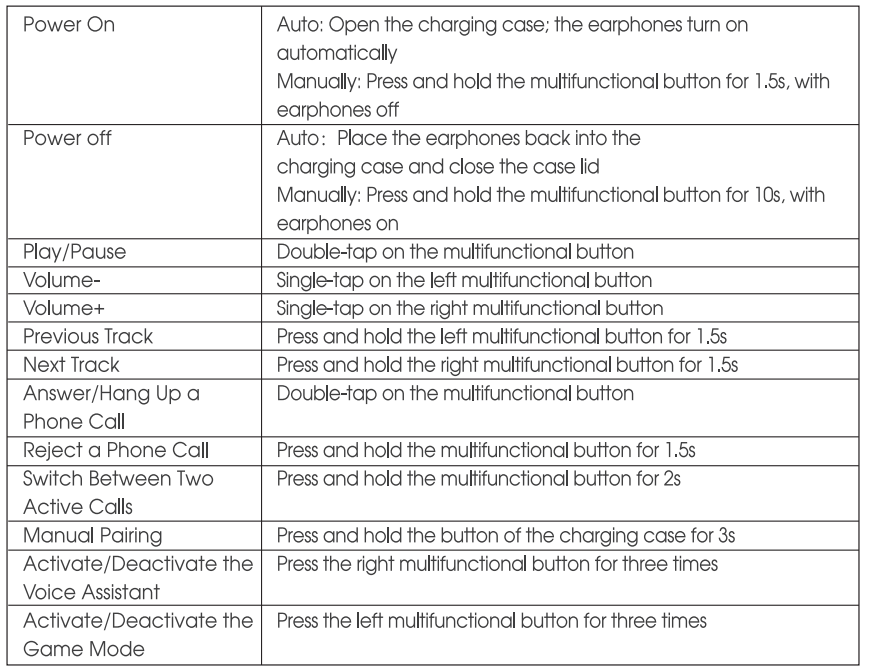
- Controls: Touch-sensitive multifunction controls for playback, calls, volume, and voice assistant
Compared to similar models like the SoundPEATS Air4, the Air4 Lite offers LDAC support but lacks Qualcomm aptX codec and advanced ANC, positioning it as a budget-friendly, high-quality alternative with impressive battery life and stable connectivity.
First Time ot Use
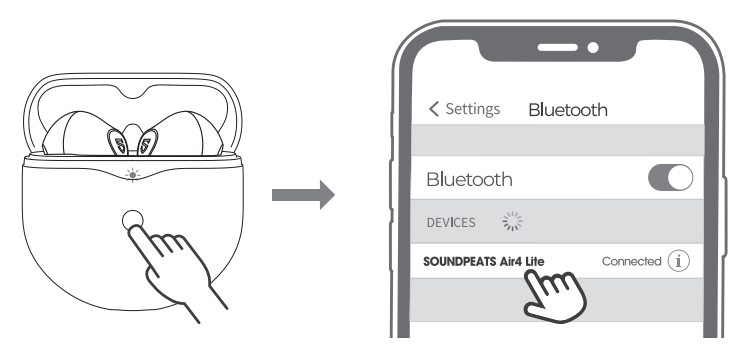
- Open the lid of the charging case, press and hold the button on the charging case for 3 seconds until the indicator light on the charging case flashes white. At this point, they enter into pairing mode.
- Turn on your device's Bluetooth and select SOUNDPEATS Air4 Lite from the Bluetooth list to complete the pairing.
Multi-point Connection
SOUNDPEATS Air4 Lite earphones can be paired simultaneously with two devices.
How to connect: Once the earphones are paired with device A, turn off the Bluetooth of device A. Repeat the pairing operation to connect the earphones to device B. When the pairing is completed, please turn on the Bluetooth of device A to complete the pairing.
Reset
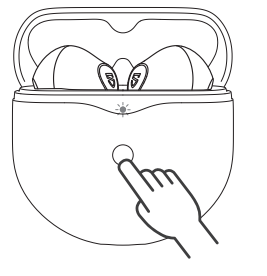
- Place both earphones back into the charging case, and make sure they are correctly placed.
- With the case lid open, press and hold the button of the charging case for l OS until the indicator light on the charging case flashes white twice.
- Close the case lid and take out the earphones, and they are activated successfully.
Wearing methods
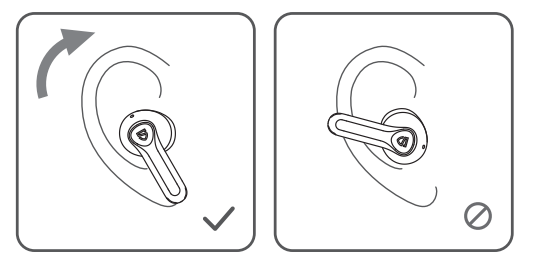
- Identify the left and right earphones.
- Adjust the earphones to fit your ears.
Product Diagram
Controls
Troubleshooting SoundPEATS Air4 Lite Earbuds
- No Sound or One Earbud Not Working: Ensure earbuds are fully charged and properly paired. Reset earbuds by placing them in the case and holding the multifunction buttons for 10 seconds.
- Bluetooth Connectivity Issues: Clear the Bluetooth cache on your device and re-pair the earbuds. Confirm Bluetooth 5.3 compatibility for optimal performance.
- Call Quality Problems: Clean microphone openings; check AI noise reduction settings. Avoid windy environments for the best call clarity.
- Charging Problems: Use the supplied USB Type-C cable; clean charging contacts on earbuds and case to ensure good connection.
Preventive measures include regularly cleaning earbuds, avoiding exposure to excessive moisture the ture beyond the IPX4 rating, and timely charging to maintain battery health. The product comes with a 1-year warranty covering manufacturing defects. For technical support, contact SoundPEATS customer service via their official website or the Amazon message center.
Pros & Cons of SoundPEATS Air4 Lite Earbuds
Pros
- Hi-Res LDAC Audio: Exceptional sound quality with clear highs and deep bass for the price segment.
- Long Battery Life: Up to 7 hours per charge and 30 hours total with the case, supporting extended usage.
- Robust Call Quality: Six microphones with AI noise cancellation reduce ambient noise effectively.
- Multipoint Bluetooth 5.3: Allows simultaneous connection to multiple devices with seamless switching.
- Comfort & LSemi-in-ear Semi in-ear design weighs only 4g per earbud, suitable for prolonged wear.
Cons
- No Active Noise Cancellation (ANC): Ambient noise isolation relies on design and mic noise reduction, less effective than ANC models.
- Plastic Case Finish: Matte plastic prone to fingerprints and minor scratches.
- Fit Adjustment Required: Some users find the earbud insertion angle awkward, causing accidental volume button presses.
Overall, the SoundPEATS Air4 Lite earbuds offer excellent value with premium sound and features, standing out in the affordable true wireless earbuds market.
Customer Reviews of SoundPEATS Air4 Lite Earbuds
Users consistently praise the SoundPEATS Air4 Lite Earbuds for their impressive sound clarity, especially the rich bass and detailed mids enabled by the 13mm drivers and LDAC support. Many highlight the long battery life and reliable Bluetooth 5.3 connection as standout features. The call noise cancellation with six microphones receives positive feedback for clarity even in noisy environments.
Common complaints include occasional difficulty fitting the earbuds comfortably and minor issues with the charging case's fingerprint-prone surface. Some users note the lack of active noise cancellation as a downside compared to pricier models.
Overall, the earbuds receive average age ratings around 4 to 4.5 stars, with recommendations for those seeking affordable, high-resolution wireless earbuds with solid performance and reliable connectivity.
Faqs
How do I set up soundpeats Air4 Lite Earbuds for the first time?
What can I do if my soundpeats Air4 Lite Earbuds have poor call quality or background noise?
What are the key sound features of soundpeats Air4 Lite Earbuds that enhance music listening?
Are soundpeats Air4 Lite Earbuds compatible with both Android and iOS devices?
How can I optimize battery life on my soundpeats Air4 Lite Earbuds during daily use?
What should I do if my soundpeats Air4 Lite Earbuds are not connecting or pairing properly?
How do the touch controls on soundpeats Air4 Lite Earbuds work?
What maintenance is required to keep soundpeats Air4 Lite Earbuds in good condition?
More soundpeats manuals
- Setup & Pairing: Soundpeats Opera Erabuds User Manual
- Setup & Pairing: Soundpeats Air4 Earbuds User Manual
- Pairing: Soundpeats Breezy Wireless Earbuds User Manual
- Setup & Pairing: Soundpeats RunFree Lite Earbuds User Manual
- Setup & Pairing: Soundpeats Capsule3 Pro+ Earbuds User Manual
- Setup & Pairing: Soundpeats Engine 4 Earbuds User Manual
Leave a Comment