
Setup & Pairing: Soundpeats Engine 4 Earbuds User Manual
Content
Soundpeats Engine 4 Earbuds
Introduction
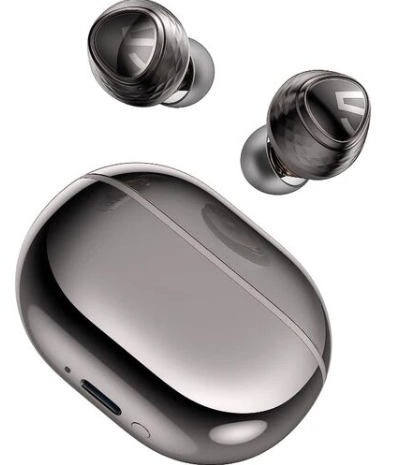
Meet the Soundpeats Engine 4 Earbuds: a versatile, high-performance pair of true wireless earphones designed for music enthusiasts, gamers, and everyday users seeking a powerful audio experience. Engineered with a unique dual-driver system,, a 10mm woofer,, er and a 6mm tweeter,, the Engine 4 Earbuds deliver immersive sound quality, from punchy bass to crystal-clear highs, at a price that redefines value in the wireless audio market.
These earbuds stand out with Bluetooth 5.3 multipoint connectivity, allowing seamless switching between two devices,, making it ideal for multitaskers juggling music, calls, and videos across phones and laptops. Hi-Res Audio certification via the LDAC codec (for Android devices) ensures you enjoy studio-quality wireless audio, previously only available in much pricier models. The Engine 4 also offers a responsive gaming mode with low latency (as low as 70ms), making it a solid choice for gamers and video streamers.
With up to 12.5 hours of playtime on a single charge and a compact case that extends total battery life to 43 hours, the Engine 4 Earbuds are built for all-day use, whether you’re commuting, working out, or relaxing at home. IPX4 water resistance adds durability for active lifestyles, while the comfortable, ergonomic design ensures a secure fit for hours of wear. The accompanying SOUNDPEATS app provides customizable EQ settings, firmware updates, and touch control personalization, making these earbuds as smart as they are powerful.
Priced between $50–$70 USD, the Soundpeats Engine 4 Earbuds are available globally through major online retailers and the official SOUNDPEATS website, offering exceptional features and audio quality at a budget-friendly price point. Whether you’re an audiophile, gamer, or daily commuter, these earbuds are designed to provide a premium wireless audio experience without breaking the bank.
Specifications
- Drivers: Dual co-axial dynamic drivers (10mm woofer + 6mm tweeter)
- Audio Codecs: LDAC (Hi-Res Audio certified), AAC, SBC
- Bluetooth Version: 5.3 with multipoint connectivity (pair with two devices simultaneously)
- Chipset: WUQI WQ7033AR
- Microphones: Quad-mic array with ENC (Environmental Noise Cancellation)
- Active Noise Cancellation (ANC): Not available
- Battery Life: Up to 12.5 hours per charge (AAC), up to 8 hours (LDAC); up to 43 hours with charging case
- Charging: USB-C; no wireless or fast charging
- Water Resistance: IPX4 (splash and sweat resistant)
- Weight: 6.3g per earbud; 42.74g total (case + buds)
- Dimensions: Earbud (HxWxD): 19.8mm x ~26.8mm; Case: 61mm x 45mm x 28mm
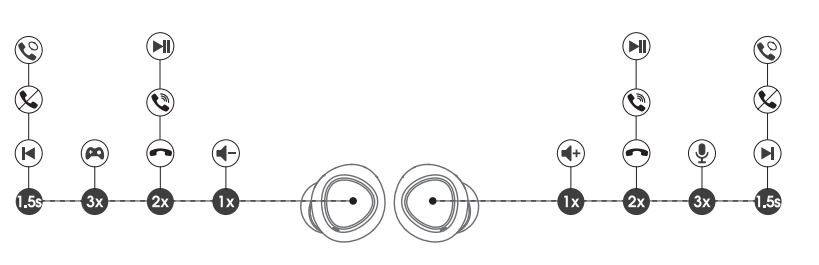
- Touch Controls: Play/pause, volume, track skip, call management, voice assistant
- App Support: SOUNDPEATS app for EQ, firmware updates, battery status, touch customization
- Gaming Mode: Low latency (~70ms) for synchronized audio in games and videos
- Bluetooth Range: Up to 10 meters (32 feet) line-of-sight
The Soundpeats Engine 4 Earbuds compete favorably with other similarly priced wireless earbuds, especially due to their dual-driver design, LDAC support, and multipoint connectivity features typically found in higher-end models. While lacking ANC, they excel in audio quality, battery life, and connectivity features for the price.
First Time of Use
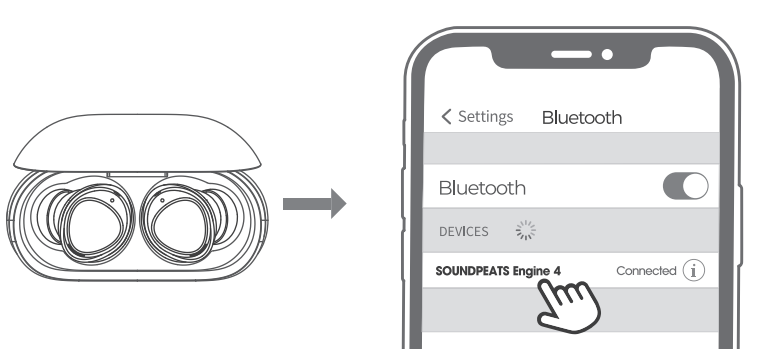
- Please open the lid of the charging case to take out the headphones, remove the insulating film from the top of both headphones, then put both headphones back into the charging case. Press and hold the button at the bottom of the charging case for 3 seconds until the indicator light inside the charging case flashes white. They are in pairing mode then.
- Turn on your device's Bluetooth and select SOUNDPEATS Engine 4 from the Bluetooth list to complete the pairing.
Pairing of a Second Device
SOUNDPEATS Engine 4 earphones can be paired simultaneously with two devices. How to connect: Once the earphones are paired with device A, turn off the Bluetooth of device A. Repeat the pairing operation to connect the earphones to device B. When the pairing is completed, please turn on the Bluetooth of device A to complete the pairing.
Reset
- Place both earphones back into the charging case, and make sure they are correctly placed.
- With the case lid open, press and hold the button on the bottom of the charging case for 105 seconds until the indicator light inside the charging case flashes white twice.
- Close the case lid and open it again, and the earphones are activated successfully.

Wearing methods
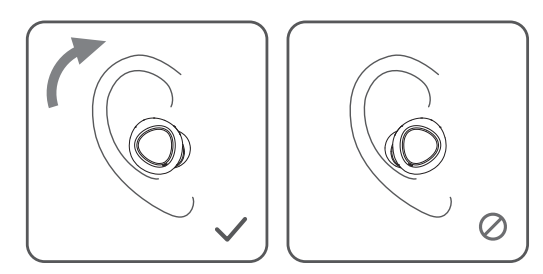
- Identify the left and right earphones.
- Adjust the earphones to fit your ears.
Product Diagram
Controls
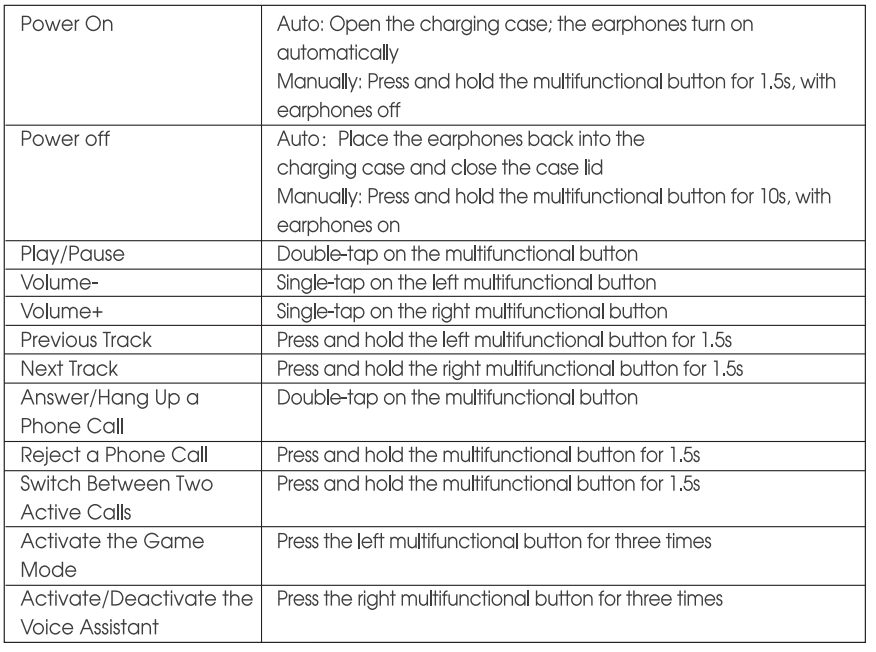
Troubleshooting Common Issues
If you encounter issues with your Soundpeats Engine 4 Earbuds, refer to the following troubleshooting tips:
- Connection Problems: Ensure Bluetooth is enabled on your device, and the earbuds are in pairing mode. Reset the earbuds by placing them in the case, holding the touchpads for 10 seconds until the LED flashes, then re-pair.
- Audio Dropouts: Move closer to your connected device; obstructions can reduce Bluetooth range. Update firmware via the SOUNDPEATS app for improved stability.
- Charging Issues: Use the included USB-C cable and ensure the charging contacts on the earbuds and case are clean. The case does not support wireless charging.
- Touch Controls Unresponsive: Clean the earbud surfaces. If the issue persists, reset the earbuds and update the firmware.
- Microphone Quality: Call quality can suffer in noisy or windy environments; use in quieter areas for best results.
- No Sound/One Earbud Not Working: Check if both earbuds are charged and paired. Reset them if needed.
Preventive Measures: Regularly update firmware, store earbuds in their case when not in use, and avoid exposing them to excessive moisture despite the IPX4 rating.
Warranty & Support: SOUNDPEATS offers a standard Check ckwith with your retailer for details. For further assistance, contact SOUNDPEATS customer support via their official website or the support section in the SOUNDPEATS app.
Pros & Cons of Soundpeats Engine 4 Earbuds
Pros
- Superior Sound Quality: Dual-driver setup delivers powerful bass and clear highs; LDAC support for Hi-Res Audio on Android
- Long Battery Life: Up to 12.5 hours per charge, 43 hours with case, ideal for all-day use
- Bluetooth 5.3 Multipoint: Seamlessly switch between two devices, great for multitaskers
- Low-Latency Gaming Mode: ~70ms latency for synchronized audio in games and videos
- Comfortable, Secure Fit: Ergonomic design with soft-grey finish for reduced slippage
- Customizable Controls: Responsive touch panels and app-based EQ/firmware customization
- Affordable Price: Premium features at a budget-friendly price point
Cons
- No Active Noise Cancellation: Lacks ANC, relying on passive isolation only
- Call Quality in Noise: Microphones struggle in noisy or windy environments
- Bulky Design: Earbuds protrude slightly from the ears, which may affect aesthetics for some users
- No Wireless Charging: Case charges via USB-C only
- App Could Be Improved: SOUNDPEATS app is functional,, but not the most advanced.d
Value for Money: ThSoundpeatsts Engine 4 Earbuds offer exceptional audio performance, battery life, and connectivity features for their price, making them a top choice in the budget wireless earbuds category. They outperform many competitors in sound quality and multipoint support, though those needing ANC or superior call quality in noisy environments may want to consider alternatives.
Customer Reviews and Testimonials
Users consistently praise the Soundpeats Engine 4 Earbuds for their impressive sound quality, especially the deep, punchy bass and clear highs enabled by the dual-driver design. Many highlight the long battery life and comfortable fit, making them suitable for extended listening sessions and outdoor activities. The multipoint connectivity and low-latency gaming mode are also frequently mentioned as standout features for multitaskers and gamers.
Common complaints include mediocre call quality in noisy environments and the lack of ANC, which may be a dealbreaker for some. A few users note the earbuds’ slightly bulky design, though most find them stable and easy to wear. The SOUNDPEATS app, while useful for customization, receives mixed feedback for its user interface and responsiveness.
Overall, the Engine 4 Earbuds earn strong recommendations for their price-performance ratio, with many users stating they are among the best-sounding budget wireless earbuds available today. Star ratings typically range from 4 to 4.5 out of 5, reflecting high satisfaction among buyers seeking great audio without a high price tag.
Faqs
How do I set up the soundpeats Engine 4 Earbuds for the first time?
What should I do if my soundpeats Engine 4 Earbuds are not connecting or pairing properly?
How can I optimize the sound quality and use the LDAC codec on soundpeats Engine 4 Earbuds?
Are soundpeats Engine 4 Earbuds compatible with both Android and iOS devices?
What are the main causes and solutions if soundpeats Engine 4 Earbuds have poor call quality?
How long does the battery of soundpeats Engine 4 Earbuds last, and how do I charge them properly?
How do I enable and use the gaming mode on soundpeats Engine 4 Earbuds for low latency?
What maintenance tips should I follow to prolong the lifespan of soundpeats Engine 4 Earbuds?
More soundpeats manuals
- Setup & Pairing: Soundpeats RunFree Lite Earbuds User Manual
- Setup & Pairing: Soundpeats PearlClip Pro Earbuds User Manual
- Setup & Pairing: Soundpeats Air4 Earbuds User Manual
- Setup & Pairing: Soundpeats Wings2 Earbuds User Manual
- Setup & Pairing: Soundpeats Air4 Lite Earbuds User Manual
- Setup & Pairing: Soundpeats Air3 Pro Earbuds User Manual
Leave a Comment