
Setup & Pairing: Soundpeats Air3 Pro Earbuds User Manual
Content
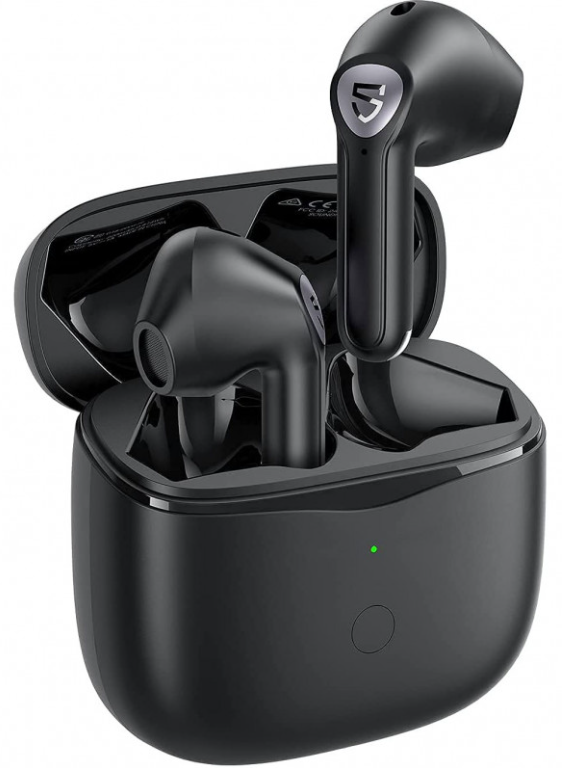
Soundpeats Air3 Pro Earbuds
Introduction
The Soundpeats Air3 Pro Earbuds are an advanced pair of true wireless earbuds designed to deliver premium sound quality, robust active noise cancellation, and exceptional battery life at a highly affordable price. Built with the Qualcomm QCC3046 chipset and Bluetooth 5.2, these earbuds offer a stable wireless connection with low power consumption, making them ideal for daily use across multiple environments.
Key benefits include Hybrid Active Noise Cancellation (ANC) up to 35dB, powerful 12mm bio-diaphragm drivers for rich, dynamic audio, and aptX Adaptive codec support for high-resolution 24-bit/420kHz sound and low latency, especially useful for gaming and video streaming. The earbuds also feature a sleek ergonomic design ensuring comfort during long listening sessions, with IPX4 water resistance to protect against sweat and light splashes.
Targeted at music enthusiasts, gamers, and professionals seeking quality wireless sound without breaking the bank, the Air3 Proise is perfect for commuting, workouts, remote working, and casual listening. They come with a compact USB-C charging case that provides a total of 24 hours of playback time, supporting fast charging and offering flexible mono or stereo modes.
Available globally and priced competitively at around $39.99, the Soundpeats Air3 Pro earbuds present an excellent value proposition for anyone looking for feature-rich, budget-friendly wireless earbuds with premium capabilities.
Specifications of Soundpeats Air3 Pro Earbuds
- Bluetooth Version: 5.2 with Qualcomm QCC3046 chipset
- Audio Codec Support: SBC, aptX, aptX Adaptive (24bit/420kHz)
- Active Noise Cancellation: Hybrid ANC with 35dB noise reduction depth
- Drivers: 12mm bio-diaphragm dynamic drivers for immersive stereo sound
- Latency: Game mode latency as low as 60ms (80ms end-to-end)
- Battery Life: 6 hours per charge; 24 hours total with charging case (280mAh case, 40mAh earbuds)
- Charging: USB-C port; earbuds charge in 1.5 hours, case in 2 hours
- Water Resistance: IPX4 rating (sweat and splash resistant)
- Weight: 4.5g per earbud; 36.8g with charging case
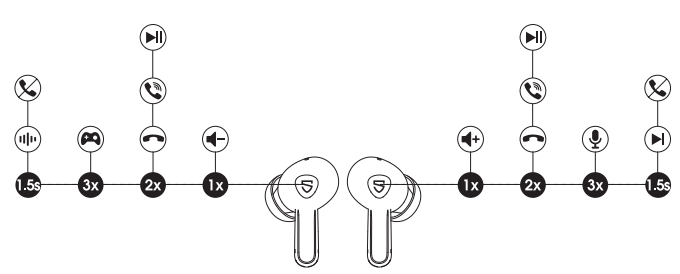
- Controls: Touch controls with smart assistant support
- Additional Features: cVc 8.0 noise reduction for clearer calls, transparency mode, TrueWireless Mirroring for single earbud use
Compared to similar products like AirPods Pro or other budget ANC earbuds, the Soundpeats Air3 Pro offer exceptional features such as Hybrid ANC and aptX Adaptive support at a fraction of the cost, making them a competitive choice for users focused on value and audio quality.
Pairing
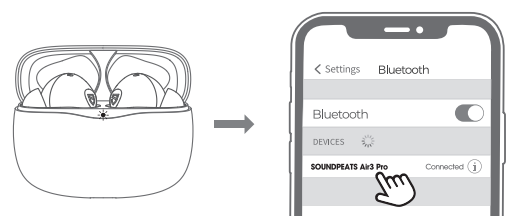
- Open the charging case lld, both earbuds will power on automatically when the LED indicator of the charging case is solid green. Keep the case lid in open status, and both earbuds will enter into pairing mode.
- Activate the Bluetooth on your device and choose "SOUNDPEATS Air3 Pro" to connect.
Wearing
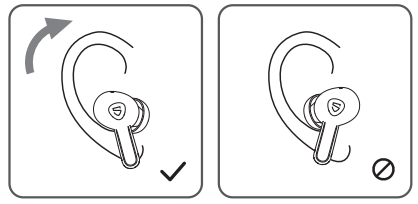
- Identify the left and right earbuds.
- Rotate earbuds to find the most comfortable angle.
Product Diagram
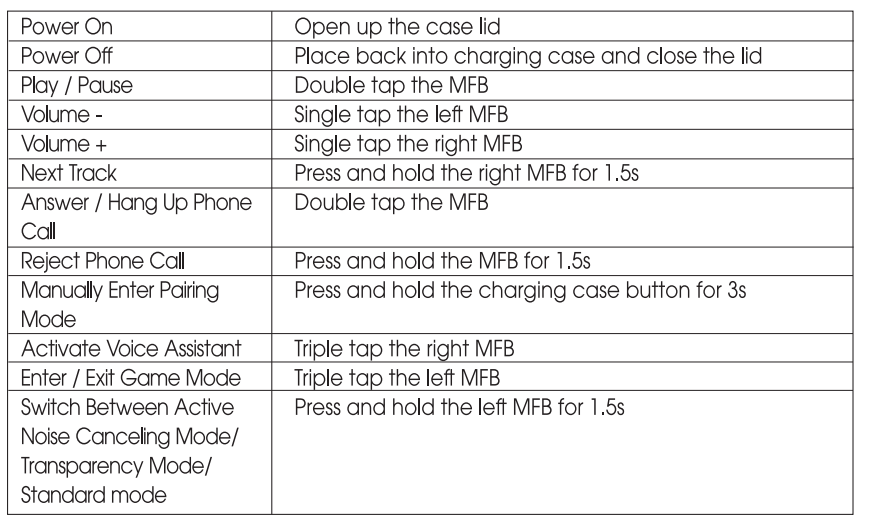
Touch Control
Soundpeats Air3 Pro Earbuds Troubleshooting Guide
- Issue: Earbuds not pairing or connecting
Solution: Ensure earbuds are charged, turn off and on Bluetooth on your device, reset the earbuds by placing them in the case and holding the touch controls for 10 seconds until the LED flashes. - Issue: One earbud is not producing sound
Solution: Check battery level for each earbud, clean charging contacts, and reconnect earbuds independently using TrueWireless Mirroring mode. - Issue: Audio cuts out or delays
Solution: Stay within the 33-foot wireless range, reduce interference by moving away from other Bluetooth devices, and update device firmware if available. - Issue: Noise cancellation is not effective
Solution: Ensure Hybrid ANC mode is enabled via touch controls; reposition earbuds for a better seal; update firmware to address ANC performance. - Preventive Measures: Regularly clean earbuds and charging contacts, avoid water immersion beyond IPX4 limits, and store earbuds in the charging case when not in use.
These earbuds come with a standard warranty (check purchase details for duration). For further technical support or replacement parts, contact Soundpeats customer service through their official website or authorized distributors.
Pros & Cons of Soundpeats Air3 Pro Earbuds
Pros
- Affordable price: Outstanding value under $40 with premium features like Hybrid ANC and aptX Adaptive.
- Impressive sound quality: 12mm bio-diaphragm drivers deliver clear, balanced audio with rich bass.
- Low-latency game mode: 60ms latency enhances gaming and video streaming experiences.
- Long battery life: Up to 24 hours total with fast USB-C charging.
- Comfortable fit: Lightweight design and multiple ear tip sizes for extended wear without fatigue.
- Effective noise cancellation: Hybrid ANC up to 35dB reduces ambient noise significantly.
Cons
- IPX4 rating only: Suitable for sweat and light splashes but not for heavy rain or swimming.
- Touch controls sensitivity: Some users may experience accidental triggers or require adjustment time.
- Limited brand recognition: Compared to premium brands, Soundpeats is less well-known but growing rapidly.
- No wireless charging: Charging case requires a USB-C cable connection exclusively.
Customer Reviews of Soundpeats Air3 Pro Earbuds
Users consistently praise the Soundpeats Air3 Pro Earbuds for their exceptional value, comfortable fit, and strong active noise cancellation at this price point. Many reviewers highlight the crisp, dynamic sound quality and reliable Bluetooth connectivity as major strengths. The game mode’s low latency has been particularly appreciated by mobile gamers.
Common complaints include occasional touch control misfires and the limited water resistance, which some users wish were higher. However, overall star ratings average around 4.5 out of 5, reflecting strong satisfaction with the earbuds’ performance and battery life.
Most customers recommend the Air3 Pro as an affordable alternative to more expensive ANC earbuds, especially for those wanting a blend of quality sound, noise cancellation, and long playtime in a compact form factor.
Faqs
How do I set up my soundpeats Air3 Pro Earbuds for the first time?
What should I do if my soundpeats Air3 Pro Earbuds are not connecting to Bluetooth?
How can I activate and customize the Hybrid ANC feature on soundpeats Air3 Pro Earbuds?
Are soundpeats Air3 Pro Earbuds compatible with both Android and iOS devices?
What is the expected battery life of soundpeats Air3 Pro Earbuds and how do I optimize it?
How do I enable game mode on soundpeats Air3 Pro Earbuds to reduce latency?
What maintenance steps should I follow to keep my soundpeats Air3 Pro Earbuds in good condition?
Why are my soundpeats Air3 Pro Earbuds experiencing call quality issues and how can I fix them?
More soundpeats manuals
- Setup & Pairing: Soundpeats Wings2 Earbuds User Manual
- Setup: Soundpeats Free2 Classic Earbuds User Manual
- Setup & Pairing: Soundpeats PearlClip Pro Earbuds User Manual
- Soundpeats Multi-connection Headset Q900 User Manual | Connection
- Setup & Pairing: Soundpeats Engine 4 Earbuds User Manual
- Setup & Pairing: Soundpeats RunFree Lite Earbuds User Manual
Leave a Comment