
Setup & Pairing: Soundpeats RunFree Lite Earbuds User Manual
Content
Soundpeats RunFree Lite Earbuds
Introduction
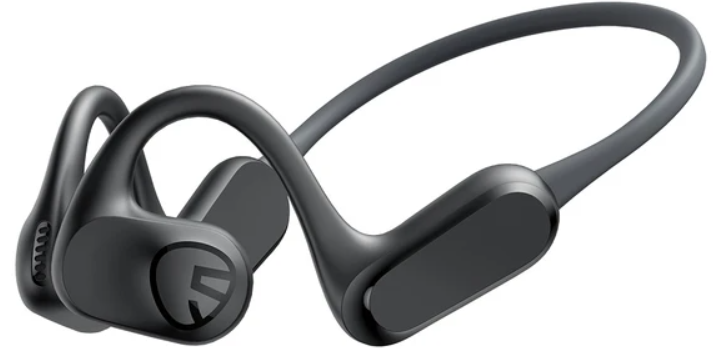
The Soundpeats RunFree Lite Earbuds are the latest addition to the Soundpeats Bluetooth air conduction sport headphones lineup, designed for active users who refuse to compromise on safety, comfort, or audio quality. These open-ear, wireless earbuds combine advanced air conduction technology with a lightweight, ergonomic build weighing just 0.99 ounces,, making them ideal for running, cycling, gym workouts, or any outdoor activity where situational awareness is crucial.
With a built-in 16.2mm dynamic driver and patented bass enhancement technology, the RunFree Lite delivers surprisingly rich, immersive sound for open-ear headphones, offering a warm, intimate listening experience without the harshness found in many competitors. The headphones boast up to 17 hours of playtime, IPX4 sweat and water resistance, and Bluetooth 5.3 for stable, long-range connectivity perfect for users on the move. Additional features include a companion app with customizable EQ, multipoint connectivity, and a game mode for low-latency audio, catering to both fitness enthusiasts and casual listeners.
Priced under $50, the Soundpeats RunFree Lite Earbuds present an affordable alternative to premium sport earbuds, without sacrificing essential features. They are widely available through the Soundpeats website, Amazon, and authorized retailers, making them accessible to a broad audience seeking reliable, feature-packed audio gear for an active lifestyle.
Specifications
- Driver: 16.2mm dynamic driver with bass enhancement technology
- Bluetooth: 5.3 with multipoint connectivity (pair with two devices simultaneously)
- Battery Life: Up to 17 hours of continuous playback
- Charging: USB-C (charging cable included)
- Water Resistance: IPX4 rating for sweat and splash protection
- Weight: 0.99 oz (28g), ultra-lightweight for all-day comfort
- Microphones: Dual mics for clear calls and voice assistant support
- Codecs: SBC, AAC, LDAC (high-resolution audio support)
- Controls: Physical buttons for power, volume, and track navigation
- App Support: Customizable 10-band EQ, preset sound profiles, battery monitoring, and game mode
- Warranty: Standard manufacturer warranty (check retailer for details)
Comparison with Similar Products: The RunFree Lite outperforms many budget air conduction headphones with its smoother, more natural sound profile, longer battery life, and robust app support. While it can't match the audio fidelity of high-end in-ear or over-ear models, it stands out in its class for comfort, features, and value.
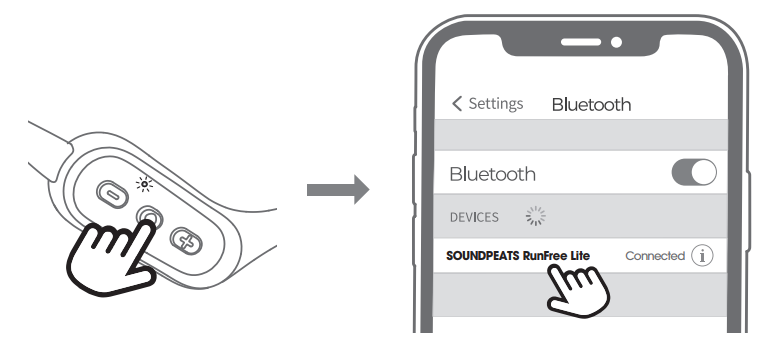
Press the power button for 3 seconds to turn on the headset. After the white light is on once, the headset enters the pairing mode, and the red and white lights flash alternately.
- Turn on the Bluetooth of your device, then select“SOUNDPEATS RunFree Lite” from the bluetooth list to complete the pairing.
Reset
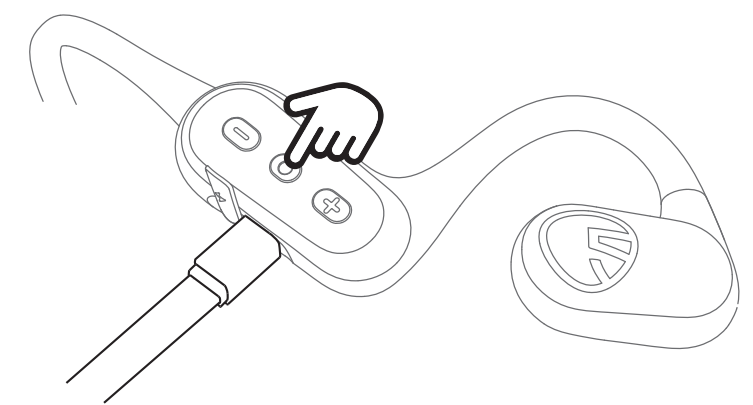
- Please insert the charging cable into the charging port to make the headset enter the charging status.
- Press the power button for 3 seconds, the red and white lights will flash alternately twice, a total of 4 seconds to restore factory settings.
- Unplug the charging cable and turn it on; the headset reset is complete.
Wearing
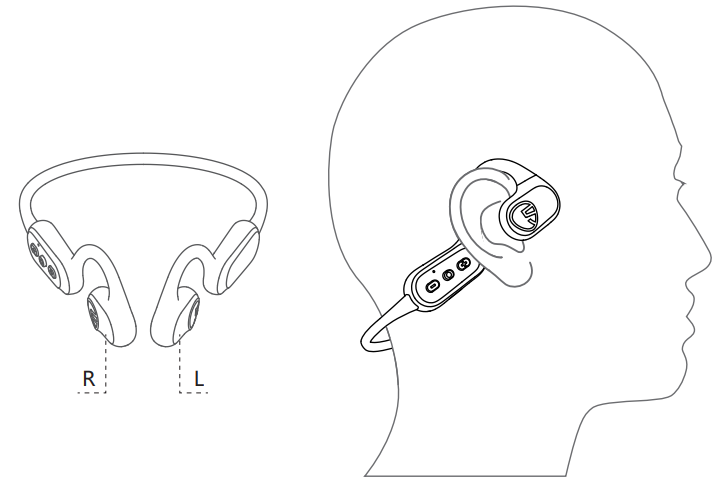
- Identify the left and right earphones and wear .
- Rotate the headset and find the most comfortable position.
Product Diagram
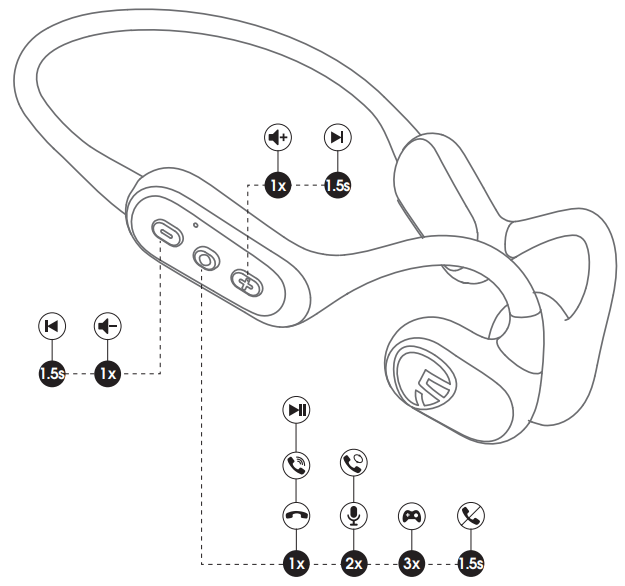
Control
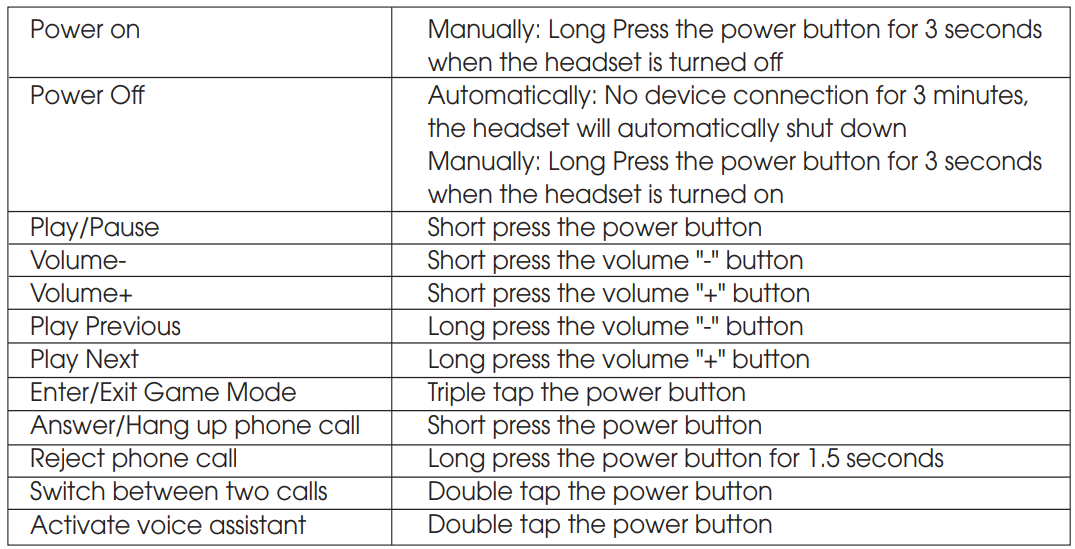
Troubleshooting
Common Issues and Solutions:
- Pairing Problems: Ensure Bluetooth is enabled on your device, reset the earbuds (hold the power button for 10 seconds), and try pairing again. Keep the earbuds within 3 feet of the device during initial setup.
- Short Battery Life: Disable the LDAC codec in the app for extended playtime. Fully charge the earbuds before first use.
- Audio Quality Issues: Adjust EQ settings via the companion app. Clean the speakers regularly to prevent muffled sound.
- Connection Drops: Move closer to your device, avoid interference from other wireless devices, and ensure firmware is up to date.
- Microphone Not Working: Check that the earbuds are selected as the audio input device on your phone or computer.
Error Codes: No specific error codes are documented, but most issues can be resolved via reset, re-pairing, or firmware updates.
Preventive Measures: Store the earbuds in a dry place, avoid extreme temperatures, and regularly update the firmware via the app for optimal performance.
Warranty & Support: Soundpeats provides a standard warranty and offers customer support through the official website for replacements or repairs. For further assistance, visit the Soundpeats support page or an authorized retailer.
Pros & Cons
Pros
- Comfort & Fit: Ultra-lightweight, secure open-ear design ideal for sports and extended wear
- Battery Life: Up to 17 hours of playtime, among the best in class
- Sound Quality: Warm, natural sound with enhanced bass for an open-ear model
- Connectivity: Reliable Bluetooth 5.3 with multipoint support
- App Features: Custom EQ, presets, game mode, and battery monitoring
- Value: Packed with features at a budget-friendly price
Cons
- Audio Fidelity: Not on par with high-end in-ear or over-ear headphones,,s expect some compression in highs and detail.
- Ambient Noise: Open-ear design means less isolation background noise can interfere in loud environments
- Build Quality: Plastic construction feels durable but lacks premium material. als
- Bass: Enhanced but still less impactful than sealed earbuds
Value for Money: The Soundpeats RunFree Lite Earbuds deliver exceptional value, especially for athletes and outdoor enthusiasts who prioritize safety, comfort, and battery life over audiophile-grade sound.
Customer Reviews
User feedback for the Soundpeats RunFree Lite Earbuds is overwhelmingly positive, with many praising the comfortable fit, long battery life, and surprisingly good sound for open-ear headphones. Reviewers highlight the ease of pairing, stable Bluetooth connection, and useful app features like customizable EQ and game mode. Common complaints include some lack of detail in the treble and the inevitable trade-off in noise isolation due to the open-ear design. Star ratings consistently fall in the 4 to 4.5 out of 5 range, with users recommending these earbuds for running, cycling, and gym use. Purchase recommendations emphasize the product’s value, especially compared to more expensive alternatives.
Authentic testimonials often mention the RunFree Lite as a “budget-friendly wireless audio solution” for active lifestyles, with specific praise for the secure fit during workouts and the ability to stay aware of surroundings d, ings a key safety feature for outdoor exercise.
Faqs
How do I set up soundpeats RunFree Lite Earbuds for the first time?
What should I do if my soundpeats RunFree Lite Earbuds are not connecting to my phone?
Can I use soundpeats RunFree Lite Earbuds with multiple devices simultaneously?
How do I optimize sound quality and latency on soundpeats RunFree Lite Earbuds?
Are soundpeats RunFree Lite Earbuds suitable for workouts and outdoor use?
How long does the battery last on soundpeats RunFree Lite Earbuds, and how do I charge them?
What maintenance tips help prolong the life of soundpeats RunFree Lite Earbuds?
Why do my soundpeats RunFree Lite Earbuds sound different from traditional in-ear headphones?
More soundpeats manuals
- Setup & Pairing: Soundpeats Air4 Earbuds User Manual
- Setup & Pairing: Soundpeats Engine 4 Earbuds User Manual
- Setup & Pairing: Soundpeats Air4 Lite Earbuds User Manual
- Setup & Pairing: Soundpeats PearlClip Pro Earbuds User Manual
- Setup & Pairing: Soundpeats Opera Erabuds User Manual
- Setup & Pairing: Soundpeats Wings2 Earbuds User Manual
Leave a Comment