
Setup & Pairing: Soundpeats PearlClip Pro Earbuds User Manual
Content
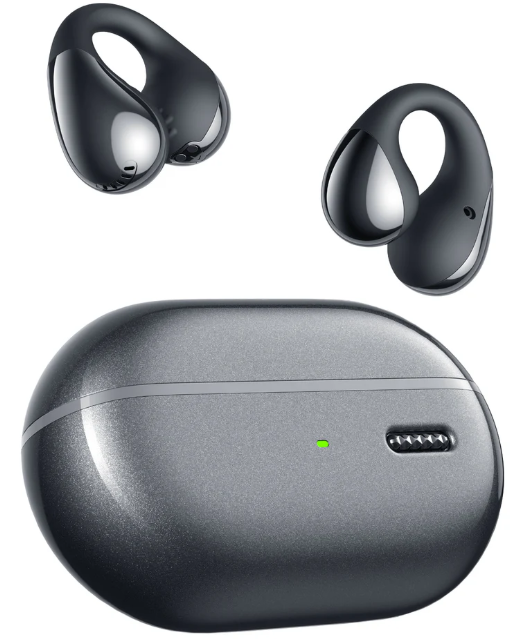
Soundpeats PearlClip Pro Earbuds
Introduction
The Soundpeats PearlClip Pro Earbuds offer a fresh take on wireless audio with their innovative open-ear, clip-on design that prioritizes comfort and situational awareness. Designed for users who seek a blend of freedom, safety, and quality sound, these earbuds are perfect for outdoor activities, workouts, and daily commutes where staying alert to the environment is essential. Their unique clip-on style eliminates the need to insert buds deeply into the ear canal, providing an alternative for those who find traditional earbuds uncomfortable or intrusive.
Equipped with 12mm dual-magnet dynamic drivers and a dynamic EQ, the PearlClip Pro delivers clear highs, smooth mids, and punchy bass, creating a cinematic soundstage suitable for music listening and calls alike. Hybrid active noise cancellation (ANC) up to 45dB, transparency mode, and environmental noise cancellation (ENC) microphones enhance call clarity and ambient sound management.
The earbuds support Bluetooth 5.3 connectivity with aptX Adaptive codec, ensuring stable and low-latency audio streaming, including a dedicated gaming mode. With up to 6 hours of playback on a single charge and a total of 24–28 hours using the charging case, plus quick 10-minute charging for 1.5 to 2 hours of use, these earbuds balance performance and convenience.
Available in black and white, the Soundpeats PearlClip Pro Earbuds are competitively priced in the $50–70 range, making them an affordable option for those seeking advanced features without premium pricing. They are widely available online through major retailers and the official SoundPEATS website.
Technical Specifications and Key Features of Soundpeats PearlClip Pro Earbuds
- Design: Open-ear, clip-on semi-open earbuds, lightweight (~6g per earbud)
- Drivers: 12mm dual-magnet dynamic drivers with PU and nickel-plated diaphragms
- Bluetooth: Version 5.3 (some sources mention 5.4), supporting HFP, A2DP, and AVRCP profiles
- Audio Codecs: SBC, AAC, aptX Adaptive for high-quality audio streaming
- Noise Control: Hybrid ANC reducing up to 45dB, Transparency mode, Quad microphones with ENC
- Battery Life: 6 hours per full charge (ANC off), 5 hours with ANC on; total 24–28 hours with charging case
- Charging: USB-C port, fast charging (10 min = approx. 1.5 to 2 hours playback), no wireless charging
- Water Resistance: IPX4 to IPX5 splash and sweat resistant, suitable for workouts
- Additional Features: Soundpeats app support for EQ customization and game mode; low-latency gaming mode (~60ms)
- Compatibility: Android, iOS, Windows, macOS devices
Compared to similar products like SoundPEATS POP Clip or other open-ear earbuds, the PearlClip Pro stand out for their enhanced dynamic EQ, hybrid ANC, and gaming mode, blending strong bass response with environmental awareness and comfortable fit.
FIRST TIME OF USE
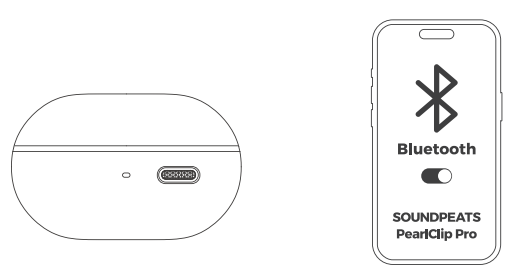
- Remove the headphones from the charging case and peel off the headphone insulation film.
- When the headphones are placed in the charging case, opening the case lid will automatically power them on; closing the lid will automatically power them off.
- Once the headphones are powered on, search for and select the Bluetooth device named SOUNDPEATS PearlClip Pro on your mobile phone to establish a successful connection.
CONTROL
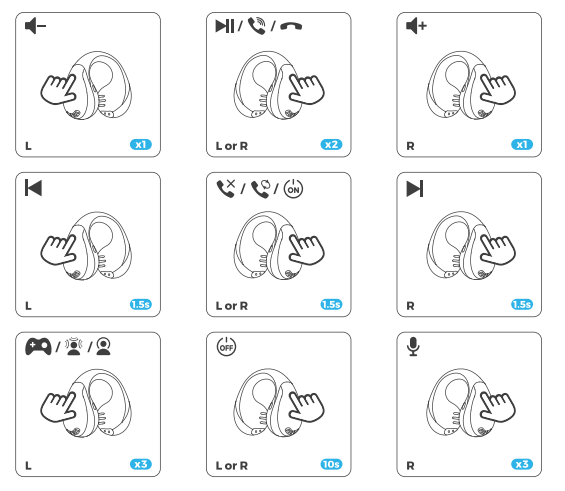
- x1: Single tap
- 1.5s: Long press for 1.5s
RESET & ENTER PAIRING MODE MANUALLY
Open the charging box and place the earphones in the charging box.
- Reset: Long-press the charging case button for 10 seconds until the indicator light flashes white and red twice.
- Enter pairing mode manually: Long-press the charging case button for 3s,, and the indicator light flashes white until the earphones are connected successfully.
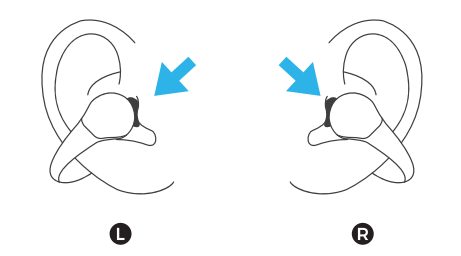
RIGHT AND LEFT CHANNEL
Left and right channel adaptive
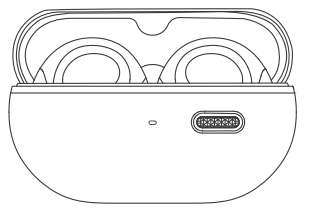
- Put the earbuds into the charging case. The earbuds are in n charging state. Close the case cover for 10 seconds and then open it. The left and right channels of the earbuds are adaptive now.
- Take out the earbud on the left side of the charging case, which is the left earbud. Take out the earbud on the right side of the charging case, which is the right earbud.
WHAT DOES THE INDICATOR LIGHT OF THE CHARGING CASE DISPLAY?

DUAL DEVICE CONNECTION
Follow these steps:
- Pair the headsets with Device A first. After successful pairing, turn off the Bluetooth function on Device A.
- Repeat the pairing process to connect the headsets with Device B. Keep the headsets connected to Device B.
- Turn on the Bluetooth function on Device A.
The headset will automatically connect with two devices next time after the first time dual device connection.
Common Troubleshooting for Soundpeats PearlClip Pro Earbuds
- Issue: Earbuds not pairing or connecting
Solution: Ensure Bluetooth is enabled and within range; reset earbuds by placing them in the case and holding the button for 10 seconds; clear Bluetooth cache on your device. - Issue: One earbud is not producing sound
Solution: Check battery levels, clean charging contacts, re-pair earbuds; use the auto-adaptive left/right channel feature by placing both earbuds in the case and closing the lid for 10 seconds. - Issue: Poor call quality or the microphone not working
Solution: Enable ENC in the Soundpeats app; check microphone openings for debris; ensure firmware is updated. - Issue: Battery drains quickly
Solution: Turn off ANC or transparency mode when not needed; reduce volume; fully charge earbuds and case before use. - Error codes: The PearlClip Pro does not display error codes but may indicate connection issues via LED signals—refer to the user manual for LED patterns.
Preventive measures include keeping the earbuds and charging case clean, avoiding exposure to excessive moisture beyond the IPX4/IPX5 rating, and using the Soundpeats app for firmware updates. The earbuds come with a standard 12-month warranty and customer support via the SoundPEATS official website and authorized retailers.
For further assistance, contact SoundPEATS support at their official website or consult the included user manual.
Pros and Cons of Soundpeats PearlClip Pro Earbuds
- Pros:
- Innovative open-ear clip-on design for comfort and situational awareness
- Powerful 12mm dual-magnet drivers with dynamic EQ produce clear, punchy sound
- Hybrid ANC and ENC microphones improve call and audio quality
- Long battery life with fast charging (up to 6 hours per charge, 24+ hours total)
- Low-latency gaming mode (~60ms) supports immersive audio for gaming and video
- Auto-adaptive left/right channel pairing simplifies use
- IPX4/IPX5 splash and sweat resistance suitable for workouts
- Cons:
- Open-ear design may leak sound and offer less isolation than in-ear buds
- Fit can feel less secure during vigorous movement or intense sports
- Wireless charging is not supported
- Not officially certified for certain conferencing platforms (e.g., Microsoft Teams)
- May require practice to clip on correctly for stable wear
Overall, the Soundpeats PearlClip Pro earbuds provide great value for money by combining unique clip-on comfort with solid sound quality and useful features, outperforming some competitors in price-to-performance ratio.
Customer Reviews and Feedback on Soundpeats PearlClip Pro Earbuds
Users praise the Soundpeats PearlClip Pro earbuds for their comfortable clip-on fit and clear, vibrant sound signature, especially appreciating the punchy bass and transparency mode that allows ambient sound awareness. Many reviewers highlight the convenience of the quick charge feature and the long battery life as standout advantages.
Common compliments include the earbuds' stable Bluetooth 5.3 connection, effective ANC for an open-ear design, and the useful gaming mode for low-latency audio. Several users note the auto left/right channel adaptation as a clever, hassle-free feature.
On the downside, some customers report that the open-ear design may result in occasional sound leakage and that the fit may not feel secure during intense physical activity. A few mention that the earbuds are slightly larger than typical in-ear models, which may require adjustment time.
Overall, the PearlClip Pro receives an average user rating of around 4 out of 5 stars, with many recommending it for casual listeners, outdoor enthusiasts, and those seeking alternatives to in-ear buds with good sound performance and smart features.
Faqs
How do I set up my soundpeats PearlClip Pro Earbuds for the first time?
What should I do if my soundpeats PearlClip Pro Earbuds are not connecting to Bluetooth?
How does the open-ear design of soundpeats PearlClip Pro Earbuds affect sound quality and usage?
Are soundpeats PearlClip Pro Earbuds compatible with both Android and iOS devices?
How long does the battery of soundpeats PearlClip Pro Earbuds last, and how does the quick charge feature work?
What are the best practices for maintaining and cleaning soundpeats PearlClip Pro Earbuds?
How can I optimize the audio performance of soundpeats PearlClip Pro Earbuds for gaming or calls?
What common problems do users face with soundpeats PearlClip Pro Earbuds, and how can they be resolved?
More soundpeats manuals
- Setup & Pairing: Soundpeats Engine 4 Earbuds User Manual
- Setup & Pairing: Soundpeats Wings2 Earbuds User Manual
- Setup & Pairing: Soundpeats RunFree Lite Earbuds User Manual
- Setup & Pairing: Soundpeats Air3 Pro Earbuds User Manual
- Setup & Pairing: Soundpeats Air4 Earbuds User Manual
- Setup: Soundpeats Free2 Classic Earbuds User Manual
Leave a Comment