
Setup & Pairing: Soundpeats Air4 Earbuds User Manual
Content
Soundpeats Air4 Earbuds
Introduction
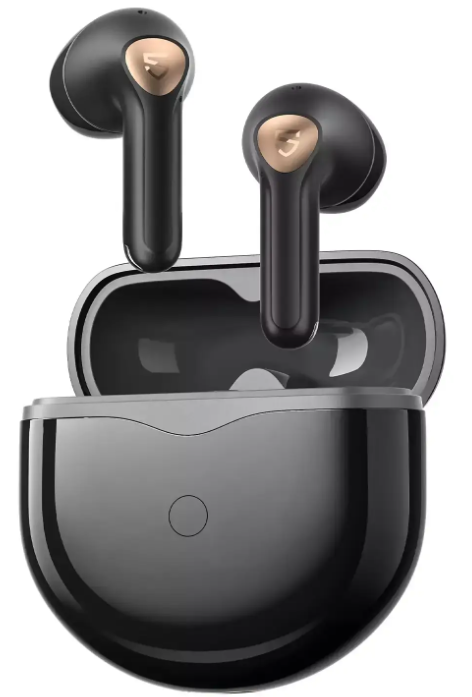
The Soundpeats Air4 Earbuds are premium true wireless earbuds designed to deliver high-fidelity audio with advanced features tailored for modern lifestyles. Leveraging Qualcomm's cutting-edge Snapdragon Sound™ technology, these earbuds provide lossless, CD-quality sound via the aptX Lossless codec, making them an excellent choice for audiophiles and casual listeners alike. Their semi-in-ear design offers a comfortable fit while balancing ambient awareness and noise isolation.
Key benefits include adaptive active noise cancellation (ANC) capable of reducing up to 45dB of environmental noise, a powerful 6-microphone array for clear calls with environmental noise reduction (CvC), and an ultra-low latency gaming mode with 88ms delay optimized for gamers and video streamers. The earbuds support multipoint Bluetooth 5.3 connectivity, enabling seamless switching between multiple devices.
Ideal for daily commuting, work-from-home setups, workout sessions, and gaming, the Soundpeats Air4 Earbuds cater to users seeking premium sound quality, effective noise cancellation, and stable wireless performance. They come with a compact charging case offering up to 26 hours of total playtime, supporting fast charging in approximately one hour for the earbuds and 90 minutes for the case.
Available globally through official SoundPEATS retailers and online platforms, the SoundPEATS Air4 Earbuds are priced competitively around the $70-$90 range, offering substantial value against similar wireless earbuds in this segment.
Specifications of Soundpeats Air4 Earbuds
- Driver: 13mm Dynamic Driver for immersive, rich audio
- Bluetooth Version: 5.3 with multipoint connectivity
- Chipset: Qualcomm QCC3071 supporting Snapdragon Sound™ technology
- Supported Codecs: aptX Lossless, aptX Adaptive, AAC, SBC
- Active Noise Cancellation: Adaptive ANC up to 45dB with 6-mic system and CvC noise reduction
- Battery Life: Up to 6.5 hours per charge, 26 hours with charging case
- Charging: Type-C wired charging, approx. 60 minutes for earbuds, 90 minutes including case; no wireless charging
- Weight: Earbuds 4.19g each; Case approx. 38.62g
- Water Resistance: IPX4 splash-proof rating
- Additional Features: 88ms low-latency game mode, customizable touch controls via app, stable multipoint connection
Compared to alternatives like the SoundPEATS Air4 Lite (which supports LDAC codec but lacks Qualcomm aptX and Snapdragon Sound), the Air4 offers superior audio fidelity and more advanced ANC features, positioning it as a strong competitor against similarly priced earbuds from brands such as Anker Soundcore and Xiaomi.
First Time of Use
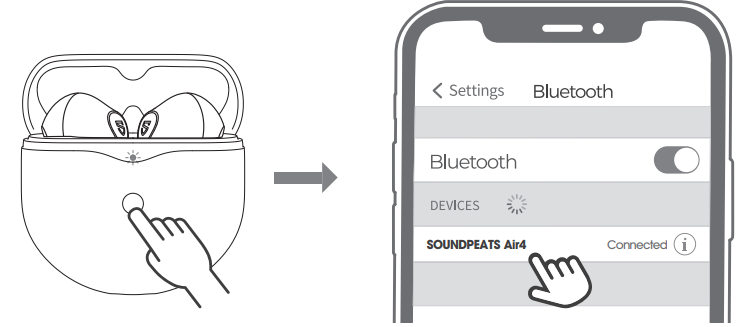
- Please open the lid of the charging case to take out the headphones, remove the insulating film from the top of both headphones, then put both headphones back into the charging case, and keep the charging case open. Press and hold the button of the charging case for 3 seconds until the indicator light inside the charging case flashes white. They are in pairing mode then.
- Turn on your device's Bluetooth and select SOUNDPEATS Air4 from the Bluetooth list to complete the pairing.
Multi-point Connection
SOUNDPEATS Air4 earphones can be paired simultaneously with two devices.
How to connect: Once the earphones are paired with device A, turn off the Bluetooth of device A. Repeat the pairing operation to connect the earphones to device B. When the pairing is completed, please turn on the Bluetooth of device A to complete the pairing.
Reset
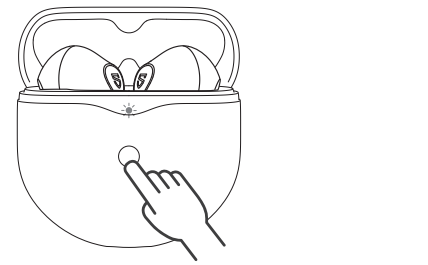
- Place both earphones back into the charging case, and make sure they are correctly placed.
- With the case lid open, press and hold the button of the charging case for 10 seconds until the indicator light on the charging case flashes white twice.
- Close the case lid and take out the earphones, and they are activated successfully.
Wearing methods
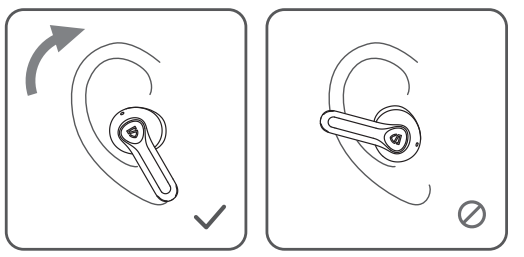
- Identify the left and right earphones.
- Adjust the earphones to fit your ears.
Product Diagram
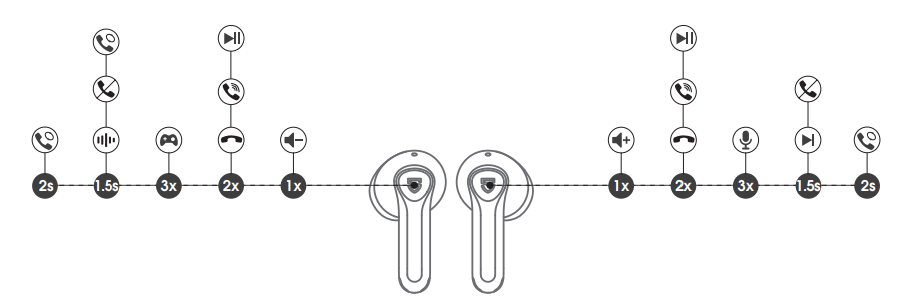
Controls
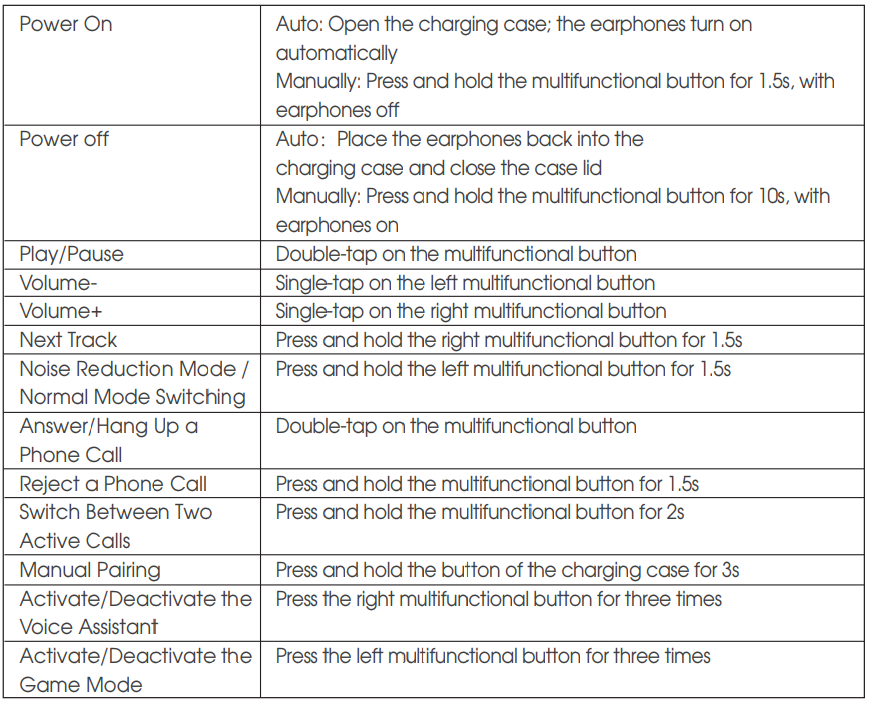
Troubleshooting Soundpeats Air4 Earbuds..
- No sound or one earbud not working: Ensure earbuds are charged; try resetting by placing both earbuds in the case and holding touch controls for 10 seconds.
- Bluetooth connection issues: Clear previous pairing on your device, turn Bluetooth off and on, and reconnect. Ensure earbuds are within 10m range.
- ANC not working properly: Check if ANC mode is enabled in the app, ensure earbuds fit properly for optimal noise cancellation, and update firmware if available.
- Microphone issues or poor call quality: Clean microphone openings gently, reduce background noise, and verify CV C noise cancellation is active.
- Charging problems: Use the original Type-C cable and charger; clean charging contacts; ensure re the case battery is not depleted.
Preventive measures include keeping earbuds dry, regularly updating firmware via the SoundPEATS app, and storing them in the protective case when not in use.
The Soundpeats Air4 Earbuds come with a standard 12-month warranty covering manufacturing defects. For support, users can contact SoundPEATS customer service via their official website or authorized retailers.
Pros & Cons of Soundpeats Air4 Earbuds
- Pros:
- Exceptional audio quality with aptX Lossless and Snapdragon Sound technology
- Effective adaptive ANC with up to 45dB noise reduction
- Long battery life—up to 26 hours with charging case
- Low-latency 88ms gaming mode is ideal for gamers and video streaming
- Lightweight and comfortable semi-in-ear design suitable for extended wear
- Cons:
- No wireless charging support for the case
- Customizable controls are limited compared to some competitors
- ANC effectiveness depends on ear fit due to the semi-in-ear design
- Lacks multipoint control customization via app
Overall, the Soundpeats Air4 Earbuds offer excellent value for money, especially for users prioritizing sound quality and noise cancellation at a mid-range price. Though missing some premium features like wireless charging, they stand out in their category for audio fidelity and gaming performance.
Customer Reviews of Soundpeats Air4 Earbuds
Users generally praise the Soundpeats Air4 Earbuds for their impressive sound clarity and effective noise cancellation, often highlighting the immersive experience provided by the 13mm dynamic drivers and aptX Lossless codec. The long battery life and comfortable fit receive positive mentions, especially for daily commuting and work calls.
Common complaints include the absence of wireless charging and occasional connectivity drops reported by some users in environments with heavy Bluetooth interference. A few reviewers note that ANC performance varies depending on ear fit, given the semi-in-ear design.
Overall, the earbuds maintain an average rating of around 4.3 to 4.5 stars out of 5. Many recommend the Soundpeats Air4 for those seeking premium audio features without the premium price, especially for gamers and audiophiles looking for low latency and lossless sound.
Faqs
How do I set up the soundpeats Air4 Earbuds for first-time use?
What should I do if my soundpeats Air4 Earbuds are not charging properly?
How does the adaptive ANC feature in soundpeats Air4 Earbuds work?
Are soundpeats Air4 Earbuds compatible with both Android and iOS devices?
How can I optimize the sound quality and latency on soundpeats Air4 Earbuds for gaming?
What is the expected battery life for soundpeats Air4 Earbuds with and without the charging case?
How do I properly clean and maintain my soundpeats Air4 Earbuds to ensure longevity?
What should I do if the soundpeats Air4 Earbuds disconnect frequently or have unstable Bluetooth?
More soundpeats manuals
- Setup & Pairing: Soundpeats Air4 Lite Earbuds User Manual
- Setup & Pairing: Soundpeats RunFree Lite Earbuds User Manual
- Setup & Pairing: Soundpeats Opera Erabuds User Manual
- Setup & Pairing: Soundpeats Engine 4 Earbuds User Manual
- Pairing: Soundpeats Breezy Wireless Earbuds User Manual
- Setup & Pairing: Soundpeats PearlClip Pro Earbuds User Manual
Leave a Comment