
Setup & Pairing: Soundpeats Opera Erabuds User Manual
Content
Soundpeats Opera Erabuds
Introduction
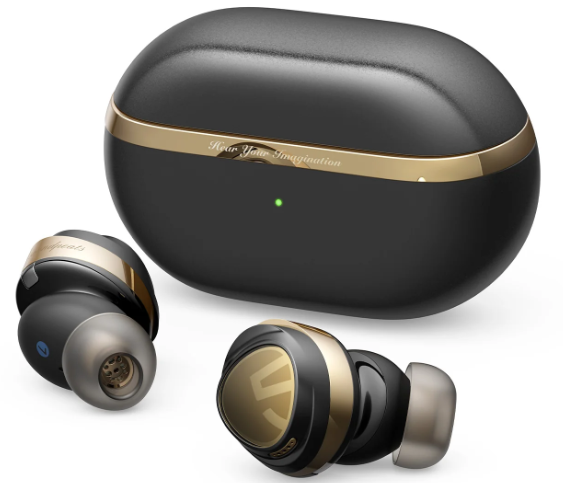
The Soundpeats Opera Erabuds represent a premium offering in the true wireless earbud market, designed for audiophiles and everyday users who seek a blend of high-fidelity sound, comfort, and advanced features. Featuring an innovative triple driver configuration with dual balanced armature drivers paired with a 12mm dynamic driver, these earbuds deliver crisp highs, rich mids, and powerful bass, ideal for music lovers, podcast listeners, and gamers alike.
These earbuds also incorporate cutting-edge Bluetooth 5.3 technology, ensuring a stable wireless connection and low latency. Active Noise Cancelling (ANC) technology with up to 30dB noise reduction allows users to immerse themselves fully in their audio experience, making them well-suited for commuting, office, or leisure use. The Soundpeats Opera Erabuds come with IPX4 water resistance, allowing for use during workouts and light rain.
With an estimated price range of around $70 to $110, depending on the model and retailer, they offer great value for those seeking high-resolution audio with LDAC codec support and a long battery life of up to 9 hours per charge, extending to 33 hours with the charging case. They are widely available through major e-commerce platforms and official SoundPEATS outlets, making them accessible worldwide.
Specifications of SoundPEATS Opera Erabuds
- Drivers: Triple hybrid system - 12mm dynamic driver + 2 balanced armature drivers for detailed sound reproduction
- Bluetooth: Version 5.3 with profiles HSP/HFP/A2DP/AVRCP, supporting LDAC, AAC, and SBC codecs
- Active Noise Cancelling: Adaptive ANC up to 30dB for effective ambient noise reduction
- Battery Life: Up to 9 hours continuous playback per charge; 33 hours total with charging case
- Charging: USB-C fast charging with approximately 1.5 hours full recharge time; no wireless charging
- Water Resistance: IPX4 rating for sweat and splash resistance
- Weight: Approximately 7.2g per earbud; charging case around 58.8g
- Controls: Touch-sensitive controls for playback, calls, and ANC toggling
- Microphones: Four microphones with Environmental Noise Cancellation (ENC) for clear calls
- App Support: Dedicated SoundPEATS app for EQ customization and firmware updates
Compared to similar true wireless earbuds in its price range, such as the Opera03 model by SoundPEATS or competitors like Anker Soundcore Life P3, the Opera Erabuds stand out with their triple driver design and LDAC codec support, delivering superior audio clarity and depth.
Pairing
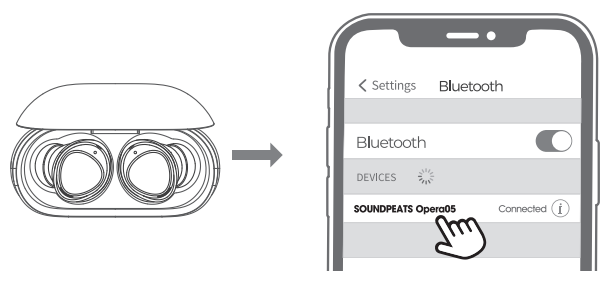
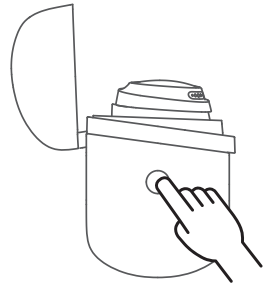
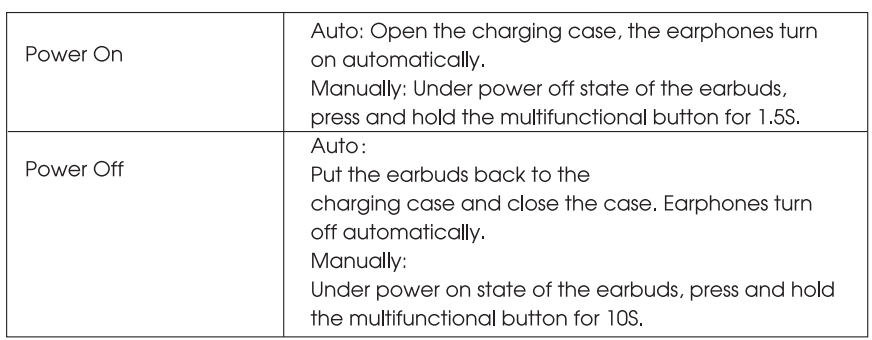
- Please open the charging case, then long-press the button for 3 seconds on the side of the charging case until the indicator light of the charging case flashes white, then the two earbuds enter the pairing state.
- Turn on the Bluetooth of your device and select SOUNDPEATS Opera05 to complete the pairing.
Reset
- Place the earbuds back into the charging case, and make sure they are correctly placed..
- When the charging box is open, press and hold the button on the side of the charging box for IOS until the red and white lights of the charging box flash twice, and the reset is comple. ted.
- Complete Tedse the charging case and open it . The, the earbuds are activated
Wearing
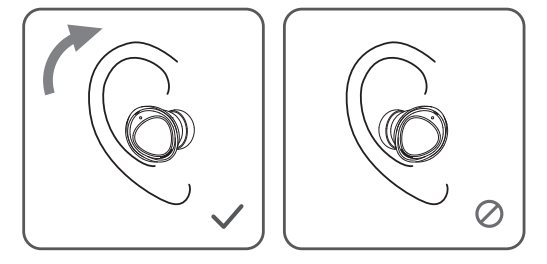
- Identify the left and the right earbuds.
- Rotate the earbuds and find the most comfortable position
Product Diagram
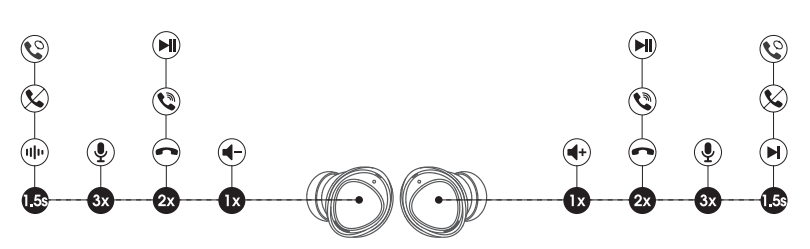
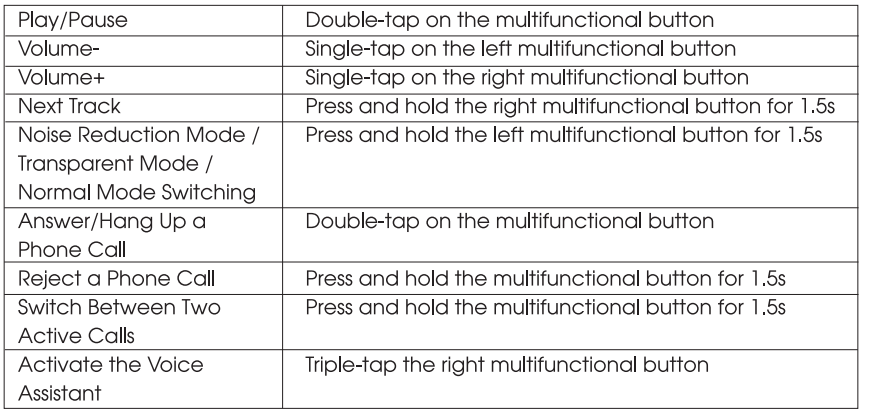
Touch Control
Troubleshooting Soundpeats Opera Erabuds
- Issue: Earbuds not pairing or connecting
Solution: Ensure Bluetooth 5.3 is enabled on your device; reset earbuds by holding touch controls for 10 seconds; re-pair via the SoundPEATS app. - Issue: One earbud is not producing sound
Solution: Check battery levels of both earbuds; clean earbuds and charging contacts; reset and reconnect earbuds. - Issue: ANC not working or weak noise cancellation
Solution: Verify ANC is enabled in the app or via touch control; update firmware; ensure earbuds fit properly to seal out external noise. - Error codes: No specific error codes reported; persistent issues may require a factory reset or contacting support.
- Preventive measures: Regularly clean earbuds and charging case; avoid exposure to excessive moisture; keep firmware updated via the app.
- Warranty & Support: SoundPEATS offers a 12-month warranty with customer service support available via the official website and app. For unresolved issues, contact support for replacement or refund options.
Pros & Cons of Soundpeats Opera Earbuds
- Pros:
- Exceptional sound quality with triple driver setup delivering clear highs, rich mids, and punchy bass
- Robust Bluetooth 5.3 connectivity with LDAC codec for high-resolution wireless audio
- Effective Adaptive ANC up to 30dB enhances the listening experience in noisy environments
- Long battery life of up to 9 hours per charge, 33 hours with the charging case
- IPX4 water resistance is suitable for workouts and moderate outdoor conditions
- Customizable EQ via the SoundPEATS app for personalized sound tuning
- Cons:
- Some users report difficulty achieving a secure fit, affecting bass performance.
- No wireless charging support for the case
- Lacks a dedicated gaming mode found in some comparable earbuds
- Touch controls may be sensitive or require an adjustment period
- ANC customization options are limited in the app
- Value for Money: Offers competitive features and sound quality at a budget-friendly price point compared to premium true wireless earbuds.
Customer Reviews of Soundpeats Opera Erabuds
Users generally praise the Soundpeats Opera Erabuds for their outstanding audio clarity and strong bass response, often highlighting the triple driver design as a key differentiator. Many reviews rate the earbuds 4 to 4.5 stars out of 5, appreciating the stable Bluetooth connection and effective ANC feature.
Common compliments include a comfortable fit for extended use, excellent call quality due to ENC microphones, and the value offered at the price point. However, some customers note occasional challenges with earbud fit leading to diminished bass and midrange performance, echoing the importance of proper ear tip selection. A few also mention the absence of wireless charging and the lack of advanced ANC controls as minor drawbacks.
Overall, buyers recommend the Opera Erabuds for those looking for high-fidelity wireless earbuds with noise cancellation on a budget, especially for music listening and daily use scenarios.
Faqs
How do I set up my soundpeats Opera Erabuds for the first time?
What should I do if my soundpeats Opera Erabuds are not connecting or pairing correctly?
Can I use soundpeats Opera Erabuds with my Android or iOS device, and do they support high-resolution audio codecs?
How can I optimize battery life when using soundpeats Opera Erabuds with ANC enabled?
What are the key features of soundpeats Opera Erabuds that enhance sound quality?
How do I troubleshoot sound issues like low bass or unclear vocals on soundpeats Opera Erabuds?
Are the soundpeats Opera Erabuds water or sweat resistant for workout use?
What is the recommended maintenance routine to keep my soundpeats Opera Erabuds functioning well?
More soundpeats manuals
- Pairing: Soundpeats Breezy Wireless Earbuds User Manual
- Setup & Pairing: Soundpeats Air4 Lite Earbuds User Manual
- Setup & Pairing: Soundpeats Capsule3 Pro+ Earbuds User Manual
- Setup & Pairing: Soundpeats Air4 Earbuds User Manual
- Setup & Pairing: Soundpeats Air5 Pro Wireless Earbuds User Manual
- Setup & Pairing: Soundpeats RunFree Lite Earbuds User Manual
Leave a Comment