
Setup & Pairing: Soundpeats Air5 Pro Wireless Earbuds User Manual
Content
Soundpeats Air5 Pro Wireless Earbuds
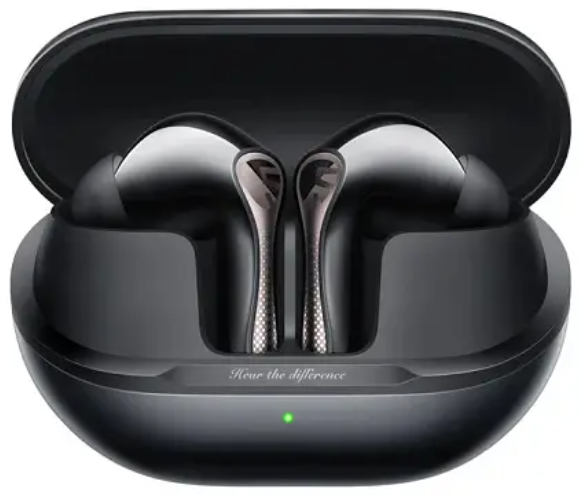
Introduction
The Soundpeats Air5 Pro Wireless Earbuds are advanced true wireless earbuds designed to deliver high-fidelity audio combined with intelligent noise cancellation technology. Engineered for audiophiles and everyday users alike, these earbuds feature Qualcomm’s Snapdragon Sound™ powered by the QCC3091 chipset for crystal-clear, lossless audio streaming and seamless connectivity. The device incorporates AI-powered adaptive Active Noise Cancellation (ANC) capable of reducing ambient noise by up to 55 dB, making it ideal for commuters, remote workers, gamers, and fitness enthusiasts.
Weighing only 4.8 grams per earbud with an ergonomic design, the Air5 Pro ensures comfortable, fatigue-free wear for extended listening sessions. Users benefit from multipoint Bluetooth 5.4 connectivity, allowing simultaneous connection to two devices, and an IPX5 water resistance rating suitable for sweat and light rain exposure. The earbuds come with a compact charging case offering a total of approximately 37 hours of playback time, with rapid charging delivering 2 hours of use after just 10 minutes.
Targeted at tech-savvy consumers seeking budget-friendly premium sound, the Soundpeats Air5 Pro retails in the price range of about $80 USD, widely available online and through major retailers. Their combination of rich bass, detailed mids, and crisp highs, along with customizable sound tuning via the PeatsAudio app,p makes them a competitive choice for those wanting quality wireless earbuds with adaptive ANC and Hi-Res audio support.
Specifications of SoundPEATS Air5 Pro Wireless Earbuds
- Bluetooth Version: 5.4 with profiles HSP/HFP/A2DP/AVRCP supporting multipoint connection
- Chipset: Qualcomm QCC3091, enabling Snapdragon Sound™ and low latency
- Audio Codecs Supported: SBC, AAC, LC3, LDAC, aptX, aptX Adaptive, aptX Lossless (user-enabled via app)
- Driver Unit: 10 mm composite bio-diaphragm (PU + PEEK) for rich, balanced sound
- Active Noise Cancellation: AI Adaptive ANC with up to 55 dB noise reduction and multiple ANC modes (Indoor, Outdoor, Traffic)
- Microphones: 6-mic array with AI Enhanced Noise Cancellation and Qualcomm cVc 8.0 for enhanced call clarity
- Battery Life: 7.5 hours per charge on earbuds; 37 hours total with charging case
- Fast Charging: 10 minutes of charging yields ~2 hours of playback
- Charging Time: 1 hour earbuds; 2 hours case via USB-C
- Weight: Earbuds ~4.8 g each; Case with earbuds ~50 g
- Water Resistance: IPX5 rated for sweat and splash protection
- Controls: Touch gestures with PeatsAudio app support for EQ customization, codec toggles, ANC/transparency modes, game mode, and multipoint management
Compared to similar models like the SoundPEATS Capsule3 Pro+, the Air5 Pro offers superior codec support, such as aptX Lossless and LDAC, with more advanced AI ANC, making it a strong contender in the mid-range true wireless earbuds segment.
BLUETOOTH CONNECTION AND USACE
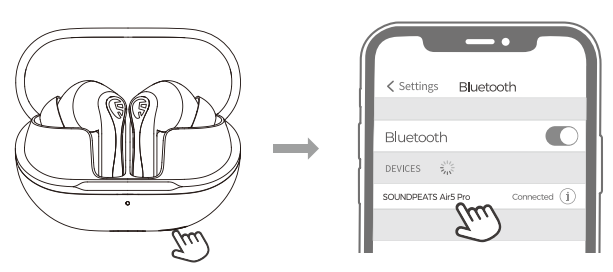
Bluetooth Pairing
- When the earbuds are in the charging case, opening the case lid will automatically power them on. Closing the case lid will power them off.
- After the earbuds are turned on. Search and select the name of your cell phone's Bluetooth device, SOUNDPEATS AirS Pr, o to connect successfully.
°First time usPleasease take out the earbuds from the charging case and remove the insulating film on them.
Forced Pairing
When earbuds are placed in the charging case, open the charging case, and long-press the charging case button for 2 seconds. When the white light of the charging case status indicator continues to flash, the earbuds enter the pairing state.
Dual Device Connection
- Pair the headsets with Device A first. After successful pairing, turn off the Bluetooth function on Device A
- Repeat the pairing process to connect the headsets with Device B. Keep the headsets connected to Device B.
- Turn on the Bluetooth function on Device A
- The headset will automatically connect with two devices next time after the first time dual device connection.
- Dual device connection cannot be used with LDAC at the same time.
- Dual device connection is enabled by default. If you need to enable LDAC, please turn off the Dual Device Connection option in APP Options and turn on the LDAC option in your phone.
Factory Reset
- Place the earbuds in the charging case with the lid open.
- Press and hold the function button on the charging case for 10 seconds until the red light flashes quickly three times. This will reset the earbuds to factory settings.
- After a factory reset, the earbuds will automatically enter pairing mode, with the white indicator light flashing continuously.
CONTROL

- xl: Single tap
- 1.5s: Long press for 1.5s
CHARGING
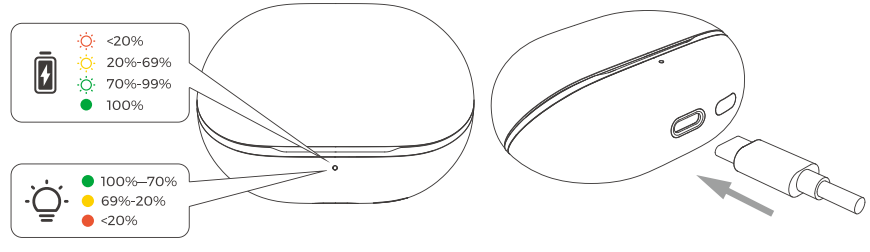
Battery Indicator
- With the charging case lid closed, the status indicator shows the case's battery level.
- When the charging case is open and there are earbuds inside, the status indicator light displays the battery level of the earbuds. When the left/right earbud is removed, the status indicator light displays the battery level of the left/right earbud (steady on for one second).
- Battery Indicator Status: 100%-70%: Green light ; 69%-20%: Yellow light ; Below 20%: Led light.
Charging the case
- You can charge the case using the provided charging cable.
- Charging Indicators: 100%: Green light on steadily ; 99%-70%: Green light pulsing ; 69%-20%: Yellow light pulsing ; Below 20%: Red light pulsing.
Troubleshooting for SoundPEATS Air5 Pro Wireless Earbuds
- Issue: Earbuds not connecting to devices
Solution: Reset earbuds by placing both in the case, holding the touch sensors for 10 seconds until LEDs flash; re-pair via Bluetooth settings. Ensure the device Bluetooth is enabled and within range. - Issue: ANC is not working properly
Solution: Toggle ANC modes in PeatsAudio app; update firmware if available; ensure earbuds fit snugly for optimal noise cancellation. - Issue: Low battery or charging problems
Solution: Use the original USB-C cable; clean the charging contacts on the earbuds and case; avoid extreme temperatures; charge the earbuds and case fully before use. - Issue: Poor call quality or microphone issues
Solution: Ensure no obstruction; toggle environmental noise modes; update firmware; restart earbuds. - Preventive Measures: Store earbuds in a charging case when not in use; keep firmware and app updated; avoid water exposure beyond the IPX5 rating.
The product includes a limited warranty covering manufacturing defects. For technical support or warranty claims, contact SoundPEATS customer service via their official website or authorized retailer contacts.
Pros & Cons of Soundpeats Air5 Pro Wireless Earbuds
- Pros:
- Exceptional AI adaptive ANC with multiple modes for versatile noise reduction
- High-resolution sound quality with aptX Lossless and LDAC codec support
- Long battery life with fast charging capability
- Lightweight ergonomic design suitable for all-day use
- Multipoint Bluetooth connection for dual-device convenience
- Customizable sound settings via the intuitive PeatsAudio app
- IPX5 water resistance for sweat and light rain protection
- Cons:
- Sound signature may require equalizer tuning for optimal clarity
- Some users report a lack of deep timbral coherence compared to premium earbuds
- ANC performance, while strong, may not match top-tier flagship models
- Certain codecs (LC3, LDAC) are disabled by default and require manual activation in the app
Overall, the Soundpeats Air5 Pro offers excellent value for money, especially for users prioritizing noise cancellation and wireless audio fidelity within a budget segment, outperforming many competitors at its price point.
Customer Reviews of Soundpeats Air5 Pro Wireless Earbuds
Users generally praise the Soundpeats Air5 Pro Wireless Earbuds for their impressive noise cancellation, comfortable fit, and rich sound performance once app equalization is applied. Many highlight the clarity of calls thanks to the 6-mic AI noise reduction technology and commend the multipoint connectivity for seamless device switching. Star ratings average around 4 out of 5, reflecting strong satisfaction.
Common complaints include the need to manually enable certain codecs like LDAC via the app and occasional minor latency during gaming without the game mode activated. Some users note the default sound profile can be bass-heavy or slightly unbalanced, requiring EQ adjustment. Overall, most recommend these earbuds for daily use, workouts, and travel due to their affordable price and feature set.
“The ANC is surprisingly effective for the price,” writes one customer, while another comments, “Perfect for my work calls and music, with very comfortable earbuds for long sessions.”
Faqs
How do I set up soundpeats Air5 Pro Wireless Earbuds for the first time?
What should I do if my soundpeats Air5 Pro Wireless Earbuds are not charging properly?
How can I optimize sound quality on soundpeats Air5 Pro Wireless Earbuds?
Are soundpeats Air5 Pro Wireless Earbuds compatible with both Android and iOS devices?
How do I use the multipoint connectivity feature on soundpeats Air5 Pro Wireless Earbuds?
What are the best practices to maintain and clean soundpeats Air5 Pro Wireless Earbuds?
How effective is the Active Noise Cancellation (ANC) on soundpeats Air5 Pro Wireless Earbuds?
Why can't I hear LDAC or LC3 codecs on my soundpeats Air5 Pro Wireless Earbuds by default?
More soundpeats manuals
- Pairing: Soundpeats Air5 Lite Wireless Earbuds User Manual
- Setup & Pairing: Soundpeats Capsule3 Pro+ Earbuds User Manual
- Setup & Pairing: Soundpeats Pop Clip Wireless Earbuds User Manual
- Pairing: Soundpeats Breezy Wireless Earbuds User Manual
- Pairing & Setup: Soundpeats Air3 Deluxe HS Wireless Earbuds User Manual
- Setup & Pairing: Soundpeats Opera Erabuds User Manual
Leave a Comment