
Pairing & Setup: Soundpeats Air3 Deluxe HS Wireless Earbuds User Manual
Content
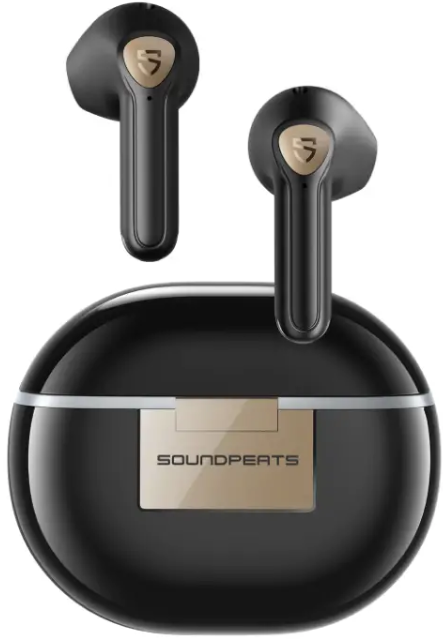
Soundpeats Air3 Deluxe HS Wireless Earbuds
Introduction
The Soundpeats Air3 Deluxe HS Wireless Earbuds are a standout choice for music lovers seeking premium audio quality at an affordable price. Designed for everyday use, these semi-in-ear earbuds deliver Hi-Res Audio certification, making them the world’s first half-in-ear true wireless earbuds to achieve this distinction. With a focus on natural sound reproduction and comfort, the Air3 Deluxe HS is ideal for casual listeners, commuters, and gamers who want a reliable, high-performance audio experience without breaking the bank.
Key benefits include a 14.2mm dynamic driver for rich, detailed sound, Bluetooth 5.2 connectivity for stable pairing, and support for the LDAC codec, which enables high-bitrate audio streaming for audiophiles. The earbuds also feature a low-latency game mode, IPX4 water resistance, and a lightweight, ergonomic design for all-day comfort. Whether you’re streaming music, taking calls, or gaming, the Soundpeats Air3 Deluxe HS Wireless Earbuds offer a versatile solution for a wide range of users.
Priced competitively in the $40–$60 range, these earbuds are widely available online and in select electronics retailers, making them an accessible upgrade for anyone seeking better sound without premium features like active noise cancellation.
Specifications of Soundpeats Air3 Deluxe HS Wireless Earbuds
- Driver Size: 14.2mm bio-diaphragm dynamic driver
- Bluetooth Version: 5.2
- Supported Codecs: SBC, AAC, LDAC
- Frequency Response: 20Hz–40,000Hz
- Battery Life: Up to 5 hours per charge, 20 hours total with charging case
- Charging Case: USB-C, no wireless charging
- Water Resistance: IPX4 (splash and sweat resistant)
- Microphones: Dual-mic system with ENC for clear calls
- Latency: Low-latency game mode (approx. 60ms)
- Touch Controls: On-ear touch for playback, calls, and volume
- Auto Pause: In-ear detection for automatic playback control
- App Support: Soundpeats app with 10-band EQ and presets
- Weight: 4.2g per earbud, 36g for case
Compared to similar models like the AirPods or other mid-range earbuds, the Soundpeats Air3 Deluxe HS stands out for its larger driver size, Hi-Res certification, and LDAC support, offering audiophile-grade sound at a fraction of the cost.
Pairing
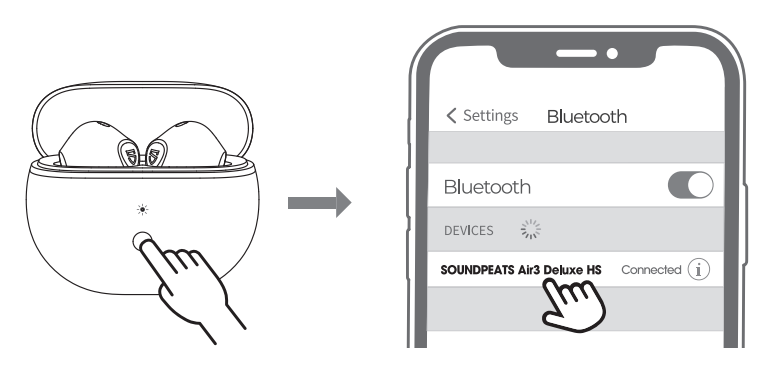
- Open the charging case lid while the case has enough power left, press and hold the button on the charging case for 3 seconds until the white light flashes, both earbuds will turn on and enter pairing mode.
- Activate the Bluetooth on your device and choose "SOUNDPEATS Air3 Deluxe HS" to connect.
Reset
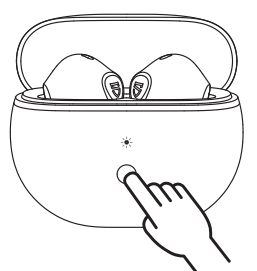
- Place both earbuds back, the white light on the charging case flashes twice, and the earbuds start charging.
- With the case lid open, press and hold the charging case button for 10 seconds until the white light flashes 2 times, reset complete.
- Close the case lid and reopen it to activate the earbuds.
Wearing
Product Diagram
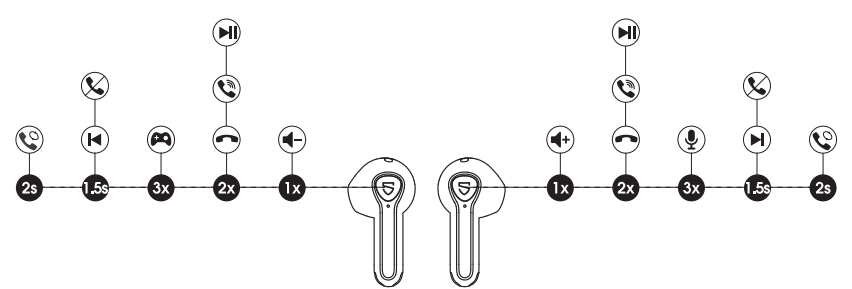
Touch Control
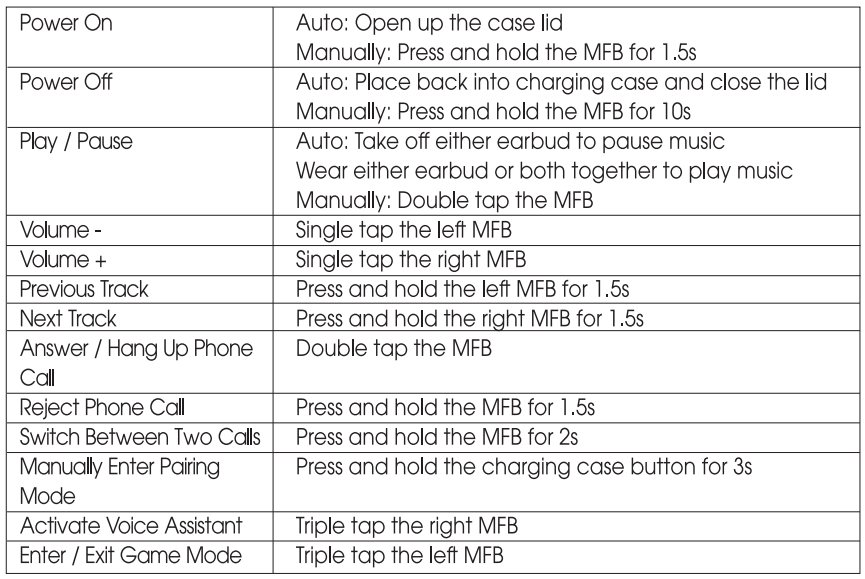
Game Mode
SOUNDPEATS Air3 Deluxe HS adopts the latest technology to ensure low latency in game mode and make sure the sound syncs with the image. Triple-tap on the left to activate the game mode with a voice prompt "Game Mode" and deactivate the mode with a prompt "Exit Game Mode"
Troubleshooting Soundpeats Air3 Deluxe HS Wireless Earbuds
- Earbuds not connecting: Ensure Bluetooth is enabled and reset the earbuds by placing them in the case, closing the lid for 10 seconds, then reopening.
- Touch controls not responding: Clean the earbud surface and ensure hands are dry. If issues persist, reset the earbuds.
- Poor battery life: Battery may degrade over time. Charge fully and avoid leaving earbuds in extreme temperatures.
- Audio cutting out: Check for interference from other devices or move closer to your source. Update firmware via the Soundpeats app if available.
- One earbud not working: Reset both earbuds and re-pair. If the problem continues, contact support.
Preventive measures include regular cleaning, avoiding water exposure beyond IPX4 limits, and storing the earbuds in the case when not in use. The Soundpeats Air3 Deluxe HS comes with a standard warranty; for support, visit the official Soundpeats website or contact customer service at support@soundpeats.com.
Pros and Cons of Soundpeats Air3 Deluxe HS Wireless Earbuds
Pros
- Excellent audio quality with 14.2mm drivers and Hi-Res certification
- LDAC codec support for high-bitrate streaming
- Low-latency game mode for lag-free gaming
- Comfortable semi-in-ear fit for extended use
- Good call quality with dual-mic ENC
- Customizable EQ via the Soundpeats app
Cons
- No active noise cancellation
- Touch controls can be overly sensitive
- Battery life is slightly less than advertised
- No wireless charging for the case
- Treble can be bright on some tracks
Overall, the Soundpeats Air3 Deluxe HS Wireless Earbuds offer outstanding value for money, especially for users prioritizing sound quality over advanced features.
Customer Reviews of Soundpeats Air3 Deluxe HS Wireless Earbuds
Customers consistently praise the Air3 Deluxe HS for its rich, detailed sound and comfortable fit. Many users highlight the 14.2mm drivers and LDAC support as major selling points, with several noting that the audio quality rivals more expensive models. The low-latency game mode and clear call quality are also frequently mentioned positives.
Common complaints include overly sensitive touch controls and occasional brightness in the treble, especially on certain tracks. The battery life is generally good,, but sometimes falls short of the advertised 20 hours. Most reviewers rate the earbuds 4–4.5 stars, recommending them for casual listeners and audiophiles on a budget. Frequent issues like connectivity and touch sensitivity are usually resolved with a reset or firmware update.
Faqs
How do I set up soundpeats Air3 Deluxe HS Wireless Earbuds for the first time?
Why is the touch control on my soundpeats Air3 Deluxe HS Wireless Earbuds too sensitive?
Can I use soundpeats Air3 Deluxe HS Wireless Earbuds with gaming devices for low latency?
What should I do if my soundpeats Air3 Deluxe HS Wireless Earbuds battery drains faster than expected?
Are soundpeats Air3 Deluxe HS Wireless Earbuds compatible with iPhones and Android phones?
How do I improve the fit and comfort of soundpeats Air3 Deluxe HS Wireless Earbuds?
What is the best way to clean and maintain soundpeats Air3 Deluxe HS Wireless Earbuds?
How can I customize the sound profile on soundpeats Air3 Deluxe HS Wireless Earbuds?
More soundpeats manuals
- Pairing: Soundpeats Watch 2 User Manual
- Setup & Pairing: Soundpeats Pop Clip Wireless Earbuds User Manual
- Pairing & Setup: Soundpeats Watch Pro 1 User Manual
- Pairing: Soundpeats Air5 Lite Wireless Earbuds User Manual
- Pairing & Setup: Soundpeats Life Wireless Earbuds User Manual
- Setup & Pairing: Soundpeats Air5 Pro Wireless Earbuds User Manual
Leave a Comment