
Pairing: Soundpeats Watch 2 User Manual
Content
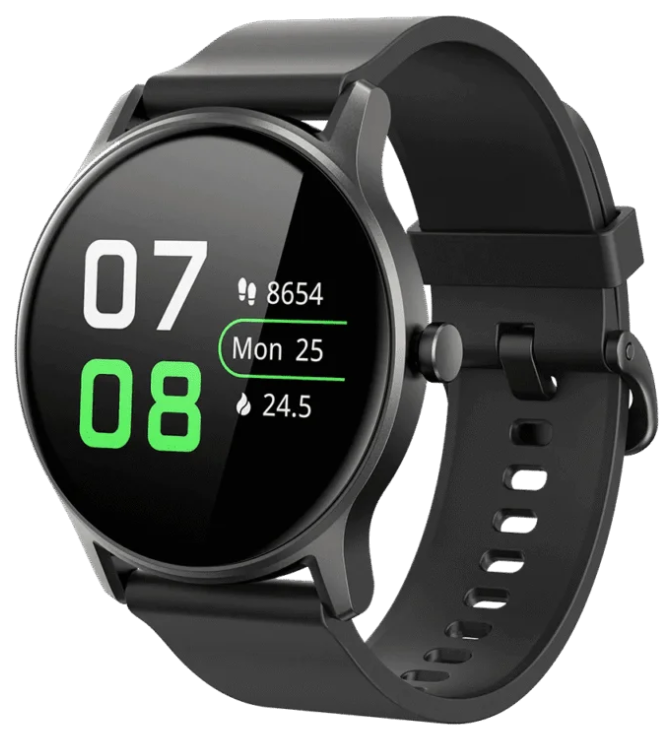
SoundPEATS Watch 2
Introduction
The SoundPEATS Watch 2 is a versatile and affordable smartwatch designed to blend classic aesthetics with modern fitness tracking technology. Released in March 2023, this device offers an impressive range of features including heart rate monitoring, blood oxygen (SpO2) measurement, sleep quality tracking, and support for 12 different sports modes. Its IP68 waterproof rating and durable build make it suitable for both everyday use and active lifestyles.
Targeted towards fitness enthusiasts, casual users, and tech-savvy individuals seeking a budget-friendly yet functional smartwatch, the SoundPEATS Watch 2 fits comfortably into various use cases from workout tracking to smart notifications. It supports customizable watch faces that allow users to personalize their experience, whether for business, casual, or athletic use.
With a lightweight design at just 38 grams and a 1.28-inch HD color display, the watch balances style and functionality. It offers seamless connectivity with both Android (6.0+) and iOS (11.0+) devices. The estimated price range is competitively set below $60, making it an accessible option widely available on major online retail platforms and select physical stores.
Specifications
- Operating System: Android-based OS version 4.4
- Display: 1.28-inch HD TFT-LCD color touchscreen, 240×240 pixels resolution (~250 PPI)
- Body & Design: PC & aluminum body with silicon strap; dimensions approx. 45.7 x 42.6 x 11.6 mm; weight 38 g; IP68 waterproof rating
- Battery: 220 mAh Li-ion battery providing up to 7 days of typical usage and approx. 20 days standby; charging time around 2 hours
- Connectivity: Bluetooth version 5.0/5.1 for fast and stable connection with smartphones
- Health & Fitness Tracking: Heart rate sensor, blood oxygen (SpO2) monitor, sleep tracking, acceleration sensor, breath training, calories burned, step counting, 12 sports modes
- Smart Features: Call, message, email, calendar notifications; music & volume control; weather updates; alarm, timer, stopwatch; find phone feature
- Compatibility: Works with iOS 11.0+ and Android 6.0+ devices via the SoundPEATS Life app
Compared to similar smartwatches in its price range, the SoundPEATS Watch 2 stands out for its comprehensive health sensors including SpO2 tracking and its high-resolution touchscreen, which is sharper than many competitors under $60. Its IP68 waterproofing is also notable for intensive daily use and water exposure.
Appearance and package list
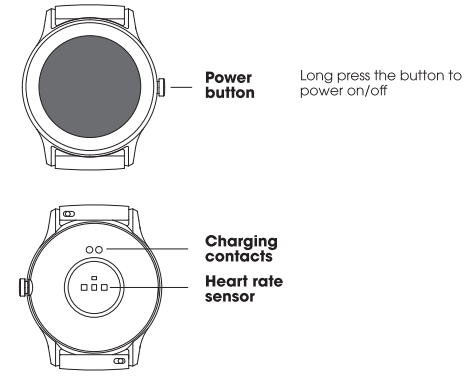
The watch is made of healthy materials that have undergone strict allergy testing, so you can wear it with confidence. Due to individual differences, if there's any skin discomfort, please stop wearing it and consult a physician.
Charging
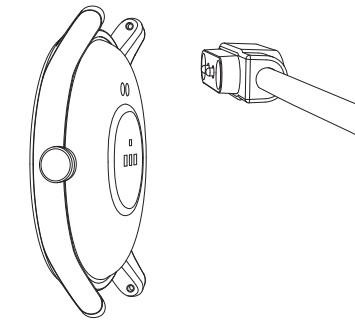
Place the back of watch on the magnetic charger, with contacts of both correspondingly attached to until the charging power indication appears on the screen.
Notice:
- Please use the supplied charging cable and dry the charging contacts before charging.
- Connect the charging cable to a standard USB charger purchased from a regular channel that has received local certification.
- If the watch cannot be turned on after being unused for a long time, it needs to be pre-charged for about i minute, beforedisplaying the charging icon.
Remove/Install the strap
If you need to remove or install watch straps, please refer to the illustration.
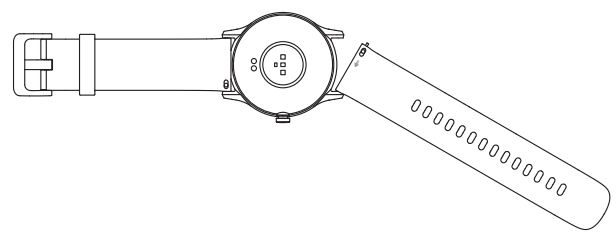
Notice: Pull the watch strap afterwards to ensure successful= installation.
Tips
- This product supports waterproof IP68, but it's not suitable for hot water, tea and other corrosive liquids and diving over 3 meters.The above behaviors may cause water to enter the product. This is a destructive use and is not within the scope of product warranty and free maintenance services.
- Please do not wear the smartwatch too tight in daily use. Keep your skin which is in close contact with the watch dry. Clean the strap regularly. In the event of skin discomfort, please stop using it and consult a doctor immediately.
- The button and touch screen do not support underwater operations. If the watch gets wet, please dry the surface with a soft cloth.
Troubleshooting Common Issues with SoundPEATS Watch 2
- Device Not Turning On: Ensure the battery is charged using the magnetic charging cable; if unresponsive, reset the watch by holding the side button for 10 seconds.
- Bluetooth Connection Problems: Restart both the watch and smartphone, ensure Bluetooth is enabled on the phone, and re-pair via the SoundPEATS Life app.
- Heart Rate or SpO2 Sensor Inaccuracy: Wear the watch snugly and clean the sensor area regularly; avoid movement during measurement.
- Notifications Not Showing: Confirm app permissions for notifications on your smartphone and allow background app refresh.
- Firmware Update Fails: Use stable Wi-Fi, keep the watch connected during OTA updates, and restart the devices if needed.
To prevent issues, keep the watch firmware updated, avoid exposure to extreme temperatures, and regularly clean the device. The product comes with a standard manufacturer warranty (typically 12 months), and SoundPEATS customer support can be contacted through their official website or the SoundPEATS Life app for assistance.
Pros & Cons of the SoundPEATS Watch 2
- Pros:
- Affordable price with competitive features for under $60
- Accurate heart rate and SpO2 monitoring with 12 sports modes
- Sharp and bright 1.28-inch HD touchscreen with customizable watch faces
- IP68 waterproof rating suitable for swimming and showering
- Long battery life up to 7 days on a single charge
- Supports both Android and iOS devices with intuitive app integration
- Cons:
- Limited app ecosystem compared to premium smartwatches
- Screen resolution and size smaller than high-end models
- Basic fitness tracking features may lack advanced metrics
- Delayed notifications sometimes reported by users
- No GPS sensor onboard, requiring phone for location-based activities
Overall, the SoundPEATS Watch 2 offers excellent value for money, especially for users prioritizing fitness tracking and essential smartwatch functions without premium price tags.
Customer Reviews and User Feedback on SoundPEATS Watch 2
Users frequently praise the SoundPEATS Watch 2 for its comfortable fit, stylish design, and reliable health monitoring features. Many appreciate the battery longevity and waterproof capabilities, highlighting that it suits their daily fitness and casual usage well. The 1.28-inch bright screen and customizable dials receive positive remarks for usability and aesthetics.
Some common complaints include occasional Bluetooth connectivity delays and limited third-party app support. A few users have noted that the absence of built-in GPS limits outdoor tracking accuracy. Despite these issues, the overall star rating averages around 4 out of 5 stars, with recommendations for those seeking budget-friendly smartwatches with core health features.
Purchase recommendations often emphasize the watch’s compatibility with both Android and iOS, making it a flexible choice for a wide audience.
Faqs
How do I set up the soundpeats Watch 2 for the first time?
What should I do if my soundpeats Watch 2 is not syncing notifications properly?
Can I use the soundpeats Watch 2 with both Android and iOS devices?
What health tracking features are available on the soundpeats Watch 2?
How long does the battery last on the soundpeats Watch 2 and how should I optimize its performance?
Is the soundpeats Watch 2 waterproof, and what precautions should I take when using it around water?
How do I change or customize watch faces on the soundpeats Watch 2?
What maintenance steps should I follow to keep my soundpeats Watch 2 in good condition?
More soundpeats manuals
- Pairing & Setup: Soundpeats Watch Pro 1 User Manual
- Pairing & Setup: Soundpeats Air3 Deluxe HS Wireless Earbuds User Manual
- Pairing & Setup: Soundpeats Life Wireless Earbuds User Manual
- Setup & Pairing: Soundpeats Pop Clip Wireless Earbuds User Manual
- Pairing: Soundpeats True Air2 Wireless Earbuds User Manual
- Pairing: Soundpeats Air5 Lite Wireless Earbuds User Manual
Leave a Comment