
Pairing: Soundpeats True Air2 Wireless Earbuds User Manual
Content
soundpeats True Air2 Wireless Earbuds
Introduction
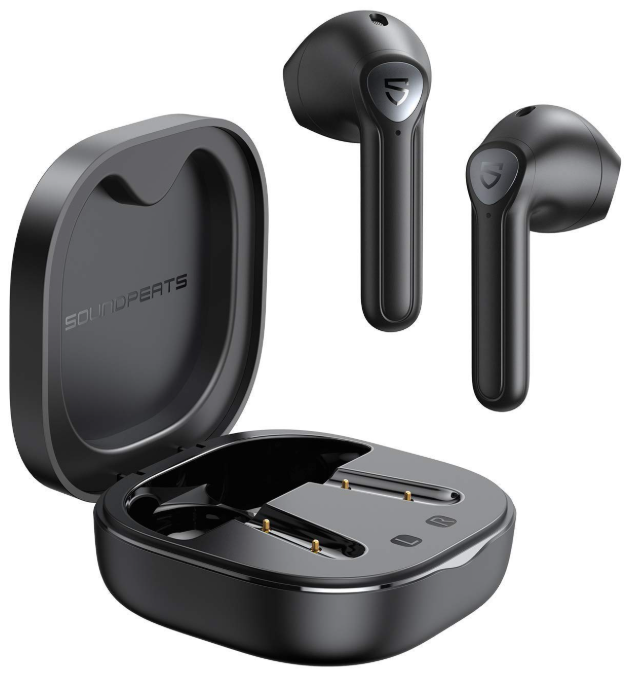
The Soundpeats True Air2 Wireless Earbuds are a compelling choice for users seeking high-quality true wireless audio without the premium price tag. Designed to deliver impressive sound clarity, these earbuds feature advanced Qualcomm technology, including the QCC3040 chipset and Bluetooth 5.2 connectivity, ensuring strong and stable wireless performance. They are perfect for everyday use, such as music listening, video streaming, calls, and light workouts, making them ideal for commuters, students, and casual audiophiles.
Noteworthy benefits include a sleek, lightweight design weighing just 0.14oz per earbud, Qualcomm aptX support for enhanced audio quality, and dual-mic CVC noise cancellation for clear voice calls. The compact charging case provides up to 25 hours of total playback time, with earbuds lasting around 5 hours per charge at moderate volume. With responsive touch controls and an IPX4 splash resistance rating, these earbuds offer convenience and durability in a budget-friendly package.
The Soundpeats True Air2 earbuds are widely available online and in retail stores, typically priced in the $40 to $50 range, making them a great value alternative to more expensive models from major brands. Their combination of advanced features and affordability targets users who want reliable wireless earbuds for daily use without compromising too much on audio performance.
Specifications of Soundpeats True Air2 Wireless Earbuds
- Bluetooth Version: Bluetooth 5.2 for stable connection and low latency
- Chipset: Qualcomm QCC3040 with aptX codec support for high-fidelity audio
- Drivers: 14.2mm bio-compound diaphragm delivering clear and balanced sound
- Noise Cancellation: Dual microphones with Qualcomm cVc noise reduction technology
- Battery Life: Up to 5 hours per earbud at 60% volume, 25 hours total with charging case
- Charging: USB Type-C port; approximately 1.5 hours for a full charge
- Water Resistance: IPX4 rating for protection against sweat and light rain
- Weight: 0.14oz (4g) per earbud, lightweight and comfortable
- Wireless Range: Up to 33 feet (10 meters) with no obstacles
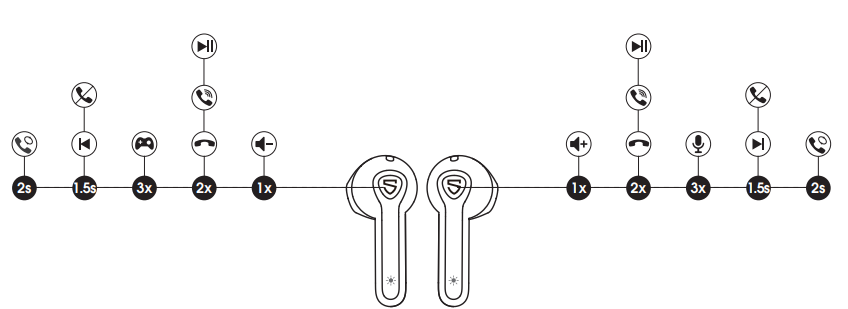
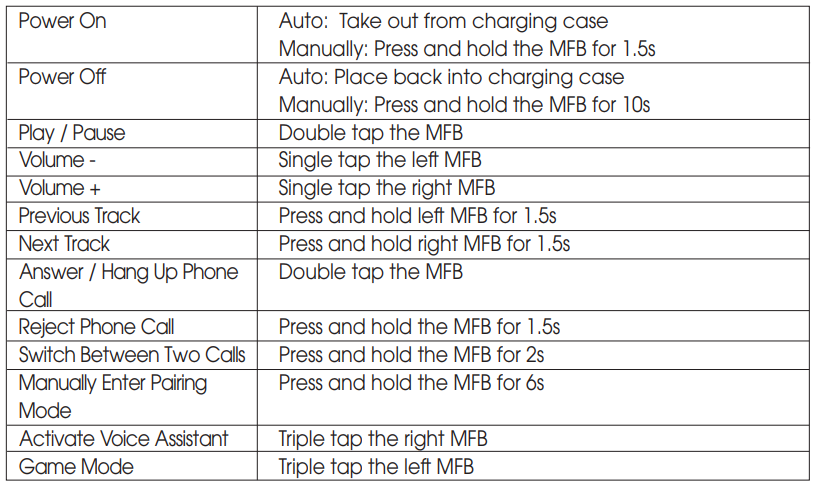
- Controls: Responsive touch controls for playback, volume, calls, and voice assistant access
Compared to similar budget wireless earbuds, the True Air2 stands out with Qualcomm’s TrueWireless Mirroring technology, which improves connection stability by having one earbud mirror the other, reducing dropouts. The aptX codec support offers better audio quality than many competitors that only support standard SBC codecs.
Pairing
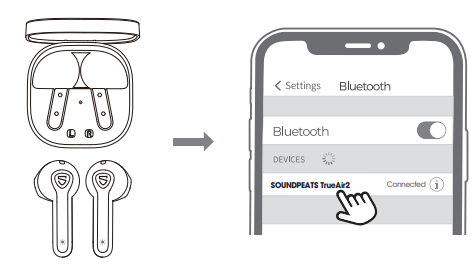
- The earbuds automatically pair with each other after being taken out of the charging case. The light on the main earbud flashes in white and red; the second earbud stays in white.
- Activate Bluetooth on the device, and choose "SOUNDPEATS TrueAir2" on the Bluetooth list to pair.
Product Diagram
Button Control
Troubleshooting common issues with Soundpeats True Air2 Wireless Earbuds
- Pairing Problems: Ensure earbuds are fully charged and reset by placing them back in the case and taking them out again. Activate Bluetooth on your device and select "SOUNDPEATS TrueAir2" to reconnect.
- Audio Cutouts or Stuttering: Keep within 10 meters of the paired device without obstacles. Reset earbuds and clear Bluetooth cache on your device if the problem persists.
- Touch Control Sensitivity Issues: Slight oversensitivity can cause accidental commands; familiarize yourself with tap patterns and avoid holding earbuds by the stem during use.
- Battery Not Charging: Check USB Type-C cable and port for debris; use official charging accessories. Allow earbuds and case to charge for at least 1.5 hours.
- Voice Call Issues: Enable microphone permissions on your device and ensure dual-mic noise cancellation is active for clearer voice quality.
Preventive measures include keeping the charging case and earbuds clean and dry, updating your device’s Bluetooth drivers, and avoiding extreme temperatures. The product typically comes with a 12-month warranty covering manufacturing defects. For further assistance, contact Soundpeats customer support via their official website or authorized resellers.
Pros & Cons of Soundpeats True Air2 Wireless Earbuds
- Pros:
- Excellent value for money, offering features comparable to higher-priced brands
- Clear sound with good bass and layered soundstage thanks to 14.2mm drivers and aptX support
- Comfortable and secure fit suitable for long listening sessions
- Stable Bluetooth 5.2 connection with TrueWireless Mirroring technology
- Long battery life with compact, pocket-friendly charging case
- IPX4 water resistance for sweat and light rain protection
- Cons:
- Mids can be average and less detailed compared to premium earbuds
- Occasional Bluetooth stuttering reported under certain conditions
- The charging case plastic feels less premium than some competitors
- Touch controls can be oversensitive, leading to unintended commands
Customer Reviews of Soundpeats True Air2 Wireless Earbuds
Users consistently praise the Soundpeats True Air2 Wireless Earbuds for their balanced sound quality and excellent battery life, with many highlighting the secure fit and comfortable wear during workouts or commutes. The aptX codec support and clear phone call quality receive positive remarks. Reviewers typically rate these earbuds around 4 to 4.5 stars out of 5.
Common complaints include occasional Bluetooth connection stutters and the touch controls being a bit too sensitive, which can cause accidental pauses or skips. Despite these minor issues, the earbuds are recommended for budget-conscious buyers looking for reliable wireless earbuds with strong performance. Many users emphasize the excellent value compared to pricier alternatives.
Faqs
How do I set up soundpeats True Air2 Wireless Earbuds for the first time?
What should I do if my soundpeats True Air2 Wireless Earbuds won't connect to my device?
Can I use soundpeats True Air2 Wireless Earbuds with gaming or video calls?
How do I use the touch controls on soundpeats True Air2 Wireless Earbuds?
Are soundpeats True Air2 Wireless Earbuds compatible with both Android and iOS devices?
How long does the battery last on soundpeats True Air2 Wireless Earbuds?
How do I clean and maintain my soundpeats True Air2 Wireless Earbuds?
Can I use one earbud at a time with soundpeats True Air2 Wireless Earbuds?
More soundpeats manuals
- Pairing & Setup: Soundpeats Air3-Deluxe Wireless Earbuds User Manual
- Pairing & Setup: Soundpeats Life Wireless Earbuds User Manual
- Pairing & Setup: Soundpeats Mini Pro HS Wireless Earbuds User Manual
- Pairing & Setup: Soundpeats Watch Pro 1 User Manual
- Pairing: Soundpeats Mini HS Wireless Earbuds User Manual
- Pairing: Soundpeats Watch 2 User Manual
Leave a Comment