
Pairing: Soundpeats Air5 Lite Wireless Earbuds User Manual
Content
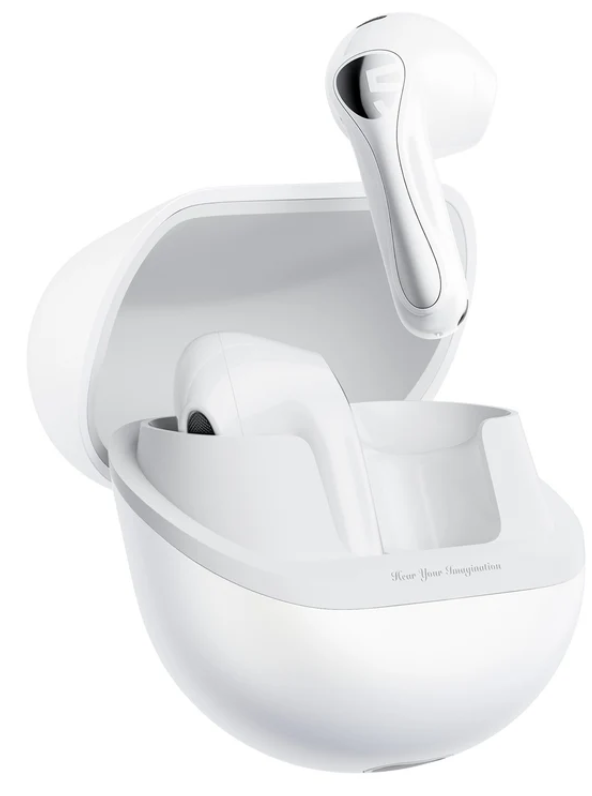
Soundpeats Air5 Lite Wireless Earbuds
Introduction
The Soundpeats Air5 Lite Wireless Earbuds represent a high-value entry in the wireless audio market, combining advanced audio technologies with a lightweight, ergonomic design. These earbuds are crafted for users who seek premium sound quality, comfort, and extended battery life without the premium price tag. Featuring a 13mm bio-diaphragm driver and support for Hi-Res LDAC audio codec, the Air5 Lite delivers crystal-clear sound with rich, dynamic bass, ideal for music enthusiasts and everyday listeners alike.
With AI-powered Environmental Noise Cancellation (ENC) through a four-microphone system, these earbuds ensure clear voice calls, making them perfect for remote workers, students, and commuters. The semi-in-ear design provides comfort for long listening sessions, while Bluetooth 5.4 technology guarantees a stable connection and dual-device pairing capabilities. Total playback time can reach up to 30 hours with the charging case, complemented by fast charging that offers 3 hours of playtime after just 15 minutes.
Priced competitively in the range of approximately $35-$50, the SoundPEATS Air5 Lite are widely available through major online retailers and popular marketplaces. Their combination of advanced features and affordability makes them an excellent choice for budget-conscious users seeking high-resolution audio and reliable wireless performance.
Specifications of Soundpeats Air5 Lite Wireless Earbuds
- Driver Size: 13mm composite bio-diaphragm delivering rich, detailed sound with enhanced bass
- Audio Codec: Supports LDAC for Hi-Res Audio streaming up to 24bit/96kHz at 990Kbps bitrate
- Bluetooth Version: 5.4 for improved connectivity, range up to 10 meters, and dual-device pairing.
- Noise Control: AI Environmental Noise Cancellation (ENC)is active during calls via a 4-mic system
- Battery Life: Up to 6 hours per charge in earbuds, total 30 hours with charging case
- Fast Charging: 15 minutes of charging yields 3 hours of playback
- Water Resistance: IPX5 rating for sweat and splash protection
- Weight: Ultra-light 4.47g per earbud for comfortable extended wear
- Frequency Response: 20Hz - 40kHz, providing a wide sound spectrum
- Controls: Touch-sensitive for playback, calls, and voice assistant access
- Charging Port: USB Type-C for fast, convenient charging
Compared to similar budget earbuds, the Air5 Lite stands out with Hi-Res LDAC support and a robust 4-mic ENC system, features often absent in competitors within the same price range. While lacking full active noise cancellation (ANC), these earbuds excel in call clarity and sound quality for casual and semi-professional use.
FIRST TIME OF USE
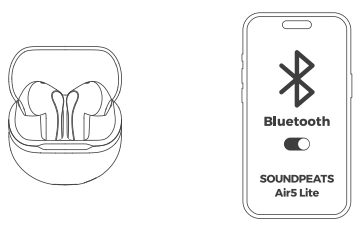
- Take out the earphones from the charging case, and remove the insulating film.
- Keep the earphones in the charging case, open the charging case lid to turn them on automatically.
Close the charging case lid to turn them off automatically. - After the earphones are turned on. Search for and select the name of the Bluetooth device on your cell phone to connect the SOUNDPEATS AirS Lite successfully.
CONTROL
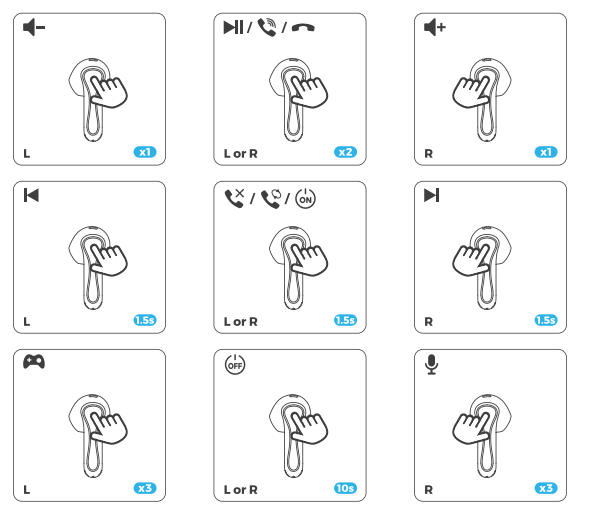
- xl: Single tap
- 1.5s: Long press for 1.5s
RESET & ENTER PAIRING MODE MANUALLY
Keep the earphones in the charging case and open the charging case lid.
- Reset Long Long-press the charging case button for 10 seconds until the indicator light flashes white and red twice.
- Enter pairing mode manually: Long-press the charging case button for 3 seconds, and the indicator light flashes white until the earphones are connected successfully.
WEARING
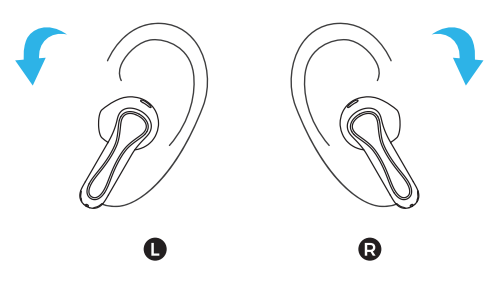
- Identify left and right earphones.
- Rotate the headset and find the most comfortable position.
WHAT DOES THE INDICATOR LIGHT OF THE CHARCINC CASE DISPLAY?
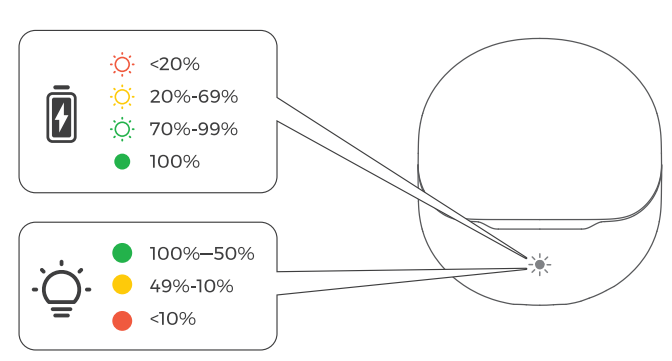
- The Green light flashes slowly.
- The Green light stays on.
DUAL DEVICE CONNECTION
Follow these steps:
- Pair the headsets with Device A first. After successful pairing, turn off the Bluetooth function on Device A.
- Repeat the pairing process to connect the headsets with Device B. Keep the headsets connected to Device B.
- Turn on the Bluetooth function on Device A.
"The headset will automatically connect with two devices next time after the first time dual device connection.- Dual device connection cannot be used with LDAC at the same time.
- "The Dual-Device Connection is enabled by default. To enable LDAC, please disable the Dual-Device Connection in the app options.
CHARCING
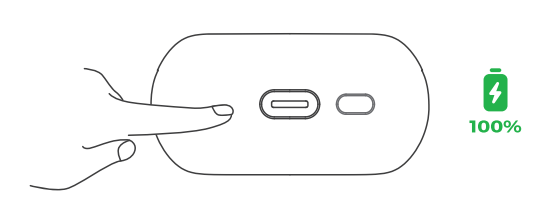
How to charge the charging case?
- Connect the Type-C charging adapter to charge it (charging current does not exceed 1A).
- When not in use for a long time, charge it at least once every three months.
Troubleshooting Soundpeats Air5 Lite Wireless Earbuds
- Issue: Earbuds not pairing – Ensure Bluetooth is enabled on your device and the earbuds are in pairing mode (hold touch controls until the LED flashes). Restart both devices if needed.
- Issue: One earbud not connecting – Place both earbuds in the charging case, fully charge, then remove simultaneously to reset the connection.
- Issue: Poor call quality or background noise – Verify firmware is updated; use in quieter environments for optimal ENC performance. Wind noise may still affect call clarity.
- Issue: Battery drains quickly – Disable unused features, lower volume, and ensure earbuds are fully charged before use. Avoid extreme temperatures.
- Error Codes: No specific error codes; LED indicators show charging and connection status (refer thee to the user manual for LED meanings).
To prevent issues, keep the earbuds and charging case clean, avoid water exposure beyond the IPX5 rating, and use the official PeatsAudio app for customization and firmware updates.
Warranty & Support: Soundpeats Air5 Lite comes with a 12-month manufacturer's guarantee. For assistance, reach out to official Soundpeats customer service via their website or authorized retailers.
Pros & Cons of Soundpeats Air5 Lite Wireless Earbuds
- Pros:
- Exceptional sound quality with 13mm Hi-Res LDAC driver delivering clear, dynamic audio and enhanced bass.
- Lightweight, ergonomic semi-in-ear design ensures comfortable wear for hours without ear fatigue.
- Long battery life of up to 30 hours total with fast charging capability.
- Stable Bluetooth 5.4 connection with dual-device pairing for versatile use.
- Effective AI-powered Environmental Noise Cancellation improves call clarity.
- IPX5 water resistance sis suitable for workouts and outdoor use.
- Cons:
- Lack of active noise cancellation (ANC) limits noise isolation during music playback.
- Minimal passive noise isolation due to semi-in-ear design without silicone tips.
- ENC works only during calls, not for music or ambient noise reduction.
- Microphone performance can suffer in very windy or loud environments.
Overall, the Soundpeats Air5 Lite offers excellent value for money, especially for users prioritizing sound quality and comfort over full noise cancellation. When compared with alternatives like Apple AirPods or similarly priced earbuds, Air5 Lite excels in audio fidelity and battery life but trades off some noise isolation features.
Customer Reviews of Soundpeats Air5 Lite Wireless Earbuds
Users consistently praise the Soundpeats Air5 Lite Wireless Earbuds for their impressive sound clarity, particularly highlighting the robust bass and Hi-Res audio support. Comfort and lightweight design receive positive mentions for all-day wear. Many reviewers admire the stable Bluetooth connection and convenient touch controls for easy operation.
Common complaints focus on the absence of active noise cancellation and limited noise isolation, making these earbuds less ideal for very noisy environments. Some users note that the microphones struggle slightly outdoors with wind interference, although the AI noise cancellation improves call quality in quieter settings.
Overall, the average customer rating hovers around 4.3 to 4.5 stars out of 5, with frequent recommendations for casual listening, work-from-home calls, and fitness activities. Buyers appreciate the strong battery life and quick charging feature, often citing the earbuds as excellent budget alternatives to pricier models.
Faqs
How do I set up the soundpeats Air5 Lite Wireless Earbuds for the first time?
What should I do if the soundpeats Air5 Lite Wireless Earbuds are not connecting or pairing properly?
Can I use soundpeats Air5 Lite Wireless Earbuds with multiple devices simultaneously?
How does the AI Environmental Noise Cancellation work on soundpeats Air5 Lite Wireless Earbuds?
What are the battery life and charging features of soundpeats Air5 Lite Wireless Earbuds?
How can I optimize sound quality on the soundpeats Air5 Lite Wireless Earbuds?
Are the soundpeats Air5 Lite Wireless Earbuds water-resistant and suitable for workouts?
How should I clean and maintain my soundpeats Air5 Lite Wireless Earbuds to ensure longevity?
More soundpeats manuals
- Setup & Pairing: Soundpeats Pop Clip Wireless Earbuds User Manual
- Setup & Pairing: Soundpeats Air5 Pro Wireless Earbuds User Manual
- Pairing & Setup: Soundpeats Air3 Deluxe HS Wireless Earbuds User Manual
- Setup & Pairing: Soundpeats Capsule3 Pro+ Earbuds User Manual
- Pairing: Soundpeats Watch 2 User Manual
- Pairing: Soundpeats Breezy Wireless Earbuds User Manual
Leave a Comment