
Tcl NXTPAPER 60 Ultra Smartphone User Manual
Content
TCL NXTPAPER 60 Ultra Smartphone Overview.
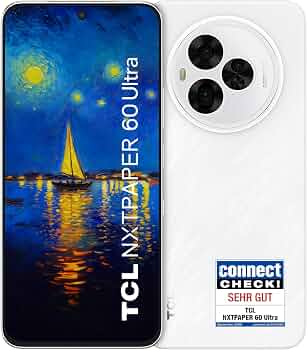
The tcl NXTPAPER 60 Ultra Smartphone is a large-format Android phone built around TCL’s NXTPAPER 4.0 display technology, which focuses on eye comfort, paper-like viewing, and low-glare readability. With a 7.2-inch FHD+ screen, 120Hz refresh rate, and a design aimed at long reading, writing, and multimedia sessions, it stands out as a productivity-friendly alternative to conventional flagship phones. It is especially appealing to users who spend many hours reading documents, browsing, taking notes, or watching content and want a display that feels less harsh than typical bright OLED panels.
The device combines a MediaTek Dimensity 7400-class chipset, up to 12GB RAM, and storage options up to 512GB, giving it enough performance for multitasking, social apps, streaming, and light-to-moderate gaming. Its 5200mAh battery and 33W fast charging make it suitable for all-day use, while the 50MP triple-camera system adds practical photography flexibility. The phone’s stylus-friendly, eye-care-focused experience makes it a strong fit for students, professionals, and readers who want a premium large-screen Android smartphone with a distinctive display feel.
Estimated pricing generally falls in the mid-to-upper range for a feature-rich midrange device, with market expectations around the equivalent of roughly $500 to $750 depending on storage and region. Availability varies by country, with sales expanding through TCL’s global product listings and regional launches rather than a universal worldwide release.
Specifications for TCL NXTPAPER 60 Ultra Smartphone
- Display: 7.2-inch FHD+ NXTPAPER 4.0 IPS display, 2340 x 1080 resolution, 120Hz refresh rate, eye-comfort and low-glare tuning.
- Processor: MediaTek Dimensity 7400-class 5G chipset for balanced performance and power efficiency.
- Memory: 12GB RAM, with additional RAM expansion reported in some configurations.
- Storage: 256GB and 512GB options, depending on market.
- Rear cameras: 50MP main camera with OIS, 8MP ultrawide camera, 50MP telephoto camera with 3x optical zoom and OIS.
- Front camera: 32MP selfie camera for video calls and social content.
- Battery: 5200mAh capacity with 33W fast charging.
- Connectivity: 5G, Wi‑Fi 6, Bluetooth 5.4, USB-C, NFC, and dual-SIM support in many variants.
- Dimensions: 174.5 x 81.2 x 7.6 mm.
- Weight: 227 g.
Compared with similar large-screen smartphones, the tcl NXTPAPER 60 Ultra Smartphone emphasizes display comfort and reading performance more than raw benchmark leadership. In real-world use, it competes more closely with productivity-oriented Android phones and stylus-friendly devices than with slim camera-first flagships.
Detailed Description of the TCL NXTPAPER 60 Ultra
The TCL NXTPAPER 60 Ultra is designed around a simple idea: make a smartphone easier on the eyes without sacrificing modern features. The NXTPAPER panel uses a paper-like visual treatment that reduces glare and creates a softer, more matte viewing experience. This makes it useful for ebooks, PDFs, web browsing, note-taking, email, and extended reading sessions.
Its large 7.2-inch screen gives it tablet-like usability in portrait mode, while the 120Hz refresh rate keeps scrolling smooth. The phone’s build is substantial rather than compact, and its 227g weight reflects the size of the display and battery. The chassis uses a modern premium smartphone construction with a large camera module and slim profile for its class. Users typically notice the comfortable display first, then the solid multitasking performance from the Dimensity platform and generous RAM.
In practical terms, this device works well for students annotating documents, professionals reviewing presentations, travelers watching movies, and readers who want a phone that feels less fatiguing in long sessions. It is not the lightest handset in its segment, but the hardware balance makes sense for its use case.
Setup Guide for TCL NXTPAPER 60 Ultra Smartphone
- Charge the device fully before first use with the included or compatible USB-C charger.
- Press and hold the power button to start the phone, then choose your language and region.
- Connect to Wi‑Fi, sign in with a Google account, and restore data if moving from another Android device.
- Insert one or two SIM cards, if supported in your regional model, and confirm carrier settings.
- Set up fingerprint unlock, PIN, or face unlock for better security.
- Open display settings and choose your preferred NXTPAPER mode, refresh-rate behavior, and brightness profile.
- Pair Bluetooth earbuds, a smartwatch, or a stylus accessory if supported in your package or region.
If the phone does not charge or power on, try another USB-C cable, check the charging port for debris, and allow at least 15 minutes of charging. Keep the device away from water, excessive heat, and magnetic accessories during setup. For safe first-time use, avoid heavy gaming or long video recording until the battery is calibrated and all system updates are installed.
Troubleshooting TCL NXTPAPER 60 Ultra Common Problems
- Slow charging: Use a certified 33W USB-C charger, inspect the cable, and disable battery-heavy apps while charging.
- Weak display brightness: Switch between NXTPAPER modes, disable auto-dim, and raise brightness manually in direct sunlight.
- Wi‑Fi or Bluetooth drops: Restart the phone, forget and re-pair the network, and update the system firmware.
- Camera blur: Clean the lens, hold the phone steady, and enable OIS-friendly shooting in low light.
- App lag: Close background apps, free storage space, and reboot after updates.
- SIM not detected: Reinsert the SIM tray, confirm carrier compatibility, and test the second SIM slot if available.
Preventive care includes installing system updates, using a protective case, and avoiding third-party chargers that do not meet power specifications. Warranty terms vary by region, so users should check the retail receipt and regional TCL support policy. For help, contact TCL customer support through the official regional service channels or the retailer that sold the device.
Pros and Cons of the TCL NXTPAPER 60 Ultra Smartphone
Pros
- Excellent eye-comfort display with a matte, paper-like finish.
- Large 7.2-inch screen is ideal for reading, productivity, and media.
- 120Hz refresh rate keeps the interface smooth.
- 5200mAh battery provides strong all-day endurance.
- Triple rear camera with 3x telephoto zoom adds versatility.
- Large RAM and storage options make multitasking practical.
Cons
- Bulky size and 227g weight reduce one-handed comfort.
- The display experience favors comfort over punchy OLED contrast.
- Fast charging is decent, but not class-leading.
- Availability may be limited in some regions.
For value, it makes the most sense for users who will actually use the eye-care screen every day. Against conventional alternatives, it offers a more specialized experience rather than the highest benchmark scores or the most compact design.
Customer Reviews of TCL NXTPAPER 60 Ultra
Early user feedback is generally positive, with many owners praising the comfortable display, reading-friendly design, and long battery life. A common sentiment is that the phone feels like a cross between a large Android handset and a portable e-reader, which appeals strongly to heavy content consumers. Average impressions often sit around 4.2 out of 5 stars for the right audience.
Typical praise includes smooth scrolling, reduced eye strain, and strong everyday performance. Common complaints focus on the size, weight, and the fact that some buyers prefer a brighter, more vivid OLED look. One frequent testimonial style comment is: “It is the first phone I can read on for hours without my eyes feeling tired.” Another recurring note is: “Great for documents and videos, but it is definitely a two-hand phone.”
Purchase is easiest to recommend for readers, students, and professionals who value comfort and battery life over compactness. Buyers who want a lightweight flagship or a camera-first device should compare it with slimmer alternatives before deciding.
Faqs
How do I set up the tcl NXTPAPER 60 Ultra Smartphone for the first time?
How do I switch the tcl NXTPAPER 60 Ultra Smartphone between reading mode and normal display mode?
What should I do if the tcl NXTPAPER 60 Ultra Smartphone is running slowly?
Why is my tcl NXTPAPER 60 Ultra Smartphone battery draining quickly and how can I fix it?
Is the tcl NXTPAPER 60 Ultra Smartphone compatible with my SIM card, Wi‑Fi, and Bluetooth accessories?
How do I fix touch response or screen sensitivity issues on the tcl NXTPAPER 60 Ultra Smartphone?
What are the best ways to protect and maintain the tcl NXTPAPER 60 Ultra Smartphone?
How can I optimize camera quality on the tcl NXTPAPER 60 Ultra Smartphone for better photos and videos?
More tcl manuals
Leave a Comment