
Tcl 501 Smart Phone User Manual
Content
TCL 501 Smart Phone: Affordable 4G Smartphone with a Large Display
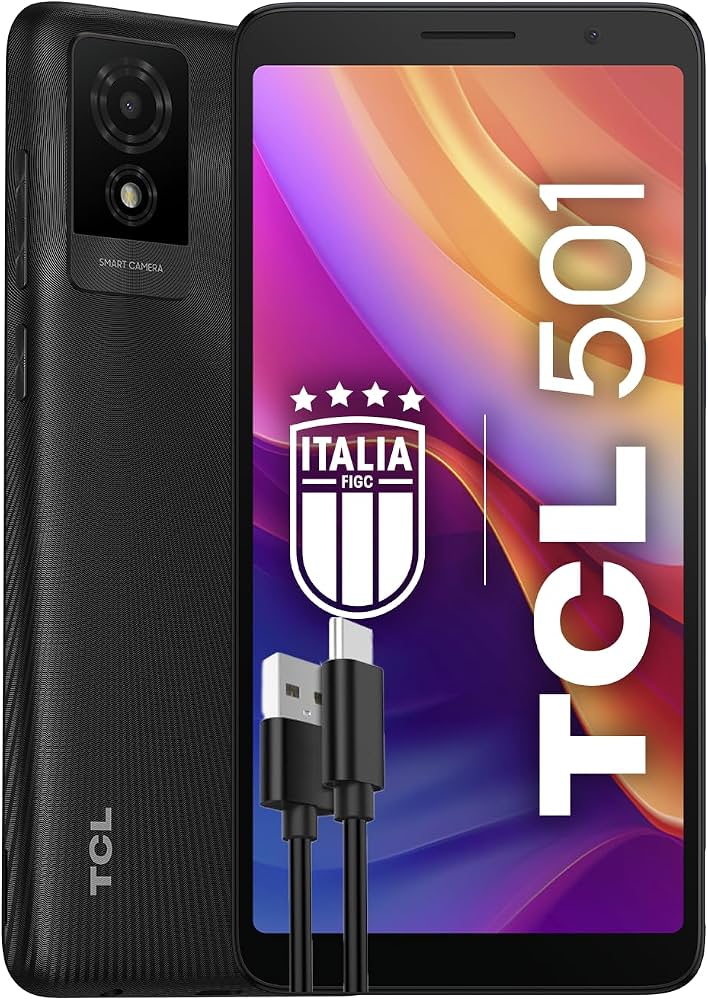
The TCL 501 Smart Phone is a budget-friendly 4G Android handset designed for everyday communication, light entertainment, and simple app use. It focuses on the essentials: a 6.0-inch display, Android 14 Go edition, a compact footprint, and enough memory for calls, messaging, browsing, and social apps. For users who want a straightforward smartphone without paying for premium hardware, this model offers a practical balance of usability and low cost.
One of the biggest strengths of the TCL 501 Smart Phone is its accessibility. The lightweight Android Go software helps the phone run efficiently on 2GB RAM, while the Helio G36 processor supports basic multitasking and everyday performance. It also includes dual-SIM support, a dedicated microSD slot, 4G LTE connectivity, Wi-Fi, Bluetooth 5.1, and USB-C, making it convenient for both work and personal use. The 3000 mAh battery is suited to light daily use, and the 6.0-inch screen gives a comfortable viewing experience for reading, video calls, and streaming.
This phone is ideal for first-time smartphone users, students, seniors, secondary device owners, and anyone searching for an entry-level Android phone. In 2026, the estimated price range is typically around the low-budget segment, often varying by region and retailer. Availability is generally broad through online electronics stores, mobile carriers, and TCL retail partners.
Specifications for TCL 501 Smart Phone
- Display: 6.0-inch IPS LCD, 540 x 1092 resolution, 60 Hz refresh rate.
- Processor: MediaTek Helio G36 octa-core chipset with PowerVR GE8320 GPU.
- Memory: 2GB RAM, 32GB internal storage, expandable via microSD card up to 1TB.
- Operating System: Android 14 Go edition for lightweight performance.
- Rear Camera: 5MP main camera with autofocus-free design for simple point-and-shoot photos.
- Front Camera: 2MP selfie camera for video calls and basic selfies.
- Battery: 3000 mAh non-removable battery with wired charging.
- Connectivity: 4G LTE, dual-band Wi-Fi, Bluetooth 5.1, GPS, USB Type-C, dual SIM support.
- Build: Approximate dimensions of 156.5 x 74.9 x 9.7 mm with a slim, practical design.
- Performance: Best suited for calls, messaging, web browsing, and light apps rather than gaming or heavy multitasking.
Compared with similar entry-level smartphones, the TCL 501 Smart Phone stands out for its modern USB-C port, Android 14 Go software, and large display. It is positioned against other budget 4G phones that prioritize battery efficiency and basic functionality over high-end camera or gaming performance.
Detailed Description of the TCL 501 Smart Phone
The TCL 501 Smart Phone is designed as a simple, dependable Android device that handles core tasks with minimal complexity. Its 6.0-inch display is large enough for comfortable reading and media viewing while still staying easy to hold. The Android 14 Go edition software is optimized for lighter memory usage, which helps the phone respond more smoothly in day-to-day use than standard Android on similar hardware.
In real-world use, this device works well for voice calls, text messaging, WhatsApp, light browsing, navigation, and video streaming at modest settings. The Helio G36 processor and 2GB RAM are not intended for demanding games or heavy multitasking, but they are sufficient for essential mobile routines. The build quality is functional and practical, using a compact plastic-bodied design that keeps the phone lightweight and durable enough for everyday carry.
User experience is centered on simplicity. The dual-SIM layout is helpful for separating work and personal numbers, while microSD expansion gives flexibility for photos, downloads, and offline media. The TCL 501 Smart Phone is best viewed as a practical budget smartphone rather than a performance device.
Setup Guide: How to Set Up the TCL 501 Smart Phone
To set up the TCL 501 Smart Phone, start by inserting your nano-SIM card and, if needed, a microSD card in the dedicated slot. Then charge the device fully before first use to help the battery calibrate properly. Press and hold the power button to begin the setup process, and follow the on-screen prompts to choose your language, connect to Wi-Fi, and sign in with a Google account.
During configuration, you can enable fingerprint-free or PIN-based security, restore backup data, and choose app permissions. If you use two SIM cards, configure the preferred SIM for calls, texts, and mobile data in the network settings. Bluetooth pairing for headphones or car systems can be completed from the Bluetooth menu, and Wi-Fi Direct is available for compatible devices.
Safety matters during setup. Use only compatible chargers and avoid exposing the phone to heat, moisture, or physical pressure. If the device does not boot or freezes during setup, restart it by holding the power button, then repeat the setup steps. If Wi-Fi or mobile data fails, confirm the correct APN and network settings with your carrier.
Troubleshooting Common TCL 501 Smart Phone Problems
Common issues on the TCL 501 Smart Phone usually relate to storage limits, network setup, or battery life. If the phone feels slow, close background apps, remove unused files, and restart the device. Because the phone uses 2GB RAM, performance improves when only a few apps are open at once.
- Problem: The phone will not connect to mobile data. Fix: Check SIM placement, verify APN settings, and make sure 4G is enabled in network settings.
- Problem: Storage is full. Fix: Move photos and downloads to a microSD card or cloud storage and uninstall unused apps.
- Problem: Battery drains quickly. Fix: Lower screen brightness, disable unused wireless features, and check battery-heavy apps.
- Problem: Bluetooth pairing fails. Fix: Turn Bluetooth off and on again, then re-pair the accessory after clearing old connections.
- Problem: Camera quality is weak in low light. Fix: Use brighter environments and keep the lens clean for sharper results.
If you encounter warning messages or setup errors, a restart or factory reset often resolves software glitches. Preventive care includes regular updates, careful charging, and avoiding overloaded storage. Warranty coverage and support options usually depend on the region and retailer, so users should contact TCL customer service or the store where the phone was purchased for repair, replacement, or service guidance.
Pros & Cons of the TCL 501 Smart Phone
Pros
- Affordable entry-level smartphone with strong value for money.
- Large 6.0-inch display for reading, messaging, and video playback.
- Android 14 Go edition helps performance on limited hardware.
- Dual SIM support is useful for personal and work usage.
- Expandable storage up to 1TB is excellent for a budget phone.
- USB-C and Bluetooth 5.1 add modern connectivity features.
Cons
- 2GB RAM limits multitasking and heavier apps.
- 5MP rear camera is basic compared with many alternatives.
- 3000 mAh battery is modest for heavy all-day use.
- Low-resolution screen is fine for essentials but not ideal for sharp media viewing.
- Not suited for gaming or demanding productivity tasks.
For buyers comparing low-cost alternatives, the TCL 501 Smart Phone is a sensible choice if simple daily use matters more than speed, camera quality, or premium design. It offers a cleaner, more modern software experience than many ultra-cheap phones with older Android versions.
Customer Reviews of the TCL 501 Smart Phone
Typical customer feedback for the TCL 501 Smart Phone is mixed but practical. Many users rate it around 4 out of 5 stars for ease of use, affordability, and the convenience of Android Go. Common praise includes the large screen, dual SIM support, and the ability to expand storage easily.
Frequent complaints usually mention the modest camera, limited RAM, and average battery life under heavy use. A common testimonial theme is that it works well as a backup phone or a starter device, especially for users who want reliable calling and messaging without unnecessary complexity. Buyers looking for smooth gaming or advanced photography should consider higher-tier alternatives, while budget-focused users will likely find it a worthwhile purchase.
Faqs
How do I set up the tcl 501 Smart Phone for the first time?
Why is my tcl 501 Smart Phone not connecting to Wi-Fi or mobile data?
How can I improve battery life on the tcl 501 Smart Phone?
What should I do if the tcl 501 Smart Phone is running slowly or freezing?
Does the tcl 501 Smart Phone support microSD cards and what is the best way to use one?
How do I transfer contacts, photos, and apps to a new tcl 501 Smart Phone?
How do I fix charging problems on the tcl 501 Smart Phone?
What routine maintenance keeps the tcl 501 Smart Phone working well over time?
Tags
More tcl manuals
Leave a Comment