
How to Use: Vizio SmartCast Display User Manual
Content
Vizio SmartCast Display
Introduction
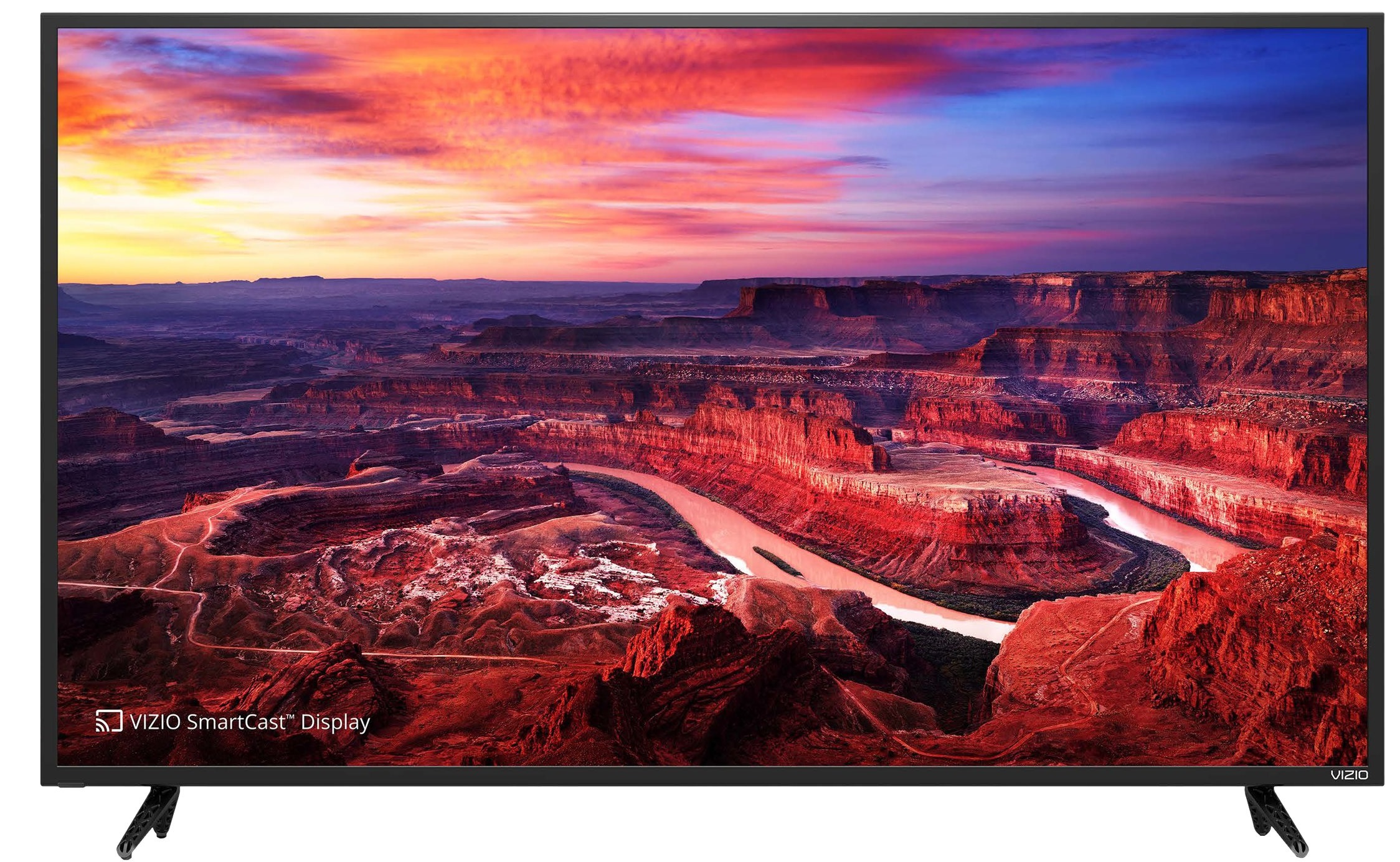
The Vizio SmartCast Display represents a cutting-edge integration of smart TV technology and superior visual performance, designed to enhance your home entertainment experience. Available in multiple sizes, including popular 43", 55", and 65" models, these displays combine Ultra HD resolution with advanced HDR support, delivering vibrant colors and deep contrast that bring movies, sports, and games to life. Equipped with Vizio’s SmartCast platform, users enjoy seamless access to thousands of streaming apps, voice control compatibility, and multi-device casting, making it a versatile centerpiece for any modern living room.
Key benefits include the built-in Chromecast and AirPlay 2 support for wireless streaming from smartphones and laptops, a high refresh rate ideal for smooth gaming and sports viewing, and proprietary technologies such as Clear Action™ 720 for crisp motion clarity. The Vizio SmartCast Display targets tech-savvy consumers, gamers, and streaming enthusiasts looking for an affordable yet feature-rich smart TV solution.
Typical price ranges vary by model size and feature sets, with the 43" Full HD model starting around $250-$350, while larger Ultra HD HDR variants cost between $600 and $1,200, widely available through major electronics retailers and online marketplaces. The Vizio SmartCast Display continues to stand out by combining value, smart connectivity, and impressive picture quality at a competitive price point.
Getting to Know Your Display
WALL-MOUNTING THE DISPLAY
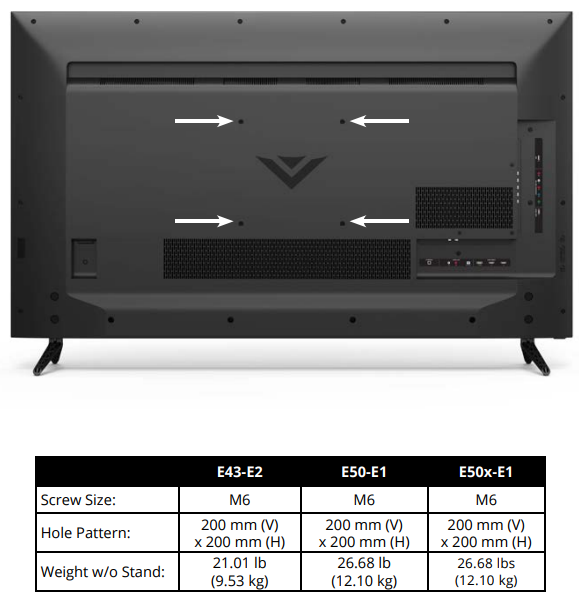
- To mount your Display on a wall, you will need a wall mount. Consult the information on this page to find the appropriate mount for your Display.
Be sure the mount you choose is capable of supporting the weight of the Display. After you have determined that you have the correct mount for your Display, you can begin the installation.
To install your Display on a wall:
- Disconnect any cables connected to your Display.
- Place the Displayface down on a clean, flat, stable surface. Be sure the surface is clear of debris that can scratch or damage the Display.
- Remove the stands by loosening and removing the screws.
- Attach your Display and wall mount to the wall, carefully following the instructions that came with your mount. Use only with a UL-listed wall mount bracket rated for the weight/load of this Display.
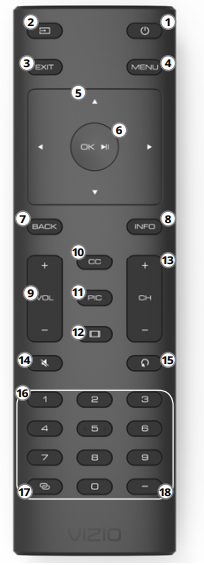
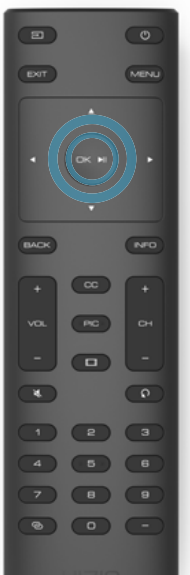
USING THE REMOTE
- Power - Turn the TV on or Off.
- Input - Change the currently displayed input.
- Exit - Close the on-screen menu.
- Menu - Display the on-screen menu.
- Arrows - Navigate the on-screen menu.
- OK / Enter - Select the highlighted option / Confirm channel or passcode entered using the number pad.
- Back - Go to the previous on-screen menu.
- Info - Display the info window.
- Volume Up/Down - Increase or decrease the loudness of the audio.
- Closed Captions - Open the closed caption menu.
- PIC - Opens the picture mode menu.
- Wide - Change the display mode.
- Channel Up/Down - Not supported on this model.
- Mute - Turn the audio on or off.
- Last - Not supported on this model.
- Number Pad - Not supported on this model.
- Link - Launches pair with the VIZIO SmartCast App.
- Dash - Not supported on this model.
Replacing the Batteries
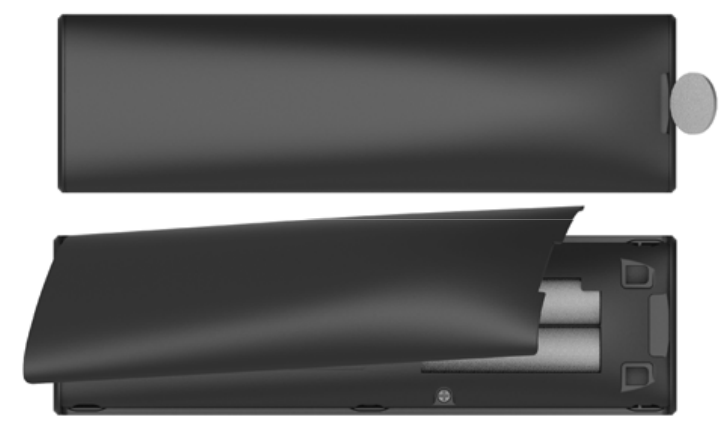
- Remove the battery cover by pressing down on the arrow markings and sliding it out.
- Insert two batteries into the remote control. Make sure that the (+) and (-) symbols on the batteries match the (+) and (-) symbols inside the battery compartment.
- Replace the battery cover.
In many places, batteries cannot be thrown away or discarded with household waste. Please ensure you properly dispose of your batteries consistent with the laws and/or regulations where you live. - WARNING: Keep the remote control batteries away from children. It may cause choking and/or lead to a fire or chemical burn if mishandled. Do not dispose of batteries in a fire. Replace only with batteries of the correct type. When needed, VIZIO recommends replacing the batteries that came with this remote with two, new Duracell 'AAA' alkaline batteries.
POWER UP WITH DURACELL
Completing First-Time Setup

The first time you turn on the Display, you can choose how to set up your VIZIO SmartCast™ Display. Complete Setup with the VIZIO SmartCast* App (recommended): Download the free VIZIO SmartCast™ App on your smartphone or tablet to set up your VIZIO display. Use your phone to power on your display, adjust the volume, switch inputs, and play and control streaming content from your iOS or Android device.
Complete Setup with the IR Remote:
Use the included IR remote to manually set up your display. The VIZIO SmartCast™ App is still VIZIO's recommended setup method. Please note that a mobile device (not included) is still required to cast content from apps like Netflix and YouTube.
Before you begin the first-time setup:
- Your Display should be installed, and the power cord should be connected to an electrical outlet.
- Your devices should be connected.
- If you have a wireless network, have the network password ready.
- If you are connecting to your network with an Ethernet cable, connect it to the Ethernet port on the Display.
Set up with the VIZIO SmartCast™ App
- Download the free VIZIO SmartCast™ App on your mobile device and launch the app.
- Pair your mobile device to your display.
- Follow the instructions on your mobile device and display screen to complete setup.
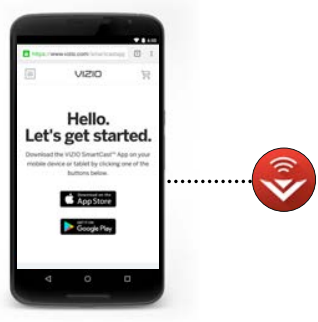
iOS Device Paring:
- Select Get Started.
- Hold your mobile device next to the VIZIO logo on your Display.
Android Device Pairing:
- Note the Wi-Fi setup name in the top corner of your Display.
- Select Get Started and select your preferred language.
- Select your Display name from the list shown on your device.
Need help installing the display?
- Refer to the printed Quick Start Guide for detailed instructions on how to install your new E-Series display.
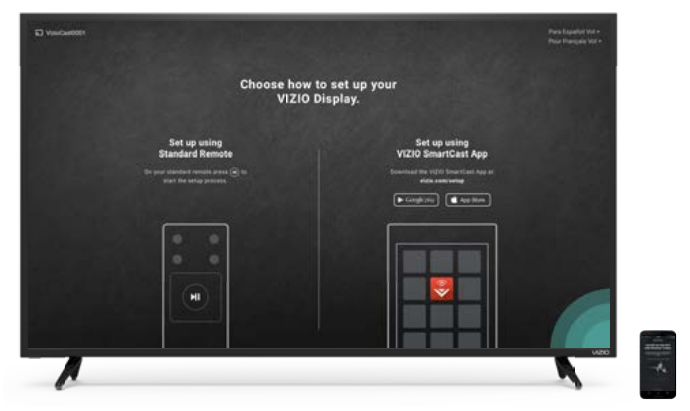
Set up with the IR Remote
- Press the OK/Play key on your IR remote during the initial setup screen.
- Use the Arrow Keys and the OK/
Play button to select and confirm settings. - Follow the instructions on the screen to complete the setup.
Specifications
E43-E2
- Screen Size:
- 43°
- Viewable Area:
- 42.51°
- Dimensions w/ Stand: w/o Stand:
- 38.39" x 24.54" x 8.23" (97.50 x 62.33x 20.90 cm)
38.39" × 22.38" x 3.39" (97.50 x 56.85 x 8.8 cm)
- 38.39" x 24.54" x 8.23" (97.50 x 62.33x 20.90 cm)
- Weight w/ Stand: w/o Stand:
- 21.38 Ibs (9.70 kg)
- 21.01 Ibs (9.53 kg)
- LCD Backlight:
- Direct LED
- Refresh Rate:
- 60 Hz|
- Maximum Resolution:
- 3840 x 2160p (UHD)|
- Dynamic Contrast Ratio:
- \200,000:1
- Pixel Pitch:
- 0.245 mm (H) X 0.245 mm (V)
- Viewing Angle:
- 178° (H) / 178° (V)
- HDMI Inputs:
- 4
- Component Video Inputs:
- 1
- Composite Inputs:
- 1
- RF Antenna Input:
- 0
- USB Port:
- 1
- Audio Outputs:
- RCA Analog Stereo Output, Optical Digital|
- OSD Language:
- English, French, Spanish
- Ambient Light Sensor:
- Yes
E43-E2
- Remote Control Model:
- XRT135
- Certifications:
- C-US, CSA, FCC Class B, BETS-7/ICES-003 Class B, IC, HDMI ( CEC , ARC ) Dolby Audio
- Voltage Range:
- 120 V @ 60 Hz
- Power Consumption:
- 71.03 W
- Standby Power:
- <0.5W
- Zero Bright Pixel Guarantee:
- Yes
- Screw Size:
- M6
- Hole Pattern:
- 200 mm (V) x 200 mm (H)
E50-E1
- Screen Size:
- 50"
- Viewable Area:
- 49.5"
- dimensions w/ Stanc 1/o Stanc
- 44.40" x 27.97" x 10.04" (112.78 x 71.04 x 25.5 cm) |
- 44.40" x 25.61" x 2.99" (112.78 x 65.04 x 7.6 cm)|
- Weight w/ Stand: w/o Stand:
- 27.34 lbs (12.40 kg)
- 26.68 Ibs (12.10 kg)
- LCD Backlight:
- Direct LED
- Refresh Rate:
- 120 Hz
- Maximum Resolution:
- 3840 x 2160p (UHD)
- Dynamic Contrast Ratio:
- 200,000:1
- Pixel Pitch:
- 0.2854 mm (H) X 0.2854 mm (V)
- Viewing Angle:
- 178° (H) / 178° (V)|
- HDMI Inputs:
- 4
- Component Video Inputs:
- 1
- Composite Inputs:
- 0
- RF Antenna Input:
- 0
- USB Port:
- 1
- Audio Outputs:
- RCA Analog Stereo Output, Optical Digital
- OSD Language:
- English, French, Spanish
- Ambient Light Sensor:
- Yes
- Remote Control Model:
- XRT135
- Certifications:
- C-US, CSA, FCC Class B, BETS-7/ICES-003 Class B, IC, HDMI ( CEC, ARC), Dolby Audio
- Voltage Range:
- 120 V @ 60 Hz
- Power Consumption:
- 97.14 W
- Standby Power:
- <0.5W
- Zero Bright Pixel Guarantee:
- Yes
- Screw Size:
- M6
- Hole Pattern:
- 200 mm (V) x 200 mm (H)
- Screen Size:
- 50"
- Viewable Area:
- 49.5"
- Dimensions w/ Stand: w/o Stand:
- 44.40" x 27.97" x 10.04" (112.78 x 71.04 x 25.5 cm) 44.40" x 25.61" x 2.99" (112.78 x 65.04 x 7.6 cm)
- Weight w/ Stand: w/o Stand:
- 27.34 lbs (12.40 kg) 26.68 lbs (12.10 kg)
- LCD Backlight:
- Direct LED
- Refresh Rate:
- 60 Hz
- Maximum Resolution:
- 3840 x 2160p (UHD)
- Dynamic Contrast Ratio:
- 200,000:1
- Pixel Pitch:
- 0.2854 mm (H) X 0.2854 mm (V)
- Viewing Angle:
- 178° (H) / 178° (V)
- HDMI Inputs:
- 4
- Component Video Inputs:
- 0
- Composite Inputs:
- 0
- RF Antenna Input:
- 0
- USB Port:
- 0
- Audio Outputs:
- RCA Analog Stereo Output, Optical Digital
- OSD Language:
- English, French, Spanish
- Ambient Light Sensor:
- Yes
- Remote Control Model:
- XRT135
- Certifications:
- C-US, CSA, FCC Class B, BETS-7/ICES-003 Class B, IC, HDMI ( CEC, ARC), Dolby Audio
- Voltage Range:
- 120 V @ 60 Hz
- Power Consumption:
- 97.14 W
- Standby Power:
- <0.5W
- Zero Bright Pixel Guarantee:
- Yes
- Screw Size:
- M6
- Hole Pattern:
- 200 mm (V) x 200 mm (H)
Limited Warranty
UNITED STATES AND CANADA
BY USING YOUR VIZIO PRODUCT, CT YOU AGREE TO BE BOUND BY ALL THE TERMS OF THIS WARRANTY. BEFORE USING YOUR VIZIO PRODUCT, PLEASE READ THIS WARRANTY CAREFULLY. IF YOU DO NOT AGREE TO THE TERMS OF THIS WARRANTY, DO NOT USE THE VIZIO PRODUCT AND, WITHIN THIRTY (30) DAYS OF THE DATE OF PURCHASE, RETURN IT FOR A REFUND TO THE AUTHORIZED RETAILER WHERE YOU PURCHASED IT.
This warranty contains a binding arbitration agreement and a class action waiver for United States residents. If you live in the United States, the binding arbitration agreement and class action waiver affect your rights under this warranty. Please read the text under the section titled "Binding Arbitration Agreement; Class Action Waiver (U.S. Residents Only)" carefully.
How LoDoes ng This Warranty Last
For non-commercial use, VIZIO warrants the product on the terms set forth below for one (1) year from the date of original purchase. For commercial use, VIZIO warrants this product on the terms set forth below for ninety (90) days from the date of original purchase. What This Warranty Covers VIZIO warrants the product against defects in materials and workmanship when the product is used normally in accordance with VIZIO's user guides and manuals.
Except where restricted by law, this warranty applies only to the original purchaser of a new product. The purchase must have been made from an authorized retailer in the United States (including Puerto Rico) or Canada.
The product must also be located in the country where it was purchased at the time of warranty service.
Zero Bright Pixel Defect Guarantee (Displays Only)
Your product may qualify for a warranty against "zero bright pixel" defects for the duration of the warranty on select new product purchases. To determine if this guarantee applies to your product, refer to the model's product information page
Your Obligations Before Service
- You must obtain pre-authorization before sending your product to a VIZIO service center. You may be required to supply a purchase receipt (or copy) to show that the product is within the warranty period.
- When you return a product to a VIZIO service center, you must ship the product in its original packaging or in packaging that affords an equal degree of protection. VIZIO Technical Support will provide instructions for packing and shipping the product to the VIZIO service center.
ALL USER DATA AND DOWNLOADED APPLICATIONS STORED ON A PRODUCT WILL BE DELETED IN THE COURSE OF SOME IN-HOME ALL-IN-WARRANTY SERVICE.
If this occurs, your product will be restored to its original state. You will be responsible for restoring all applicable user data and downloaded applications. Recovery and reinstallation of user data and downloaded applications are not covered under this warranty. To protect your personal information, VIZIO recommends that you always clear all personal information from the product before it is serviced, regardless of the servicer.
VIZIO's Responsibilities
If VIZIO determines that a product is covered by this warranty, VIZIO will (at its option) repair or replace it, or refund the purchase price to you.
There will be no charge for parts or labor during the warranty period. Replacement parts may be new or recertified at VIZIO's option and sole discretion. Replacement parts and VIZIO's labor are warranted for the remaining portion of the original warranty or for ninety (90) days from warranty service, whichever is longer.
Types of Service
Displays that are 32 inches or larger will usually be serviced in-home. In-home service requires complete and easy access to the product and does not include de-installation or re-installation of the product. In-home service is subject to availability. VIZIO will provide other service options when in-home service is not available.
All other VIZIO products must be sent to a VIZIO service center to obtain warranty service. VIZIO is not responsible for transportation costs to the service center, but VIZIO will cover return shipping to the customer.
What This Warranty Does Not Cover: This warranty does not cover:
- cosmetic damage;
- normal wear and tear;
- improper operation;
- improper voltage supply or power surges;
- signal issues;
- damage from shipping;
- acts of God;
- customer misuse, modification,s or adjustments;
- installation, set-up, or repairs attempted by anyone other than by a VIZIO authorized service center;
- products with unreadable or removed serial numbers;
- products requiring routine maintenance; or
- products sold "AS IS", "CLEARANCE", "FACTORY RECERTIFIED", or by a non-authorized reseller.
What to Do If You Are Not Satisfied With Service
If you feel VIZIO has not met its obligations under this warranty, you may attempt to resolve the issue informally with VIZIO. If you are unable to resolve the issue informally and wish to file a formal claim against VIZIO, and if you are a resident of the United States, you must submit your claim to binding arbitration according to the procedures described below, unless an exception applies. Submitting a claim to binding arbitration means that you do not have the right to have your claim heard by a judge or jury. Instead, your claim will be heard by a neutral arbitrator.
Binding Arbitration Agreement; Class Action Waiver (U.S. Residents Only) | UNLESS YOU HAVE BROUGHT AN ELIGIBLE CLAIM IN SMALL CLAIMS COURT OR HAVE OPTED OUT AS DESCRIBED BELOW, ANY CONTROVERSY OR CLAIM RELATING IN ANY WAY TO YOUR VIZIO PRODUCT, INCLUDING ANY CONTROVERSY OR CLAIM ARISING OUT OF OR RELATING TO THIS WARRANTY, A BREACH OF THIS WARRANTY, OR THE VIZIO PRODUCT'S SALE, CONDITION OR PERFORMANCE, WILL BE SETTLED BY BINDING ARBITRATION ADMINISTERED BY THE AMERICAN ARBITRATION ASSOCIATION AND CONDUCTED BY A SINGLE ARBITRATOR APPOINTED BY THE AMERICAN ARBITRATION ASSOCIATION, IN ACCORDANCE WITH ITS COMMERCIAL ARBITRATION RULES AND ITS SUPPLEMENTARY PROCEDURES FOR CONSUMER-RELATED DISPUTES.
You may learn more about the American Arbitration Association and its rules for arbitration by visiting adr.org or by calling 800-778-7879. Since this warranty concerns a transaction in interstate or international commerce, the Federal Arbitration Act will apply.
The filing fees to begin and carry out arbitration will be shared between you and VIZIO, but in no event will your fees ever exceed the amount allowable by the American Arbitration Association, at which point VIZIO will cover all additional administrative fees and expenses. VIZIO waives its
Pros & Cons of the Vizio SmartCast Display
- Pros:
- Vivid Picture Quality: Ultra HD resolution with HDR10 support and Full-Array backlighting delivers super sharp, vibrant visuals with deep blacks and rich colors.
- SmartCast Platform: Intuitive interface with Chromecast built-in and AirPlay 2 allows easy streaming from multiple devices without extra hardware.
- Gaming-Optimized Features: Technology like Clear Action™ 720 and a 240Hz effective refresh rate reduce motion blur for smooth gameplay and sports viewing.
- Affordable Pricing: Offers excellent value compared to other premium smart displays with similar feature sets.
- Wireless Connectivity: Supports Bluetooth headphone pairing for private listening and multiple HDMI inputs for versatile device connections.
- Cons:
- Software Updates: Some users report occasional delays or glitches in firmware updates affecting SmartCast app performance.
- Viewing Angles: VA panel technology in some models can result in reduced color accuracy from wide viewing angles compared to IPS panels.
- Sound Quality: Built-in speakers may lack bass depth, often necessitating external sound systems for immersive audio.
- Limited App Store: While extensive, the SmartCast app selection is not as broad as some competitor platforms like Roku or Amazon Fire TV.
Customer Reviews and Feedback on the Vizio SmartCast Display
Users generally praise the Vizio SmartCast Display for its crisp visuals, easy-to-use SmartCast interface, and strong value for money. Many highlight the seamless casting experience with smartphones and commend the picture quality, especially on models with Ultra HD and HDR support. Star ratings commonly hover around 4 to 4.5 out of 5 stars from verified purchasers.
Common complaints include occasional software bugs requiring restarts, sound quality that falls short of expectations, and limited app availability compared to other smart TV ecosystems. Nevertheless, a significant number of buyers recommend the display for casual gamers, streaming fans, and budget-conscious buyers who desire a smart TV with modern features and solid performance.
Testimonials emphasize the Vizio SmartCast Display’s strong picture quality and integrated smart features as key reasons for purchase, while advising prospective buyers to consider external audio solutions and stay updated with firmware improvements.
More vizio manuals
- Setup: Vizio 5.1 Soundbar SV510MW-0906 Instruction Guide
- Setup & Usage: Vizio E-Series 720p Smart LED TV E28h-C1 User Manual
- Vizio SV410XW-0905 4.1 Soundbar System User Manual
- Vizio Quantum Pro Smart TV VQP75C-84 User Manual
- Vizio Elevate Pro 7.1.4 Soundbar SL714PW-1006 User Manual
- Vizio 2.1 Soundbar Stand with Remote SS2521-C6 User Guide
Leave a Comment