
Setup & Usage: Vizio E-Series 720p Smart LED TV E28h-C1 User Manual
Content
vizio E-Series 720p Smart LED TV E28h-C1
Introduction
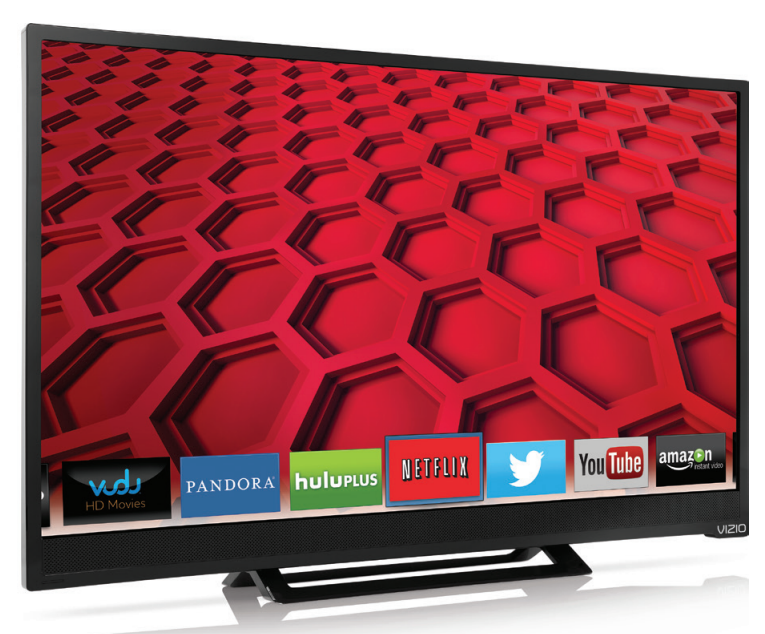
The vizio E-Series 720p Smart LED TV E28h-C1 is a compact, feature-packed 28-inch television designed for users seeking a reliable smart TV experience in smaller living spaces like bedrooms, dorm rooms, or kitchens. This model offers a crisp 720p HD resolution with LED backlighting and a 60Hz refresh rate that delivers smooth picture quality for everyday entertainment needs. Integrated smart capabilities allow seamless streaming of popular platforms such as Netflix, Hulu, YouTube, and Pandora via built-in Wi-Fi or Ethernet connection, making it ideal for casual viewers who want easy access to online content without additional devices.
Key benefits include its user-friendly Vizio SmartCast interface, dual HDMI ports for flexible connectivity with gaming consoles or Blu-ray players, and USB support for playback of photos, videos, and music from external drives. The TV’s slim design, glossy finish, and manageable size complement various room setups, while its Energy Star certification ensures efficient power use. Typically priced in the affordable range of approximately $120 to $160, this model provides excellent value for budget-conscious shoppers looking for a no-frills smart TV with solid performance and connectivity options.
Targeted toward consumers who prioritize ease of use, internet streaming, and moderate HD picture quality without requiring full 1080p resolution, the vizio E28h-C1 is well suited for secondary TV setups or compact spaces where high-end features are less critical but smart functionality is desired.
Installing the TV
INSPECTING THE PACKAGE CONTENTS
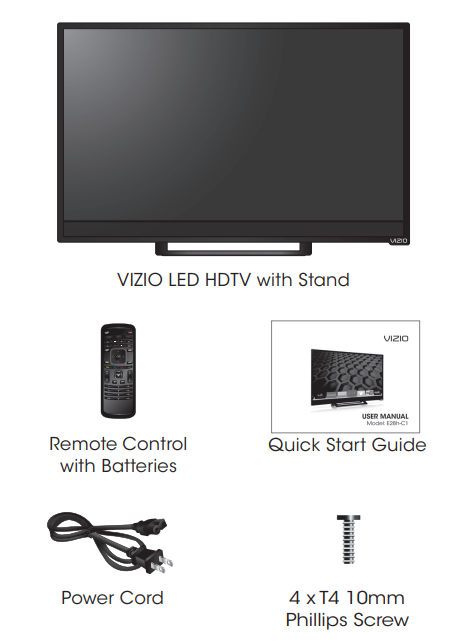
Before installing your new TV, take a moment to inspect the package contents. Use the images below to ensure nothing is missing or damaged.
INSTALLING THE TV
After removing the TV from the box and inspecting the package contents you can begin installing the TV. Your TV can be installed in two ways:
- On a flat surface, using the included stand
- On a wall, using a VESA-standard wall mount (not included)
Installing the TV Stand
Your TV includes a stand designed to support the weight of the TV and keep it from falling over. However, the TV can still fall over if:
- It is placed on an uneven, unstable, or non-level surface
- It is pushed, pulled, or otherwise improperly moved
- If an earthquake occurs and the TV is not properly secured
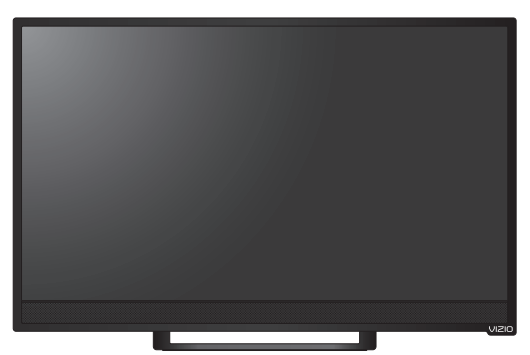
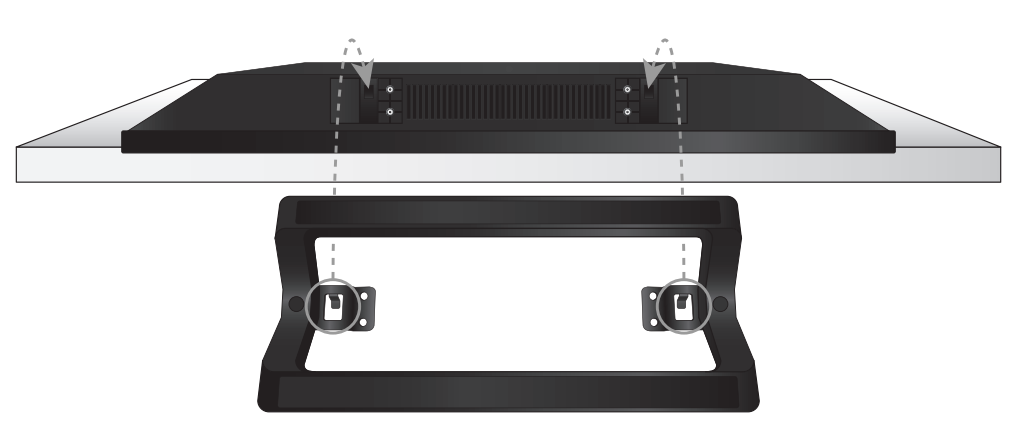
To install the base:
- Place the TV screen-down on a clean, flat surface. To prevent scratches or damage to the screen, place the TV on a soft surface, such as a blanket.
- Align the stand and hook it into the bottom of the TV as shown.
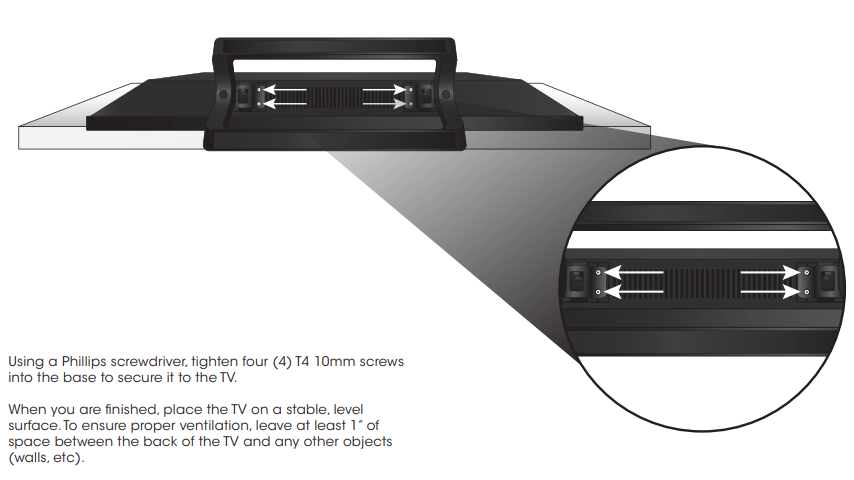
Installing the TV on a Wall
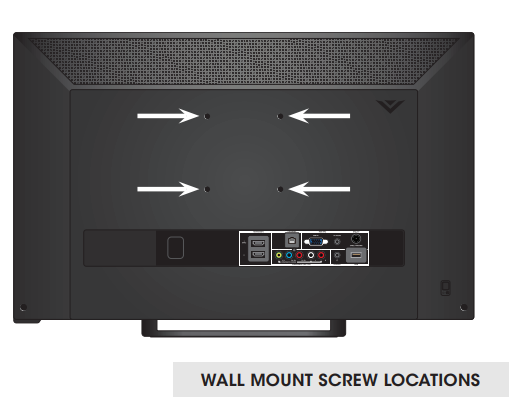
To mount your TV on a wall, you will need a wall mount. Consult the information below to find the appropriate mount for your TV model:
Installing a TV on a wall requires lifting. To prevent injury or damage to the TV, ask someone to help you.
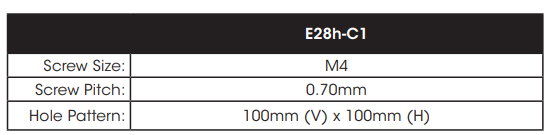
Be sure the mount you choose is capable of supporting the weight of the TV. After you have determined that you have the correct mount for your TV, you can begin the installation.
To install your TV on a wall:
- Disconnect any cables connected to your TV.
- Place the TV face-down on a clean, flat, stable surface.
Be sure the surface is clear of debris that can scratch or damage the TV. - Remove the base by loosening and removing the screws.
- Attach your TV and wall mount to the wall, carefully following the instructions that came with your mount.
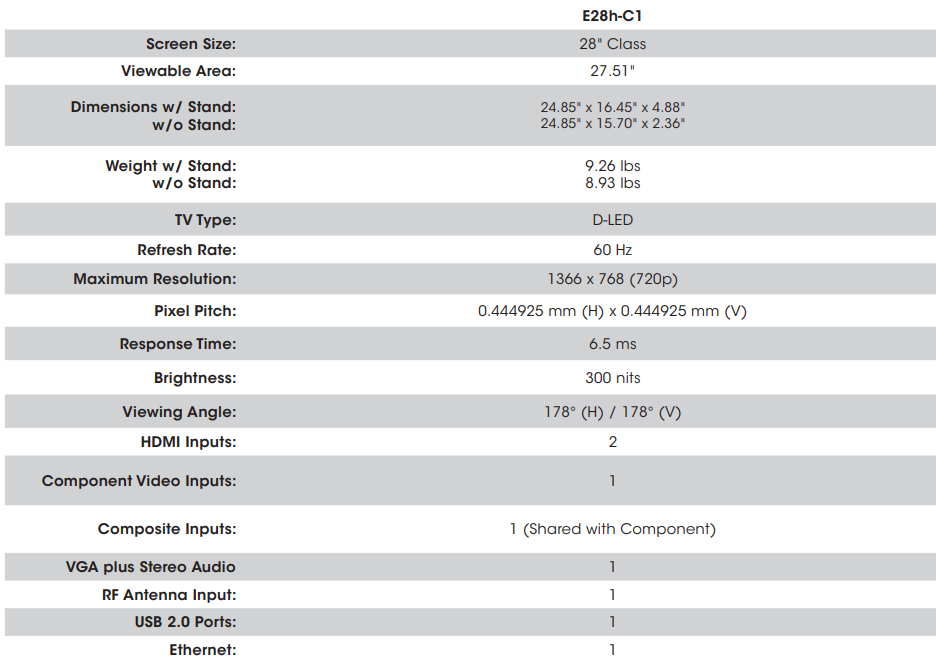
Use only with a UL-listed wall mount bracket rated for the weight/load of this TV. See Appendix B - Specifications for the weight of this TV.
Specifications
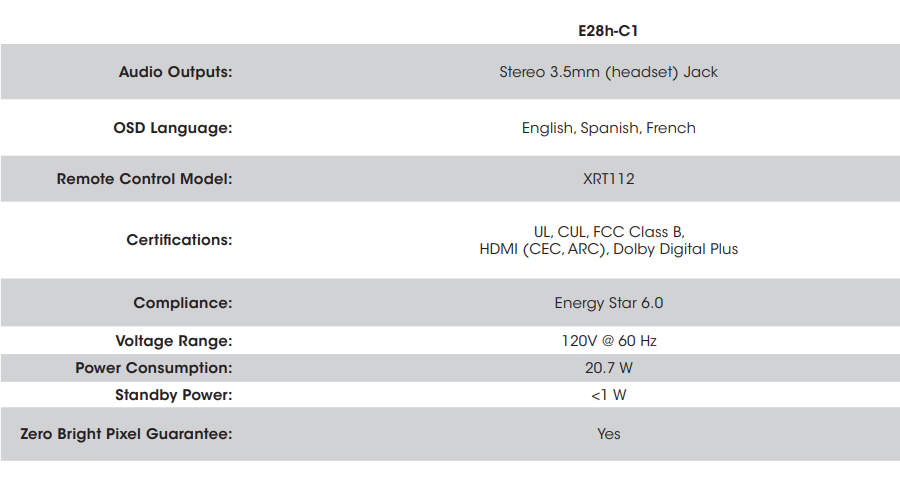
Limited Warranty
ON PARTS AND LABOR
Covers units purchased as new in United States and Puerto Rico Only. VIZIO provides a warranty to the original purchaser of a new Product against defects in materials and workmanship for a period of one (1) year of non-commercial usage and ninety (90) days of commercial use. If a Product covered by this warranty is determined to be defective within the warranty period, VIZIO will either repair or replace the Product at its sole option and discretion.
To obtain warranty service, contact VIZIO via phone at 877 MY VIZIO (877.698.4946) from 7:00AM to 11:00PM Monday through Friday and 9:00AM to 6:00PM Saturday and Sunday, Pacific Time, PRE-AUTHOR-IZATION MUST BE OBTAINED BEFORE SENDING ANY PRODUCT TO A VIZIO SERVICE CENTER. Proof of purchase in the form of a purchase receipt or copy thereof is required to show that a Product is within the warranty period.
Parts and Labor
There will be no charge for parts or labor during the warranty period. Replacement parts and Products may be new or recertified at VIZIO’s option and sole discretion. Replacement parts and Products are warranted for the remaining portion of the original warranty or for ninety (90) days from warranty service or replacement, whichever is greater.
Type of Service
Defective Products must be sent to a VIZIO service center to obtain warranty service. VIZIO is not responsible for transportation costs to the service center, but VIZIO will cover return shipping to the customer. PRE-AUTHORIZATION IS REQUIRED BEFORE SENDING ANY PRODUCT TO A VIZIO SERVICE CENTER FOR WARRANTY SERVICE.
Product returns to VIZIO’s service centers must utilize either the original carton box and shipping material or packaging that affords an equal degree of protection. VIZIO Technical Support will provide instructions for packing and shipping the covered Product to the VIZIO service center.
Limitations and Exclusions
VIZIO’s one-year limited warranty only covers defects in materials and workmanship. This warranty does not cover, for example: cosmetic damage, normal wear and tear, improper operation, improper voltage supply or power surges, signal issues, damages from shipping, acts of God, any type of customer misuse, modifications or adjustments, as well as installation and set-up issues or any repairs attempted by anyone other than by a VIZIO authorized service center. Products with unreadable or removed serial numbers, or requiring routine maintenance are not covered. This one year limited warranty does not cover Products sold “AS IS”, “FACTORY RECERTIFIED”, or by a non-authorized reseller.
THERE ARE NO EXPRESS WARRANTIES OTHER THAN THOSE LISTED OR DESCRIBED ABOVE. ANY IMPLIED WARRANTIES, INCLUDING ANY IMPLIED WARRANTY OF MERCHANTABILITY AND FITNESS FOR A PARTICULAR PURPOSE, SHALL BE LIMITED IN DURATION TO THE PERIOD OF TIME SET FORTH ABOVE. VIZIO’S TOTAL LIABILITY FOR ANY AND ALL LOSSES AND DAMAGES RESULTING FROM ANY CAUSE WHATSOEVER INCLUDING VIZIO’S NEGLIGENCE, ALLEGED DAMAGE, OR DEFECTIVE GOODS, WHETHER SUCH DEFECTS ARE DISCOVERABLE OR LATENT, SHALL IN NO EVENT EXCEED THE PURCHASE PRICE OF THE PRODUCT. VIZIO SHALL NOT BE RESPONSIBLE FOR LOSS OF USE, LOSS OF INFORMATION OR DATA, COMMERCIAL LOSS, LOST REVENUE OR LOST PROFITS, OR OTHER INCIDENTAL OR CONSEQUENTIAL DAMAGES. SOME STATES DO NOT ALLOW LIMITATIONS ON HOW LONG AN IMPLIED WARRANTY LASTS OR THE EXCLUSION OF INCIDENTAL OR CONSEQUENTIAL DAMAGES, SO THE ABOVE LIMITATIONS OR EXCLUSIONS MAY NOT APPLY TO YOU. THIS WARRANTY GIVES YOU SPECIFIC LEGAL RIGHTS, AND YOU MAY ALSO HAVE OTHER RIGHTS, WHICH VARY FROM STATE TO STATE. THIS WARRANTY IS SUBJECT TO CHANGE WITHOUT NOTICE.
Personal Data
If your VIZIO product is capable of storing personal data and other information, ALL CONTENTS AND INFORMATION WILL BE DELETED IN THE COURSE OF SOME IN-HOME AND ALL SHIP-IN WARRANTY SERVICE. If this occurs, your product will be restored to you configured as originally purchased. You will be responsible for restoring all applicable data and passwords. Recovery and reinstallation of user data is not covered under this Limited Warranty. In order to protect your personal information, VIZIO recommends that you always clear all personal information from the unit before it is serviced, regardless of the servicer.
Zero Bright Pixel Defect Guarantee
This policy covers “zero bright pixel” defects for the duration of the limited “ONE YEAR WARRANTY” on select new product purchases. To determine if this guarantee applies to your product, refer to the “DETAILS” tab of the model’s product information page
Troubleshooting
The TV displays “No Signal.”
- Press the INPUT button on the remote control to select a different input source.
- If you are using cable TV, satellite, or an antenna connected directly to the TV, scan for channels. See
Scanning for Channels on page 37.
There is no power.
- Ensure the TV is plugged into a working electrical outlet.
- Ensure the power cable is securely attached to the TV.
- Press the Power/Standby button on the remote or on the side of the TV to turn the TV on.
The power is on, but there is no image on the screen.
- Ensure all cables are securely attached to the TV.
- Ensure all devices are connected correctly. Devices differ; see your device’s user manual for details.
- Adjust Brightness, Contrast, or Backlight. See Adjusting the Picture Settings on page 24.
- Press the INPUT button on the remote to select a different input source.
There is no sound.
- Press Volume Up on the remote control.
- Press the MUTE button on the remote to ensure mute is off.
- Check the audio settings. See Adjusting the Audio Settings on page 32.
- Ensure the speakers are set to On.
- Ensure no headphones are connected to the TV.
- Check the audio connections of external devices(Blu-ray player, game console, cable/satellite box) that are connected to the TV.
- If you are using an antenna, the signal strength of the channel may be low. Ensure your antenna is connected securely to the TV and move the antenna around the room or close to a window for the best signal.
The sound is flat or dialog is not audible.
- Turn off Sound Leveling. See Adjusting the Audio Settings on page 32.
The colors on the TV don’t look right.
- Adjust the Color and Tint settings in the Picture menu. See Adjusting the Picture Settings on page 24.
- Reset the picture settings. See Deleting a Custom Picture Mode on page 31.
- Check all cables to ensure they are securely attached.
The buttons on the remote aren’t working.
- The Red and Yellow colored buttons below the V button do not work with this television.
- Ensure you are only pressing one button at a time.
- Point the remote directly at the TV when pressing a button.
- If the base is intalled, the remote must be at or above the level of the base.
- Replace the remote batteries with new ones. See
- Replacing the Batteries on page 11.
The image quality is not good.
- For the best image quality, view high-definition programs using digital sources. Connect your devices with HDMI cables.
- If you are using an antenna, the signal strength of the channel may be low. Ensure your antenna is connected securely to the TV and move the antenna around the room or close to a window for the best signal.
The picture is distorted.
- Nearby electrical devices may be interfering with the TV. Move the TV away from electrical appliances, cars, and fluorescent lights.
- Ensure all cables are securely attached.
The displayed image does not cover the entire screen.
- Set the TV image mode so that the picture fills the screen. Press the WIDE button on the remote until the screen is filled, and then press OK. See Changing the Screen Aspect Ratio on page 22.
The TV has pixels (dots) that are always dark or always lit.
- Your HDTV is precision-manufactured using an extremely high level of technology. However, sometimes pixels may not display correctly. These types of occurrences are inherent to this type of product and do not constitute a defective product.
I see “noise” or static on the screen.
- When your TV’s digital capabilities exceed a
digital broadcast signal, the signal is up-converted
(improved) to match your TV’s display capabilities. This up-converting can sometimes cause irregularities in the image. - If you are using an antenna, the signal strength of the channel may be low. Ensure your antenna is connected securely to the TV and move the antenna around the room or close to a window for the best signal.
When I change input source, the volume changes.
- The TV remembers the volume level on each input source. If the volume level on the new input source is higher or lower than the level on the source you switch from, the difference may be noticeable.
- Use the Volume Up/Down buttons on the remote to adjust the volume.
When I change input source, the display image changes size.
- The TV remembers the viewing mode on each input source. If the viewing mode on the new input source differs from the one on the input source you switch from, the difference may be noticeable. See Changing the Screen Aspect Ratio on page 22.
Pros & Cons of the vizio E-Series 720p Smart LED TV E28h-C1
Pros
- Sharp 720p HD Picture Quality: The 28-inch screen delivers detailed and natural colors with very good high-definition performance, suitable for casual viewing (Consumer Reports).
- Smart TV Functionality: Built-in Wi-Fi and Ethernet enable access to popular streaming apps like Netflix and Hulu without needing external devices (Best Buy).
- Flexible Connectivity: Includes 2 HDMI ports, a USB port, component and VGA inputs, supporting a variety of devices including computers and gaming consoles (User Manual).
- Compact and Stylish Design: Slim profile with a glossy black bezel fits well in smaller spaces and modern decor (Consumer Reports).
- Energy Efficient: ENERGY STAR certified in factory settings, offering power savings (User Manual).
- Affordable Price Point: Positioned as a budget-friendly smart TV, providing good value for casual users (Best Buy).
Cons
- 720p Resolution Only: Lower than Full HD, though the difference is minimal on 28-inch screens, making it less suitable for those demanding sharper image quality (YouTube review).
- Limited Viewing Angles: Narrow viewing angle can cause color and contrast shifts when viewed off-center (Consumer Reports).
- Semi-Gloss Screen: Some glare issues in bright environments may reduce viewing comfort (YouTube review).
- Basic Sound Quality: Speakers provide fair audio output; external sound systems may be preferred for enhanced sound experience (Consumer Reports).
- No Built-in Web Browser: Streaming apps only; lacks full internet browsing capabilities (Best Buy Q&A).
Customer Reviews and Feedback on vizio E-Series 720p Smart LED TV E28h-C1
Users generally appreciate the vizio E-Series 720p Smart LED TV E28h-C1 for its affordability, ease of use, and solid smart features. Many highlight the crisp 720p picture quality, stating it delivers vibrant and clear visuals for its size. The built-in SmartCast platform and Wi-Fi connectivity receive praise for straightforward streaming of favorite apps without lag or frequent disconnections.
Complaints commonly mention the limited resolution compared to newer Full HD or 4K models and occasional glare caused by the semi-gloss screen, which can impact viewing under bright lighting. Some users note that the internal speakers lack depth and may require external audio devices for a better sound experience.
Most customers rate this model around 4 out of 5 stars, recommending it primarily for bedrooms, dorms, or secondary TVs rather than main living room setups. Its value for money is often highlighted, especially for users wanting a smart TV at an economical price point.
Overall, the vizio E-Series 720p Smart LED TV E28h-C1 is endorsed for buyers who desire a compact, internet-connected TV with good picture quality in a budget-friendly package, with some trade-offs in resolution and sound quality acknowledged.
Faqs
How do I set up the vizio E-Series 720p Smart LED TV E28h-C1 for first-time use?
What should I do if the vizio E-Series 720p Smart LED TV E28h-C1 remote is not working?
Can the vizio E-Series 720p Smart LED TV E28h-C1 connect to both Wi-Fi and Ethernet networks?
How do I mount the vizio E-Series 720p Smart LED TV E28h-C1 on a wall safely?
What picture modes are available on the vizio E-Series 720p Smart LED TV E28h-C1 and how do I change them?
How can I troubleshoot if my vizio E-Series 720p Smart LED TV E28h-C1 has no sound?
What maintenance is recommended to keep the vizio E-Series 720p Smart LED TV E28h-C1 in good condition?
Is the vizio E-Series 720p Smart LED TV E28h-C1 compatible with gaming consoles and Blu-ray players?
More vizio manuals
- How to Use: Vizio SmartCast Display User Manual
- Vizio Quantum Pro Smart TV VQP75C-84 User Manual
- Setup: Vizio 5.1 Soundbar SV510MW-0906 Instruction Guide
- Vizio 2.1 Soundbar Stand with Remote SS2521-C6 User Guide
- Vizio SV410XW-0905 4.1 Soundbar System User Manual
- Vizio SmartCast Crave Go Speaker SP30-E0 User Manual
Leave a Comment