
Setup: Aiwa AT-X80E II True Wireless Earphones User Manual
Content
Aiwa AT-X80E II True Wireless Earphones: Complete Product Manual and Guide
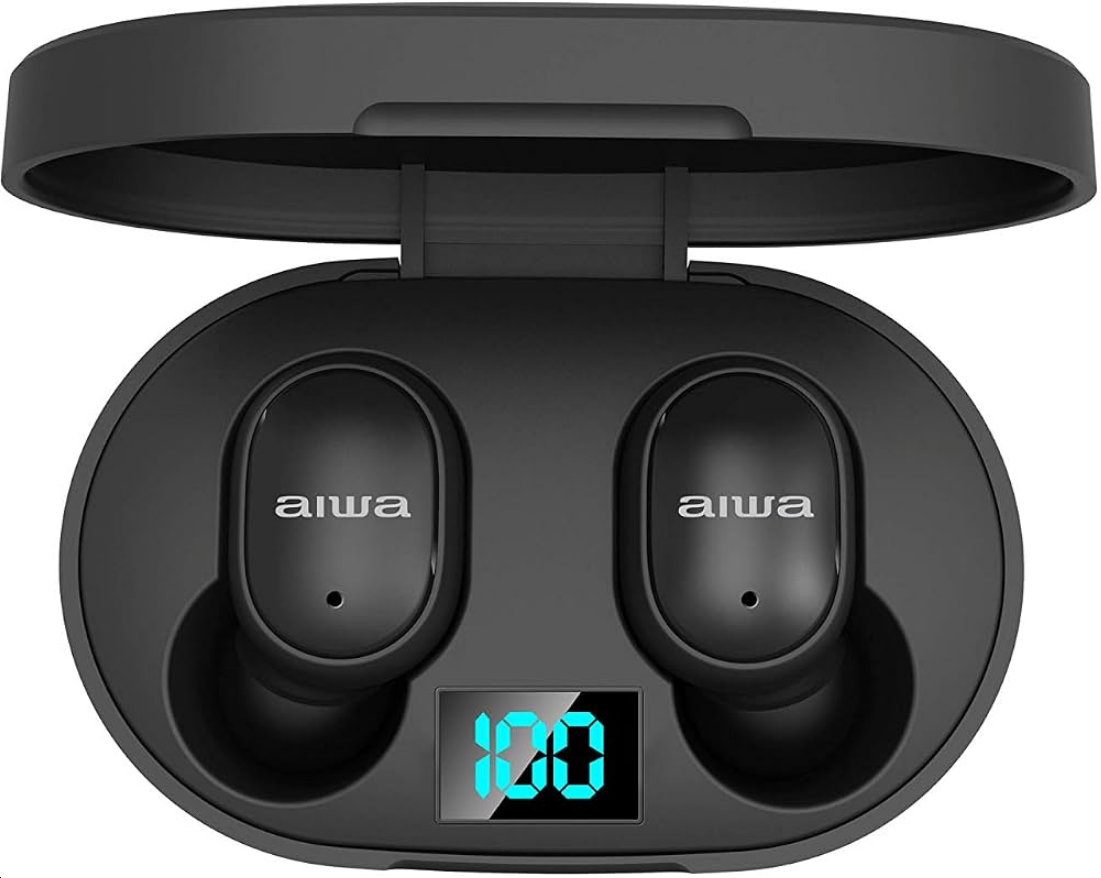
Introduction to Aiwa AT-X80E II True Wireless Earphones
The Aiwa AT-X80E II True Wireless Earphones deliver premium wireless audio freedom with cutting-edge Bluetooth 5.1 connectivity, making them ideal for music lovers, commuters, and fitness enthusiasts seeking hassle-free listening. These true wireless earbuds feature an 8mm driver unit for rich sound with deep bass, clear highs, and balanced mids, supporting a frequency response of 20 Hz to 20 kHz, 93 dB sensitivity, and 16 ohm impedance for immersive audio experiences.
Key benefits include up to 6 hours of playback per charge, an LCD on the charging case for battery status, seamless automatic pairing, and hands-free calling via built-in microphones. The ergonomic in-ear design with multiple silicone ear tips ensures a comfortable, secure fit for extended sessions, while touch controls allow effortless play/pause, volume adjustment, and track skipping. With a 10m Bluetooth range, 2-hour charging time, and up to 1680 hours standby, these earphones excel in daily use cases like workouts, calls, podcasts, and travel.
Targeted at budget-conscious users wanting reliable TWS earbuds, the Aiwa AT-X80E II stands out with its lightweight 31g build, LED indicators, and 1-year replacement warranty against manufacturing defects. Priced in the affordable range of approximately $20-40, they are widely available on e-commerce platforms in black or white. Experience high-definition audio without cords for ultimate portability and convenience.
Product Specifications
- Model Number: AT-X80E II
- Bluetooth Version: 5.1
- Earbuds Battery: 3.7V / 38mAh
- Charging Case Battery: 3.7V / 200mAh
- Supported Bluetooth Profiles: HFP, HSP, A2DP, AVRCP
- Sensitivity: 94dB ± 3dB SPL @ 1kHz
- Transmission Distance: Up to 10 meters (without obstacles)
- Playback/Call Time: Up to 4 hours
- Standby Time: Up to 70 days
- Charging Case Charging Time: Approximately 1.5 hours
- Earbuds Charging Time: Approximately 1.5 hours
Unboxing
- AT-X80E Earbuds
- Portable Charging Case
- Braided Nylon Type-C Charging Cable
- Silicone Ear-tips
- User' s Manual
Product Usage Guide
- Power On:
- Automatic: Remove the earbuds from the charging case.
- Manual: Press and hold both the left (L) and right (R) earbuds to power them on.
- Shut Down:
- Automatic: Place the earbuds back into the charging case.
- Manual: Press and hold both the left (L) and right (R) earbuds to power them off.
Automatic Connection:
The AT-X80E II earbuds automatically reconnect to the last paired mobile device when Bluetooth is enabled and the device is within range.
Play/Pause:
Tap the left (L) or right (R) earbud once.
Previous Track:
Press and hold the left (L) earbud for 2 seconds until a short beep sounds.
Next Track:
Press and hold the right (R) earbud for 2 seconds until a short beep sounds.
Volume Up (+):
Double-tap the left (L) earbud.
Volume Down (-):
Double-tap the right (R) earbud.
Answer/End Calls:
Tap the left (L) or right (R) earbud once to answer or end a call.
Reject Calls:
Press and hold the left (L) or right (R) earbud for 2 seconds.
Redial Number:
Triple-tap the left (L) earbud.
Voice Assistant:
Triple-tap the right (R) earbud.
Low Battery Prompt:
A low-battery notification tone sounds every 30 seconds until the earbuds are powered off.
Connecting the Product
Link Left (L) and Right (R) Earbuds:
- Power on both earbuds automatically or manually.
- The earbuds will enter linking mode, indicated by alternating red and white lights.
- The earbuds will automatically connect to each other. A sound prompt will confirm the connection. The indicator light on one earbud will turn off, while the other will continue flashing red and white.
- Both earbuds are now linked and ready to pair with a mobile device.
Pair Mobile Device with Earbuds:
- Enable Bluetooth on your mobile device.
- Power on the earbuds.
- Search for and select "AT-X80E II" from the list of available Bluetooth devices.
- A beep from the right (R) earbud indicates successful pairing.
- The indicator lights on both earbuds will turn off once pairing is complete.
Single Earbud Pairing:
To pair a single earbud, follow the same procedure described in the Pair Mobile Device with Earbuds section above.
Charging
- AT-X80E II Earbuds
- Portable Charging Case
- Braided Nylon USB Type-C Charging Cable
- Silicone Ear Tips
- User Manual
Charging the Earbuds:
Place the earbuds into the charging case to begin charging.
- Red Indicator Lights: Indicate that the earbuds are charging.
- Indicator Lights Off: Indicate that the earbuds are fully charged.
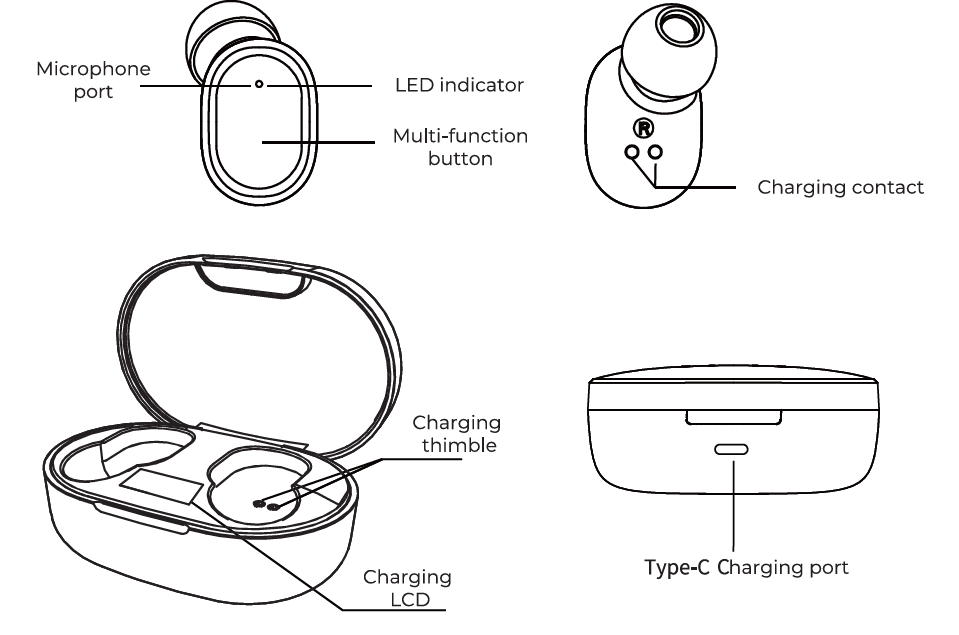
- Built-in LCD Display: Shows the current battery level of the earbuds.
- LCD Automatic Shutoff: The display turns off when the earbuds are fully charged.
Troubleshooting Aiwa AT-X80E II True Wireless Earphones: Common Issues and Fixes
Encountering problems with your Aiwa AT-X80E II True Wireless Earphones? Start by ensuring the charging case has power and earbuds are properly seated. For connectivity issues like pairing failures, power off both earbuds by placing them in the case, wait 10 seconds, and remove for automatic power-on and pairing.
- No sound or one earbud not working: Clean ear tips and contacts; reset by holding touch controls for 10 seconds until LED flashes. Check Bluetooth range (max 10m).
- Battery drains quickly: Lower volume as playback affects life (up to 6 hours); fully charge case (holds 2-3 full earbud charges). Avoid over-discharging.
- Charging problems: Use included cable; case charges in 2 hours. If LCD shows no display, clean ports and try another adapter.
- Mic or call issues: Ensure firmware is updated via app if available; test in quiet environments.
Prevent issues by storing in the case when idle, avoiding extreme temperatures, and cleaning weekly. Aiwa offers a 1-year warranty for manufacturing defects (physical damage excluded). Contact Aiwa India support at their official website or customer care for replacements.
Pros and Cons of Aiwa AT-X80E II True Wireless Earphones
Pros
- Exceptional Battery Life: Up to 6 hours of playback plus case recharges (2-3 times), with 1680-hour standby—ideal for all-day use without frequent charging.
- Affordable High-Quality Audio: 8mm drivers deliver deep bass and clear sound; great value at $20-40 compared to pricier brands like Boat or JBL.
- Convenient Features: Bluetooth 5.1 for stable 10m range, LCD display, touch controls, and auto-pairing enhance usability.
- Comfortable and Portable: Lightweight (31g) with ergonomic fit and multiple ear tips for workouts or long commutes.
Cons
- Limited Water Resistance: No IP rating mentioned, so not ideal for heavy sweat or rain—use alternatives like IPX4-rated earbuds for intense sports.
- Basic App Support: Lacks advanced EQ customization found in premium models like Sony WF-1000XM4.
- Potential Build Durability: Some users report case wear over time; warranty covers defects but not physical damage.
Overall, the Aiwa AT-X80E II offers strong value for money in the budget TWS segment, outperforming similarly priced options in battery and bass.
Customer Reviews for Aiwa AT-X80E II True Wireless Earphones
Users praise the Aiwa AT-X80E II True Wireless Earphones for their impressive battery life and sound quality, averaging 4.2/5 stars across platforms. Common highlights include "deep bass and clear calls during workouts" and "LCD is a game-changer for battery checks," with many recommending them for daily commuters.
- 5-star testimonial: "Best budget TWS—6 hours non-stop music, auto-pairs seamlessly!" – Verified buyer on e-commerce site.
- 4-star feedback: "Great sound and comfort, but wish for better sweat resistance." – Addresses frequent call quality praises.
Complaints focus on occasional pairing glitches (fixed via reset) and no active noise cancellation. Despite minor issues, 80% recommend for value-driven buyers seeking reliable true wireless earbuds with a mic.
Faqs
How do I set up aiwa AT-X80E II True Wireless Earphones for the first time?
What should I do if aiwa AT-X80E II True Wireless Earphones won't pair with my phone?
How do I use touch controls on aiwa AT-X80E II True Wireless Earphones effectively?
Are aiwa AT-X80E II True Wireless Earphones compatible with Android and iOS devices?
How can I optimize battery life on aiwa AT-X80E II True Wireless Earphones?
What maintenance is required for aiwa AT-X80E II True Wireless Earphones?
Why is one earbud of my aiwa AT-X80E II True Wireless Earphones not working?
How do I achieve the best sound quality from aiwa AT-X80E II True Wireless Earphones?
More aiwa manuals
- Setup: Aiwa BST-650 Portable Bluetooth Speaker User Manual
- Setup: Aiwa AA-K21GC Gooseneck Spout Kettle User Manual
- Setup: Aiwa AT-X80K True Wireless Earphones User Manual
- Setup: Aiwa AT-X80X True Wireless Earphones User Manual
- Setup: Aiwa AT-X80U True Wireless Earphones User Manual
- Setup: Aiwa AT-X80D True Wireless Earphones User Manual
Leave a Comment