
Setup: Aiwa BST-650 Portable Bluetooth Speaker User Manual
Content
Aiwa BST-650 Portable Bluetooth Speaker: Complete Product Manual and Guide
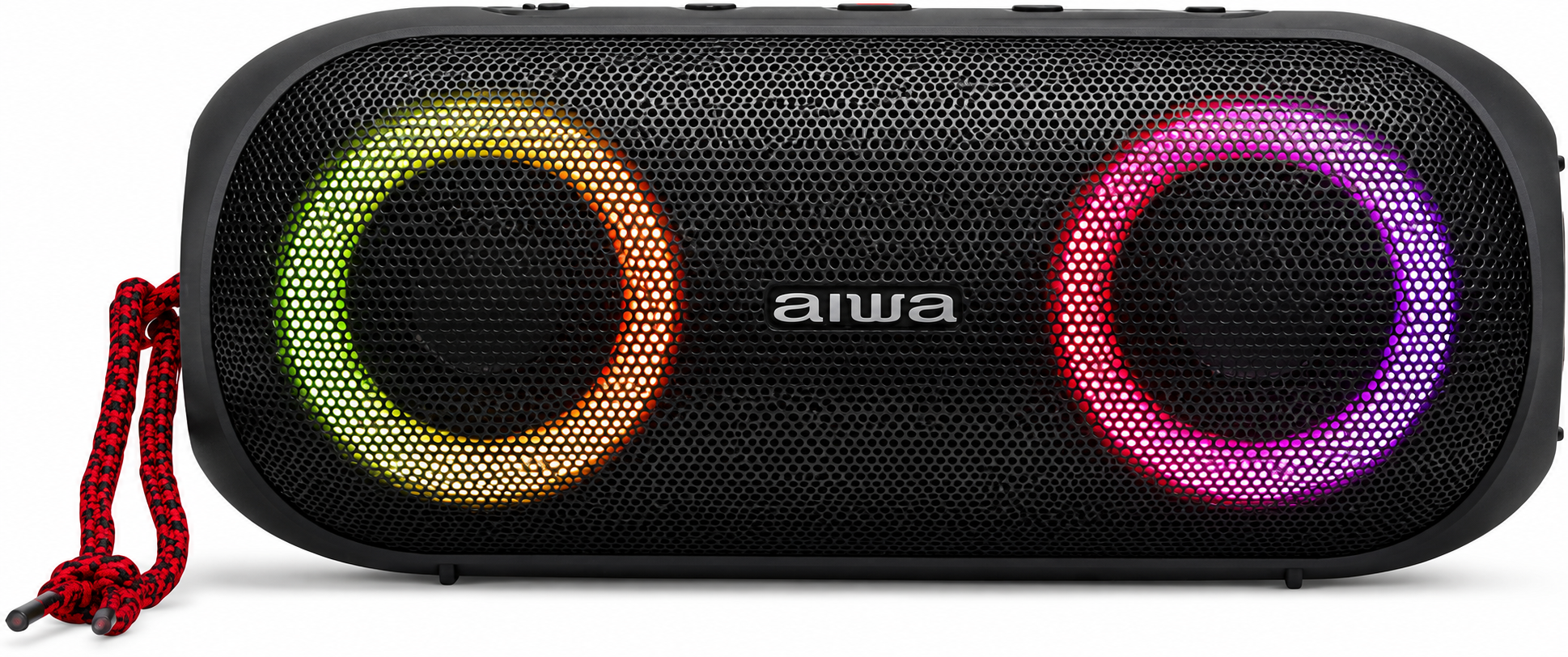
Introduction to the Aiwa BST-650 Portable Bluetooth Speaker
The Aiwa BST-650 Portable Bluetooth Speaker delivers powerful 20W RMS audio with DSP technology for superior sound quality, making it an ideal choice for music lovers seeking rugged portability and immersive listening. Featuring dual 45mm drivers and a HyperBASS passive radiator, this Bluetooth V5.0 speaker offers a wide frequency response of 60Hz–20,000Hz, ensuring rich bass and clear highs whether you're at the beach, gym, or outdoor party. Its IPX6 waterproof rating protects against high-pressure jets, perfect for adventures in rain or near water.
Key benefits include True Wireless Stereo (TWS) pairing for stereo sound with a second unit, hands-free calling via built-in microphone, Micro-SD card playback, and 3.5mm AUX input for versatile connectivity up to 10m range. Full-color RGB lighting with 9 effects adds vibrant visuals, while the 2000mAh rechargeable lithium battery provides up to 8.5 hours of playtime from a 4-hour USB Type-C charge. Compact at 200x85x83mm and 613g, it features a rubberized housing, twin metal grills, and included wrist strap for easy carrying.
Targeted at outdoor enthusiasts, travelers, and casual listeners, the aiwa BST-650 Portable Bluetooth Speaker excels in parties, workouts, or daily commutes. Priced around €89.99 or £79.99, it's widely available online from Aiwa Europe and authorized retailers, offering excellent value in the portable speaker market.
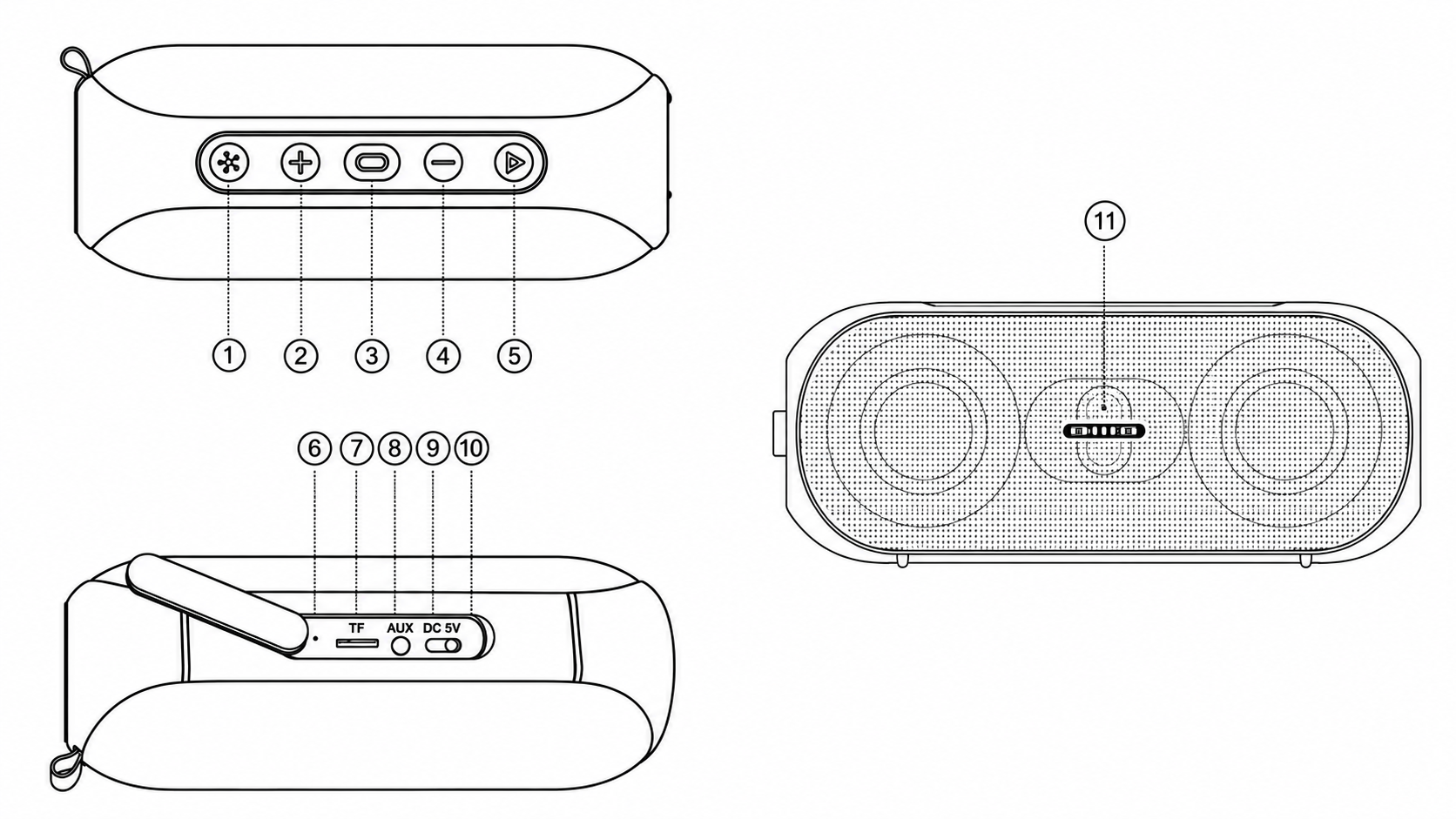
Overview
- Light Key: Switch between lighting modes.
- Volume (+) / Next Song: Increase volume or skip to the next song.
- Power On/Off: Turn the speaker on or off.
- Volume (−) / Previous Song: Decrease volume or return to the previous song.
- Play/Pause / TWS On/Off / Bluetooth Disconnect: Control playback, activate or deactivate TWS, and disconnect Bluetooth.
- Reset Key: Reset the speaker.
- Micro SD Card Slot (TF Card): Insert a compatible memory card for audio playback.
- AUX Port: Connect an external audio device.
- Type-C Charging Port: Connect the charging cable.
- Charging Indicator: Display the charging status.
- Microphone (Mic): Built-in microphone for voice input.
Product Specifications
- Model Number: BST-650
- Bluetooth Version: 5.0
- Bluetooth Range: ≥10 meters (open space)
- Playback Modes: Bluetooth, AUX, Micro SD Card (TF Card), TWS
- Battery Capacity: 2000mAh
- Battery Voltage: 7.4V
- Rated Power: 20W
- Charging Input: DC 5V/2A (Max)
- Working Time: 4–13 hours (depending on volume level)
- Charging Time: Approximately 4 hours (from empty battery)
- Total Harmonic Distortion (THD): Less than 10%
- Speaker Drivers: 2 × 45mm
- Product Dimensions: 200 × 85 × 83mm
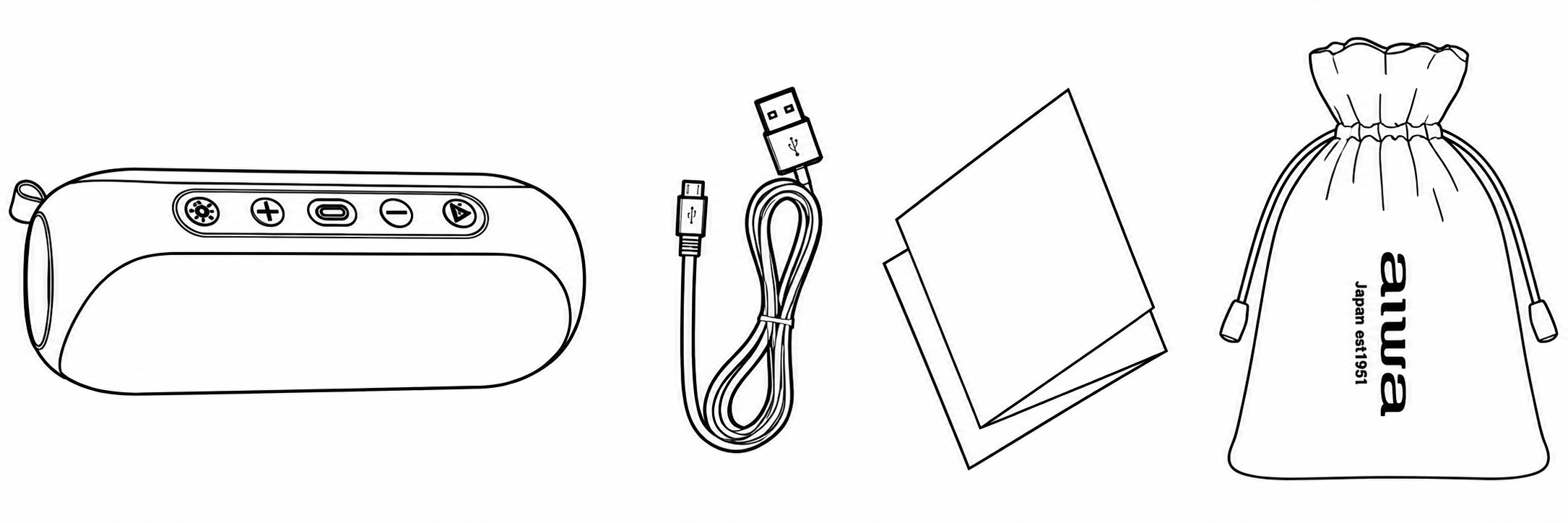
Unboxing
- BST-650 BT speaker x1
- Type C charging cable x1
- Instruction x1
- Cotton - Linen Blend Fabric Pouch
Connecting the Product
Long press: Turn on the speaker and enter bluetooth mode. The speaker will voice ”Welcome to aiwa” & “Bluetooth Mode”. Lighting will flash rapidly when bluetooth device is not connected , use the bluetooth device to search for "AIWA BST-650" and click to connect. Upon bluetooth connection, the speaker will voice “Bluetooth connected”.
- Short press: Audio switch mode
- Long press : Power off the speaker, speaker will voice” Bye bye”.
- Short press x1: Play/Pause
- Long press: Disconnect bluetooth device
- Press 3 seconds: On/OFF TWS function
TWS Function
- Power on two AIWA BST-650 Speakers and enter to Bluetooth mode.
- Press and hold the button “ ” for 3s on one of the speakers , when you hear the prompt sound “True Wireless Stereo Mode ” , then the two speakers will be connected automatically . (When paired, the speaker will voice “True Wireless Stereo Paired successfuly ”)
- Now please turn on the Bluetooth function of your mobile/other devices. and connect it to “BST-650” . When connected, the two speakers can play music at the same time.
- Press and hold the button “ ” for 3s on one of the speakers to disable TWS mode.(The speaker will voice “True Wireless Stereo Disconnected”).
Light Mode
- Short press x1: Lighting effect switch/lighting on
- Long press 3S: Lighting off
Music control -/+
- Short press x: Volume"-"/"+"
- Long press: Previous/Next song
Answer the phone @
- Short press xl: Answer/Hang up
- Short pressx2 : Dial the last call
- Long press: Reject call
Switch audio playback modes @
- Short press Xl: Switch audio playback mode
The last connected source of audio will be the playback source. Voice prompts from the speaker will be present while you switch between modes.
Charging and battery information
- This product has a built-in non-removable and rechargeable battery. Please use the equipped Type-C cable to charge the battery.
- The charging current voltage is 5V/2A(Max).
- Please choose the charger that passes the regular manufacturer's safety certification.
- Repeated charging on the speaker will cause battery performance degradation overtime, which is a normal phenomenon for all rechargeable batteries.
Troubleshooting Guide for Aiwa BST-650 Portable Bluetooth Speaker
Encounter common issues with your Aiwa BST-650 Portable Bluetooth Speaker? Start by ensuring it's charged via USB Type-C (4 hours for full charge). If no sound plays, check the mode: long-press the multifunction button for Bluetooth ("Welcome to Aiwa, Bluetooth Mode"), insert Micro-SD for TF playback, or connect AUX cable. Bluetooth not connecting? Reset by pressing the reset key, then search for "AIWA BST-650" within 10m range.
For TWS pairing issues, power on both speakers; one enters TWS mode via short-press (hear "True Wireless Stereo Paired successfully"), then connect your device. Battery drains fast? Lower volume, as playtime varies 4-13 hours. Lighting not working? It's tied to playback—start music. Water exposure problems? IPX6 handles jets, but dry thoroughly post-use. No error codes listed, but distortion (THD<10%) signals overdrive—reduce volume. Prevent issues by avoiding full discharge, cleaning ports, and firmware updates via Aiwa support.
Pros and Cons of the Aiwa BST-650 Portable Bluetooth Speaker
Pros
- Powerful Audio: 20W RMS with DSP and HyperBASS delivers deep bass and clarity, outperforming basic speakers in outdoor settings.
- Versatile Connectivity: Bluetooth 5.0, TWS, AUX, TF card—ideal for multi-device use without phone dependency.
- Durable & Portable: IPX6 waterproof, rugged rubberized build with strap; survives beach trips or hikes.
- Long Battery Life: Up to 8.5 hours playback, quick 4-hour charge via USB-C.
- Fun Extras: RGB lighting (9 effects) and mic for calls enhance parties; great value at ~€90 vs. pricier JBL alternatives.
Cons
- Bass can distort at max volume (THD<10% limit), less refined than premium models like Bose.
- No app control for EQ or lights; basic controls only.
- Weight (613g) feels hefty for ultra-portable needs compared to lighter competitors.
- RGB may drain battery faster during extended use.
Overall, excellent value for budget-conscious users seeking robust aiwa BST-650 Portable Bluetooth Speaker features over luxury refinements.
Customer Reviews and Feedback on Aiwa BST-650 Portable Bluetooth Speaker
Users rave about the Aiwa BST-650 Portable Bluetooth Speaker's sound and durability, averaging 4.5/5 stars across retail sites. "Incredible bass for the size—perfect for pool parties with IPX6 protection!" praises one reviewer, highlighting 20W power and TWS stereo mode. Many love the RGB lights: “Lights up my backyard BBQs beautifully with 9 effects.”
Common praises include easy Bluetooth pairing ("Connects instantly to 'AIWA BST-650'") and 8+ hour battery. Complaints focus on minor distortion at high volumes and no EQ app. "Great for price, but bass-heavy tunes push limits," notes a 4-star user. Frequently mentioned: Reliable TWS and accessories like braided USB-C cable.
90% recommend for outdoor use; ideal alternative to costlier brands. Address issues by volume management for optimal performance.
More aiwa manuals
- Setup: Aiwa AT-X80K True Wireless Earphones User Manual
- Setup: Aiwa AT-X80E II True Wireless Earphones User Manual
- Setup: Aiwa AT-X80U True Wireless Earphones User Manual
- Setup: Aiwa AA-K21GC Gooseneck Spout Kettle User Manual
- Aiwa SB-X100 Bluetooth Speaker User Manual
- Setup: Aiwa AT-X80X True Wireless Earphones User Manual
Leave a Comment