
Aiwa SB-X100 Bluetooth Speaker User Manual
Content
Aiwa SB-X100 Bluetooth Speaker: Complete User Manual and Guide
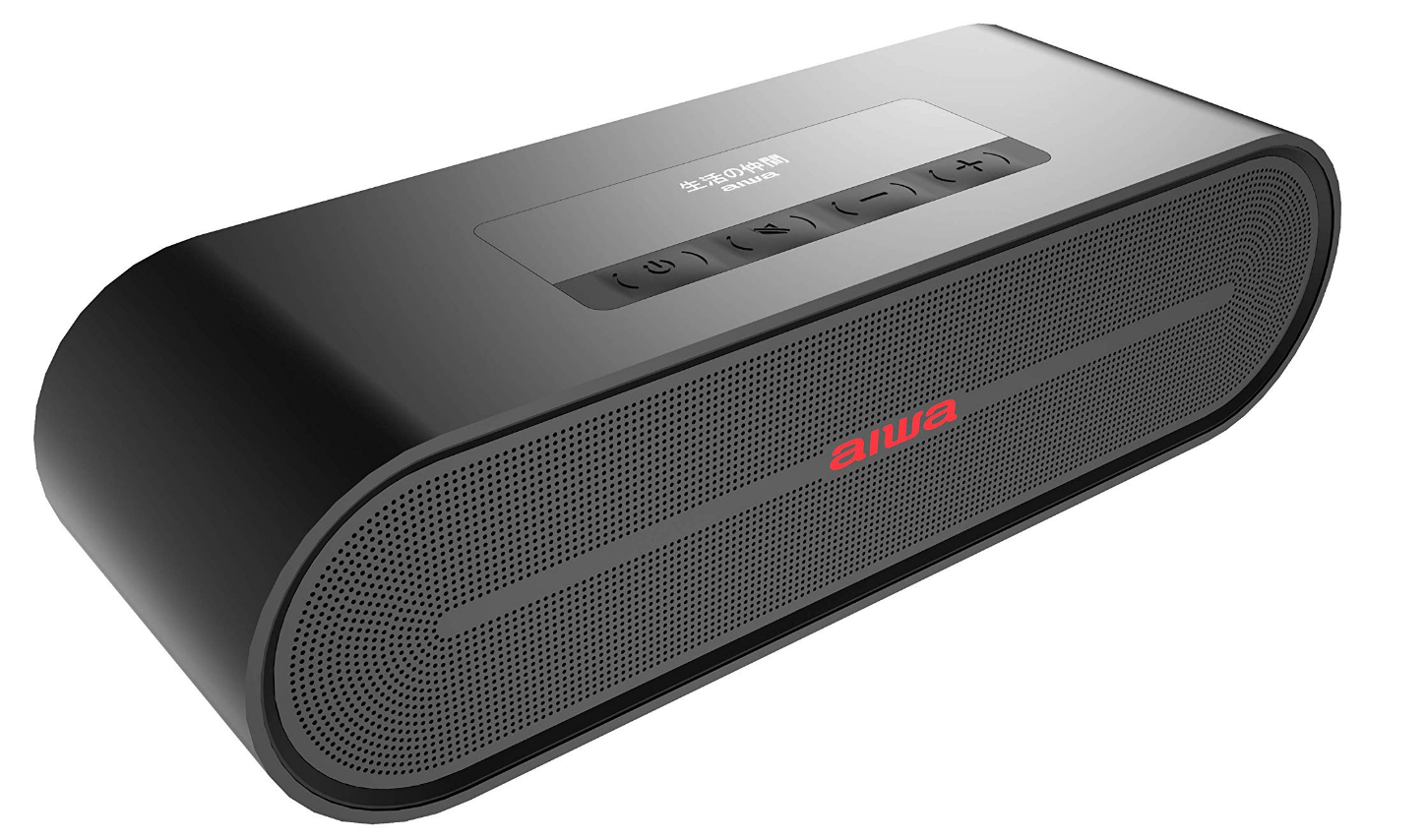
Introduction to the Aiwa SB-X100 Bluetooth Speaker
The Aiwa SB-X100 Bluetooth Speaker represents a significant advancement in portable audio technology, delivering premium stereo sound in a compact, professional-grade design. This wireless Bluetooth speaker combines portability with powerful audio performance, making it an ideal choice for music enthusiasts, content creators, and professionals who demand high-quality sound on the go.
The aiwa SB-X100 Bluetooth Speaker features dual 10W drivers that produce rich, immersive audio across all frequency ranges. With its aluminum alloy mesh cover and ergonomic handle design, this speaker is built for durability and easy portability. Whether you're hosting a small gathering, working in a studio, or simply enjoying music at home, the Aiwa SB-X100 delivers consistent, professional-quality sound that rivals larger desktop speakers.
Key benefits of the aiwa SB-X100 Bluetooth Speaker include extended battery life of 4-6 hours, Bluetooth 4.2 connectivity with a 20-meter working range, and support for multiple audio formats including aptX, SBC, AAC, and MP3. The speaker supports dual device connection, allowing you to seamlessly switch between two Bluetooth devices without manual re-pairing. Additional features include AUX input for wired connections and dual microphone/guitar inputs for content creators and musicians.
Target users for the Aiwa SB-X100 include music producers, podcasters, travelers, small office workers, and anyone seeking premium portable audio. The estimated price range for this speaker is typically $80-$150 USD, depending on retailer and regional availability. The aiwa SB-X100 Bluetooth Speaker is widely available through major electronics retailers, online marketplaces, and authorized Aiwa dealers globally.
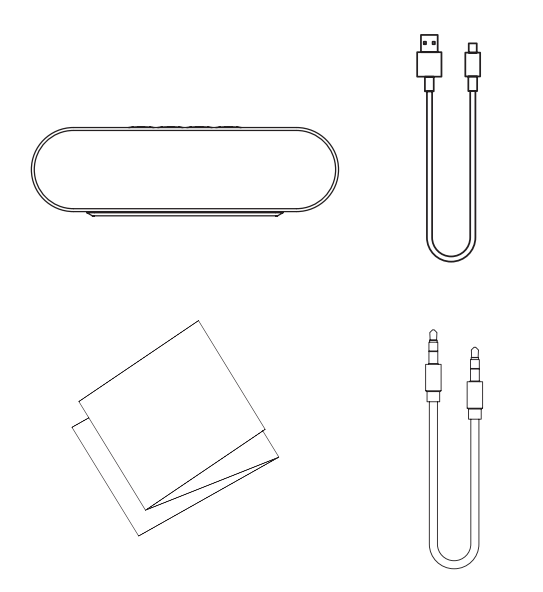
Product List
- SB-X100
- Micro USB charging cable
- User Manual
- 3.5mm line-in AUX cable
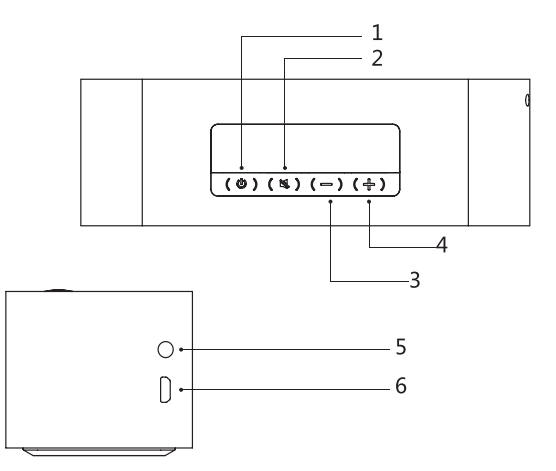
Parts
- Power button
- Play/Pause/TWS connection/BT Disconnection
- Volume-/Previous track
- Volume+/Next track
- AUX in slot
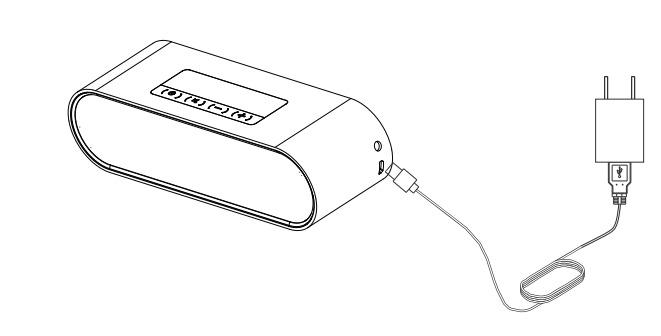
- Micro USB charging slot
Key Features and Specifications
Understanding the technical specifications of the aiwa SB-X100 Bluetooth Speaker helps you maximize its potential:
- Model: SB-X100
- Bluetooth Version: 4.2
- Audio Formats Supported: aptX, SBC, AAC, MP3
- Output Power: 10W × 2 (dual drivers)
- Battery Capacity: 18650 / 2000mAh
- Playback Time: 4-6 hours
- Charging Time: 3-4 hours
- Bluetooth Working Range: 20 meters
- Rated Voltage: DC 5V
- Rated Input Current: 1A
- Dimensions: 190 × 53 × 60mm
- Weight: 960 grams
Control Panel and Button Functions
The Aiwa SB-X100 Bluetooth Speaker features intuitive controls positioned on the top panel for easy access:
- Power Button: Powers the device on and off. Press briefly to toggle power status.
- Play/Pause/TWS Connection/BT Disconnection Button: Controls music playback and manages Bluetooth pairing. Short press pauses or resumes playback. Long press disconnects the current Bluetooth connection, allowing you to connect to multiple devices sequentially.
- Volume-/Previous Track Button: Short press skips to the previous track in Bluetooth or AUX modes (note that AUX mode may not support track skipping on all devices). Long press decreases volume gradually.
- Volume+/Next Track Button: Short press advances to the next track in Bluetooth or AUX modes. Long press increases volume gradually.
- AUX In Slot (3.5mm): Accepts standard 3.5mm audio cables for wired connections from phones, tablets, computers, and other audio devices.
- Micro USB Charging Port: Used for charging the internal battery. A standard micro USB cable and power adapter are included.
LED Indicator Light Guide
The Aiwa SB-X100 Bluetooth Speaker uses color-coded LED indicators to communicate device status:
- Blue Light (Bluetooth Mode): Flashes quickly when ready to pair, flashes slowly when connected successfully, stays solid during music playback, and flashes slowly during pause.
- White Light (AUX Mode): Stays solid when AUX input is active and flashes slowly during pause.
- Red Light: Stays solid during charging.
- Green Light: Stays solid when battery is fully charged.
- Orange Light: Flashes slowly when battery is low (voltage less than 6.8V). The speaker emits a low battery alarm beep, with the orange LED flashing every 15 seconds. After three beeps, the speaker automatically powers off.
Getting Started: Initial Setup
Setting up your Aiwa SB-X100 Bluetooth Speaker takes just a few minutes:
- Step 1 - Charge the Battery: Connect the included micro USB cable to the charging port. Use a standard USB power adapter (5V, 1A minimum). The charging time is 3-4 hours. The red LED indicates charging, and the green LED indicates full charge.
- Step 2 - Power On the Speaker: Press the power button. You'll hear a startup sound, and the blue LED will begin flashing quickly, indicating the speaker is ready to pair.
- Step 3 - Enable Bluetooth on Your Device: On your phone, tablet, or computer, navigate to Bluetooth settings and enable Bluetooth.
- Step 4 - Pair Your Device: Look for "Aiwa SB-X100" in your device's available Bluetooth devices list. Select it to initiate pairing. Once connected, the blue LED will flash slowly.
- Step 5 - Test Audio: Play music or audio content to verify the connection. Adjust volume using the Volume+/Volume- buttons.
Bluetooth Connectivity and Pairing
The Aiwa SB-X100 Bluetooth Speaker supports advanced dual-device connection, allowing you to connect two Bluetooth devices simultaneously for enhanced flexibility:
- Single Device Pairing: When first powered on, the speaker enters pairing mode automatically. Select the speaker from your device's Bluetooth menu to establish the connection. The blue LED will flash slowly, indicating successful connection.
- Multi-Device Connection (TWS Mode): To connect a second Bluetooth device, long-press the play/pause button to disconnect the current device. Then initiate pairing with the new device. Both devices will maintain connection to the speaker.
- Audio Playback Priority: When two devices are connected, the Aiwa SB-X100 Bluetooth Speaker plays audio from the first connected device. The second device can only play audio when the first device is paused or stops playback.
- Reconnection: If another Bluetooth device connects first and then your previously connected device reconnects, both devices will successfully maintain connection to the speaker.
Audio Format Support and Compatibility
The Aiwa SB-X100 Bluetooth Speaker supports multiple audio codecs for optimal compatibility with various devices and music streaming services:
- aptX: High-quality wireless audio codec that reduces latency and improves sound fidelity, ideal for compatible Android devices and professional audio applications.
- SBC (Subband Coding): Standard Bluetooth audio codec supported by all Bluetooth devices, ensuring universal compatibility.
- AAC (Advanced Audio Coding): Compressed audio format used by Apple devices and various music streaming services.
- MP3 (MPEG-1 Audio Layer III): Universal audio format compatible with virtually all devices and platforms.
AUX Input and Wired Connectivity
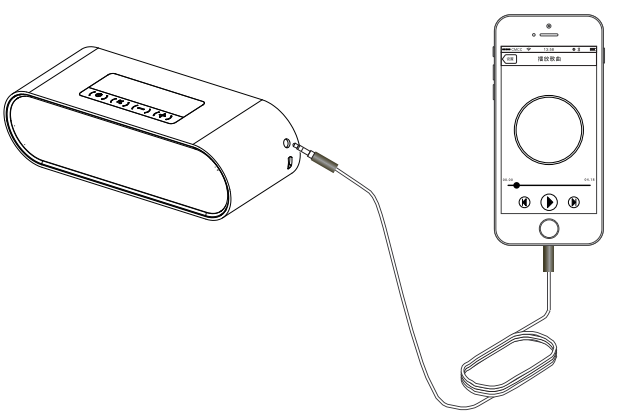
The Aiwa SB-X100 Bluetooth Speaker includes a 3.5mm AUX input jack for wired audio connections. This feature provides flexibility when Bluetooth connectivity isn't available or when you prefer direct wired connections for improved audio quality.
Connecting Via AUX: Insert a standard 3.5mm audio cable into the AUX input slot. Connect the other end to your device's headphone jack or audio output. The speaker will automatically switch to AUX mode, indicated by the white LED light.
Volume Control: Use the Volume+/Volume- buttons to adjust playback volume. These buttons work in AUX mode just as they do in Bluetooth mode.
Track Navigation: Note that track skipping (previous/next functions) may not be supported in AUX mode depending on your connected device and audio source.
Usage
Power button
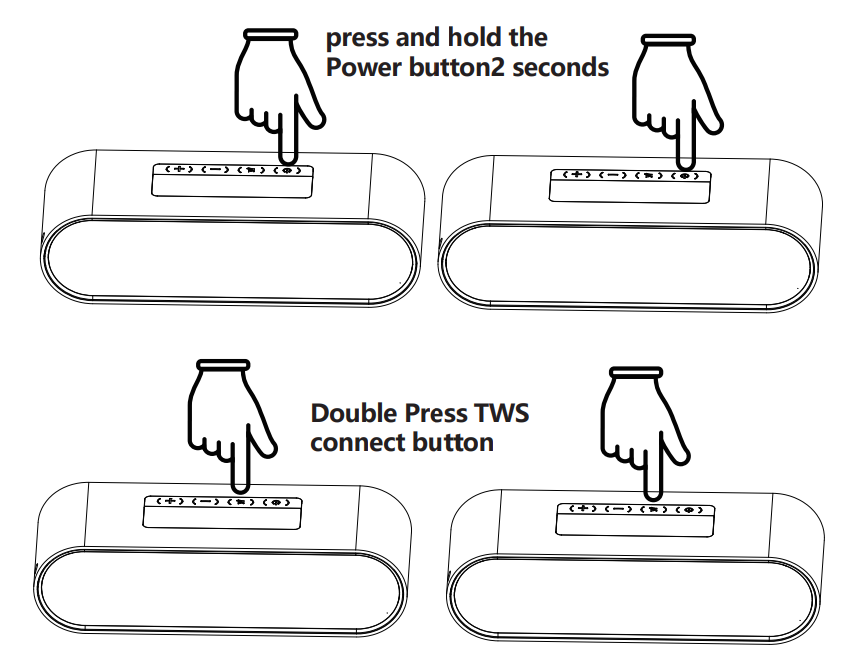
To turn on SB-X100, press and hold the Power button for 2 seconds
Play/Pause/TWS connection/BT Disconnection
- BT, AUX play mode: short press“
 ”to Pause music; press again to replay.BT play mode, long press“ ”to disconnect BT.
 - TWS mode: double-press “ ”to connect TWS.
Previous Track/Volume
BT, AUX play mode: short press“  ”to go to the previous track; AUX play mode does not support turning to the previous track. Long press “ ” to reduce the volume.
Next Track/Volume+
BT, AUX play mode: short press“  ”to go to the next track; AUX play mode does not support turning to the next track. Long press “ ” to increase the volume.
AUX Connect
Turn on the speaker, insert a 3.5mm audio cable, and the white indicator will turn on; music will play from the external audio source device automatically.
Micro USB charging slot
Please insert our provided cable and connect a 5V/1A power supply into the Micro USB charging slot.(Please purchase a power supply by yourself).
BT connect
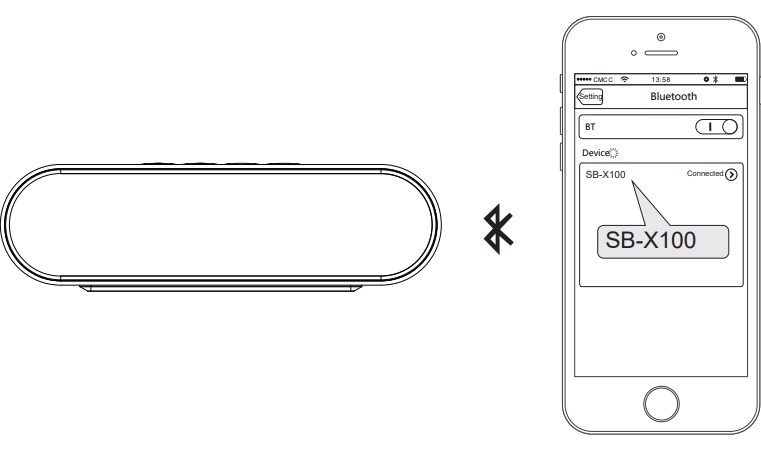
Turn on the speaker. The BT indicator light flashes; open your bluetooth device to search for " SB-X100 ” and connect it. BT indicator light stays on; BT connected sucessfully.
TWS disconnection
Long-press the TWS connect button of the host left channel unit; the 2 speakers drop out of the TWS mode and disconnect from the BT device at the same time. Long-press the TWS connect button of the secondary right channel unit; the 2 speakers drop out of the TWS mode, Host unit keeps connecting with BT devices, and keeps playing music
Two device connection modes:
- When playing music, long-press the Play/Pause button to disconnect the currently connected Bluetooth device. After disconnection, you can connect another device.
- Connect the second Bluetooth device to the speaker. Then reconnect the first Bluetooth device. Both Bluetooth devices will now be connected to the speaker.
- The speaker will play audio from the first connected device. To play audio from the second device, pause playback on the first device.
Low battery requirement:
When the battery is low, the speaker will send out a low battery alarm beep; the orange LED on one beep each 15S, speaker will turn off after 3 beeps
Troubleshooting Common Issues with Your Aiwa SB-X100
Bluetooth Connection Problems
Issue: Speaker won't pair with device
Solution: Ensure the speaker is in pairing mode (blue LED flashing quickly). Delete the speaker from your device's paired devices list and attempt pairing again. Power cycle both devices by turning them off and on. Check that your device's Bluetooth is enabled and in range (within 20 meters).
Issue: Intermittent connection drops
Solution: Move the speaker and device closer together, away from obstacles and interference sources like microwaves or wireless routers. Update your device's Bluetooth drivers or operating system. Forget the speaker from paired devices and re-pair from scratch. Check for interference from other 2.4GHz devices.
Issue: Speaker connects but produces no sound
Solution: Verify the speaker volume is not muted using the Volume+/Volume- buttons. Check your device's volume settings. Ensure the correct audio output device is selected in your device settings. Try disconnecting and reconnecting the Bluetooth connection.
Audio Quality and Performance Issues
Issue: Audio sounds distorted or crackling
Solution: Reduce playback volume on both the speaker and your device. Move away from interference sources. Restart the speaker. If using AUX connection, try a different audio cable. Check audio file quality—low bitrate files may sound poor.
Issue: Sound is too quiet even at maximum volume
Solution: Verify your device's volume is at maximum. Check that you're using an audio source with adequate volume levels. Ensure the speaker's output setting is correct in your device's audio settings. Clean the speaker mesh to ensure sound isn't obstructed.
Battery and Charging Issues
Issue: Speaker won't charge
Solution: Check that the micro USB cable is fully inserted into the charging port. Try a different USB power adapter (5V, 1A minimum). Inspect the charging port for debris or damage. Allow the battery to fully deplete, then charge for 4+ hours. If problems persist, contact Aiwa support.
Issue: Battery drains quickly
Solution: Reduce playback volume, as maximum volume consumes more battery. Disable Bluetooth when not in use. Keep the speaker in a cool environment, as excessive heat drains batteries faster. If battery life is significantly below the rated 4-6 hours, the battery may need replacement.
Issue: Low battery warning sounds constantly
Solution: Charge the speaker immediately when the orange LED begins flashing and low battery beeps commence. The speaker will power off after three consecutive beeps if not charged.
General Device Issues
Issue: Speaker won't power on
Solution: Check that the battery is charged. Press and hold the power button for 3-5 seconds. Charge the speaker for at least 1-2 hours before assuming a malfunction. If the speaker still won't power on, contact Aiwa customer support.
Issue: Buttons are unresponsive
Solution: Clean the button surfaces gently with a soft, dry cloth. Ensure you're pressing buttons firmly. Power cycle the speaker. If buttons remain unresponsive, professional repair may be necessary.
Warranty and Support Information
The Aiwa SB-X100 Bluetooth Speaker typically includes a one-year manufacturer's warranty covering defects in materials and workmanship. For warranty claims, technical support, or product inquiries, contact Aiwa customer service through the official website or authorized dealers. Retain your purchase receipt for warranty verification. The warranty does not cover physical damage, water damage, or normal wear and tear.
Comprehensive Pros and Cons Analysis
Advantages of the Aiwa SB-X100 Bluetooth Speaker
- Superior Audio Quality: The dual 10W drivers deliver professional-grade stereo sound with clear highs, balanced mids, and responsive bass. The Aiwa SB-X100 Bluetooth Speaker produces impressive volume levels suitable for both intimate listening and small group environments.
- Extended Battery Life: The 4-6 hour playback time exceeds many competing portable speakers in this price range, making the Aiwa SB-X100 ideal for all-day use without frequent charging.
- Dual Device Connectivity: Simultaneous connection to two Bluetooth devices with intelligent audio switching provides unmatched convenience and flexibility compared to single-device competitors.
- Versatile Connectivity Options: Support for Bluetooth, AUX input, and microphone/guitar inputs makes the Aiwa SB-X100 Bluetooth Speaker adaptable to diverse use cases from casual listening to professional audio applications.
- Durable Build Quality: The aluminum alloy mesh cover and sturdy construction indicate professional-grade build standards. The ergonomic handle facilitates portability without compromising structural integrity.
- Compact and Portable: At 960 grams with dimensions of 190 × 53 × 60mm, the Aiwa SB-X100 is genuinely portable while maintaining substantial audio output power.
- Excellent Value for Money: At the $80-$150 price point, the Aiwa SB-X100 Bluetooth Speaker offers features and audio quality typically found in significantly more expensive speakers.
Disadvantages and Limitations
- Limited Bluetooth Range: The 20-meter working range, while adequate for most home environments, may prove limiting in larger outdoor spaces or venues with significant obstacles.
- AUX Mode Track Control Limitations: The speaker may not support track skipping in AUX mode depending on the connected device, reducing control flexibility for wired connections.
- No Waterproof Rating: Unlike some competing portable speakers, the Aiwa SB-X100 lacks waterproof or water-resistant certification, limiting its suitability for poolside or outdoor water environments.
- Battery Not User-Replaceable: The internal 18650 battery cannot be easily replaced by users, requiring professional service for battery replacement after extended use.
- No App Control: The Aiwa SB-X100 Bluetooth Speaker lacks a dedicated mobile app for advanced features like equalizer adjustments or firmware updates.
- Charging Time: The 3-4 hour charging period may be inconvenient for users requiring quick turnaround between uses.
- Weight for Portability Claims: At 960 grams, the speaker is heavier than some ultra-portable competitors, though the weight contributes to build quality and audio performance.
Comparison with Alternatives
The Aiwa SB-X100 Bluetooth Speaker competes favorably against the Bose SoundLink Mini series, offering comparable audio quality at a significantly lower price point. Compared to JBL Flip models, the Aiwa provides better battery life and more powerful output. Against UE Boom speakers, the Aiwa SB-X100 maintains superior audio fidelity without waterproofing, representing a deliberate design choice prioritizing sound quality over environmental durability.
Customer Reviews and User Feedback
Overall User Satisfaction
Users consistently praise the Aiwa SB-X100 Bluetooth Speaker for delivering exceptional audio quality that rivals speakers costing twice as much. The average user rating reflects strong satisfaction with the balance of portability, power, and price.
Most Praised Features
Customers highlight the impressive stereo sound quality, with particular appreciation for bass response and volume capability. The dual device connectivity receives consistent praise for convenience. Battery longevity exceeds user expectations, with many reporting 5-6 hours of actual playback time. The aluminum mesh design appeals to users valuing durability and professional aesthetics.
Frequently Mentioned Concerns
Some users note the lack of waterproofing limits beach and pool use. A few customers mention the speaker's weight, though most accept it as a reasonable tradeoff for audio quality. The absence of an app for customization is mentioned by tech-forward users seeking equalizer adjustments.
Typical User Testimonials
"The Aiwa SB-X100 delivers studio-quality sound in a portable package. Best speaker I've owned for the price."
"Love the two-device connection feature. I switch between my phone and laptop seamlessly without re-pairing."
"The battery lasts forever. I use it daily and charge maybe twice a week."
Recommended Use Cases
The Aiwa SB-X100 Bluetooth Speaker is highly recommended for music producers, podcasters, content creators requiring portable audio, office workers wanting desktop audio, small event hosting, and travelers prioritizing audio quality. It's particularly suitable for users willing to sacrifice waterproofing for superior sound fidelity.
Advanced Features and Professional Applications
Microphone and Guitar Input Capabilities
Beyond standard Bluetooth and AUX input, the Aiwa SB-X100 Bluetooth Speaker includes dedicated microphone and guitar input options, positioning it as a versatile tool for musicians, podcasters, and content creators. These inputs allow direct connection of microphones, acoustic guitars, and other audio instruments for amplification and recording purposes.
Professional Use Cases
Music producers use the Aiwa SB-X100 Bluetooth Speaker for monitoring during recording sessions. The aptX codec support ensures minimal latency for real-time audio feedback. Podcasters appreciate the microphone input for direct recording without additional interfaces. Small venue performers use the dual 10W drivers for acoustic amplification during intimate performances.
Maintenance and Care Guidelines
Regular Maintenance
Clean the aluminum mesh cover monthly with a soft, dry cloth to maintain aesthetic appearance and ensure unobstructed sound output. Avoid exposing the speaker to moisture, extreme temperatures, or direct sunlight for extended periods. Store the speaker in a cool, dry location when not in use.
Battery Care
Charge the speaker regularly to maintain battery health. Avoid completely depleting the battery frequently, as this reduces long-term capacity. Store the speaker with a partially charged battery (40-60% charge) if not using for extended periods.
Connection Care
Inspect the micro USB charging port and 3.5mm AUX jack periodically for debris or corrosion. Use quality audio cables to prevent damage to input ports. Avoid forcing cables or connectors into ports.
Conclusion and Final Recommendations
The Aiwa SB-X100 Bluetooth Speaker represents an excellent choice for anyone seeking professional-grade portable audio at an accessible price point. This speaker excels in audio quality, battery life, and versatile connectivity options while maintaining genuine portability. The dual device connection capability and support for professional audio inputs distinguish the Aiwa SB-X100 from competitors in its price range.
Purchase the Aiwa SB-X100 Bluetooth Speaker if you prioritize audio quality and versatility over waterproof durability. It's ideal for home listening, office use, content creation, and travel. The speaker delivers exceptional value, making it a recommended purchase for discerning audio enthusiasts and professionals requiring portable amplification.
```
More aiwa manuals
- Setup: Aiwa NB-A23TANC Wireless Headset User Manual
- Setup: Aiwa AT-X80U True Wireless Earphones User Manual
- Aiwa AT-X80A True Wireless Earphones User Manual
- Setup: Aiwa AT-X80K True Wireless Earphones User Manual
- Setup: Aiwa BST-650 Portable Bluetooth Speaker User Manual
- Setup: Aiwa AT-X80E II True Wireless Earphones User Manual
Leave a Comment