
Aiwa AT-X80A True Wireless Earphones User Manual
Content
aiwa AT-X80A True Wireless Earphones Product Manual
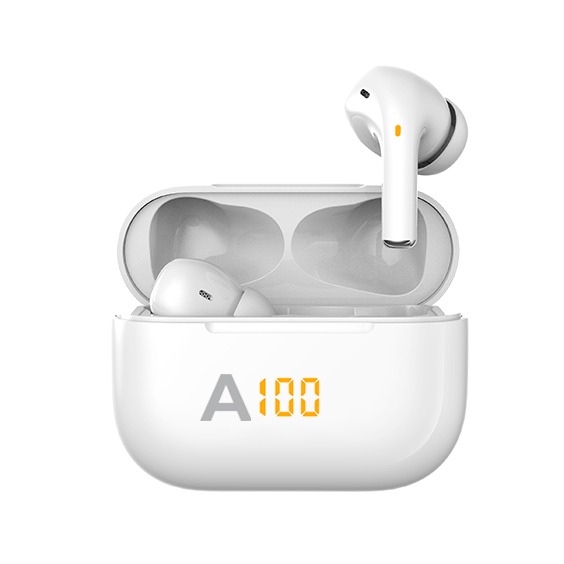
The aiwa AT-X80A True Wireless Earphones are compact Bluetooth earbuds designed for everyday listening, hands-free calling, and portable use. With Bluetooth 5.1, IPX4 splash resistance, and a lightweight build, the aiwa AT-X80A True Wireless Earphones are aimed at users who want an affordable, easy-to-carry wireless audio solution for commuting, workouts, and casual entertainment.
These true wireless earbuds feature a 10-meter wireless range in ideal conditions, HFP/A2DP/AVRCP support, and a frequency response of 20Hz to 20kHz for full-range audio playback. The earbuds weigh just 3.5 grams each, while the charging case weighs 35 grams, making them comfortable to carry in a pocket or bag. Battery life is rated at 4 to 5 hours per charge for playback or calls, with the charging case extending overall convenience through multiple recharges. The case itself supports standby for up to 200 days, which is useful for users who do not charge their earbuds every day.
The aiwa AT-X80A True Wireless Earphones are best suited for students, office workers, travelers, and anyone looking for a simple pair of wireless earbuds for music, video calls, podcasts, and casual gaming. Their IPX4 rating adds protection against sweat and light rain, making them practical for light exercise and outdoor use. In terms of price, the model typically falls in the budget to entry-level mid-range category, with an estimated range of about $20 to $40 depending on region, seller, and promotions. Availability is usually strongest through online marketplaces, electronics retailers, and regional aiwa distributors.
Pros and Cons of aiwa AT-X80A True Wireless Earphones
Pros
- Lightweight and compact design makes the earbuds comfortable for long listening sessions.
- Bluetooth 5.1 helps deliver stable wireless pairing and dependable everyday connectivity.
- IPX4 splash resistance adds useful protection for workouts and light rain.
- 4 to 5 hours of playback per charge is practical for commuting, calls, and short travel.
- The charging case is small and easy to carry, improving portability for daily use.
- Good value for money for users who want basic true wireless earbuds without paying for premium ANC features.
Cons
- No active noise cancellation, so they are less suitable for noisy buses, trains, or open offices than ANC alternatives.
- Battery life is modest compared with newer earbuds that offer longer single-charge playback.
- Sound quality is functional rather than audiophile-grade, especially when compared with higher-end models.
- Feature set is minimal, so users looking for app controls, advanced codecs, or gaming modes may prefer newer alternatives.
- Touch or button controls may feel basic compared with more refined competitors in the same category.
Overall, the aiwa AT-X80A True Wireless Earphones offer strong entry-level value for users who prioritize simplicity, portability, and dependable wireless audio. Compared with alternatives in the same price bracket, they stand out for their lightweight build and balanced core features, but buyers seeking better battery life or premium sound tuning may want to compare them with newer budget TWS models.
Customer Reviews and User Feedback for aiwa AT-X80A True Wireless Earphones
Customer feedback for the aiwa AT-X80A True Wireless Earphones is generally positive, with many users giving them around 4 out of 5 stars for comfort, portability, and ease of use. Buyers often praise the lightweight fit, stable Bluetooth connection, and convenient charging case.
One common testimonial reads: “Great for daily commuting and calls. They pair quickly and feel very light in the ears.” Another frequent comment is: “Good sound for the price, but I wish the battery lasted longer.”
- Praise: Comfortable fit for extended wear, quick pairing, and simple controls.
- Praise: Portable charging case and reliable performance for music and phone calls.
- Complaint: Battery life can feel short for long travel days or heavy all-day use.
- Complaint: Bass and detail are adequate, but not exceptional when compared with premium earbuds.
- Complaint: Basic feature set may disappoint users expecting ANC or advanced app support.
Purchase recommendation: choose the aiwa AT-X80A True Wireless Earphones if you want affordable, lightweight earbuds for casual listening, calls, and workouts. If you need longer battery life, stronger noise isolation, or richer sound customization, a newer alternative may be a better fit.
aiwa AT-X80A True Wireless Earphones Specifications at a Glance
- Bluetooth version: 5.1
- Water resistance: IPX4
- Wireless range: up to 10 meters in ideal conditions
- Battery capacity: 40mAh per earbud, 400mAh charging case
- Playback and call time: 4 to 5 hours
- Earbud weight: 3.5g each
- Charging case weight: 35g
- Frequency response: 20Hz to 20kHz
- Impedance: 16Ω ± 15%
- Sensitivity: 103dB ± 3dB
Who Should Buy These Wireless Earphones?
The aiwa AT-X80A True Wireless Earphones are a smart choice for budget-conscious buyers who want straightforward wireless audio without complex setup or premium pricing. They are especially suitable for students, first-time TWS users, commuters, and anyone who needs a lightweight pair of earbuds for everyday tasks.
If your priority is convenience, portability, and a simple true wireless experience, this model delivers solid everyday performance. If your priority is premium bass, active noise cancellation, or all-day battery endurance, you may want to explore higher-tier true wireless earbuds instead.
Faqs
How do I set up aiwa AT-X80A True Wireless Earphones for the first time?
Why are my aiwa AT-X80A True Wireless Earphones not pairing with my phone?
How can I fix one earbud not working on aiwa AT-X80A True Wireless Earphones?
Are aiwa AT-X80A True Wireless Earphones compatible with Android, iPhone, and laptops?
How do I improve sound quality and Bluetooth connection on aiwa AT-X80A True Wireless Earphones?
What should I do if the aiwa AT-X80A True Wireless Earphones battery drains too fast?
How do I clean and maintain aiwa AT-X80A True Wireless Earphones safely?
What features should I expect from aiwa AT-X80A True Wireless Earphones during daily use?
Tags
More aiwa manuals
- Setup: Aiwa NB-A23TANC Wireless Headset User Manual
- Aiwa SB-X100 Bluetooth Speaker User Manual
- Setup: Aiwa AT-X80U True Wireless Earphones User Manual
- Setup: Aiwa AT-X80K True Wireless Earphones User Manual
- Setup: Aiwa BST-650 Portable Bluetooth Speaker User Manual
- Setup: Aiwa AT-X80E II True Wireless Earphones User Manual
Leave a Comment