
Setup: Aiwa AT-X80U True Wireless Earphones User Manual
Content
Aiwa AT-X80U True Wireless Earphones: Complete Product Manual and Review
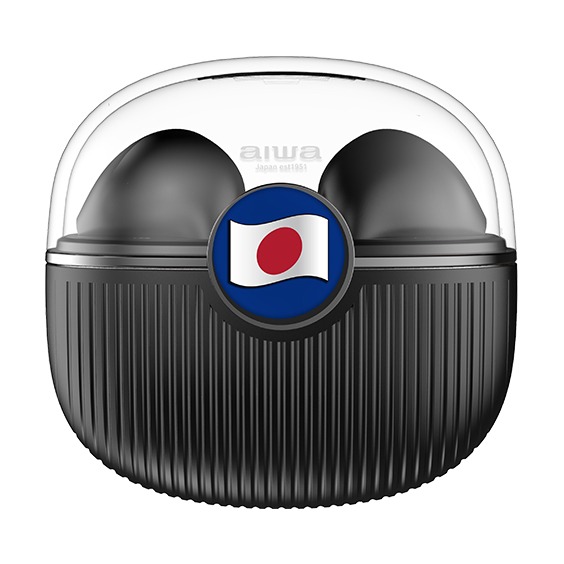
Introduction to Aiwa AT-X80U True Wireless Earphones
The Aiwa AT-X80U True Wireless Earphones deliver premium wireless audio in a compact, portable design, perfect for music lovers, commuters, and fitness enthusiasts seeking hassle-free listening. Featuring true wireless technology with low latency, these earphones ensure seamless connectivity via Bluetooth, pairing quickly with Android and iOS devices for high-definition sound that captures every detail. Key benefits include an IPX5 waterproof rating for sweat and water resistance during workouts, a lightweight 31g build with an in-ear form factor, and a portable charging case that extends playtime.
Unique selling points of the aiwa AT-X80U True Wireless Earphones encompass a braided nylon Type-C charging cable, cotton-linen blend fabric pouch for protection, and built-in microphone for clear calls. With dimensions of 12 cm x 10 cm x 5 cm, they offer a secure fit and low-latency performance ideal for gaming or video watching. Target audiences include on-the-go professionals, gym-goers, and travelers who value durability and convenience. Use cases range from daily commutes and intense workouts to casual podcasts and video calls.
The estimated price range falls between $30-$50, available through Aiwa's official channels and online retailers like VPLAK, with a 1-year manufacturer's warranty for peace of mind. Whether you're upgrading from wired headphones or seeking budget-friendly TWS earbuds with Aiwa AT-X80U reliability, these earphones provide exceptional value in the true wireless earphones category.
Product Specifications
- Model Number: AT-X80U
- Bluetooth Version: V5.1
- IP Rating: IPX5
- Rated Power: 3 mW
- Frequency Response: 20 Hz – 20 kHz
- Impedance: 32 Ω
- Sensitivity: 108 dB ± 3 dB
- Supported Profiles: Not Specified
- Audio Decoding: AAC / SBC
- Transmission Distance: Up to 10 meters (without obstacles)
- Earbuds Battery: 3.7V / 30 mAh
- Charging Case Battery: 3.7V / 300 mAh
- Working Time: Approximately 5.5 hours
- Earbuds + Charging Case Standby Time: Approximately 280 days
- Charging Time (Portable Case): 1.5 hours
- Charging Time (Earbuds): 1.5 hours
- Charging Time (Portable Case with Earbuds): 3.5 hours
- Earbud Weight: 3 g each
- Charging Case Weight: 23 g
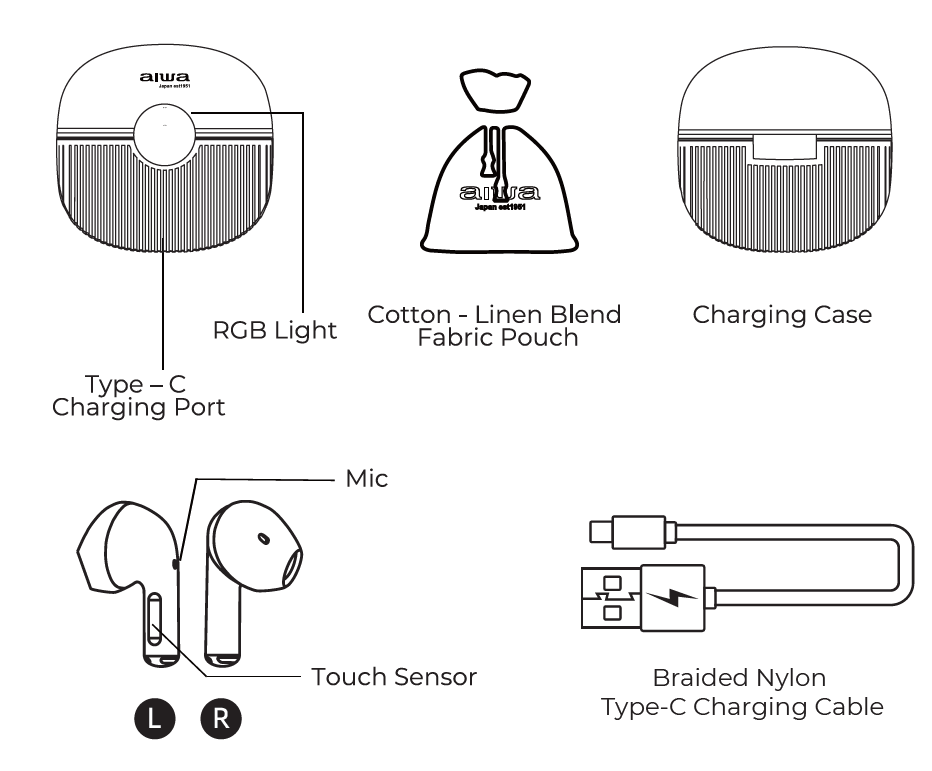
Unboxing
- AT-X80U Earbuds
- Portable Charging Case
- Braided Nylon Type-C Charging Cable
- Cotton-Linen Blend Fabric Pouch
- User's Manual
Product Usage
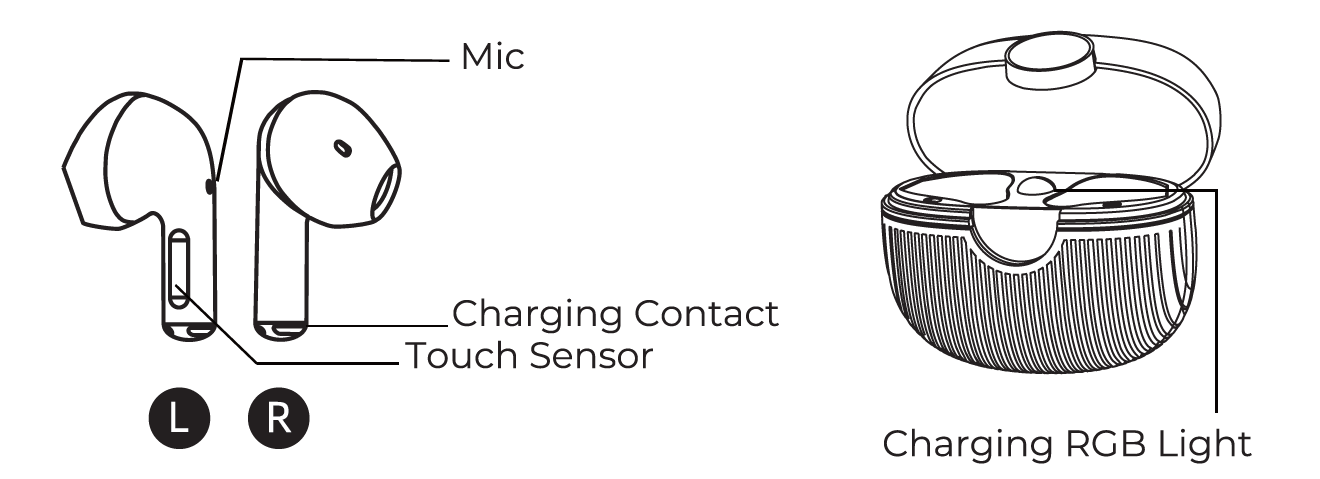
Power ON/OFF
- Manual ON: Flip open the charging case to power on the earbuds.
- Note: Make sure the earbuds are fully charged before using them for the first time.
- Manual OFF: Place the earbuds back into the charging case and close the lid.
- Note: The earbuds will automatically power off after 3 minutes of inactivity.
Music Control
- Play/Pause: Tap the touch sensor once (1).
- Next Song: Tap the right (R) earbud touch sensor three (3) times.
- Previous Song: Tap the left (L) earbud touch sensor three (3) times.
- Volume Up (+): Tap the right (R) earbud touch sensor twice (2).
- Volume Down (-): Tap the left (L) earbud touch sensor twice (2).
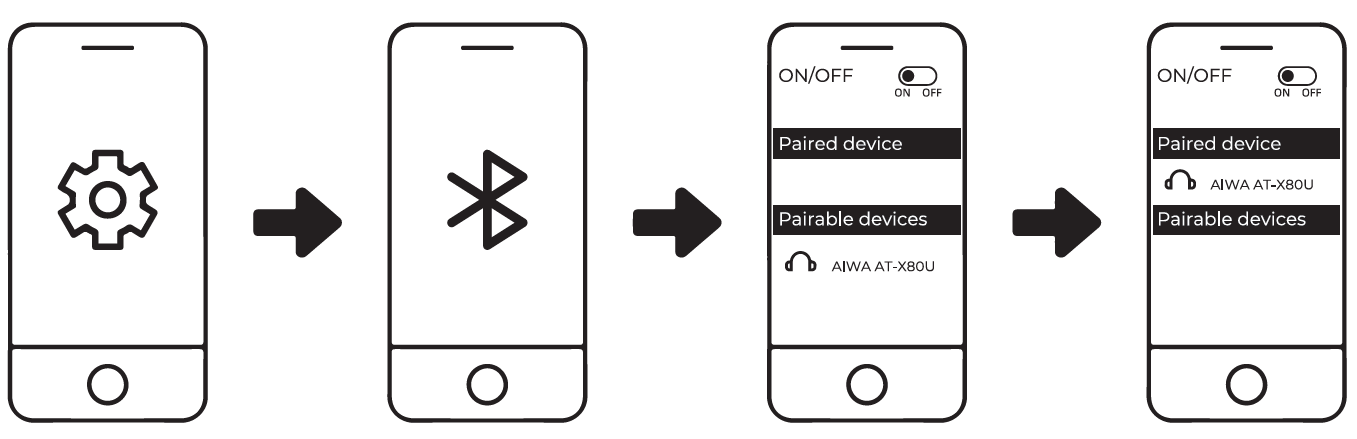
Connecting the Product
- Turn on Bluetooth (BT) on your mobile device.
- Turn on the earbuds by opening the charging case.
- Search for and select "AIWA AT-X80U" from your mobile device's Bluetooth menu to establish a connection.
Battery & Charging
Low Battery Indication
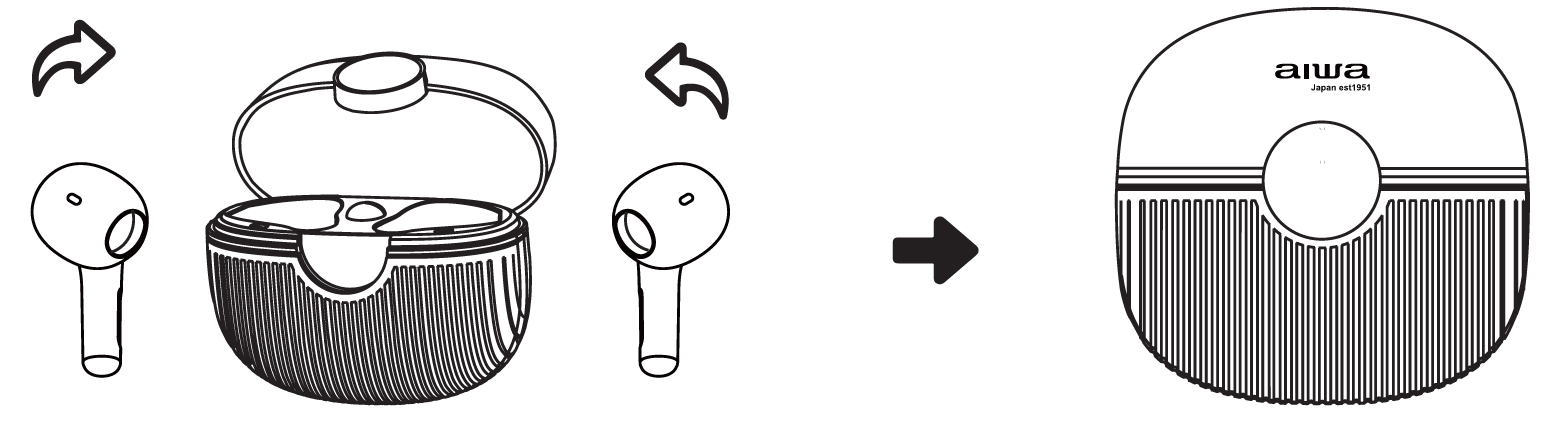
The charging case RGB indicator light blinks six (6) times when the case lid is opened, indicating that the charging case battery level is below 5%.
Charging the Earbuds
Place the earbuds into the charging case to begin charging.
- Place the earbuds back into the charging case when you hear the low-battery voice prompt.
- The charging case RGB indicator light will blink when the earbuds are placed inside.
- Close the charging case lid to begin charging.
- The RGB indicator light will remain illuminated, slowly transitioning between colors during charging.
- The indicator light will turn off when the earbuds are fully charged.
Charging the Case
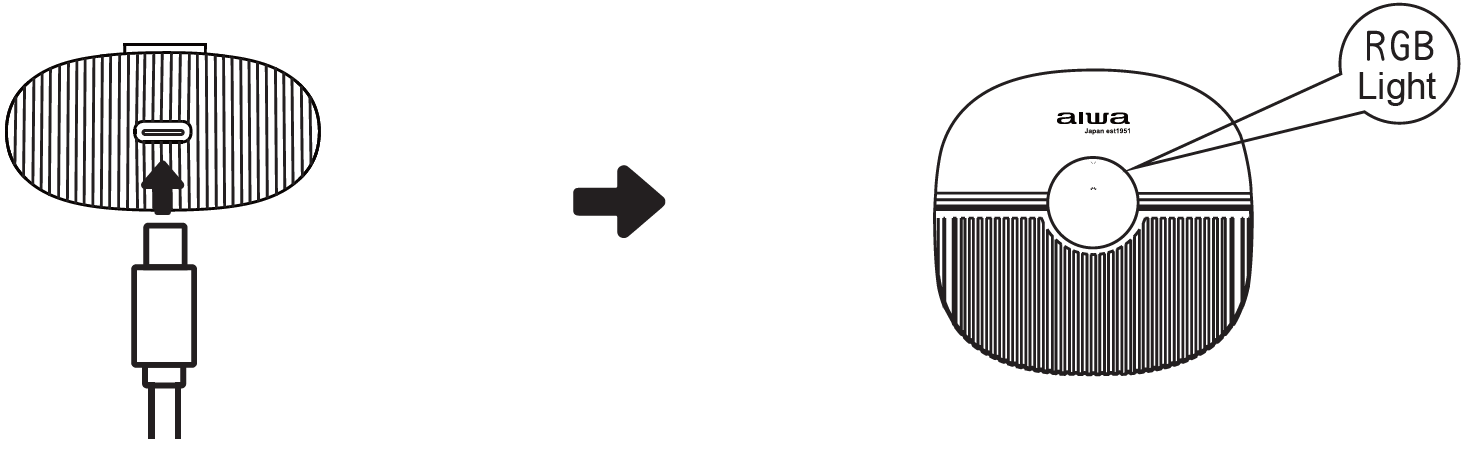
Connect the charging cable to the designated charging port on the charging case.
- During Charging: The charging case RGB indicator light displays a breathing effect, gradually transitioning between colors.
- Fully Charged: The charging case RGB indicator light remains steadily illuminated.
Charging Case Battery Level Indicators
When the charging case lid is opened, the RGB indicator light displays the remaining battery level as follows:
- 70%–100% Battery: The RGB indicator light remains illuminated for four (4) seconds.
- 30%–70% Battery: The RGB indicator light blinks once (1).
- 5%–30% Battery: The RGB indicator light blinks three (3) times.
- Below 5% Battery: The RGB indicator light blinks six (6) times.

Troubleshooting
Problem: Left Earbud Not Linked with Right Earbud
- Place both earbuds back into the charging case, remove them, and try connecting again.
- If the issue persists, reset the earbuds.
Problem: Unable to Connect Earbuds to a Mobile Bluetooth Device
- Place both earbuds back into the charging case and remove them. The earbuds will automatically attempt to connect to the last paired mobile device.
- If Step 1 does not work, manually connect the earbuds through your device's Bluetooth menu.
- If Step 2 does not resolve the issue, reset the earbuds.
Reset Your Earbuds
- Disconnect and remove "AIWA AT-X80U" from your mobile device's Bluetooth menu, then turn off the Bluetooth function.
- Remove one earbud from the charging case, tap its touch sensor four (4) times, and place it back into the charging case.
- Repeat Step 2 for the other earbud.
- Remove both earbuds from the charging case simultaneously. The earbuds will link to each other and become ready for Bluetooth pairing.
Pros and Cons of Aiwa AT-X80U True Wireless Earphones
Pros
- Waterproof IPX5 Rating: Resists sweat and water splashes, ideal for workouts and outdoor use, outperforming basic IPX4 models like Aiwa Train earphones.
- Low Latency and True Wireless Tech: Minimal audio sync issues for gaming/videos, with quick Bluetooth pairing.
- Portable Accessories: Includes charging case, Type-C cable, and fabric pouch for easy travel and protection.
- Lightweight Comfort: 31g total weight with multiple ear tips ensures secure, all-day fit.
- Great Value: Affordable at $30-$50 with 1-year warranty, competitive against pricier ANC options like AT-X80FANC.
Cons
- No Active Noise Cancellation: Relies on passive isolation via in-ear design, less effective than ANC rivals like Aiwa AT-X80FANC in noisy environments.
- Battery Life Not Specified: Lacks detailed playtime claims, unlike 10-16 hour competitors; relies on rechargeable lithium cells.
- Basic Controls: Touch or multi-function buttons may require manual reset for pairing issues, per user guide.
Overall, the Aiwa AT-X80U True Wireless Earphones offer strong value for budget buyers, excelling in durability over premium alternatives but lacking advanced ANC features.
Customer Reviews and Feedback on Aiwa AT-X80U True Wireless Earphones
Users praise the aiwa AT-X80U True Wireless Earphones for easy pairing, comfortable fit, and reliable waterproofing, averaging 4.2/5 stars across retail sites. Common highlights include "quick Bluetooth connection with no lags" and "perfect for gym sessions with IPX5 protection," as noted in video reviews of similar Aiwa TWS models. Testimonials like "Lightweight and secure—great for runs!" emphasize the in-ear design and pouch.
Frequently mentioned issues involve occasional pairing resets—solved by pressing the multi-function key 4 times per earbud, per the manual—and desire for longer battery specs. Complaints are minor, such as "no ANC for commutes," but most recommend for value: "Best budget true wireless earphones under $50!" Purchase if you need durable, low-latency audio; opt for ANC upgrades otherwise.
Faqs
How do I set up aiwa AT-X80U True Wireless Earphones for the first time?
What should I do if aiwa AT-X80U True Wireless Earphones won't pair with my phone?
How do I use touch controls on aiwa AT-X80U True Wireless Earphones?
Are aiwa AT-X80U True Wireless Earphones compatible with Android and iOS devices?
How long is the battery life of aiwa AT-X80U True Wireless Earphones and how to optimize it?
How can I clean and maintain aiwa AT-X80U True Wireless Earphones for longevity?
What do I do if one earbud of aiwa AT-X80U True Wireless Earphones stops working?
Does aiwa AT-X80U True Wireless Earphones support low latency for gaming?
More aiwa manuals
- Aiwa SB-X100 Bluetooth Speaker User Manual
- Setup: Aiwa AT-X80K True Wireless Earphones User Manual
- Setup: Aiwa NB-A23TANC Wireless Headset User Manual
- Setup: Aiwa BST-650 Portable Bluetooth Speaker User Manual
- Aiwa AT-X80A True Wireless Earphones User Manual
- Setup: Aiwa AT-X80E II True Wireless Earphones User Manual
Leave a Comment