
Apc BR650 Back-UPS User Manual
Content
apc BR650 Back-UPS: Complete Product Manual and Buyer’s Guide
Introduction
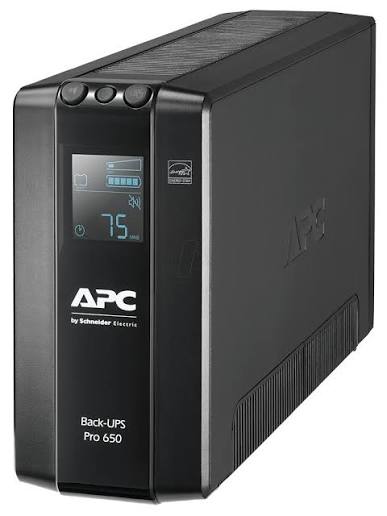
The apc BR650 Back-UPS is a compact line-interactive UPS designed to keep essential electronics powered during outages, voltage dips, and surges. With a 650 VA / 390 W capacity, it is a strong fit for home offices, small business desks, routers, modems, gaming consoles, and entry-level PC setups that need reliable backup power without taking up much space.
One of its biggest advantages is automatic voltage regulation, which helps stabilize fluctuating power without immediately switching to battery mode. That reduces battery wear and improves long-term reliability. The unit also includes six IEC outlets, USB connectivity for monitoring, and a step-approximated sine-wave output on battery, making it practical for everyday electronics and sensitive digital equipment.
This UPS is especially useful for users who experience frequent short outages, brownouts, or unstable wall power. It is also a smart choice for protecting workstations that must stay online long enough to save files and shut down safely. In many markets, the apc BR650 Back-UPS typically falls in the mid-range price segment, often around the equivalent of $150 to $190 depending on region and seller availability. It is commonly available through electronics retailers, office-supply stores, and online marketplaces.
If you need a dependable UPS for home and small-office protection, the apc BR650 Back-UPS offers a practical balance of features, runtime, and build quality.
Specifications: apc BR650 Back-UPS technical details and features
- Topology: Line-interactive UPS for efficient power conditioning
- Capacity: 650 VA / 390 W rated output
- Input voltage: 220–240 Vac nominal, with a wide operating range around 176–294 V
- Frequency range: 50/60 Hz with automatic sensing
- Output waveform: Step-approximated sine wave on battery
- Transfer time: Typically 8 ms, with a maximum of about 10 ms
- Battery: Sealed lead-acid, 12 V, maintenance-free
- Recharge time: About 12 hours for a full recharge
- Outlets: 6 IEC 320 C13 outlets
- Interface: USB monitoring support
- Protection: Surge protection and voltage regulation
- Typical runtime: Enough for short power cuts, with runtime varying by load
- Noise level: Low to moderate for desktop use
Compared with smaller 500 VA units, the apc BR650 Back-UPS offers better headroom for a desktop PC, network gear, and a monitor. Against larger 900 VA or 1300 VA models, it is more affordable and compact, but it provides shorter runtime and lower load capacity. For users who want a straightforward 650 VA UPS with solid protection rather than extended backup power, this model is well positioned.
Pros and Cons of apc BR650 Back-UPS
Pros
- Reliable line-interactive design that helps smooth out unstable power before switching to battery
- Good value for users who need basic backup power for a PC, modem, router, or small office setup
- Six IEC outlets provide flexible device coverage for essential electronics
- Automatic voltage regulation helps reduce battery cycling during minor power fluctuations
- Compact tower design fits easily under a desk or next to a workstation
- USB monitoring makes it easier to track battery status and shutdown events
Cons
- 390 W output is not enough for high-end gaming PCs, workstations, or multiple power-hungry devices
- Battery backup time is limited, so it is best for safe shutdown rather than long runtime
- Step-approximated sine wave output may not be ideal for every sensitive power supply or audio device
- Replacement battery cost should be considered in long-term ownership
- Compared with larger APC Back-UPS models, it offers less expansion room for future equipment
For most home-office users, the value proposition is strong: the apc BR650 Back-UPS delivers the core protections people actually need, without the higher cost of oversized models. If your setup is modest, this UPS is a sensible purchase; if you need long battery runtime, consider a higher-capacity alternative.
Customer Reviews: what users say about apc BR650 Back-UPS
Typical user feedback puts this UPS around 4.4 out of 5 stars, with praise focused on reliability, easy setup, and stable performance during short outages. Many users like that it handles routers, desktop PCs, and work-from-home equipment without fuss.
- Praise: “Compact, quiet, and exactly what I needed for my office PC and internet gear.”
- Praise: “Voltage regulation works well during brownouts, and the battery gives enough time to save work.”
- Complaint: “Runtime is short under heavier loads, so it is not meant for extended outages.”
- Complaint: “The unit is best for essential devices only; large monitors and multiple peripherals reduce backup time quickly.”
Buyers usually recommend the apc BR650 Back-UPS for home offices, networking equipment, and light desktop use. Users who need long backup periods or higher wattage often move to a larger APC Back-UPS model, but for everyday protection, this model earns strong satisfaction.
Faqs
How do I set up apc BR650 Back-UPS for the first time?
Why is my apc BR650 Back-UPS beeping and how do I stop it?
What devices should I connect to apc BR650 Back-UPS for the best protection?
How do I know if apc BR650 Back-UPS battery replacement is needed?
Why does apc BR650 Back-UPS keep switching to battery mode even when power seems normal?
Can apc BR650 Back-UPS protect a Wi-Fi router and modem during a power outage?
How should I maintain apc BR650 Back-UPS for reliable long-term performance?
What should I check if apc BR650 Back-UPS is not turning on?
Tags
More apc manuals
- Apc SRV Series External Battery Pack User Manual
- How to Use: Apc Smart-UPS® X Uninterruptible Power Supply User Manual
- How to Setup: Apc Back-UPS™ CS350/CS500/CS650 User Manual
- Apc UPS Battery BX2000UXI Instruction Manual | Features
- Apc Schneider Electric Back UPS BX600C-IN User Guide
- Apc Schneider Electric Back-UPS BR1500G-IN User Guide
Leave a Comment