
How to Use: Ariete Stick Vacuum Cleaner 2772/4 User Manual
Content
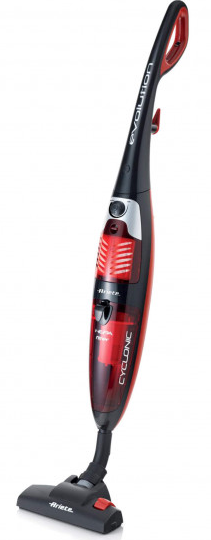
Ariete Stick Vacuum Cleaner 2772/4
Introduction
The Ariete Stick Vacuum Cleaner 2772/4 is a powerful, lightweight corded electric broom designed for quick and efficient cleaning in homes, offices, and small commercial spaces. Featuring a high-efficiency 800W motor, this vacuum cleaner delivers strong suction for dust, debris, and pet hair, making it ideal for daily maintenance and spot cleaning. Its bagless design with a 1L removable dust container ensures easy disposal and reuse, while the adjustable suction power lets you customize cleaning intensity for different surfaces.
Perfect for busy households, renters, and pet owners, the Ariete Stick Vacuum Cleaner 2772/4 is easy to maneuver and store, thanks to its vertical stick design and compact footprint. The 5.5-meter power cord provides ample reach, reducing the need for frequent outlet changes. With a sleek red finish and intuitive controls, this vacuum cleaner combines style with practicality. The Ariete Stick Vacuum Cleaner 2772/4 is widely available online and in major appliance stores, typically priced between $80 and $120, offering excellent value for its performance and features.
Specifications: Ariete Stick Vacuum Cleaner 2772/4
- Model: Ariete 2772/4 Corded Stick Cleaner Evolution
- Power: 800W (some listings report 600W; actual may vary by region)
- Dust Container Capacity: 1 liter, removable for easy cleaning
- Cord Length: 5.5 meters (5 meters in some variants)
- Weight: 3.1 kg
- Type: Vertical stick, corded electric broom
- Cleaning Type: Dry only
- Suction Power Adjustment: Yes, adjustable for different surfaces
- ON/OFF Switch: Integrated for easy operation
- Color: Red
Compared to similar stick vacuums, the Ariete 2772/4 stands out for its high suction power, large dust capacity, and user-friendly design. It outperforms many budget models in cleaning efficiency and durability, making it a top choice for those seeking reliable, corded cleaning solutions.
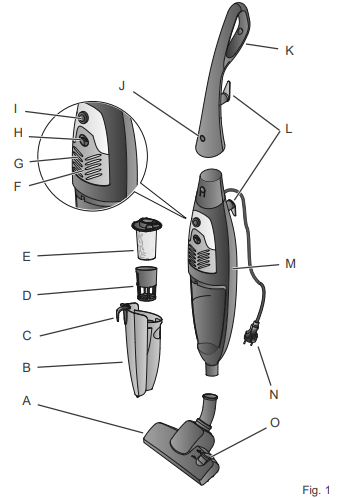
DESCRIPTION OF THE APPLIANCE
- Carpet/floor brush
- Dust container
- Dust container release button
- Filter support
- Filter
- Air outlet grill
- Hepa filter
- Air outlet grill release button!|
- On-off switch and power control
- Handle the release button
- Handle
- Cord storage device
- Motor body
- Power cord
- Brush position switch
HOW TO INSTALL THE APPLIANCE
Warning
Switch off the appliance and remove the plug from the socket before inserting or removing the individual parts.
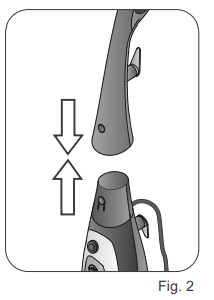
- Insert the handle (K) in the body of the motor (M) until you hear a "click" (Fig. 2). To disconnect the handle from the motor body, press the release button (J) and pull the handle upwards.
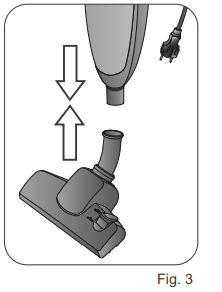
- Insert the brush (A) into the motor body. Press gently until it clicks (Fig. 3).
INSTRUCTIONS FOR USE
Warning
- Disconnect the power plug from the outlet when the appliance is not used
- Totally unwind the power cord.
- Always hold the product and check that the ON/OFF switch is in the OFF position. Plug into the mains socket.
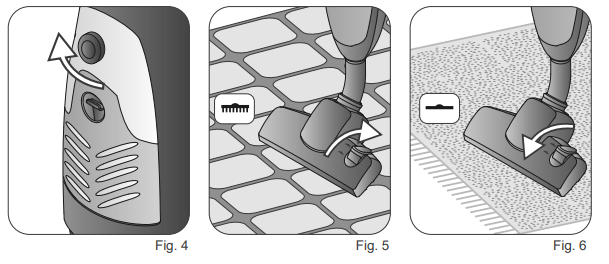
- Press the ON/OFF switch (I). Turn the control button (l) and set the suction power (Fig. 4).
- Clean large surfaces by pushing the brush back and forth: this allows the vacuum cleaner to collect the fragments and dirt from the floor.
- Press the brush switch (O) to position (
 ) for cleaning hard surfaces such as floors (Fig. 5). Press the brush switch (0) to position (— for the cleaning soft surfaces such as carpets (Fig. 6).
- Press the ON/OFF switch (
 ) to turn off the appliance.
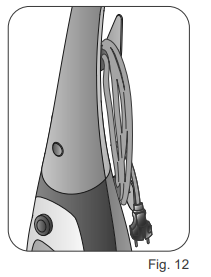
 - Store the power cord in the storage compartment (Fig. 12).
Warning
Switch off the appliance of immediately if something gets trapped inside the brush, such as a piece of cloth, the fringes of a carpet, etc.
Check the filters regularly and, if necessary, brush them or replace them.
CLEANING
Warning
Never immerse the motor body, plug, or the power cord in water or other liquids. Use a damp cloth for cleaning them.
Switch off the appliance and remove the plug from the outlet before inserting or removing parts and before cleaning.
- Clean plastic parts with a damp, non-abrasive cloth and dry them with a dry cloth. Do not let any kind of liquid enter into the appliance. Never use solvents that may damage the plastic parts.
How to empty the dust container
Clean the dust container (B) and the filter (E) in time; the suction power will be reduced if the container is full or if the filter is clogged.
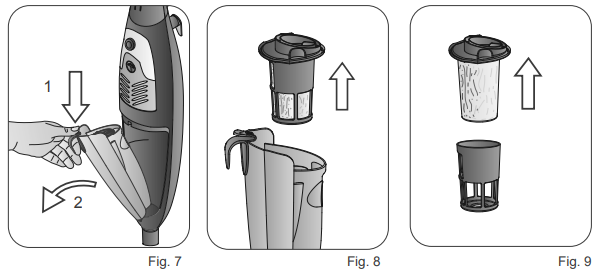
- Press the release button of the dust container (C). Tilt the container and remove it from its housing (Fig. 7).
- Remove the filter holder (D) from the dust container (Fig. 8). Remove the filter (E) from the filter holder (Fig. 9). Clean the filter holder and the filter with water.
Warning
- Rinse the lens only with clean water without using soaps or detergents.
- Empty the dust container (B) into a plastic bag and wash it with water.
- Allow tall components to dry and reassemble them.
Warning
Properly assemble the supon (D and the te fier (E) in the dust container before starting the appliance.
Assemble the dust container to the motor body by pushing it until you hear the click of the correct insertion.
How to clean the HEPA filter
The Hepa filter (G) is a high efficiency filter that removes impurities and filters particulate of all kinds and even bacteria.
The filter is located under the air outlet slots.
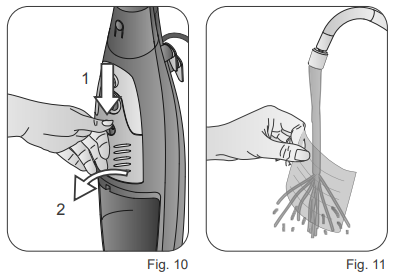
- Press the air outlet grill release button(H). Tilt the grill and remove the filter from its housing (Fig. 10).
- Wash the HHEPA filter with water (FFig.11).
Warning
Wash Hepa file only with dean water without using soaps or detergents.
It is good to change the filter frequently (every 2-3 months) to prevent the circulation of bacteria in the environment air.
Setup Guide: Ariete Stick Vacuum Cleaner 2772/4
Setting up your Ariete Stick Vacuum Cleaner 2772/4 is quick and straightforward. Begin by unpacking the unit and checking all included parts. Plug the vacuum into a standard electrical outlet using the 5.5-meter cord. Press the ON/OFF switch to start cleaning. Adjust the suction power as needed for carpets, tiles, or hard floors.
To empty the dust container, simply remove it from the unit, open the lid, and dispose of the contents. Reattach the container for reuse. No pairing or connectivity is required, as this is a corded model. Always ensure the vacuum is unplugged before cleaning or maintenance.
Safety Warnings: Do not use on wet surfaces, avoid blocking the air intake, and keep away from children. Regularly check the dust container and filter for blockages to maintain optimal performance.
Troubleshooting: Ariete Stick Vacuum Cleaner 2772/4
Common issues with the Ariete Stick Vacuum Cleaner 2772/4 include reduced suction (often due to a full dust container or clogged filter), overheating (from prolonged use), and power cord damage. Always empty the container and clean the filter after each use to prevent clogs. If the vacuum overheats, turn it off and let it cool for 30 minutes before resuming.
No error codes are displayed, but persistent problems may indicate a need for professional service. The Ariete 2772/4 comes with a standard manufacturer’s warranty—contact customer support for warranty claims or technical assistance. For help, visit the official Ariete website or contact authorized retailers.
Pros & Cons: Ariete Stick Vacuum Cleaner 2772/4
Pros
- Powerful 800W motor for strong suction
- Large 1L removable dust container
- Adjustable suction for versatile cleaning
- Lightweight and easy to store
- Long 5.5-meter power cord
- Bagless design for cost savings
Cons
- Corded design limits mobility
- Not suitable for wet cleaning
- Some users report minor noise at high power
The Ariete Stick Vacuum Cleaner 2772/4 offers excellent value for money, especially for those who prefer corded reliability over cordless convenience. It outperforms many budget stick vacuums in suction and durability.
Customer Reviews: Ariete Stick Vacuum Cleaner 2772/4
Users consistently rate the Ariete Stick Vacuum Cleaner 2772/4 highly, with an average of 4.5 stars. Many praise its strong suction, ease of use, and quick cleaning capabilities. Common compliments include the large dust container and adjustable power settings. Some users mention the cord can be slightly limiting, but appreciate the uninterrupted runtimeAfAfeww notes of minor noise at maximum power, but overall find it quiet for a corded model. Most recommend it for daily cleaning, pet owners, and small to medium-sized homes.
Faqs
How do I set up the ariete Stick Vacuum Cleaner 2772/4 for the first time?
What should I do if the ariete Stick Vacuum Cleaner 2772/4 suction power decreases?
Can I use the ariete Stick Vacuum Cleaner 2772/4 on both hard floors and carpets?
How do I clean and maintain the dust container of the ariete Stick Vacuum Cleaner 2772/4?
What are the power requirements and cable length of the ariete Stick Vacuum Cleaner 2772/4?
Why is the ariete Stick Vacuum Cleaner 2772/4 not turning on, and how can I fix it?
What are the key features of the ariete Stick Vacuum Cleaner 2772/4 that enhance its cleaning performance?
How can I optimize the performance of the ariete Stick Vacuum Cleaner 2772/4 for pet hair removal?
More ariete manuals
- Setup: Ariete Cordless Stick and Handheld Vacuum Cleaner 2758/2723 User Manual
- How to Use: Ariete Filter Coffee Machine 1342 User Manual
- Setup: Ariete Handy Force Stick Vacuum Cleaner 2761 User Manual
- Setup: Ariete Coffee Maker Cassetto 1301 User Manual
- Setup: Ariete Vertical Force Stick Vacuum Cleaner 2762 User Manual
- Setup: Ariete Coffee Grinder 3016 User Manual
Leave a Comment