
Setup: Ariete Cordless Stick and Handheld Vacuum Cleaner 2758/2723 User Manual
Content
Ariete Cordless Stick and Handheld Vacuum Cleaner 2758/2723

Introduction
The Ariete Cordless Stick and Handheld Vacuum Cleaner 2758/2723 offers a versatile and powerful cleaning solution designed for modern homes. Combining a cordless design with a 2-in-1 stick and handheld vacuum format, this device ensures effortless cleaning of floors, carpets, upholstery, and hard-to-reach areas without cumbersome cords. Its compact, lightweight build and rechargeable lithium-ion battery provide up to 45 minutes of runtime at normal speed, making it ideal for quick cleanups and deep cleaning sessions alike.
Key benefits include a digital motor delivering double suction power, a triple-level filtration system for improved air quality, and multiple brush heads tailored for various surfaces. The vacuum is particularly suited for busy households, pet owners, and those seeking an easy-to-use, portable cleaning device. With its attractive pink finish and ergonomic design, it balances style and functionality.
Available globally through select retailers and online marketplaces, the Ariete 2758/2723 typically ranges between $150 and $220, depending on the vendor and region. This price point places it competitively among mid-range cordless vacuum cleaners, offering excellent value considering its features and performance.
Specifications of the Ariete Cordless Stick and Handheld Vacuum Cleaner 2758/2723
- Model Numbers: 2758 (Pink), 2723
- Battery: 22.2V, 2200 mAh Lithium-ion rechargeable battery
- Charging Time: Approximately 4 hours
- Runtime: Up to 45 minutes at normal suction; 20 minutes at maximum power
- Motor: Digital motor with double suction power for optimal cleaning efficiency
- Filtration: Triple-level filtration system capturing fine dust and allergens
- Design: 2-in-1 cordless stick and handheld vacuum for versatile cleaning
- Accessories: Includes 3 brush heads suitable for carpets, floors, and delicate surfaces
- Weight: Lightweight and easy to maneuver (approx. 2.5 kg)
- Performance: Effective on multiple surfaces, including hardwood, tile, and carpet
Compared to other cordless stick vacuums in its price range, the Ariete 2758/2723 provides competitive battery life and suction power, especially with its digital motor technology. Its filter system surpasses many basic models, making it a strong contender for allergy-conscious users.
DESCRIPTION OF THE APPLIANCE
- Motor body release button
- Tube
- Brush release button
- Motorized brush with bristle roller
- Fabric brush
- Animal hair brush
- Motorized brush with soft roller for floors
- Dust collector door
- Dust collector door release button
- Motor body
- Speed control button
- On/Off button
- Unlocking the button of the dust collector
- Dust container
- Wall bracket
- Nozzle
- Handle
- Battery release button
- Removable battery
- Charge indicator
- Charger access
- Charger
- Screws (x 2)
- Wall plugs (x 2)

Identification data
On the label under the base of the appliance are reported the following identification data of the appliance:
- manufacturer and CE marking
- model (Mod.)
- serial number (SN)
- electrical supply voltage (V) and frequency (Hz)
- electrical power consumption (W)
- assistance toll-free phone number
When ordering at Authorized Service Centers, indicate the model and serial number.
HOW TO CHARGE THE BATTERY
Before connecting the charger to the electric grid c,, check that the voltage reported on the label under the charger corresponds to that of the local grid.
This appliance can be charged only with the provided charger.
Warning
Before using the thusingpliance for the first time, charge it completely.
The battery must be recharged with the battery disconnected from the body of the appliance.
- Remove the packaging materials from inside and outside of the appliance. Remove all the stickers. Place the motor body horizontal surface.
- Press the release button (18) to remove the battery from the body of the appliance (Fig. B).
- Plug the charger cable into the input (21) on the battery (19).
- Plug in the charger.
- The charge indicator (20) turns on in blue colour and blinks. When the charge indicator comes to a steady light, the battery is completely charged.
- Disconnect the charger from the socket. Unplug the charger from the battery.
- Place the battery into the body of the appliance (Fig. B) and check that it is correctly locked into place.

INSTRUCTIONS FOR USE
- Grab the motor body (10) by the handle (17).
- Assemble the tube (2) on the motor body until you hear the click of the release button of the motor body (1) (Fig. C).
- Assemble the tube on the brush (4) until you hear the click of the release button of the brush (3) (Fig. D).

Warning
- Apiance all danger. The appliance, once that it is assembled, cannot stand on the brush in a vertical position.
- Press the speed control button (11) to select the desired speed (Fig. E).
- Two speeds are available: when the appliance is turned on, the speed is set to the minimum level.
- To switch to maximum speed, press the speed control button (11).

Warning
- Switch the appliance off immediately in the event that something gets trapped inside the brush, such as a piece of cloth, the fringes of a carpet, etc. Before turning on the appliance again, remove anything that caused the obstruction of the aspiration ducts.
- When the dust reaches the MAX lever, you need to empty the dust container.
- Switch off the appliance.
- Press the release button of the motor body (1). Disassemble the tube.
- Take the motor body to a trash bin. Press the release button of the dust collector door (Fig. F). Empty all the dust (Fig. G).
- Close the dust collector door.

When the last remaining bar of the battery charge indicator starts flashing, the battery is low and should be recharged.
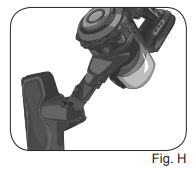
The appliance can be used with the tube and the brush or with the brush built directly on the motor body (Fig. H).
USING THE ACCESSORIES
The appliance is equipped with various accessories:
- A brush with a soft roller (7), particularly suitable for cleaning delicate floors, such as parquet, marble, and porcelain tile.
- A brush with a bristle roller (4), particularly suitable for deep cleaning of rugs and carpets.
- An animal hair brush (6), particularly suitable for vacuuming animal hair on various surfaces such as floors, pet kennels, sofas, and chairs.
- A fabric brush (5), particularly suitable for vacuuming dirt from fabrics, sofas, and also horizontal surfaces.
- A crevice nozzle (16), particularly suitable for vacuuming in the most hidden corners and narrow slots.
The accessories can be built on the tube to reach the highest points.
The accessories can be built directly on the motor body to clean the windows and the interior of the car.
AFTER USE
- Switch off the appliance. Empty the dust container.
- Disassemble the motor body from the tube.
- Put the appliance in a dry place and away from the reach of children.
- Alternatively, use the wall mount to fasten the appliance to the wall. The wall bracket (15) is supplied with screws (23) and wall plugs (24).
- Place the wall mount against the wall. Adjust the height of the wall mount according to the height of the appliance. Using a pencil, make marks on the wall in line with the three holes of the wall mount. Remove the wall mount. Drill the wall in line with the marks. Insert the supplied wall plugs (24) into the holes.
- Place the wall mount on the wall,, keeping the holes in line with the wall plugs. Insert the supplied screws (23) into the holes. Tighten the screws with a screwdriver.
- Fasten the appliance to the wall mount (Fig. L).

Cleaning the motorized brush with a bristle roller
Do not lubricate or grease the rotating parts to avoid that hair and lint getting stuck.
- The bristle roller can be removed from its seat to clean the bristles.
- Remove the brush (4) from the tube. Press the brush release button (3).
- Turn the brush upside-down. There is a locking hook on one side of the brush (Fig. I).

- Lift the locking hook (Fig. J).
- Lift the bristles roller on the locking hook side (Fig. K). Remove the bbristleroller completely.
- Clean the bristles from the dirt.
- To reassemble the bristleoller in the motorized brush, first insert the side opposite the locking hook.
- Lower the roller on the side of the locking hook and insert the motorized brush support vertically into its seat.
- Reinsert the locking hook.

Cleaning the motorized brush with a sofa t roller
- The soft roller can be removed from its seat to clean the roller.
- Turn the brush upside-down. There is a locking hook on one side of the brush (Fig. M).
- Lift the locking hook (Fig. N).
- Lift the soft roller on the locking hook side (Fig. O). Remove the soft roller completely.
- Clean the roller of the collected dirt.
- To reassemble the soft roller in the motorized brush, first insert the side opposite the locking hook.
- Lower the soft roller on the side of the locking hook and insert the support vertically into its seat.
- Reinsert the locking hook.

Cleaning the animal hair brush
- The bristles' support can be removed from its seat to clean the bristles.
- There is a locking lever on one side of the brush (Fig. P).
- Turn the locking lever, then pull out the locking screw from the opposite side (Fig. Q).
- Pull out the bristles support completely (Fig. R).
- Clean the bristles from the dirt.
- Reassemble the bristles support to the brush, insert the locking screw into the specific seat and turn the lever to lock the bristles.

HEPA air outlet filter cleaning
- The HEPA air outlet filter, located in the upper part of the motor body. It can be removed by pressing the side buttons (Fig. S).
- The HEPA filter is a high-efficiency filter which removes the impurities and filters particles and bacteria.
Often change the Hepa filter (every 4-6 months) to avoid the circulation of the bacteria in the air.
Warning!
- Wash the air outlet filter only with clean water without soap or detergent.
- Wait until the air outlet filter is completely dry before inserting it into its seat.
Cleaning the fabric filter and the metal filter
- Take the motor body to a trash bin. Press the release lever of the dust collector door. Remove all the dust.
- Press the release button of the dust collector. Remove the dust container from the motor body.
- Remove the filters from the dust collector (Fig. T-U). The fabric filter can be easily removed from the tank even without opening the dust collector.
- Correctly clean the filters by removing dirt or washing them.

Warning!
- Only wash the filters with clean water without soap or detergents.
- Wait until the filters are completely dry before inserting them into the housing.
- Insert the metal filter into the dust collector.
- Insert the fabric filter into the metal filter.
- Insert the dust container into the motor body. Press slightly till you will hear the locking click.
SETTING THE MACHINE OUT OF SERVICE
In the case of decommissioning of the appliance, it must be electrically disconnected. Empty the dust container- er. In case of scrapping, you will be required to separate the various materials used in the construction of the appliance and dispose of them according to their composition and to the applicable laws in the country of use.
Setup Guide for the Ariete Cordless Stick and Handheld Vacuum Cleaner 2758/2723
- Remove the vacuum and accessories from the packaging.
- Charge the vacuum fully before first use by connecting the charger to the charging port; charging takes approximately 4 hours.
- Attach the desired brush head according to your cleaning needs: motorized brush for carpets, soft brush for hardwood floors, or crevice tool for tight spaces.
- For handheld mode, detach the stick section by pressing the release buttons and use the vacuum as a compact handheld device.
- Turn on the vacuum using the power button; adjust suction modes if available (normal or max power).
Troubleshooting Tips: If the vacuum does not turn on, ensure the battery is fully charged. Check for blockages in the brush or suction path regularly. Clean or replace filters according to the maintenance schedule.
Safety Precautions: Do not use the vacuum to pick up liquids or flammable materials. Avoid exposing the battery to extreme temperatures. Always switch off and unplug the charger before cleaning or maintenance.
Troubleshooting for the Ariete Cordless Stick and Handheld Vacuum Cleaner 2758/2723
- Vacuum won’t power on: Ensure battery is charged. If still unresponsive, battery replacement may be necessary.
- Loss of suction: Check and clean filters and brush heads. Remove any debris blocking the airways.
- Battery drains quickly: Use only the recommended charger. Avoid prolonged storage with a depleted battery.
- Error codes or blinking lights: Refer to the user manual or contact customer support for diagnostics.
- Unusual noises: Inspect brush rollers for entangled hair or objects and clean accordingly.
Preventive maintenance includes regular filter cleaning or replacement, avoiding vacuuming sharp objects, and storing the vacuum in a dry environment. The product comes with a standard warranty covering manufacturing defects. For support, contact Ariete customer service via their official website or authorized retailers.
Pros & Cons of the Ariete Cordless Stick and Handheld Vacuum Cleaner 2758/2723
- Pros:
- Strong digital motor with double suction power ensures effective cleaning on various surfaces.
- Long battery life with up to 45 minutes of runtime supports extended cleaning without frequent recharges.
- Lightweight and ergonomic design increases ease of use and portability.
- 2-in-1 versatility enables quick switching between stick and handheld modes.
- Triple-level filtration improves air quality by capturing fine dust and allergens.
- Cons:
- The charging time of 4 hours is longer than some competing models.
- At maximum suction, the runtime decreases to about 20 minutes, which may limit deep cleaning sessions.
- Limited availability in some regions may pose purchasing challenges.
- Brush heads may require frequent cleaning to maintain optimal performance.
Overall, the Ariete Cordless Stick and Handheld Vacuum Cleaner 2758/2723 offers strong value for money, balancing power, battery life, and convenience. It compares favorably against similar mid-tier cordless vacuums like Dyson V8 or Shark Rocket in terms of runtime and filtration, but at a more affordable price point.
Customer Reviews of the Ariette Cordless Stick and Handheld Vacuum Cleaner 2758/2723
Users have praised the Ariete Cordless Stick and Handheld Vacuum Cleaner 2758/2723 for its powerful suction and lightweight design, often highlighting its ease of switching between stick and handheld modes. Many note the effective triple filtration system as beneficial for allergy sufferers. The vacuum has received average star ratings of around 4 out of 5 stars, with customers appreciating the runtime and portability.
Common complaints mention the relatively long charging time and reduced battery life in max power mode. Some users experienced minor issues with brush head maintenance, recommending frequent cleaning to avoid clogging. Despite these, the majority recommend the vacuum for everyday household use, especially for apartments, small homes, or pet owners needing quick cleanups.
Faqs
How do I set up the Ariete Cordless Stick and Handheld Vacuum Cleaner 2758/2723 for the first time?
What should I do if the Ariete Cordless Stick and Handheld Vacuum Cleaner 2758/2723 is not charging?
Can I use the Ariete Cordless Stick and Handheld Vacuum Cleaner 2758/2723 as a handheld vacuum?
How do I empty and clean the dust container on the Ariete Cordless Stick and Handheld Vacuum Cleaner 2758/2723?
What accessories are included with the Ariete Cordless Stick and Handheld Vacuum Cleaner 2758/2723?
How do I switch between speed settings on the Ariete Cordless Stick and Handheld Vacuum Cleaner 2758/2723?
How often should I clean or replace the filter in the Ariete Cordless Stick and Handheld Vacuum Cleaner 2758/2723?
What should I do if the Ariete Cordless Stick and Handheld Vacuum Cleaner 2758/2723 loses suction power?
More ariete manuals
- Setup: Ariete Handy Force Stick Vacuum Cleaner 2761 User Manual
- How to Use: Ariete Stick Vacuum Cleaner 2772/4 User Manual
- Setup: Ariete Vertical Force Stick Vacuum Cleaner 2762 User Manual
- How to Use: Ariete Filter Coffee Machine 1342 User Manual
- Setup: Ariete Steam Mop 10-in-1 4164 User Manual
- Setup: Ariete Coffee Maker Cassetto 1301 User Manual
Leave a Comment