
How to Use: Ariete Filter Coffee Machine 1342 User Manual
Content
Ariete Filter Coffee Machine 1342

Introduction
The Ariete Filter Coffee Machine 1342 is a versatile and stylish appliance designed to deliver rich, aromatic American-style coffee conveniently at home or in small office settings. With its vintage-inspired look and modern technical features, this coffee maker blends classic aesthetics with functional innovation, making it a must-have for coffee lovers who value both design and performance.
Key benefits include a generous brewing capacity of 4 to 12 cups, perfect for families or small gatherings, and a 24-hour programmable timer that allows users to schedule coffee preparation in advance for a fresh brew any time of day. The machine also features a drip-stop system and a heated plate to keep coffee warm for up to 30 minutes after brewing. Its removable and easy-to-clean filter holder enhances convenience and maintenance.
Ideal for daily home use, office environments, or coffee enthusiasts seeking an easy-to-use drip coffee maker, the Ariete 1342 supports a range of coffee strengths and cup quantities to suit different tastes and occasions. Its estimated price range typically falls between €60 to €90, making it competitively priced among mid-range filter coffee machines. The product is widely available through online retailers and specialty kitchen appliance stores.
Specifications of the Ariete Filter Coffee Machine 1342
- Model Number: 1342 Vintage
- Capacity: 4 to 12 cups (1.5 liters)
- Programmable Timer: Up to 24 hours in advance with LCD
- Heating Plate: Keeps coffee warm for approximately 30 minutes
- Anti-drip System: Prevents spills when removing the carafe
- Filter Type: Removable and washable permanent coffee filter
- Dimensions: 21 cm (length) x 23.5 cm (width) x 35 cm (height)
- Weight: Approximately 2.9 kg
- Power Supply: Standard electric plug (voltage varies by region)
- Design: Vintage beige, blue, or green color variants with tempered glass carafe
This machine stands out in its category by offering a programmable timer and multiple coffee intensity settings, which are features often reserved for higher-end models. Compared to similar filter coffee machines in the mid-range segment, the Ariete 1342 combines user-friendly functionality with aesthetic appeal, making it suitable for both practical use and kitchen decor enhancement.
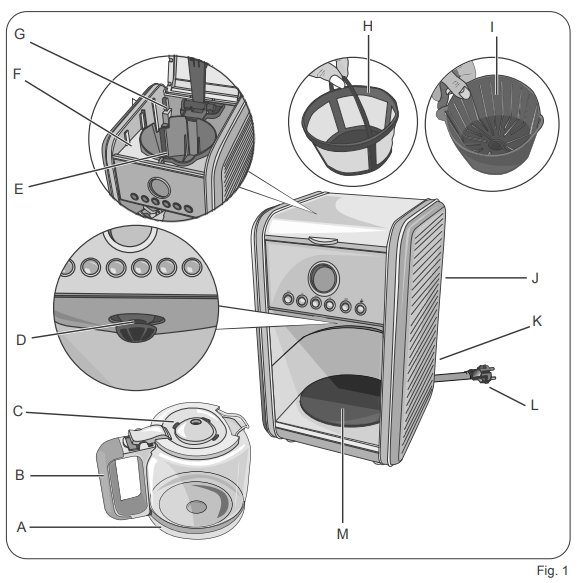
DESCRIPTION OF THE APPLIANCE
- Jug
- Carafe handle
- Carafe lid
- Dispensing spout
- Filter holder seat
- Water tank
- Water level indicator
- Coffee filter
- Removable filter holder
- Tank lid
- Cable compartment
- Power cord + Plug
- Hot plate
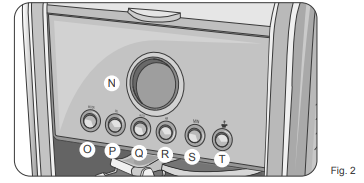
- Display
- MODE
- SEL
- AUTO
- Button for setting the hours (HR)
- Button for setting the minutes (MIN)
- Coffee dispensing button (
 ) / OFF
Identification data
In the label located under the support base of the machine,, there is the following identification data of the machine:
- manufacturer and CE marking
- model (Mod.)
- serial number (SN)
- electrical supply voltage (V) and frequency (Hz)
- electrical power consumption (W)
- assistance toll-free phone number
When ordering at Authorized Service Centers, indicate the model and serial number.
INSTRUCTIONS FOR USE
Starting the appliance
- Check that the domestic mains voltage is the same as the voltage indicated on the label of the device.
- Remove the packaging materials from inside and outside of the appliance.
- Then place the unit on a flat surface. Place the appliance at a distance of at least 10 cm from walls, furniture, or other appliances.
Warning
Risk of damage to the appliance surface. The appliance's high temperature can cause the support surfaces' lamination. Place a cloth or a mat between the appliance and the supporting surface.
Warning
Risk of power line overload. More appliances connected to a single electrical outlet can cause a short circuit. Connect the device to an electrical outlet free from other appliances. - Wash the jug, the removable filter holder,, and the coffee filter with hot water and soap. Rinse and dry the components.
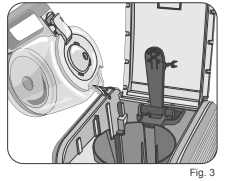
- Place the removable filter holder in its seat (Fig. 5).
The flow valve located on the bottom of the removable filter holder must be inserted into the central hole of the filter holder.
First start-up
In case of first power on, or after a period of disuse, it is recommended to allow at least two jugs of water to come out from the hydraulic circuit of the boiler.
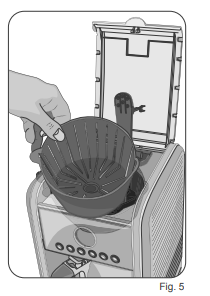
- Fill the tank with cool tap water (Fig. 3) to the level indicated with "12". The level "12" is equivalent to the maximum water level and the maximum number of cups of coffee. Close the tank lid.
NEVER fill the tank beyond the maximum level.
For this washing, do not fit the coffee filter in the filter holder. - Insert the plug into the socket, which must be earthed.
- Place the empty jug on the warming plate (M). Make sure that the flow valve is correctly positioned on the jug lid.
- Press the coffee dispensing button (). Wait until all the water contained in the tank is dropped into the jug. Wait 15 minutes to let the appliance cool down.
- Repeat with a second jug of water. Wait until all the water contained in the tank is dropped into the jug.
Now it is possible to prepare the appliance and dispense your first jug of coffee.
Auto-off function
- If the machine is turned on but not in use, the auto-off function operates after about 40 minutes.
- This function puts the appliance on standby and disables all the heating functions.
How to prepare a second jug of coffee
Press the coffee button (). The appliance turns off. Remove the plug from the socket.
Warning
Danger of burns caused by splashes of water or steam. Wait at least 15 minutes before refilling the tank with water. Wait for the cooling of the hot parts.
Before starting to dispense coffee, check that there is enough water in the tank. Do not start the coffee dispensing if the water level is below the minimum level.
- Open the lid. Lift the coffee filter handle. Pull out the coffee filter from the filter holder. Remove the coffee residues from the filter.
- Remove the filter holder from the appliance. Rinse the jug and filter holder with fresh, clean water. Fill the tank with cool tap water to the desired level.
- Place the empty jug on the warming plate (M).
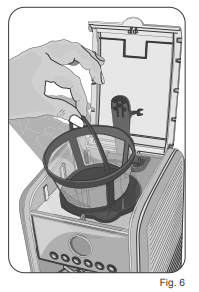
- Place the filter holder in its seat (Fig.Fig. 5). Place the coffee filter in the filter holder (Fig.Fig. 6). Measure the coffee in the filter. A cup of coffee is equivalent to a spoonful of powdered coffee.
- Close the cover. Plug into the mains socket.
- Press the coffee button (). The machine starts the coffee dispensing cycle.
Setup Guide for the Ariete Filter Coffee Machine 1342
- Place the coffee machine on a flat, stable surface near a power outlet.
- Open the water tank lid and fill with fresh, cold water up to the desired level (4 to 12 cups).
- Insert the removable coffee filter holder into its seat and add the appropriate amount of ground coffee based on the selected strength.
- Close the lid securely and place the tempered glass carafe on the heated plate.
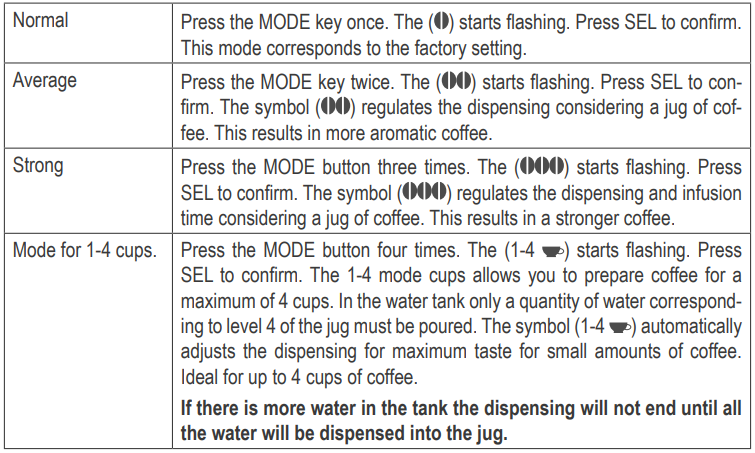
- Plug in the machine and use the MODE button to select coffee strength: normal, average, strong, or 1-4 cups mode.
- Set the timer using the HR and MIN buttons if you wish to schedule coffee preparation up to 24 hours ahead.
- Press the AUTO or coffee dispensing button to start brewing immediately or at the set time.
Troubleshooting tips: Ensure the water tank is filled sufficiently, the filter holder is properly seated, and the carafe is correctly positioned to avoid leaks or interruptions. Use the Pause & Serve button to temporarily stop coffee dispensing without removing the carafe.
Safety warnings: Do not touch hot surfaces during or immediately after use. Unplug the machine before cleaning. Keep out of reach of children.
Setting the coffee intensity
Troubleshooting the Ariete Filter Coffee Machine 1342
- The machine does not start: Check the power cord connection and ensure the power outlet is functioning.
- No coffee dispensed: Confirm the water tank is filled and the filter holder is correctly placed.
- Weak coffee: Adjust coffee strength using the MODE button to a stronger setting or add more ground coffee.
- Dripping continues after carafe removal: Check the anti-drip system; clean or reposition the carafe and filter basket.
- Timer not working: Verify correct time and timer settings; reset the machine if needed.
Preventive measures: Regularly clean the removable filter and carafe to prevent residue buildup. Descalcify the machine periodically if using hard water.
The Ariete Filter Coffee Machine 1342 comes with a manufacturer’s warranty covering faults and operational issues; details may vary by seller and region. For support, contact Ariete customer service via their official website or authorized retailers.
Pros & Cons of the Ariete Filter Coffee Machine 1342
Pros
- Programmable 24-hour timer: Allows convenient coffee preparation scheduled ahead for freshness.
- Large brewing capacity: Suitable for 4 to 12 cups, ideal for families or small offices.
- Easy maintenance: Removable and washable filter holder simplifies cleaning.
- Anti-drip system: Prevents messes when pouring or removing the carafe.
- Stylish vintage design: Adds aesthetic value to kitchen decor.
Cons
- Limited keep-warm duration: The Heating plate keeps coffee warm for only about 30 minutes.
- No built-in grinder: Requires pre-ground coffee, unlike some higher-end models.
- Basic display: LCD timer display is functional but lacks advanced touchscreen features.
Overall, the Ariete 1342 offers excellent value for money for those seeking a classic, programmable filter coffee machine, though it may not satisfy users wanting advanced automation or integrated grinding.
Customer Reviews of the Ariete Filter Coffee Machine 1342
Users frequently praise the Ariete Filter Coffee Machine 1342 for its reliable brewing performance and ease of programming the 24-hour timer. Many highlight the convenience of preparing coffee ahead of time and the quality of the American-style drip coffee it produces. The vintage design and sturdy glass jug receive positive comments for adding charm to kitchens.
Common complaints include the relatively short warm-keeping time on the hot plate and the absence of a grinder, which necessitates purchasing pre-ground coffee. Some users note that the machine’s size requires sufficient counter space.
Overall, the machine holds a strong average rating of approximately 4 out of 5 stars, with many recommending it to users who want an easy-to-use, programmable filter coffee maker with classic styling and dependable functionality.
Faqs
How do I set up the ariete Filter Coffee Machine 1342 for the first time?
What should I do if the ariete Filter Coffee Machine 1342 is not dispensing coffee properly?
How can I adjust the coffee strength on the ariete Filter Coffee Machine 1342?
Can the ariete Filter Coffee Machine 1342 be programmed to brew coffee in advance?
What maintenance is required to keep the ariete Filter Coffee Machine 1342 working efficiently?
Is the ariete Filter Coffee Machine 1342 compatible with permanent or paper filters?
How does the Pause & Serve function work on the ariete Filter Coffee Machine 1342?
What is the maximum coffee capacity of the ariete Filter Coffee Machine 1342, and how does it affect brewing?
More ariete manuals
- How to Use: Ariete Stick Vacuum Cleaner 2772/4 User Manual
- Setup: Ariete Coffee Maker Cassetto 1301 User Manual
- Setup: Ariete Cordless Stick and Handheld Vacuum Cleaner 2758/2723 User Manual
- Setup: Ariete Coffee Grinder 3016 User Manual
- Setup: Ariete Handy Force Stick Vacuum Cleaner 2761 User Manual
- Setup: Ariete Coffee Maker 1389A User Manual
Leave a Comment