
Bose 300-Series Soundbar User Manual
Content
Introduction to the Bose 300-Series Soundbar
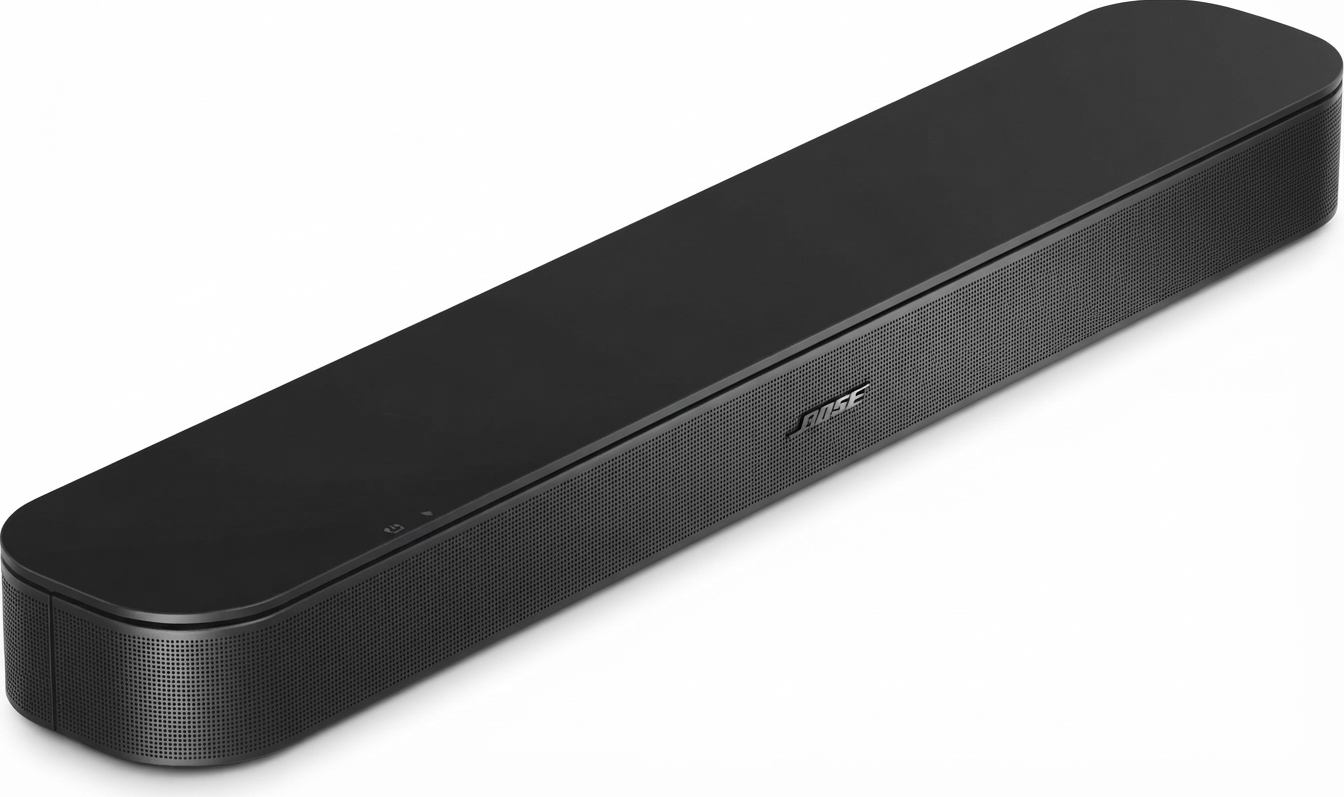
The Bose 300-Series Soundbar, commonly known as the Bose Smart Soundbar 300, is a compact home audio solution built for users who want clearer TV dialogue, richer streaming sound, and a cleaner setup than traditional speaker systems. It is designed for small to medium-sized rooms, bedrooms, apartments, and living spaces where simplicity and premium sound quality matter. With support for Wi-Fi, Bluetooth, HDMI ARC, optical audio, and voice assistant integration, it works well for movies, TV shows, music streaming, and everyday smart-home use.
One of its biggest strengths is the balanced sound profile that Bose is known for, especially for spoken content and casual entertainment. The soundbar also integrates with the Bose Music app, making setup, device control, and streaming management straightforward for most users. It supports Dolby Digital and can be expanded with a Bose Bass Module or wireless surround speakers for a fuller home theater experience.
As of current market listings, the price range is typically around $449 for the standalone unit, while bundles with bass modules can cost significantly more. Availability is generally through Bose’s official store and major electronics retailers, although stock may vary by region. The Bose 300-Series Soundbar is best suited for buyers who want a compact smart soundbar with premium branding, easy installation, and strong voice clarity.
How to Use the Bose 300-Series Soundbar: Setup and Basic Operation
Getting started
- Place the soundbar centered below your TV for the best stereo imaging and dialogue clarity.
- Connect it using HDMI ARC for the most convenient TV control, or use the optical cable if ARC is not available.
- Plug in the power cord and follow the on-screen setup instructions in the Bose Music app.
- Complete Wi-Fi pairing if you want streaming, app control, and voice assistant features.
- Use the remote, app, or TV controls to adjust volume, dialogue mode, bass, and source input.
Best practices for daily use
- Keep the firmware updated through the Bose app for improved performance and compatibility.
- Use HDMI ARC whenever possible to reduce audio lag and simplify control.
- Enable dialogue enhancement when watching news, podcasts, or dialogue-heavy content.
- For larger rooms, consider adding a bass module for deeper low-end output.
Troubleshooting the Bose 300-Series Soundbar
If the soundbar does not produce sound, first check the cable connections, the TV’s audio output settings, and the selected source input. For HDMI ARC issues, confirm that ARC is enabled on the TV and try a different high-speed HDMI cable. If audio cuts out during streaming, restart both the TV and soundbar, then verify that the Wi-Fi connection is stable.
Common Bose error codes include C3-SC3004, C7-SC3103, c3-sc1005, and 1321. These are often tied to setup problems, app communication issues, or music service access problems. A practical fix is to close and reopen the Bose Music app, restart the soundbar, and confirm that the phone and soundbar are on the same network.
Prevent problems by keeping the unit updated, avoiding weak Wi-Fi signals, and using quality cables. The product includes a 1-year limited warranty, and support is available through Bose customer support, the Bose app, and the official Bose support website. For help, contact Bose Support through the support section of the official Bose website or use the Bose Music app for guided troubleshooting and product assistance.
Pros and Cons of the Bose 300-Series Soundbar
Pros
- Compact design that fits easily under most TVs.
- Clear dialogue and balanced sound for movies, news, and streaming.
- Wi-Fi, Bluetooth, HDMI ARC, and optical connectivity provide flexible setup options.
- Voice assistant support and app control add convenience.
- Expandable with Bose bass and surround accessories for a better home theater experience.
Cons
- Premium pricing compared with many entry-level soundbars.
- Limited bass output without an additional bass module.
- Not the strongest choice for users who want a very wide or cinematic soundstage.
- Some alternatives offer more channels or included subwoofers at a lower price.
For value for money, the Bose 300-Series Soundbar makes sense if sound quality, simplicity, and brand reliability matter more than raw power. Compared with budget alternatives, it offers better polish and app integration, while competing multi-channel bars may deliver more immersion for less money.
Customer Reviews of the Bose 300-Series Soundbar
Customer feedback is generally positive, with many users praising the crisp dialogue, compact design, and easy setup. A common rating pattern is around 4 out of 5 stars, especially from buyers using it in apartments or smaller living rooms. One typical review says, “The voice clarity is excellent, and it fits perfectly under my TV without clutter.”
Frequent complaints mention the higher price and the fact that bass performance is modest without an extra module. Some users also report occasional app or Wi-Fi setup frustration, especially during first-time activation. Another common comment is, “Great sound for TV and streaming, but I added a bass module to get the full movie experience.”
Recommendation-wise, this soundbar is a strong buy for people who want a premium compact soundbar with smart features and reliable TV audio improvement. Buyers who want thunderous bass or a full surround package from the start may want to compare it with larger soundbars or bundled alternatives.
Frequently Asked Questions About the Bose 300-Series Soundbar
What is the Bose 300-Series Soundbar best for?
It is best for clearer TV dialogue, music streaming, and simple home entertainment in small to medium-sized rooms.
Does it support Bluetooth and Wi-Fi?
Yes, it supports both Bluetooth and Wi-Fi for wireless streaming and app-based control.
Can it be expanded?
Yes, it can be paired with a Bose bass module and wireless surround speakers for a more immersive setup.
Is it worth the price?
If you value premium sound quality, easy setup, and a compact design, the Bose 300-Series Soundbar is worth considering. If you want maximum bass or the lowest cost, there are cheaper alternatives available.
Faqs
How do I set up bose 300-Series Soundbar for the first time?
Why is my bose 300-Series Soundbar not connecting to Wi-Fi or the Bose app?
How do I fix bose 300-Series Soundbar audio delay or lip-sync problems?
What devices are compatible with bose 300-Series Soundbar?
How can I improve bass and surround sound on bose 300-Series Soundbar?
Why is my bose 300-Series Soundbar not producing any sound?
How do I update firmware on bose 300-Series Soundbar and why does it matter?
What is the best way to clean and maintain bose 300-Series Soundbar?
More bose manuals
Leave a Comment