
How to Use: Bose Solo Soundbar Series II User Manual
Content
Bose Solo Soundbar Series II: Complete Product Manual and Buyer Guide
Introduction
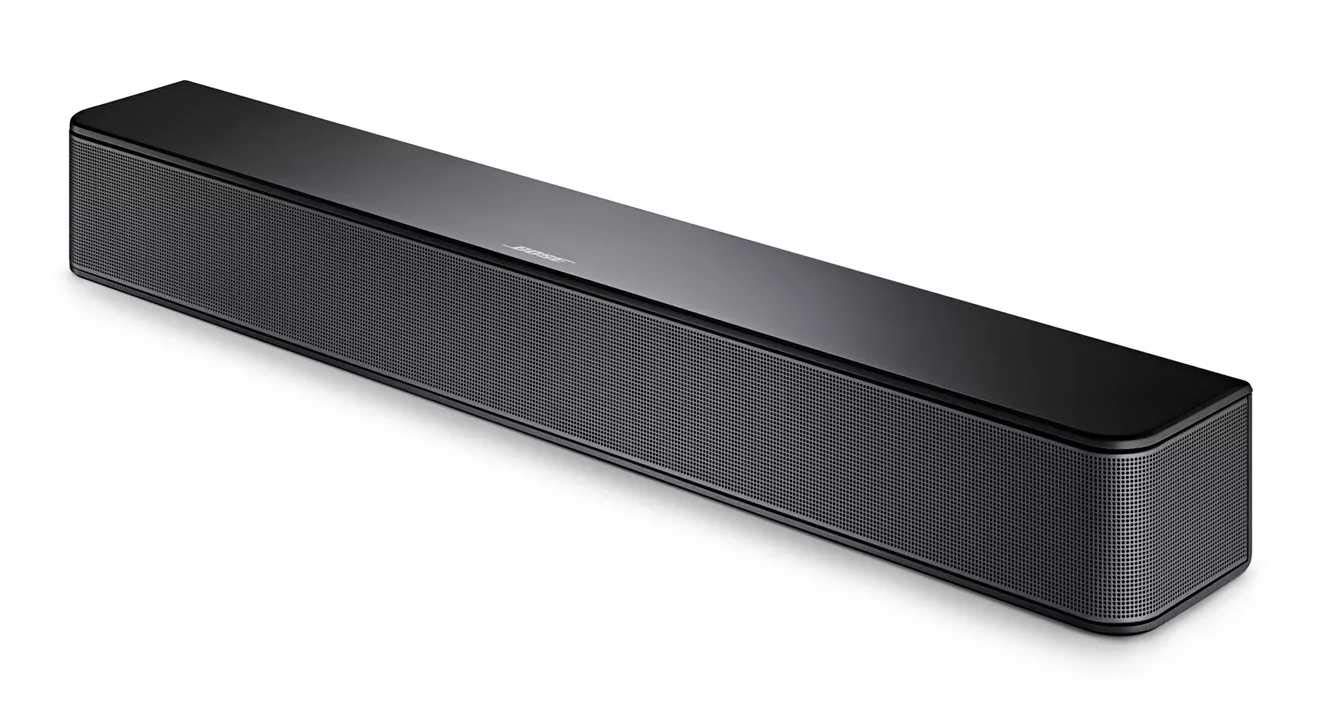
The Bose Solo Soundbar Series II is a compact 2.0-channel soundbar designed to upgrade TV audio with clearer dialogue, wider stereo separation, and a simple setup. Built for users who want better sound without a full home theater system, it fits well in small to medium rooms, apartments, bedrooms, and secondary TVs. Its slim profile, wireless Bluetooth support, and Bose’s focus on vocal clarity make it a practical choice for everyday streaming, movie nights, and news viewing.
One of its biggest strengths is ease of use. The Bose Solo Soundbar Series II connects to a TV with a single cable, and it is engineered to improve speech intelligibility so you can hear conversations more clearly at lower volumes. It also includes Bluetooth for wireless music playback from phones and tablets, making it useful as both a TV speaker upgrade and a casual audio speaker.
The estimated price range is typically around $100 to $200, depending on whether you buy new, refurbished, or during seasonal promotions. Availability is generally strong through Bose, major electronics retailers, and online marketplaces. For shoppers looking for a simple, compact soundbar with trusted brand value, the Bose Solo Soundbar Series II remains a popular entry-level option.
Specifications
- Audio system: 2.0-channel soundbar with two full-range drivers
- Sound enhancement: Built-in Dolby decoding for improved spatial audio processing
- Connectivity: Bluetooth wireless audio streaming, optical digital input, and 3.5 mm auxiliary input
- Output power: Commonly listed around 100 watts peak output
- Dimensions: Approximately 21.6 inches wide, 2.8 inches high, and 3.4 inches deep
- Weight: About 3.7 pounds, making it lightweight and easy to mount
- Design: Tabletop or wall-mount capable
- Materials: Plastic and metal construction
- Remote control: Included for volume and source control
- Bluetooth version: Typically listed as Bluetooth 4.0 on Bose documentation and refurb listings
Compared with many budget soundbars, the Bose Solo Soundbar Series II stands out for dialogue clarity and compact size rather than bass-heavy performance. It competes most closely with other small 2.0-channel models from Yamaha, Sony, and Samsung, but it usually offers a more polished voice-focused tuning.
Detailed Description
The Bose Solo Soundbar Series II is built to sit beneath a television and improve the listening experience without requiring a separate subwoofer or surround speakers. Inside the cabinet, angled drivers are tuned to spread sound more broadly across the room, helping create a more open soundstage than standard TV speakers. This makes everyday content easier to follow, especially dialogue-heavy shows, sports commentary, and news broadcasts.
In real-world use, the soundbar works best for users who want cleaner mids and more intelligible voices rather than cinematic low-end impact. It performs well in small living rooms, bedrooms, dorms, and office spaces where a compact footprint matters. The slim chassis and understated design also help it blend into modern entertainment setups.
The build quality is solid for its class, with a durable outer shell that balances lightweight portability and stability. The included remote and straightforward interface keep operation simple, and Bluetooth support adds convenience for music playback from mobile devices. Overall, the experience is designed around simplicity, reliability, and consistent everyday performance.
Setup Guide
- Place the soundbar directly in front of your TV or mount it on the wall using compatible hardware.
- Connect the power cord to the soundbar and plug it into a live AC outlet.
- Use one audio connection only: optical cable is preferred for most TVs, while the 3.5 mm auxiliary input is available for compatible devices.
- On your TV, go to audio settings and select the correct output format, such as stereo or PCM if needed.
- Turn on the soundbar and test volume using the included remote or TV controls if supported.
- To use Bluetooth, enable pairing mode on the soundbar, then select it from your phone, tablet, or laptop’s Bluetooth menu.
If audio does not play, confirm the TV is sending sound to the correct output and that the cable is connected to Audio Out rather than Audio In. Avoid blocking ventilation openings, and keep liquids away from the unit. If the sound is distorted or absent, power cycle the soundbar and TV, then reconnect the cable securely. For best results, do not mix multiple audio cables at once.
Troubleshooting
- No sound: Check the power connection, volume level, TV audio output settings, and cable placement.
- Low volume or weak dialogue: Raise the TV output level, confirm stereo or PCM output, and make sure any TV sound enhancements are disabled.
- Bluetooth will not pair: Turn Bluetooth off and on again, remove old pairings, then restart both devices.
- Intermittent audio: Inspect the optical cable for a secure fit and confirm the soundbar is receiving a stable power supply.
- Remote not working: Replace the batteries and ensure there is a clear line of sight to the soundbar.
There are no widely used consumer-facing error codes for this model, so most issues are resolved through cable checks, TV menu settings, and resets. Preventive care includes keeping firmware-capable connected devices updated, using quality cables, and avoiding power surges with a surge protector. Bose support and warranty service are typically available through the Bose support center, the product documentation, and the retailer where the unit was purchased.
Pros & Cons
Pros
- Excellent dialogue clarity for TV shows, news, and streaming content
- Compact design fits easily under most televisions
- Simple setup with minimal cables
- Bluetooth support for wireless music playback
- Reliable Bose sound signature and build quality
- Good value for users who want better TV audio without buying a subwoofer
Cons
- No dedicated subwoofer, so bass impact is limited
- Only 2.0-channel audio, so it does not create true surround sound
- Best suited for small to medium rooms rather than large home theaters
- Fewer advanced features than more expensive soundbars with HDMI eARC or voice assistants
For buyers comparing alternatives, the Bose Solo Soundbar Series II is strongest as a straightforward TV audio upgrade. Models with subwoofers or virtual surround may offer bigger cinematic impact, but this Bose soundbar usually wins on simplicity, size, and speech clarity.
Customer Reviews
Average user sentiment is generally positive, with many owners rating it around 4 out of 5 stars for everyday TV use. Common praise includes clearer voices, a compact footprint, and easy setup. Many buyers say it solves the problem of muffled television speakers without requiring a complicated system.
Frequent complaints focus on limited bass, modest volume for larger rooms, and the lack of advanced connectivity options. A typical testimonial theme is: “Great for dialogue and late-night viewing, but not for movie-theater bass.” Another common response is that it works best when expectations are focused on clarity rather than room-filling power.
Purchase recommendation: choose this model if you want a simple, reputable, small soundbar for TV and streaming. If deep bass or surround effects matter more, consider a soundbar with a separate subwoofer instead.
Faqs
How do I set up bose Solo Soundbar Series II for the first time with my TV?
What should I do if bose Solo Soundbar Series II has no sound even though it is powered on?
Does bose Solo Soundbar Series II support Bluetooth streaming from phones and tablets?
Which TV connections work with bose Solo Soundbar Series II: optical, coaxial, or AUX?
How do I improve dialogue clarity on bose Solo Soundbar Series II for movies and TV shows?
Why does bose Solo Soundbar Series II keep disconnecting from Bluetooth devices?
Can I wall-mount bose Solo Soundbar Series II, and what should I check before mounting?
How should I clean and maintain bose Solo Soundbar Series II for long-term use?
More bose manuals
Leave a Comment