
Setup: Bose SoundWear Companion Speaker User Manual
Content
Bose SoundWear Companion Speaker
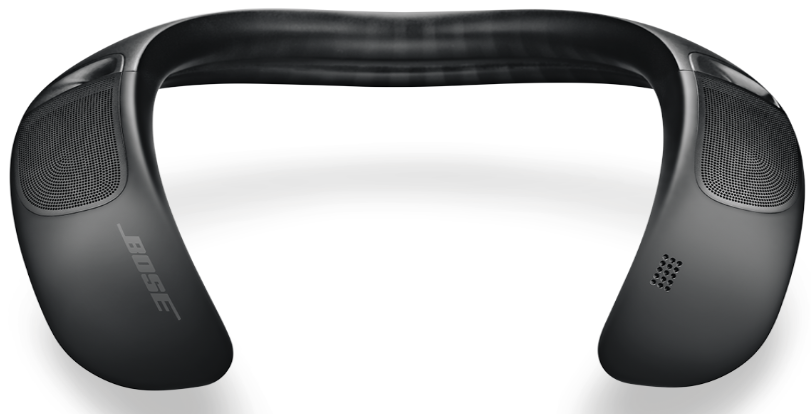
Introduction
The Bose SoundWear Companion Speaker offers a unique wearable audio experience that blends the freedom of wireless sound with an open-ear design. Unlike traditional headphones, this around-the-neck speaker delivers deep, clear sound directly to the wearer while allowing ambient awareness, making it ideal for users who want to stay connected to their music and surroundings. Its ergonomic neckband design ensures comfort for extended use, making it perfect for outdoor activities, casual listening at home, or staying engaged during calls without isolation.
Key benefits include hands-free control, natural-sounding phone calls, and access to voice assistants like Siri and Google Assistant. The speaker’s innovative waveguide technology provides rich, immersive audio without disturbing others nearby. With up to 12 hours of wireless playback and sweat- and weather-resistant construction (IPX4-rated), it is tailored for active lifestyles.
The Bose SoundWear Companion Speaker typically falls within the mid-to-high price range of wearable speakers, approximately $230-$280, and is widely available through Bose retailers and major electronics outlets. Its design and features make it especially appealing to commuters, outdoor enthusiasts, and professionals who seek audio convenience without losing situational awareness.
Specifications
- Audio Technology: Dual 11-inch waveguide speakers delivering deep, clear sound with balanced bass and treble.
- Design: Flexible, ergonomic neckband that rests comfortably on shoulders; ear-free for situational awareness.
- Connectivity: Bluetooth 4.2 wireless with voice prompts and support for voice assistants (Siri, Google Assistant).
- Battery Life: Up to 12 hours of continuous playback per charge via Micro-B USB charging port.
- Durability: Sweat and weather-resistant (IPX4 rating), suitable for outdoor use.
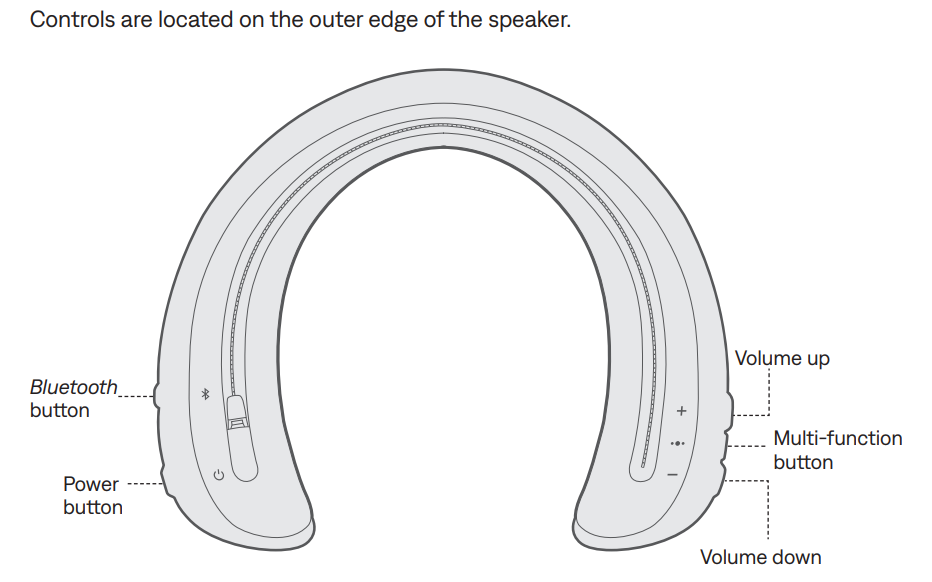
- Controls: Volume up/down, multi-function button for calls and media control, and power button.
- Call Features: Clear, natural-sounding calls with personalized vibration alerts for incoming calls.
- App Support: Bose Connect app for Bluetooth management, bass adjustment, and personalized settings.
- Sound Leakage: Minimizes sound heard by others while delivering immersive audio to the user.
Compared to similar wearable speakers, the SoundWear Companion stands out for its advanced waveguide technology and superior comfort. While it lacks aptX low-latency support, it offers consistent sound quality and a wide stereo image, making it competitive with other mid-range wearable speakers.
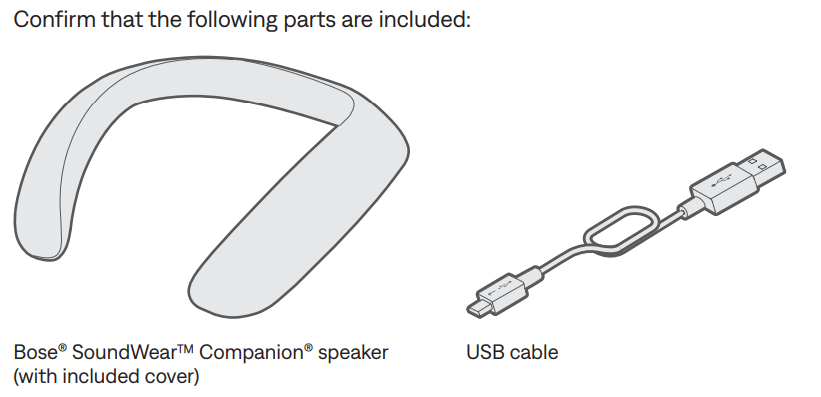
WHAT’S IN THE CARTON
SPEAKER CONTROLS
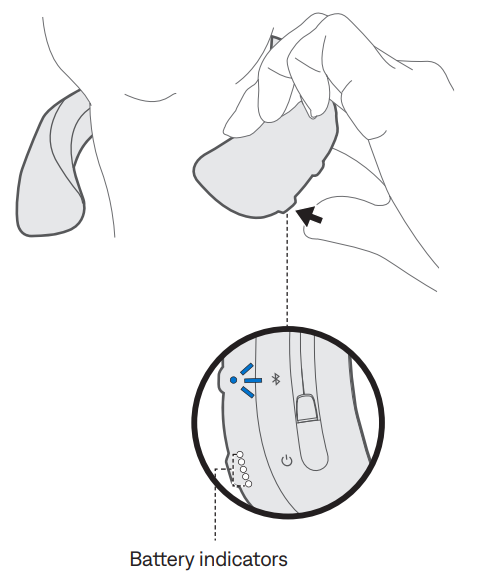
Power on/off
- Press the Power button .
- The battery indicators glow solid white, and a voice prompt announces the battery level.
Auto-off timer
- The auto-off timer conserves the battery when the speaker is not being used.
- The speaker switches off when the audio has stopped and no buttons have been pressed for three hours.
- Note: To adjust the time it takes for your speaker to automatically power off or to disable the auto-off timer, use the Bose® Connect app.
Speaker functions
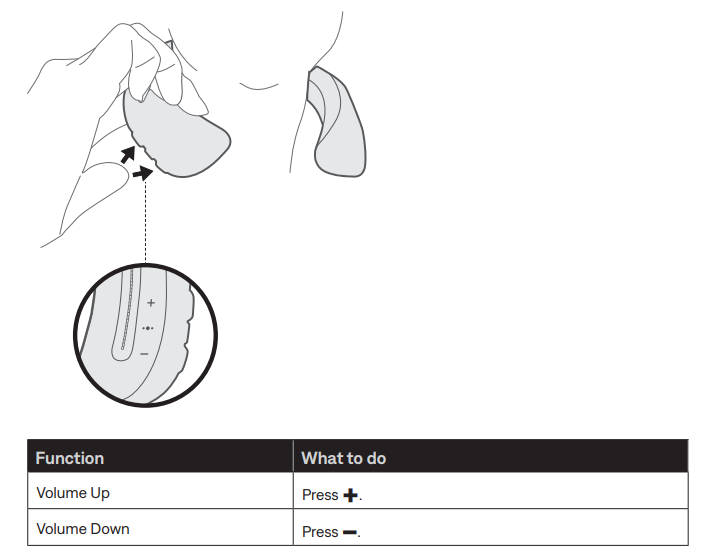
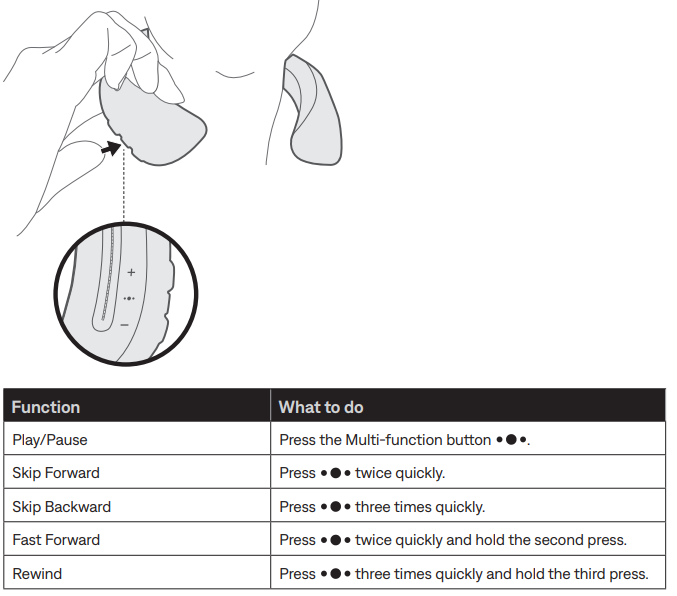
The controls for speaker functions are located on the outer right edge of the speaker.
Volume functions
Media playback functions
Call functions
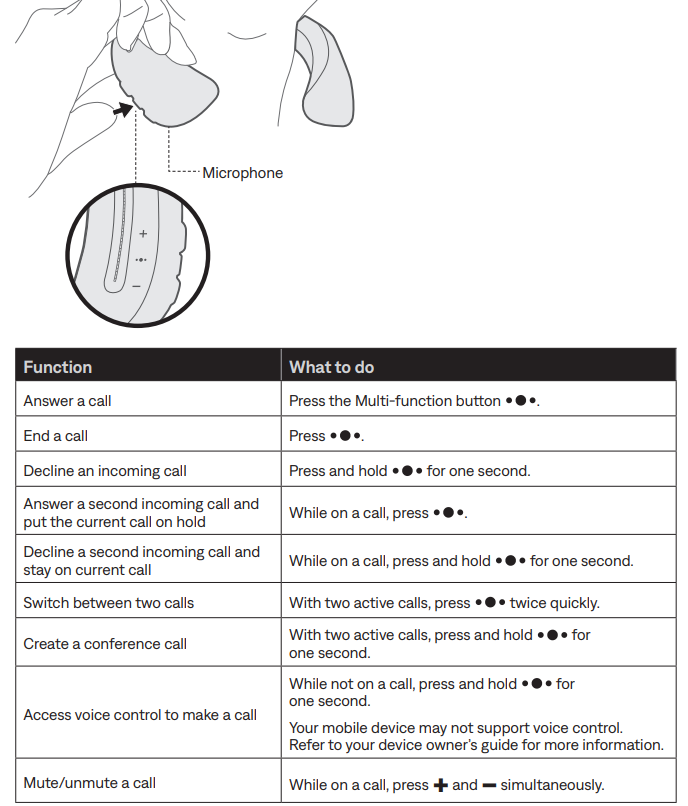
Access voice control
The speaker microphone acts as an extension of the microphone in your mobile device. Using the Multi-function button on the speaker, you can access the voice control capabilities on your device to make/take calls or ask Siri or Google Now™ to play music, tell you the weather, give you the score of a game , and more. Press and hold to access voice control on your device. You hear a tone that indicates voice control is active.
CARE AND MAINTENANCE
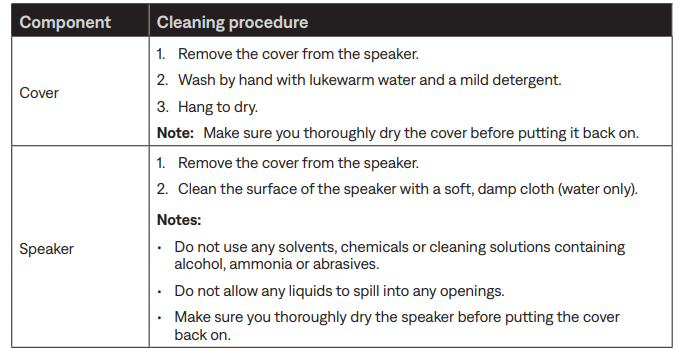
Clean the speaker and cover
Your speaker and cover may require periodic cleaning.
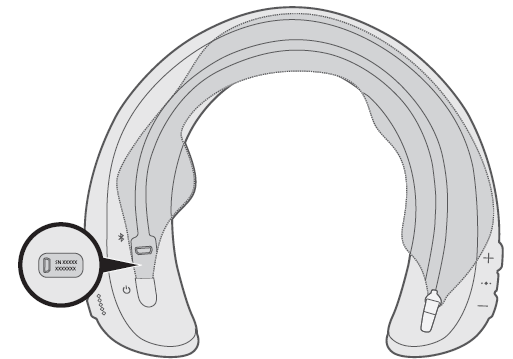
Serial number location
The serial number is located on the underside of the speaker, near the USB connector. To view the serial number, unzip the cover.
Troubleshooting Tips: If pairing fails, restart both the speaker and the device. Ensure the speaker is within range (~30 feet) and that no other Bluetooth devices interfere. Reset the speaker by holding the power button for 10 seconds if needed.
Safety Precautions: Avoid exposing the speaker to extreme temperatures or submerging it in water. Use only the supplied charging cable and accessories to prevent damage.
Troubleshooting Common Issues with the Bose SoundWear Companion Speaker
Pros and Cons of the Bose SoundWear Companion Speaker
- Pros:
- Comfortable neckband design ideal for long wear
- Deep, clear sound with minimal audio leakage
- Hands-free calls with vibration alerts
- Strong battery life up to 12 hours
- Weather and sweat resistant for outdoor use
- Intuitive controls and companion app support
- Cons:
- Bluetooth 4.2 lacks support for newer low-latency codecs like aptX-LL
- Sound leakage not fully eliminated, may disturb others at high volume
- Bass transmitted partly through the body may be affected by thick clothing
- Limited color options compared to some competitors
- The price is higher than some alternative wearable speakers
Overall, the Bose SoundWear Companion Speaker offers excellent value for users prioritizing comfort and open-ear listening. It competes well with other wearable speakers but may not satisfy audiophiles seeking deeper bass extension or ultra-low latency Bluetooth.
Customer Reviews of the Bose SoundWear Companion Speaker
Users generally praise the Bose SoundWear Companion Speaker for its comfort and sound clarity, especially noting how it allows situational awareness while enjoying music. Common positive comments highlight the hands-free call quality and the convenience of voice assistant integration. The battery life also receives favorable feedback, supporting all-day use.
Some users mention occasional Bluetooth connectivity quirks and sound leakage at higher volumes as downsides. A few reviews note that the bass sensation can feel different due to the speaker’s unique body-conducted bass design. Average star ratings hover around 4 out of 5, reflecting overall satisfaction.
Many reviewers recommend the speaker for outdoor walkers, office use, and anyone wanting wearable audio without earphones. Frequent suggestions include improving codec support and expanding color options.
Faqs
How do I set up my bose SoundWear Companion Speaker for the first time?
What should I do if my bose SoundWear Companion Speaker is not connecting to my smartphone?
Can I connect my bose SoundWear Companion Speaker to multiple devices simultaneously?
How do I clean and maintain the bose SoundWear Companion Speaker to ensure longevity?
What are the battery life and charging recommendations for the bose SoundWear Companion Speaker?
How can I adjust the sound quality or volume on my bose SoundWear Companion Speaker?
Is the bose SoundWear Companion Speaker compatible with all Bluetooth-enabled devices?
What should I do if the bose SoundWear Companion Speaker stops responding or has software issues?
More bose manuals
Leave a Comment