
Setup & Pairing: Bose Frames User Manual
Content
Bose Frames
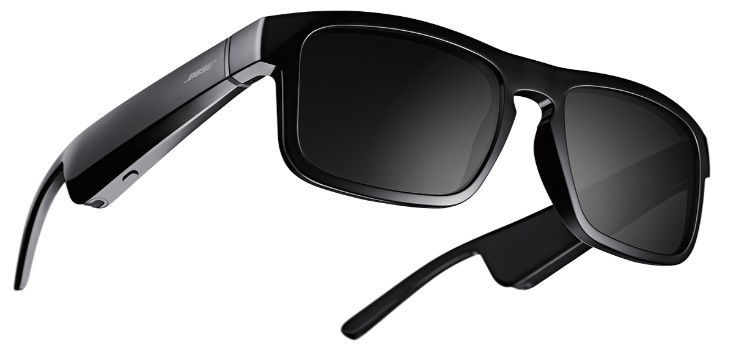
Introduction to Bose Frames Audio Sunglasses
Bose Frames represent a revolutionary approach to wearable audio technology, combining premium sunglasses with advanced Bluetooth speakers seamlessly integrated into the frame design. These innovative audio sunglasses deliver high-quality sound through patented acoustic chambers positioned in the temples, allowing you to enjoy music, podcasts, and calls while maintaining full awareness of your surroundings. The Bose Frames collection includes multiple styles—Alto, Rondo, and Tenor—each offering distinctive aesthetics and fit options to suit different preferences and face shapes.
The primary appeal of Bose Frames lies in their open-ear audio technology, which directs sound toward your eardrums while minimizing sound leakage to people around you. This unique design philosophy makes them ideal for outdoor enthusiasts, commuters, professionals who need to stay aware of their environment, and anyone seeking a stylish alternative to traditional headphones. Whether you're jogging, cycling, attending outdoor meetings, or simply enjoying a day in the sun, Bose Frames provide functional eyewear with integrated entertainment capabilities.
Bose Frames feature uniformly tinted lenses that block up to 99% of UVA/UVB rays, offering legitimate sun protection alongside audio functionality. The frames are constructed with premium materials,, including stainless-steel hinges plated in gold, scratch-resistant nylon, and shatter-resistant lenses designed to withstand daily wear. Available in sizes ranging from S/M to M/L with different nose bridge widths, Bose Frames accommodate various facial geometries for optimal comfort and fit.
The product line typically ranges from $250 to $350 USD, depending on the specific model and retailer, positioning Bose Frames as a premium accessory. These audio sunglasses are widely available through Bose's official website, major electronics retailers, and authorized dealers globally. The investment in Bose Frames appeals to tech-forward consumers who value both functionality and fashion, seeking products that seamlessly integrate into their lifestyle without compromising on audio quality or style.
Technical Specifications & Features
Bose Frames Alto comes in two size configurations:
- Alto S/M Global Fit: 53 mm lens width / 20 mm distance between lenses / 135 mm temple length with narrow nose bridge
- Alto M/L: 54 mm lens width / 21 mm distance between lenses / 136 mm temple length with wide nose bridge
Bose Frames Rondo features a retro, round design:
- Rondo One-Size S/M: 51 mm lens width / 22 mm distance between lenses / 135 mm temple length with wide nose bridge
Bose Frames Tenor offers rectangular styling with premium craftsmanship and polarized lenses for enhanced glare reduction.
Core Performance Specifications:
- Bluetooth Range: Up to 9 meters (30 feet) for a stable wireless connection
- Battery Life: Up to 3.5 hours continuous music streaming; up to 12 hours standby time
- Battery Charging Time: Approximately 1-2 hours for a full charge
- Wireless Connectivity: Bluetooth A2DP and Bluetooth HFP for phone calls; no Wi-Fi or WiDi support
- Audio Technology: Patented acoustic chambers with miniaturized Bose speakers precisely positioned for directional sound
- Lens Protection: Blocks up to 99% of UVA/UVB rays; polarized lenses on select models
- Controls: Gesture-based volume control, multi-function button for power/calls/music, capacitive touch on Tenor model
- Materials: Stainless-steel gold-plated hinges, scratch-resistant nylon frames, shatter-resistant and scratch-resistant lenses
- Voice Assistant Integration: Press and hold the multi-function button to access Siri on iOS devices or Google Assistant on Android devices. Tenor models feature double-tap capability for voice assistant activation.
- Motion Sensing Technology: Tenor models include integrated motion sensors that automatically power off the device when placed upside down, preserving battery life during periods of non-use.
WHAT’S IN THE CARTON
CONTENTS
Confirm that the following parts are included:

FRAME CONTROLS
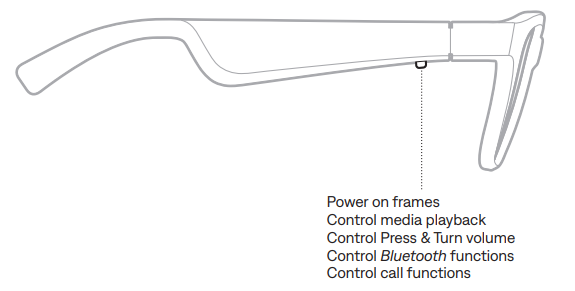
BATTERY
Align the pins on the charging cable with the charging port on the right temple.
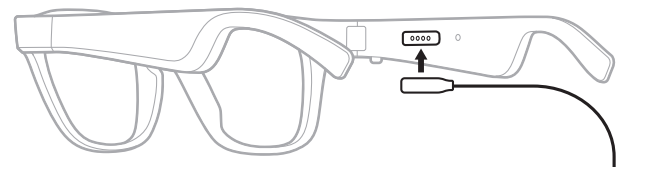
NOTE: The pins must be correctly oriented with the charging port to successfully charge the frames.
- Lightly press the pins against the charging port until they magnetically snap into place.
- Connect the other end to a USB wall charger once the computer is powered on. CAUTION: Use this product only with an agency-approved power supply that meets local regulatory requirements (e.g., UL, CSA, VDE, CCC).
While charging, the status light blinks white (see page 16). When the battery is fully charged, the status light glows solid white.
NOTES:
- The frames do not play audio while charging.
- Do NOT wear the frames while charging.
Setup & Configuration Guide
- Initial Pairing with Your Device
Before using your Bose Frames for the first time, ensure your smartphone or tablet has Bluetooth enabled. Press and hold the multi-function button located on the right temple for approximately 3-5 seconds until you see a light indicator. The frames will enter pairing mode and appear as "Bose Frames" in your device's Bluetooth settings. Select the Bose Frames from your available devices list and confirm the pairing request. Once successfully paired, the light indicator will change color or pattern to confirm the connection. - Volume and Playback Control
Adjust volume using gesture controls by pressing and holding the multi-function button while looking right to increase volume or left to decrease volume. Alternatively, Tenor models allow you to slide your finger along the right temple for continuous volume adjustment. Single-tap the button to play or pause music. Double-click to skip forward to the next track, and triple-click to skip backward to the previous track. These intuitive controls eliminate the need to remove your phone from your pocket. - Connectivity Considerations
Bose Frames maintain a stable Bluetooth connection up to 9 meters (30 feet) from your paired device. Performance may be affected by physical obstacles such as walls or metal objects, interference from Wi-Fi networks, or other wireless devices operating on the 2.4 GHz frequency. Position your phone within reasonable proximity for optimal audio quality and responsiveness. If you experience connection drops, move closer to your device or eliminate potential sources of interference. - Charging Your Bose Frames
Connect the provided charging cable to the charging port on your Bose Frames. Full charging typically requires 1-2 hours. The device will provide visual feedback during charging. It's recommended to charge your frames overnight or before extended outdoor activities to ensure maximum battery availability. Avoid leaving the frames uncharged for extended periods, as this may degrade battery performance over time. - Safety Precautions
Do not expose Bose Frames to extreme temperatures, moisture, or direct immersion in water unless specifically rated as waterproof. Protect the lenses from scratches by storing frames in the provided case when not in use. Avoid dropping or applying excessive pressure to the frames, as this may damage the internal acoustic components or lens coating.
CARE AND MAINTENANCE
STORE THE FRAMES
The frames collapse for easy, convenient storage.
Fold the temples inward towards the lenses so the temples lie flat.
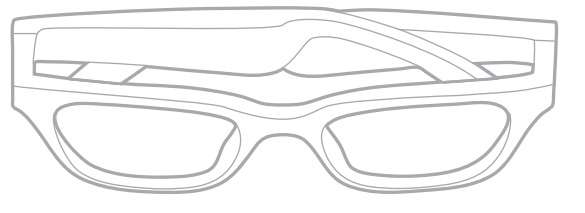
- Place the frames into the case with the lenses facing towards the front of the case.
NOTES:
- Make sure to power off the frames when not in use.
- Before storing the frames for more than a few months, make sure the battery is fully charged.
MAINTAIN THE FRAMES
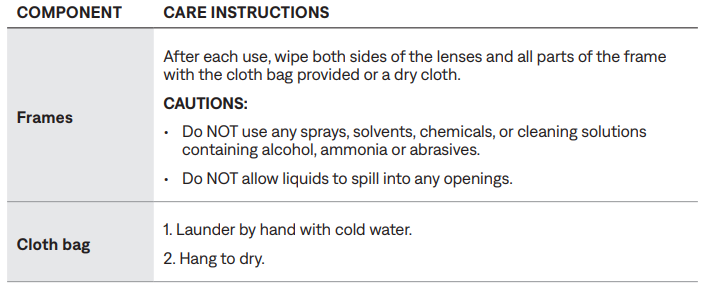
The frames and cloth bag may require periodic care.
REPLACEMENT PARTS AND ACCESSORIES
Replacement parts and accessories can be ordered through Bose customer service.
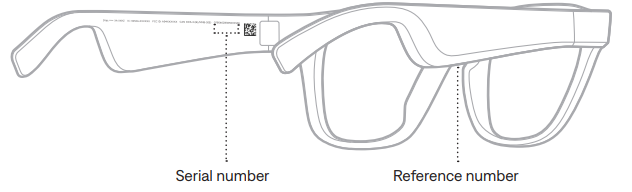
SERIAL AND REFERENCE NUMBER LOCATIONS
The serial number is located on the inner left temple, and the reference number is located on the inner right temple.
TROUBLESHOOTING
TRY THESE SOLUTIONS FIRST
If you experience problems with the frames, try these solutions first:
- Power on the frames (see page 9).
- Check the state of the status light (see page 16).
- Make sure your mobile device supports Bluetooth pairing (see page 18).
- Download the Bose Connect app and run available software updates.
- Charge the battery (see page 15).
- Increase the volume on your mobile device and music app.
- Connect another mobile device (see page 18).
OTHER SOLUTIONS
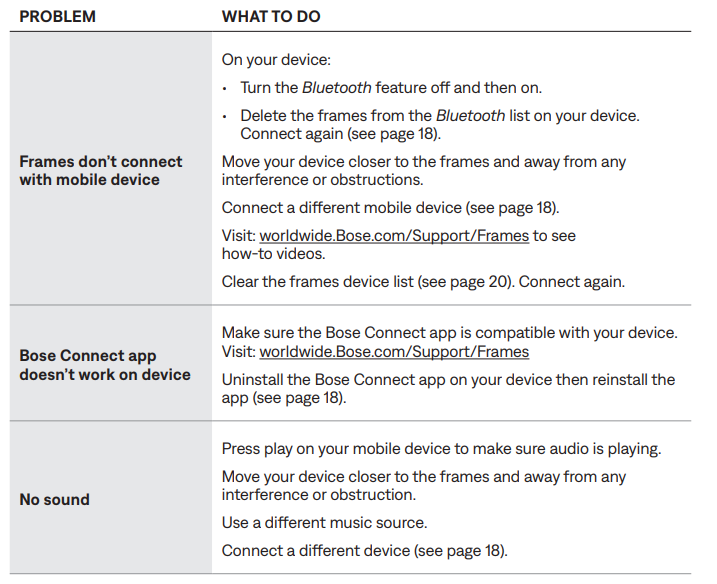
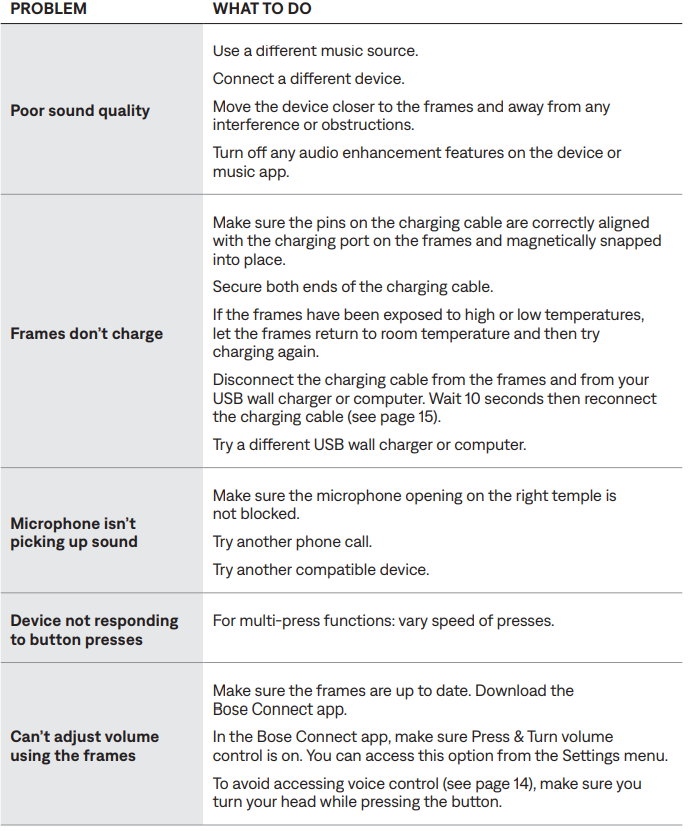
If you could not resolve your issue, see the table below to identify symptoms and solutions to common problems. If you are unable to resolve your issue, contact Bose customer service.
Troubleshooting Common Issues
- Bluetooth Connection Problems
If your Bose Frames fail to connect to your device, first ensure Bluetooth is enabled on your phone or tablet. Forget the device from your Bluetooth settings and attempt re-pairing by holding the multi-function button for 3-5 seconds. If the connection drops frequently, check for interference from other wireless devices, move closer to your phone, or restart both the frames and your mobile device. Ensure your device's Bluetooth software is updated to the latest version for optimal compatibility. - Battery Not Charging or Draining Quickly
Verify that the charging cable is properly connected and the charging port is clean and free from debris. If the battery drains unusually fast, disable the motion-sensing feature on Tenor models if you're not using it, as this feature consumes additional power. Reduce screen-on time on your phone, as continuous streaming at high volumes accelerates battery consumption. If battery performance doesn't improve after a full charge cycle, contact Bose support, as the battery may require replacement. - Audio Quality Issues or No Sound
Confirm that music playback is not paused on your connected device. Adjust the volume using the gesture controls or temple slider, ensuring the volume isn't set to the minimum level. Check that the audio app or service you're using is functioning properly by testing with a different application. If sound is distorted at high volumes, reduce the volume level, as the directional acoustic design performs optimally at moderate volume settings. Clean the speaker openings on the temples to ensure sound isn't blocked by dust or debris. - Automatic Power-Off Not Working
On Tenor models with motion sensing, the automatic power-off feature may be disabled in settings. Access the Bose app or device settings to re-enable this feature. If the frames remain powered on indefinitely, manually power off by double-pressing and holding the multi-function button for 3-5 seconds. After 10 minutes of no motion detection, the frames should automatically power down if motion sensing is enabled. - Fit and Comfort Issues
Bose Frames come in multiple sizes with different nose bridge widths. If your current fit feels uncomfortable or unstable, verify that you have the correct size for your facial geometry. Alto S/M features a narrow nose bridge for smaller faces, while Alto M/L and Rondo accommodate wider nose bridges. Contact Bose customer support to arrange a size exchange if needed. Adjust the temple arms slightly for a more secure fit, but avoid excessive bending that could damage the frame structure.
LIMITED WARRANTY
- A limited warranty covers the frames. Visit our website at global.Bose.com/warranty for details of the limited warranty.
- To register your product, visit global.Bose.com/register for instructions.
- Failure to register will not affect your limited warranty rights.
Warranty & Support
Bose Frames typically include a one-year limited warranty covering manufacturing defects. Extended warranty options may be available at purchase. For technical support, visit the official Bose website, contact customer service by phone or email, or visit an authorized retailer. Keep your proof of purchase for warranty claims. Bose offers a risk-free trial period,, allowing you to return frames within a specified timeframe if you're not satisfied with the product.
Advantages & Disadvantages
Advantages of Bose Frames
- Open-Ear Audio Design: Allows you to hear music while remaining aware of your environment, making them safer for outdoor activities than traditional closed-ear headphones
- Premium UV Protection: Blocks up to 99% of UVA/UVB rays with polarized lens options, providing legitimate sun protection alongside audio functionality
- Stylish Aesthetics: Available in multiple designs (Alto, Rondo, Tenor) with premium materials including gold-plated hinges and scratch-resistant construction, allowing you to wear them as fashionable eyewear
- Hands-Free Control: Gesture-based volume control and multi-function button eliminate the need to access your phone during use
- Directional Sound Technology: Minimizes sound leakage to nearby people, creating a more private listening experience in public settings
- Versatile Compatibility: Work with any Bluetooth-enabled device and support popular music services like Spotify and Apple Music
- Extended Standby Time: Up to 12 hours of standby battery life means the frames stay ready for use throughout your day
Disadvantages of Bose Frames
- Limited Battery Runtime: Only 3.5 hours of continuous music streaming falls short compared to traditional wireless earbuds, requiring frequent charging for extended use
- Audio Quality Trade-offs: Open-ear design sacrifices some audio depth and bass response compared to in-ear or over-ear headphones, though quality remains respectable
- Premium Pricing: At $250-$350, Bose Frames cost significantly more than comparable Bluetooth sunglasses or traditional audio solutions
- Limited Bluetooth Range: The 9-meter (30-foot) effective range is shorter than some competing wireless audio devices
- Fingerprint-Prone Materials: The glossy finish can accumulate fingerprints, potentially affecting aesthetics and requiring regular cleaning
- Accidental Activation Risk: The multi-function button design may inadvertently trigger commands through incidental contact
- No Wi-Fi Support: Bluetooth-only connectivity limits integration with certain smart home systems or streaming protocols
- Specialized Use Case: The open-ear design isn't ideal for users seeking complete audio isolation or immersive listening experiences
Value Assessment
Bose Frames represent a premium investment best suited for consumers who prioritize style, environmental awareness, and the unique experience of directional audio. They excel in outdoor activities, commuting, and situations where hearing ambient sounds remains important. However, users seeking maximum battery life, deep bass response, or budget-conscious options may find better value in traditional Bluetooth headphones or alternative audio sunglasses. The product justifies its premium price for those who value the integration of fashion, function, and audio technology in a single wearable device.
Real User Feedback & Reviews
User Experiences
- Customers consistently praise the innovative open-ear audio technology, with many reporting genuine surprise at the quality of sound produced from temple-mounted speakers. Users appreciate the UV protection and polarized lenses, noting that Bose Frames function as legitimate sunglasses while also delivering audio. The gesture-based volume control receives positive feedback for its intuitive operation, eliminating the need to access your phone while wearing the frames.
- Common user complaints center on battery life, with some users noting that 3.5 hours falls short for full-day use, particularly for active outdoor enthusiasts. Several reviewers mention that the glossy finish attracts fingerprints, detracting from the premium feel. The multi-function button occasionally receives criticism for accidental activation, though this can often be mitigated through careful handling or settings adjustments.
Audio Performance Testimonials
Independent testing confirms battery performance exceeding manufacturer claims, with some users achieving up to 7+ hours of continuous playback at moderate volume levels. Audio quality at low-to-moderate volumes receives particular praise, with the directional design producing clear, distortion-free sound without disturbing nearby listeners. Users in noisy environments appreciate the advanced microphone system that focuses on voice input while reducing wind and background noise during calls.
Recommendation Summary
Bose Frames are recommended for outdoor enthusiasts, commuters, professionals requiring situational awareness, and fashion-conscious consumers seeking integrated audio technology. They're ideal for cycling, jogging, beach activities, and outdoor meetings where traditional headphones prove impractical. Best suited for users prioritizing style, safety, and unique audio experiences over maximum battery life or audio isolation, Bose Frames deliver genuine innovation in wearable audio technology.
Faqs
How do I set up my bose Frames for the first time using the Bose app?
What should I do if my bose Frames are not connecting or pairing with my device?
How can I control media playback and volume on bose Frames during use?
Are bose Frames compatible with both iOS and Android devices, and what are the requirements?
What battery life can I expect from bose Frames, and how do I charge them safely?
How do I troubleshoot audio issues like no sound or distorted sound on my bose Frames?
What maintenance and cleaning tips help prolong the lifespan of bose Frames?
How do the bose Frames’ auto-off and standby features work to save battery?
Tags
More bose manuals
Leave a Comment