
Setup: Bose Solo 15/10 Series II TV Sound System User Manual
Content
Bose Solo 15/10 Series II TV Sound System
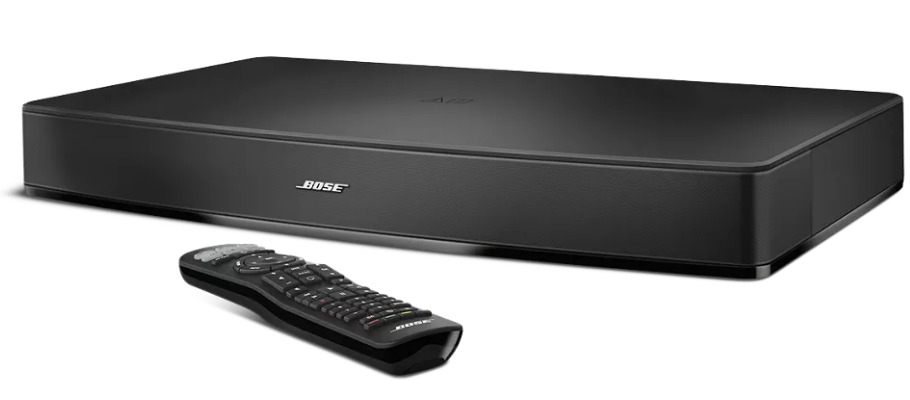
Introduction: Transform Your TV Audio Experience
The Bose Solo 15/10 Series II TV sound system represents a significant advancement in home entertainment audio, delivering dramatically superior sound quality compared to standard television speakers. This one-piece soundbar solution is engineered for viewers who demand clarity, depth, and immersive audio without the complexity of multi-component surround sound systems.
Available in two configurations—the Solo 15 Series II with a premium metal grille and programmable universal remote, and the Solo 10 Series II with a cloth grille—this system addresses a fundamental problem facing modern TV viewers: inadequate dialogue intelligibility and thin audio reproduction. Whether you're watching movies, streaming shows, or enjoying sports, the Bose Solo 15/10 Series II elevates your listening experience with proprietary Bose technology designed specifically for television audio.
The system features a dedicated center speaker for improved dialogue clarity, advanced digital signal processing including TrueSpace technology for spacious sound reproduction, and flexible connectivity options. With built-in Bluetooth capability, universal remote control functionality, and compatibility with TVs up to 46 inches (with some models supporting up to 50 inches), this soundbar integrates seamlessly into any home theater setup.
Priced at approximately $449.99 for the Solo 15 Series II, the system is widely available through major retailers, including Best Buy, Crutchfield, and authorized Bose dealers. It's ideal for anyone seeking a straightforward, high-quality audio solution without requiring extensive installation or technical expertise.
Technical Specifications
Physical Dimensions and Design:
- Speaker dimensions: 7.6 cm H x 62.8 cm W x 35.6 cm D (approximately 3 inches H x 24.75 inches W x 14 inches D)
- Speaker weight: 5.4 kg (12 lbs)
- Remote control dimensions: 22.4 cm H x 5.6 cm W x 3 cm
- Remote weight: 0.14 kg
- Solo 15 Series II features a metal grille; Solo 10 Series II features a cloth grille
Audio Performance and Technology:
- Five-element transducer array for wider sound reproduction than the screen width
- Digital signal processing with proprietary Bose technology
- TrueSpace technology for clear, natural, and spacious sound
- Dedicated center speaker for improved intelligibility and dialogue clarity
- Dialogue mode for enhanced speech comprehension in news and talk programming
- Adjustable bass control with visual LED indicators
Connectivity and Bluetooth:
- Bluetooth wireless connectivity with a 30-foot (10-meter) stable operation range
- Connects up to two Bluetooth devices simultaneously for easy device switching
- Stores up to eight Bluetooth devices in pairing memory
- Optical digital audio input
- Coaxial digital audio input (Europe only)
- Stereo RCA analog audio input
Power and Operating Specifications:
- Operating voltage: 100-240V AC (auto-voltage, universal compatibility)
- Input AC frequency: 50Hz/60Hz
- Output voltage: 20V DC
- Output current: 1.8A
- Output power: 36W
- Average active efficiency: 89.6%
- Standby power consumption: ≤ 0.5W
- No-load power consumption: 0.08W
Remote Control Features:
- Programmable universal remote (Solo 15 Series II) controls TV, soundbar, and connected devices
- Standard remote (Solo 10 Series II) controls core functions
- Power on/off and auto-wake functionality
- Volume and bass adjustment controls
- Dialogue mode activation
- Bluetooth pairing and device switching controls
TV Compatibility:
- Compatible with most TVs up to 46 inches
- Some compatibility with TVs up to 50 inches
- Single connection point to the television for simplified setup
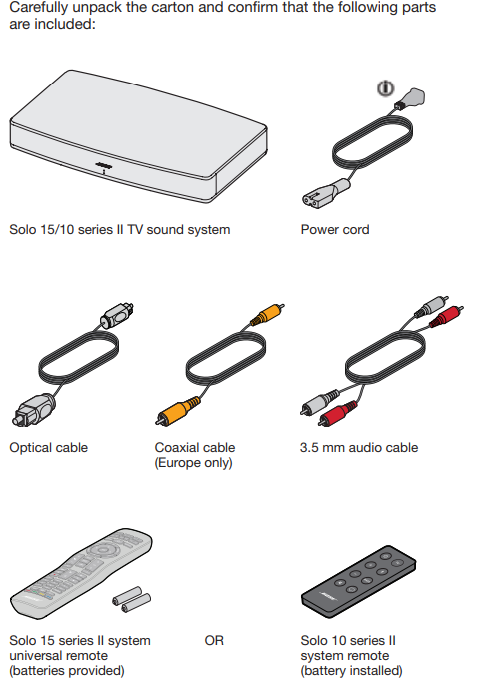
Unpacking
Setting up the System
Placing the system
- Move your TV so you can see the Audio Out panel.
- Place the Solo 15/10 series II system where you had your TV.
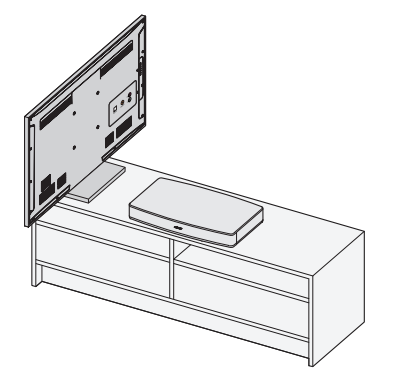
Placement guidelines:
If placing the sound system in a cabinet or on a shelf, position the front of the system as close as possible to the front edge of the shelf for optimum audio performance.
CAUTIONS:
- If placing the sound system backed up to a wall, make sure there is a space of at least 1" (2.5 cm) between the wall and the rear of the system.
- With any placement of this product, make sure the ventilation openings on the rear panel are not blocked.
Cable options
Connect your TV to the system using one of the three cable options. The optical cable is the preferred method for connection.
Tip: If your TV does not have an optical, coaxial , or analog connector, see page 15.
On the back of your TV, locate the Audio OUT (digital) connector panel.
Note: You must connect the audio cable through your Audio OUT connector panel.
Your TV's connector panel may not appear as shown. Look for the shape (optical) or color of the connector.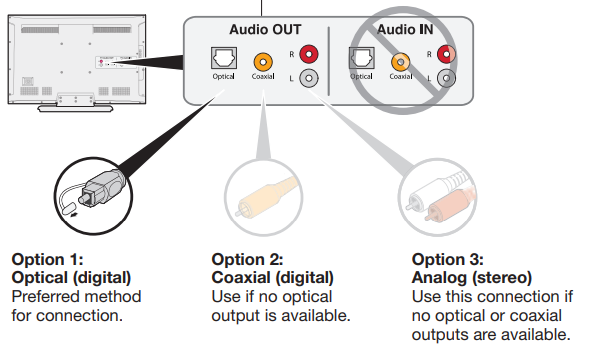
- Choose an audio cable.
Connecting your TV
Insert one end of the audio cable into the correct Audio OUT (digital) connector on your TV.
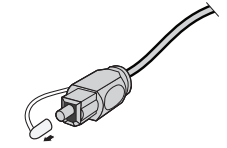
CAUTION: If using an optical cable, remove the protective caps from both ends. Inserting the plug in the wrong orientation can damage the plug and/or the connector.
Connecting the system
After connecting the audio cable to your TV, connect the other end to your system. Use only one audio cable.
Option 1: Optical cable (preferred)
CAUTION: Ensure you have removed the protective cap from both ends of the optical cable. Inserting the plug in the wrong orientation can damage the plug and/or he connector.
- Hold the optical cable’s plug with the Bose logo facing up.
Align the plug with the Optical connector on the system and insert the plug carefully.
Note: The connector has a hinged door that swings inward en inserting the plug.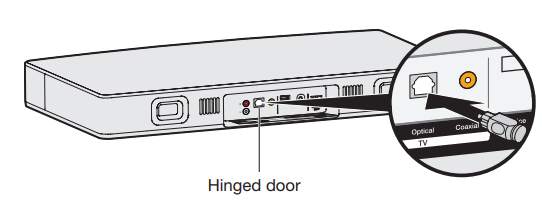
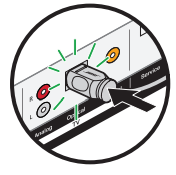
Firmly push the plug into the connector until you hear or feel a click.
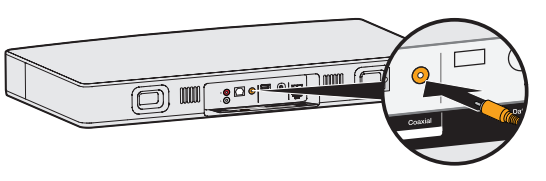
Option 2: Coaxial cable
Insert the other end of the coaxial cable into the Coaxial connector on the system.
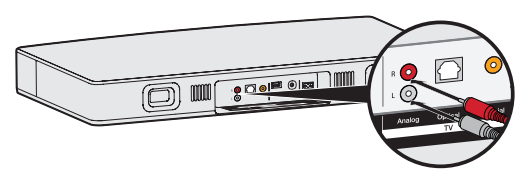
Option 3: Analog cable
- Insert the red plug into the R connector on the system.
- Insert the white plug into the L connector on the system.
Connecting to power
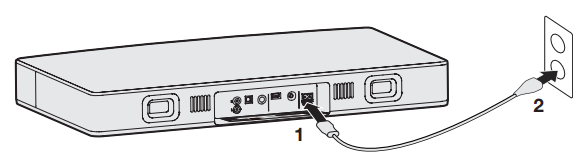
- Plug one end of the power cord into the Power connector.
- Plug the other end into a live AC power (mains) outlet. The system emits a tone.
Placing your TV in the system
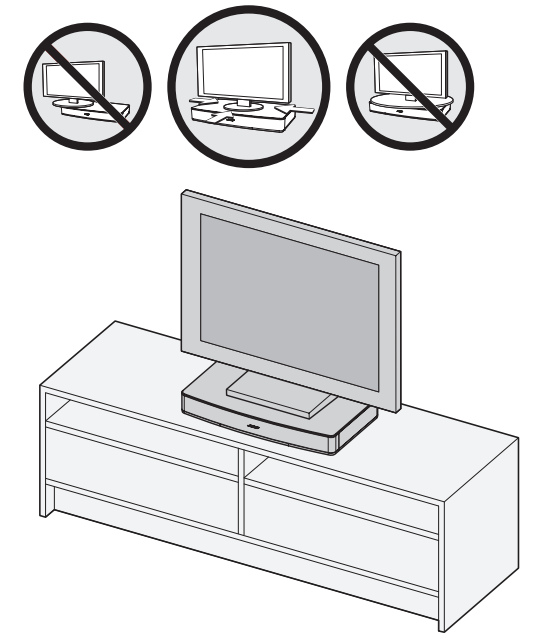
Lift your TV and place it on top of the system. Follow these guidelines:
- The Bose Solo 15/10 series II system is designed to fit under TVs that weigh no more than 75 lbs (34 kg) and have bases no wider than 24" (61 cm), and no deeper than 12.25" (31 cm).
- The base of your TV should be centered on the top of the system and must not hang over any of its edges.
- If the TV base is too large to fit on top of the system, place the sound system in another location,, such as on an open shelf under the TV, but keep it close to your TV so the audio cable will reach. You can also mount your TV on the wall above the system.
CAUTIONS:
- DO NOT place CRT-typepe TV on this system. It is not designed for use with this type of TV.
- Allowing the base of your TV to hang over any edge of this speaker system increases the risk of the TV tipping, which may result in injury.
- If your TV comes with an anti-tip device, install it according to the manufacturer’s instructions and adjust the tether as instructed after placing the TV on top of the system. Installing an anti-tip device is recommended when using a TV with this product. If your TV did not come with an anti-tip device, you can get one from most retail TV suppliers.
To avoid wireless interference:
- Keep other wireless equipment away from the system.
- Place the system outside of and away from metal cabinets, other audio/video components, and direct heat sources.
Sample system placement
Turning off your TV speakers
To avoid hearing distorted sound, turn off your TV speakers. Refer to your TV’s owner’s guide for more information.
Powering on the system
- Power on your TV.
- If you are using a cable/satellite box or other secondary source, power on the source.
- 3. Press the Power button on the remote control.
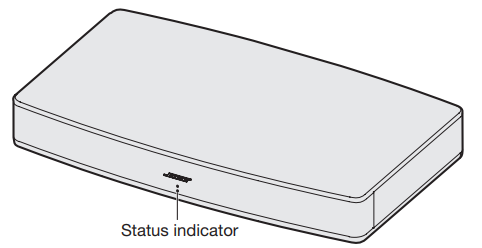
The status indicator glows green.
Status indicator - Check if sound is coming from the system.
Note: If you do not hear sound coming from the system, see “Troubleshooting” on page 18.
Confirming your TV speakers are off- Press the Mute button ( ) on the remote.
- Check that no sound is coming from your TV.
Note: If you hear a sound coming from your TV, see “Troubleshooting” on page 18.
Care and Maintenance
Cleaning
- Clean the surface of the system with a soft, dry cloth.
- Do not use any sprays near the system. Do not use any solvents, chemicals, or cleaning solutions containing alcohol, ammonia, or abrasives.
- Do not allow liquids to spill into any openings.
Troubleshooting Common Issues
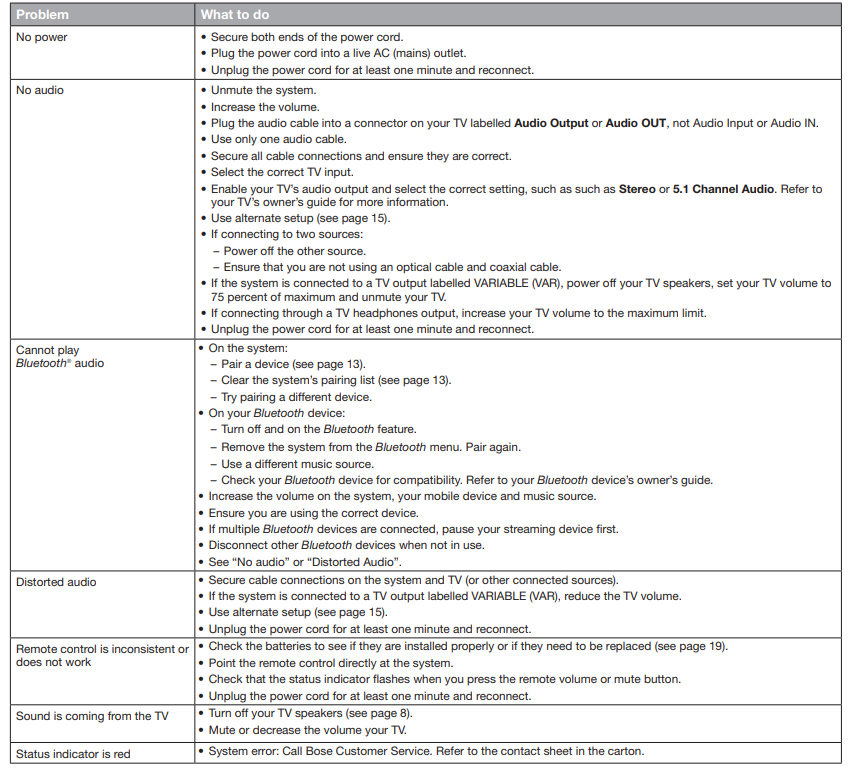
Advantages and Disadvantages
Key Advantages:
- Superior Dialogue Clarity: The dedicated center speaker and digital signal processing deliver remarkably clear dialogue, ensuring you hear every word in movies and television programs without constantly adjusting volume.
- Simplified Setup: Single audio connection to your TV with no subwoofer or surround speakers required—ideal for users seeking straightforward installation without complex wiring
- Flexible Connectivity: Multiple audio input options (optical, coaxial, RCA, Bluetooth) accommodate virtually any television or audio source
- Wireless Convenience: Built-in Bluetooth allows streaming audio from smartphones, tablets, and other devices without cables
- Universal Remote Control: The Solo 15 Series II's programmable remote controls your TV and connected devices, eliminating multiple remote controls
- Compact, Unobtrusive Design: The soundbar's modest footprint fits beneath most televisions without dominating your entertainment space
- Adjustable Bass: Fine-tune low-frequency response to match your personal preferences and room acoustics
- Wide Soundstage: TrueSpace technology creates a sense of spaciousness wider than your television screen, enhancing immersion
Key Disadvantages:
- No Surround Sound: This is a front-channel system only—it does not provide immersive surround sound or height channels available in 5.1, 7.1, or Dolby Atmos systems
- Limited Bass Response: While adjustable, the single soundbar cannot match the low-frequency impact of dedicated subwoofers in larger rooms
- TV Size Limitations: Optimal compatibility is with TVs up to 46 inches, with limited support for larger screens—users with 55-inch or larger TVs may find the soundbar proportionally undersized
- No DTS-HD Support: The system does not support DTS-HD Master Audio, limiting compatibility with some premium audio formats
- Moderate Price Point: At approximately $450, the Solo 15 Series II is premium-priced compared to basic soundbars, though less expensive than full surround systems
- Bluetooth Range Limitations: The 30-foot Bluetooth range can be reduced by walls, metal objects, and Wi-Fi interference
- Fixed Configuration: Unlike modular systems, you cannot add subwoofers or surround speakers later to expand the system
Value Assessment:
The Bose Solo 15/10 Series II delivers exceptional value for consumers prioritizing dialogue clarity and simplicity over immersive surround sound. It excels for television viewing, news programs, and streaming content where speech intelligibility is paramount. For movie enthusiasts seeking full surround sound immersion or users with very large television screens, full surround systems or larger soundbars may be more appropriate choices. However, for most living room television applications, this system provides professional-quality audio in a user-friendly, aesthetically pleasing package.
Customer Reviews and User Feedback
The Bose Solo 15 Series II receives consistently high customer ratings, with users particularly praising its sound quality, ease of setup, and Bluetooth functionality. Customers frequently highlight how dramatically the system improves dialogue intelligibility compared to television speakers—a common complaint resolved by this soundbar. Many reviewers note that whispered dialogue in movies and subtle sound effects become clearly audible without requiring constant volume adjustment.
Users appreciate the universal remote functionality, which consolidates control of the soundbar, television, and connected devices into a single interface. The compact footprint is frequently mentioned as a practical advantage, allowing the soundbar to fit beneath most television stands without requiring additional furniture or space reallocation.
Common user concerns include the system's inability to provide surround sound effects and its limitations with very large television screens (55 inches or larger). Some users note that while dialogue clarity is excellent, bass response is moderate—adequate for television viewing but potentially underwhelming for action-heavy movie soundtracks. A few customers report occasional Bluetooth connectivity issues, typically resolved by re-pairing devices or repositioning the soundbar away from Wi-Fi routers and other wireless devices.
Overall, customers recommend the Bose Solo 15 Series II highly for television viewing, streaming content, and general home entertainment, where simplicity, reliability, and dialogue clarity are priorities. Users consistently report satisfaction with the purchase and note significant audio quality improvements over television speakers.
Faqs
How do I set up the Bose Solo 15/10 Series II TV Sound System for the first time?
What should I do if the Bose Solo 15/10 Series II TV Sound System is not producing any sound?
Can the Bose Solo 15/10 Series II TV Sound System connect to Bluetooth devices, and how many at once?
What TV sizes and types are compatible with the Bose Solo 15/10 Series II TV Sound System?
How can I optimize the sound performance, especially the bass, on the Bose Solo 15/10 Series II TV Sound System?
What are the main features of the Bose Solo 15/10 Series II TV Sound System that improve TV audio quality?
How do I maintain and care for my Bose Solo 15/10 Series II TV Sound System?
What should I do if the universal remote of the Bose Solo 15/10 Series II TV Sound System is not controlling my TV or other devices?
Tags
More bose manuals
Leave a Comment