
Pairing: Bose Frames Tenor Audio Sunglasses User Manual
Content
Bose Frames Tenor Audio Sunglasses
Introduction
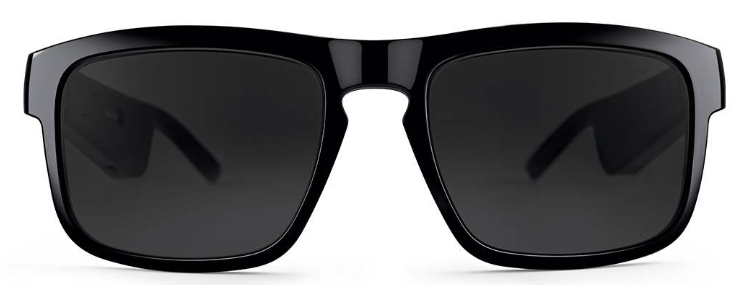
The Bose Frames Tenor Audio Sunglasses combine premium eyewear fashion with cutting-edge audio technology, offering a unique blend of style and functionality. Designed for modern users who demand more than just sun protection, these sunglasses feature Bose's exclusive Open Ear Audio technology, allowing you to enjoy rich, immersive sound without blocking ambient noise. This makes them ideal for outdoor enthusiasts, commuters, and anyone wanting to listen to music, podcasts, or take calls discreetly while staying aware of their surroundings.
With a refined rectangular frame and distinctive keyhole bridge, the Bose Frames Tenor provides a contemporary yet classic look. Equipped with polarized lenses that reduce glare and block up to 99% of UV rays, they offer excellent eye protection and visual clarity for sunny days. The lightweight, durable design is crafted from ultramodern materials for comfort and luxury.
These sunglasses connect seamlessly to your smartphone via Bluetooth, providing up to 5.5 hours of playback on a single charge, and feature an advanced microphone system for crystal-clear voice calls. They are priced approximately in the premium range, typically around $200-$250, and are widely available through major retailers and online stores.
Whether you’re cycling, walking, or simply relaxing outdoors, the Bose Frames Tenor Audio Sunglasses deliver an innovative audio experience while maintaining fashionable eyewear aesthetics.
Specifications of Bose Frames Tenor Audio Sunglasses
- Audio Technology: Bose Open Ear Audio with a wafer-thin acoustic package in temples delivering directional, immersive sound
- Bluetooth Connectivity: Bluetooth A2DP and HFP for music and phone calls; range up to 30 feet (9 meters)
- Battery Life: Up to 5.5 hours of continuous playback; approximately 1 hour of full charge
- Microphone: Advanced mic array for clear phone calls and voice assistant access
- Lenses: Polarized, scratch- and shatter-resistant lenses blocking up to 99% UV rays
- Water Resistance: IPX2 rating — protection against dripping water but not submersion
- Controls: Capacitive touch controls with slide volume adjustment and double-tap for voice assistant
- Weight and Materials: Lightweight frame made from ultramodern materials for comfort and durability
- Lens Replacement: Compatible with prescription lenses and interchangeable accessory lenses
Compared to similar audio sunglasses like Ray-Ban Stories, the Bose Frames Tenor offer a longer battery life and a distinct rectangular frame with Bose’s proprietary OpenAudio technology, which emphasizes an open-ear listening experience with less sound leakage.
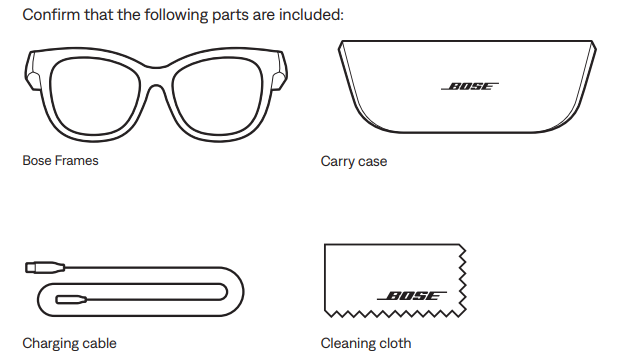
WHAT’S IN THE CARTON
FRAMES CONTROLS
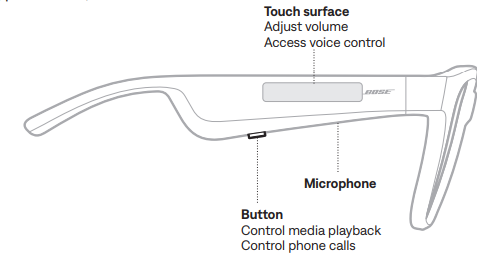
Use the button and touch surface on the right temple to control media playback, volume, phone calls, and voice control.
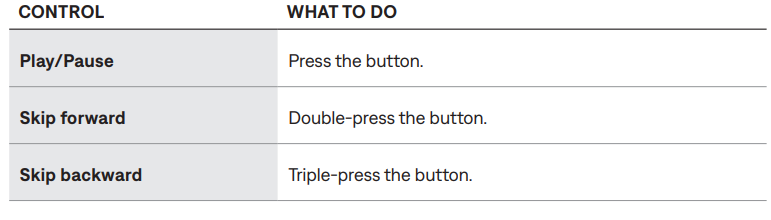
MEDIA PLAYBACK
VOLUME
Increase volume
Swipe forward on the touch surface.
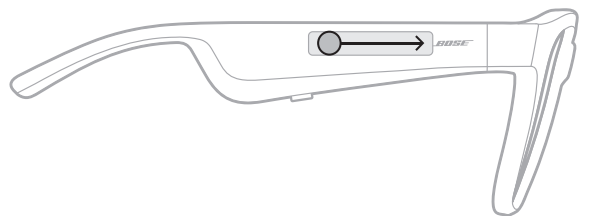
NOTE: You hear a tone when the volume reaches the maximum level.
Decrease volume
Swipe backward on the touch surface.
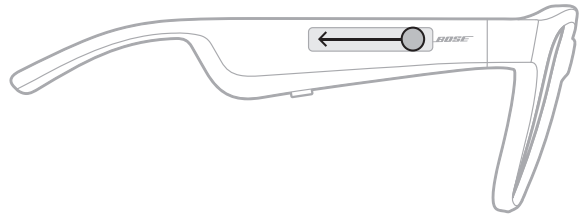
NOTE: You hear a tone when the volume reaches the minimum level.
PHONE CALLS
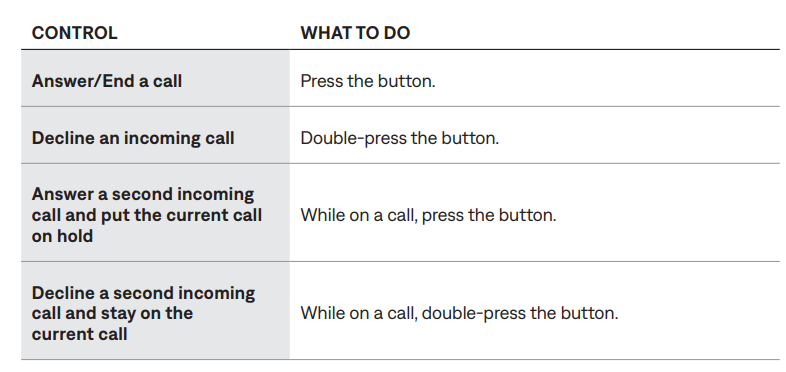
NOTE: To use all phone call controls, run available software updates in the Bose Music app.
Call notifications
A voice prompt announces incoming callers and call status.
ACCESS VOICE CONTROL
The frame's microphone acts as an extension of the microphone in your mobile
device. Using the touch surface on the right temple, you can access the voice control capabilities on your device to make/take calls or ask Siri or your Google Assistant to play music, tell you the weather, give you the score of a game, and more.
Double-tap the touch surface to access voice control on your device.
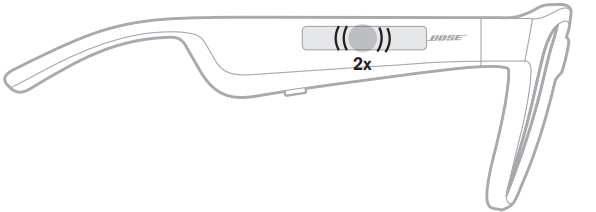
You hear a tone when voice control is active.
CARE AND MAINTENANCE
STORE THE FRAMES
The frames collapse for easy, convenient storage.
- Fold the temples inward towards the lenses so the temples lie flat.
- Place the frames in the case with the lenses facing towards the front of the case.
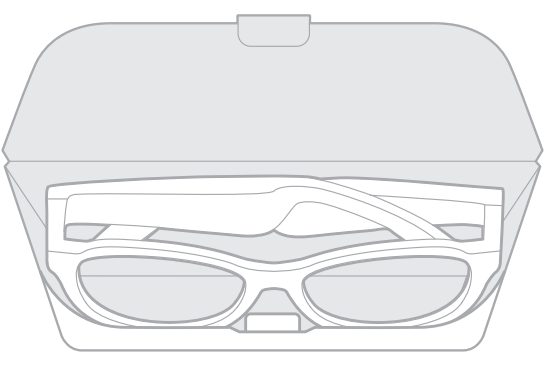
NOTES:
- Make sure to power off the frames when not in use.
- Before storing the frames for more than a few months, make sure the battery is fully charged.
MAINTAIN THE FRAMES
After each use, wipe both sides of the lenses and all parts of the frame with the provided cleaning cloth or a dry cloth.
CAUTIONS:
- Do not use any sprays near the frames.
- Do not see any solvents, chemicals, or cleaning solutions containing alcohol, ammonia, or acids.
- Do not allow liquids to spill into any openings.
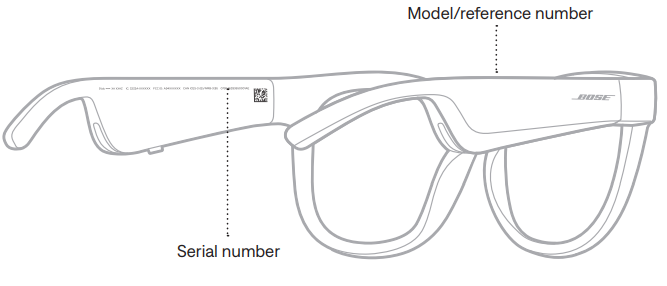
SERIAL AND MODEL/REFERENCE NUMBER LOCATIONS
The serial number is located on the inner left temple, and the model/reference number is located on the inner right temple.
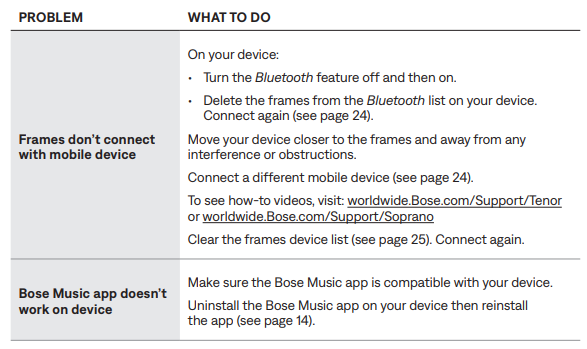
Troubleshooting for Bose Frames Tenor Audio Sunglasses
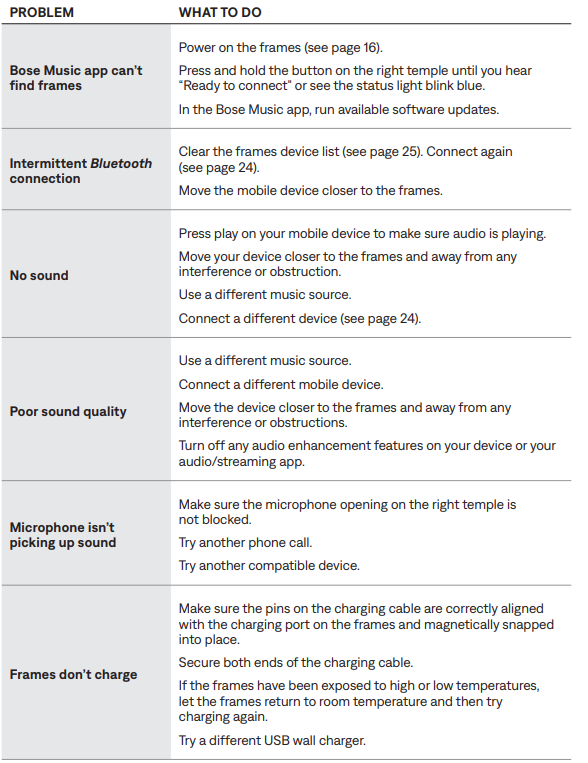
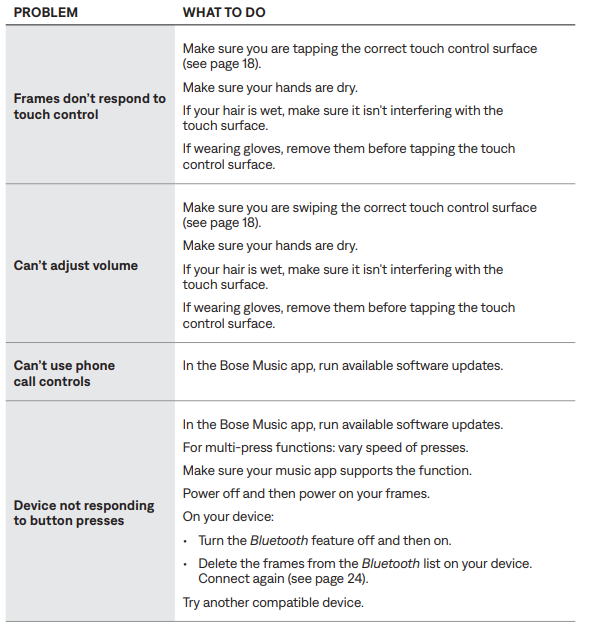
Preventive measures: Store sunglasses in the protective case when not in use, avoid exposure to extreme temperatures, and keep firmware updated.
Bose offers a limited warranty covering manufacturing defects. For support, contact Bose customer service through their official website or authorized dealers.
Pros & Cons of Bose Frames Tenor Audio Sunglasses
- Pros:
- Exceptional open-ear sound quality with directional audio minimizing sound leakage
- Stylish rectangular frame with high-quality polarized lenses blocking 99% UV rays
- Long battery life of up to 5.5 hours with quick charging
- An advanced microphone system enabling clear phone calls and voice assistant interaction
- Lightweight, durable construction with interchangeable prescription lens options
- Cons:
- Not fully waterproof—only IPX2 drip resistant, unsuitable for swimming or heavy rain
- Sound bass response lessis powerful compared to in-ear headphones
- May feel bulky for some users compared to regular sunglasses
- Priced at a premium level, which might not suit all budgets
Compared to alternatives like Ray-Ban Stories, the Bose Frames Tenor excel in battery longevity and polarized lens quality but may lack in deeper bass performance.
Customer Reviews of Bose Frames Tenor Audio Sunglasses
Users commonly praise the Bose Frames Tenor Audio Sunglasses for their clear sound quality and stylish design. Many appreciate the open-ear audio that allows them to stay aware of their environment, making them ideal for outdoor activities. The polarized lenses receive positive feedback for reducing glare and enhancing visibility.
Common complaints include the less robust bass response compared to traditional headphones and the feeling that the frames are somewhat large on the face. Battery life is generally praised, with some users reporting even longer usage than advertised. Most reviewers rate the product between 4 and 4.5 stars out of 5.
Overall, customers recommend the Bose Frames Tenor for those who want a sophisticated audio eyewear experience that balances sound and style, especially for casual listening and phone calls during daily activities.
Faqs
How do I set up my Bose Frames Tenor Audio Sunglasses for the first time?
What should I do if the Bluetooth connection on my Bose Frames Tenor Audio Sunglasses keeps dropping?
Can the lenses on Bose Frames Tenor Audio Sunglasses be replaced with prescription lenses?
Are Bose Frames Tenor Audio Sunglasses water or sweat resistant?
How do the open-ear audio features of Bose Frames Tenor Audio Sunglasses work?
What is the battery life and charging time for Bose Frames Tenor Audio Sunglasses?
How can I troubleshoot poor call quality on my Bose Frames Tenor Audio Sunglasses?
Are Bose Frames Tenor Audio Sunglasses compatible with all smartphones and apps?
Tags
More bose manuals
Leave a Comment