
Setup: Bose Frames Tempo User Manual
Content
Bose Frames Tempo
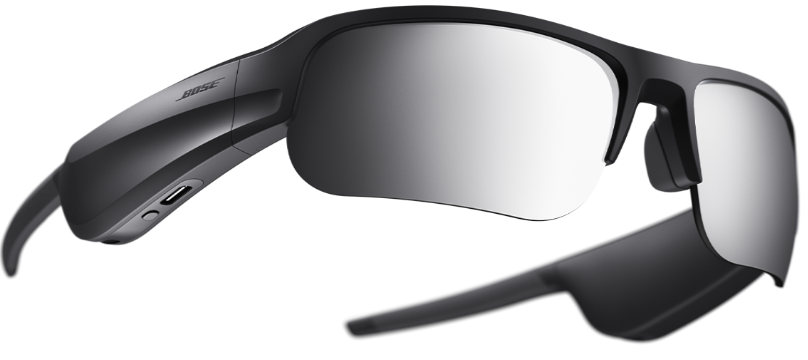
Introduction to Bose Frames Tempo Sport Sunglasses
The Bose Frames Tempo represents a revolutionary advancement in wearable audio technology, combining high-performance sport sunglasses with innovative open-ear audio capabilities. These Bluetooth sunglasses are engineered specifically for athletes, cyclists, runners, and outdoor enthusiasts who demand both premium sound quality and situational awareness during their workouts. Unlike traditional headphones or earbuds that isolate you from your environment, the Bose Frames Tempo utilizes proprietary Bose OpenAudio technology to deliver immersive music and audio content while allowing you to hear traffic, pedestrians, and other ambient sounds,, a critical safety feature for outdoor activities.
The Bose Frames Tempo features specially designed speakers embedded in each temple, delivering louder and deeper sound than competing audio sunglasses on the market. The lightweight aerodynamic nylon frame combined with soft silicone nose pads ensures maximum comfort during extended wear, whether you're running, cycling, or simply enjoying outdoor activities. With IPX4 water and sweat resistance, these sunglasses can withstand the demands of rigorous training sessions and unpredictable weather conditions.
Bose Frames Tempo sport sunglasses are priced in the premium segment, typically ranging from $250 to $350 USD depending on retailer and regional availability. The product is widely available through Bose's official website, major electronics retailers like Best Buy, and online marketplaces, including Walmart. Target users include fitness enthusiasts, outdoor athletes, commuters, and anyone seeking a sophisticated alternative to traditional audio devices. These sunglasses are particularly suited for runners, cyclists, and active individuals who prioritize safety and environmental awareness while enjoying their favorite music and podcasts during workouts.
Technical Specifications and Features
Audio Technology and Performance:
- Bose OpenAudio design for simultaneous music and ambient sound awareness
- Dual speakers embedded in temple frames for enhanced audio delivery
- Bluetooth A2DP and Bluetooth HFP connectivity for music and phone calls
- Bluetooth range: Up to 30 feet (9 meters) with stable operation
- No Wi-Fi or WiDi support; Bluetooth connectivity only
Physical Design and Durability:
- Lightweight aerodynamic nylon frame construction
- Mirrored black polarized lenses for enhanced visibility and eye protection
- IPX4 water and sweat resistance rating
- Soft silicone nose pads with three size options for a custom fit
- Durable, weather-resistant materials throughout
Control Interface and Connectivity:
- Touch-sensitive right temple for intuitive volume control
- Slide finger forward to increase volume, backward to decrease
- Single press for play/pause media controls
- Double-tap for forward track navigation
- Triple tap for previous track
- Voice assistant integration (Siri, Google Assistant)
Included Accessories and Packaging:
- Ballistic nylon protective carrying case
- USB-C charging cable for convenient battery replenishment
- Three interchangeable nose-pad options for optimal comfort
- Microfiber cleaning cloth for lens maintenance
WHAT’S IN THE CARTON

BOSE MUSIC APP SETUP
The Bose Music app lets you set up and control the frames from any mobile device, such as a smartphone or tablet.
Using the app, you can customize power settings, choose your voice prompt language, and get new features.
NOTE: If you have already created a Bose account in the app for another Bose product, see “Add the frames to an existing account.”
DOWNLOAD THE BOSE MUSIC APP
On your mobile device, download the Bose Music app.
NOTE: If you’re located in mainland China, download the Bose app.
- Follow the app instructions.
BATTERY
CHARGE THE FRAMES
Connect the small end of the USB cable to the USB-C port.
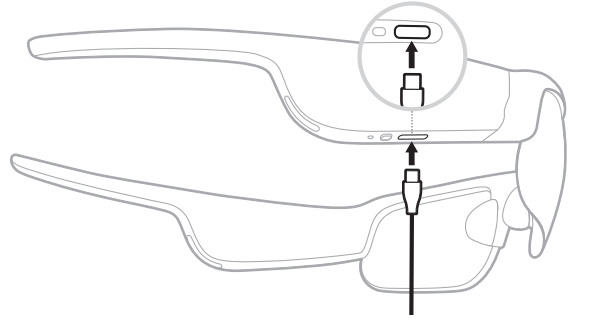
- Connect the other end to a USB-A wall charger (not provided).
CAUTION: Use this product only with an agency-approved power supply that meets local regulatory requirements (e.g., UL, CSA, VDE, CCC).
While charging, the status light blinks white. When the battery is fully charged, the status light glows solid white (see page 26).
NOTES:
- The frames don’t play audio while charging.
- Don’t wear the frames while charging.
CHECK THE FRAMES BATTERY LEVEL
Hear battery notifications
Each time you power on the frames, a voice prompt announces the battery level. While using the frames, a voice prompt announces if the battery needs to be charged.
View the battery level.
- Check the home screen in the Bose Music app.
- When the status light blinks red, the frames need to be charged.
Setup and Configuration Guide
- Initial Pairing and Bluetooth Connection:
Begin by ensuring your Bose Frames Tempo are fully charged using the included USB-C charging cable. Power on the sunglasses by pressing and holding the right temple button until you see a visual indicator (typically an LED light). The device will enter pairing mode automatically if no previously connected device is detected. On your smartphone or audio device, navigate to Bluetooth settings and search for "Bose Frames Tempo" in available devices. Select the device from the list and confirm the pairing request. Once connected, you'll receive a confirmation notification, and the Bluetooth connection will remain active within the 30-foot operational range. - Adjusting Nose Pads for Comfort:
The Bose Frames Tempo includes three different nose-pad sizes to accommodate various face shapes and sizes. Test each option during initial setup to determine which provides the most secure and comfortable fit. Replace the pads by gently removing the existing pads and snapping the new size into place. Proper pad selection is crucial for maintaining comfort during extended wear and ensuring the sunglasses remain secure during vigorous physical activity. - Volume Control and Audio Management:
Locate the touch-sensitive area on the right temple of the sunglasses. To adjust volume, slide your finger forward along this area to increase audio output or backward to decrease volume. The system provides audio feedback at various volume levels. For phone calls, simply answer incoming calls by pressing the right temple once and reject calls with a double-tap. Access your device's voice assistant by double-tapping the volume control area, allowing hands-free operation during workouts.
Important Precautions and Safety Warnings:
- Always verify your surroundings before engaging in physical activities, particularly when near traffic
- Maintain awareness that audio sunglasses are not a substitute for situational awareness
- Avoid operating motor vehicles while adjusting settings or controls
- Protect lenses from extreme temperatures and direct sunlight when not in use
- Do not expose to high-pressure water jets or submersion beyond the IPX4 rating
CARE AND MAINTENANCE
STORE THE FRAMES
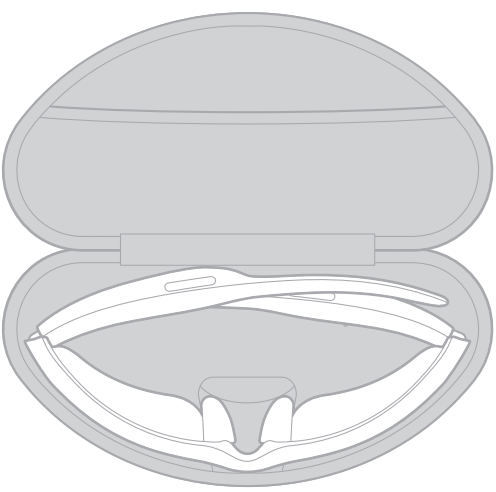
The frames collapse for easy, convenient storage.
- Fold the temples inward towards the lenses so the temples lie flat.
Place the frames in the case with the lenses facing towards the front of the case.
NOTES:
- Make sure to power off the frames when not in use.
- Before storing the frames for more than a few months, make sure the battery is fully charged.
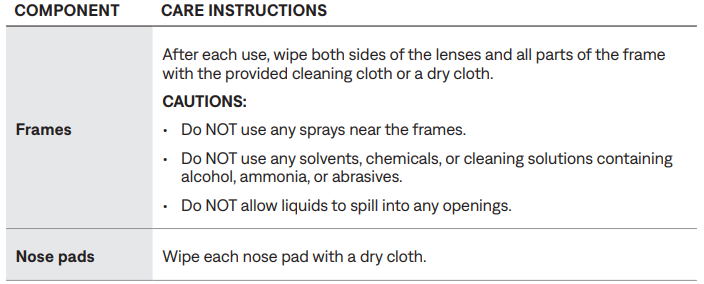
MAINTAIN THE FRAMES
REPLACEMENT PARTS AND ACCESSORIES
Replacement parts and accessories can be ordered through Bose customer service. Visit: worldwide.Bose.com/Support/Tempo
NOTE: For information about how to replace lenses, refer to the instructions provided with your lens accessories.
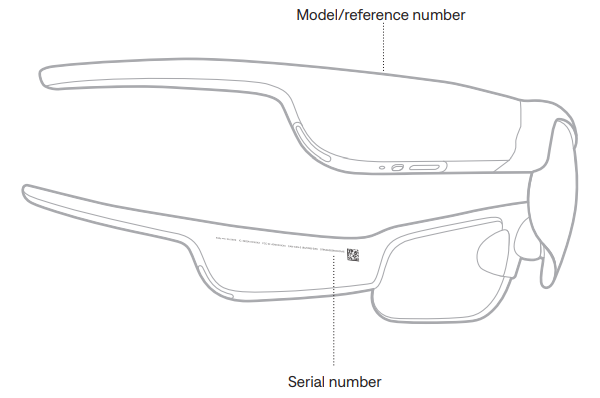
SERIAL AND MODEL/REFERENCE NUMBER LOCATIONS
The serial number is located on the inner left temple, and the model/reference number is located on the inner right temple.
Troubleshooting Common Issues
TRY THESE SOLUTIONS FIRST
If you experience problems with the frames:
- Power on the frames (see page 19).
- Connect the frames to power for 2 seconds and then disconnect (see page 24).
- Charge the battery (see page 24).
- Check the state of the status lights (see page 25).
- Make sure your mobile device supports Bluetooth connections.
- Download the Bose Music app and run available software updates.
- Increase the volume on the frames, your mobile device, and/or your audio/streaming app.
- Connect another mobile device (see page 27).
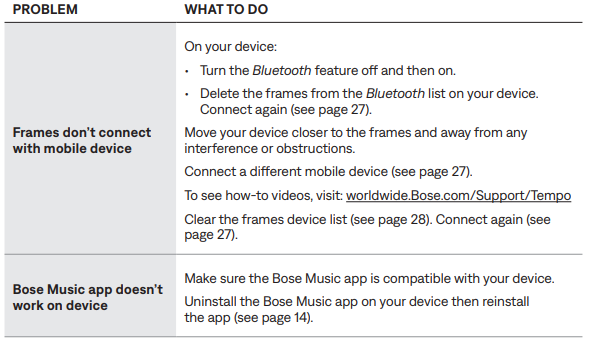
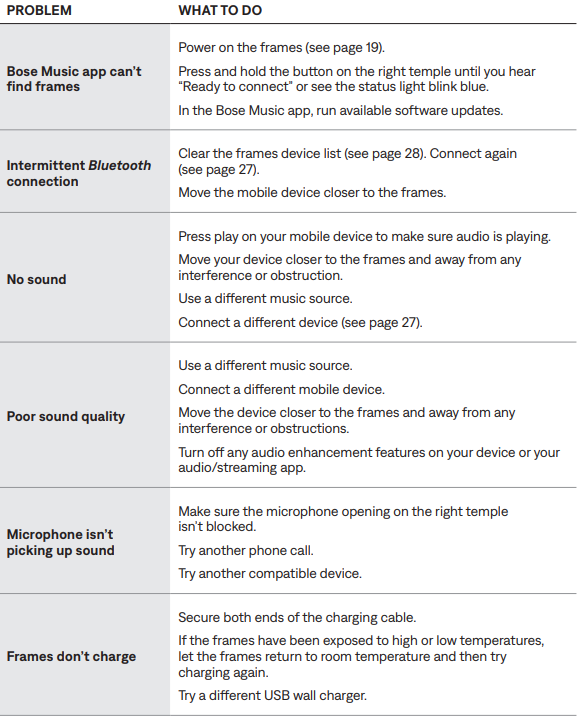
OTHER SOLUTIONS
If you could not resolve your issue, see the table below to identify symptom solutions to common problems. If you are unable to resolve your issue, contact Bose customer service.
Visit: worldwide.Bose.com/Contact
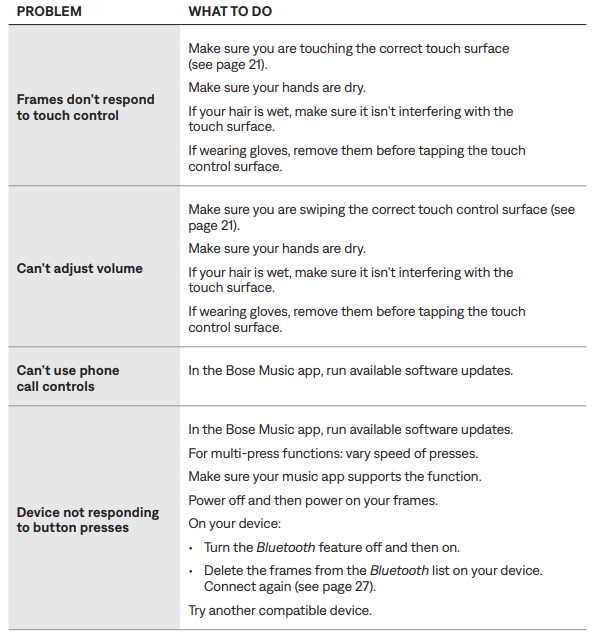
- Bluetooth Connection Problems:
If your Bose Frames Tempo fail to connect to your device, first verify that Bluetooth is enabled on both the sunglasses and your phone. Restart the pairing process by powering off the sunglasses completely, waiting 30 seconds, and powering them back on. Clear any existing pairings by holding the right temple button for 10 seconds until you hear a reset confirmation tone. Re-enter pairing mode and reconnect your device. If problems persist, ensure no physical obstacles or metal structures are blocking the connection, as these can interfere with Bluetooth signal transmission. - Audio Quality and Volume Issues:
If audio sounds distorted or lacks bass, verify that your connected device's volume is set to maximum before adjusting the temple controls. The Bose Frames Tempo deliver high-quality midrange and treble frequencies but provide limited bass response compared to traditional speakers. If one speaker produces no sound, ensure both ears are properly positioned and the nose pads are secure. Check that your audio source is functioning correctly by testing with another device. - Battery and Charging Concerns:
Connect the sunglasses to the USB-C charging cable and verify that the charging indicator activates. If charging fails, inspect the USB-C port for debris or damage. Clean the charging contacts gently with a dry cloth. Ensure you're using a compatible power adapter with adequate output. If the device still won't charge, contact Bose customer support for a warranty assessment. - Water Damage and Weather Resistance:
The IPX4 rating protects against sweat and light rain but not complete submersion. If your sunglasses are exposed to salt water or chlorine, rinse them immediately with fresh water and dry thoroughly. Avoid wearing during swimming or water sports. Store in the protective carrying case when not in use to prevent environmental damage. - Warranty and Support Options:
Bose Frames Tempo typically come with a one-year manufacturer's warranty covering defects in materials and workmanship. Register your product on the official Bose website to activate extended warranty options. For technical support, contact Bose customer service through their website, phone support, or authorized retail partners. Keep your original purchase receipt and packaging for warranty claims.
Advantages and Disadvantages
Key Advantages:
- Revolutionary OpenAudio technology allows simultaneous music listening and environmental awareness, essential for outdoor safety
- Superior audio performance compared to competing audio sunglasses, with louder, deeper sound delivery
- Lightweight, comfortable design suitable for extended wear during workouts and outdoor activities
- IPX4 water and sweat resistance provides reliable durability for athletic use
- Convenient touch controls on the right temple eliminate the need for separate remote devices
- Bluetooth connectivity supports both audio streaming and phone calls for comprehensive communication
- Premium polarized lenses reduce glare and provide excellent eye protection during outdoor activities
- Comes with a protective carrying case and multiple nose-pad options for customization
Notable Disadvantages:
- Limited bass response compared to traditional headphones—not ideal for bass-heavy music genres
- Premium pricing ($250-$350) places these sunglasses in the high-end market segment..
- Bluetooth range is limited to 30 feet, requiring your phone to remain relatively close during use
- No Wi-Fi connectivity or advanced wireless options beyond standard Bluetooth
- Audio quality may be insufficient for high-speed motorcycle riding (speeds exceeding 70 mph) due to wind noise..
- No built-in equalizer or audio customization options for personalized sound tuning
- Battery life is not specified in the product documentation, requiring research before purchase.
- Frames do not include the Z-87 safety rating by default, though compatible lenses may be available separately..
Value Assessment:
The Bose Frames Tempo represent excellent value for serious athletes and outdoor enthusiasts who prioritize both audio quality and situational awareness. The combination of premium Bose sound engineering, durable construction, and innovative OpenAudio technology justifies the premium price point for intended users. However, casual listeners or those seeking traditional audio quality with heavy bass may find more economical alternatives more suitable.
Real User Feedback and Reviews
Customers consistently praise the Bose Frames Tempo for their innovative design and practical functionality during outdoor activities. Users report that the audio quality is excellent for podcasts, audiobooks, and most music genres, with particularly strong performance at moderate volume levels (10-15 mph cycling speeds). The lightweight frame and comfortable nose pads receive high marks for extended wear comfort during running and cycling sessions.
Commonly Praised Features:
- Exceptional environmental awareness capability users appreciate hearing traffic and pedestrians while enjoying audio
- Reliable performance during active workouts with a secure, comfortable fit
- Intuitive touch controls that function reliably during physical activity
- Premium audio quality suitable for music, podcasts, and audiobooks
Frequently Mentioned Concerns:
- Limited bass response may disappoint users who enjoy bass-heavy music
- Not suitable for high-speed applications (motorcycle riding at 70+ mph) due to wind noise interference
- Premium pricing may be prohibitive for casual users
- Lack of audio customization or equalizer options limits personalization
Purchase Recommendations:
The Bose Frames Tempo are highly recommended for runners, cyclists, and outdoor athletes who value safety and audio quality equally. These sunglasses excel for fitness enthusiasts, commuters, and active individuals seeking a sophisticated alternative to traditional headphones. They are particularly well-suited for users who frequently exercise outdoors and need to maintain awareness of their surroundings. However, they may not be ideal for users primarily seeking bass-heavy audio or those with budget constraints.
Faqs
How do I set up bose Frames Tempo for the first time?
What should I do if my bose Frames Tempo will not power on?
How can I adjust the volume on bose Frames Tempo?
Are bose Frames Tempo compatible with both Android and iOS devices?
What features make bose Frames Tempo different from regular sunglasses?
How do I clean and maintain my bose Frames Tempo for long-lasting performance?
What troubleshooting steps can I take if bose Frames Tempo audio cuts out or disconnects?
How do I access and use voice control features with bose Frames Tempo?
Tags
More bose manuals
Leave a Comment