
Setup: Bose TV Speaker User Manual
Content
Bose TV Speaker
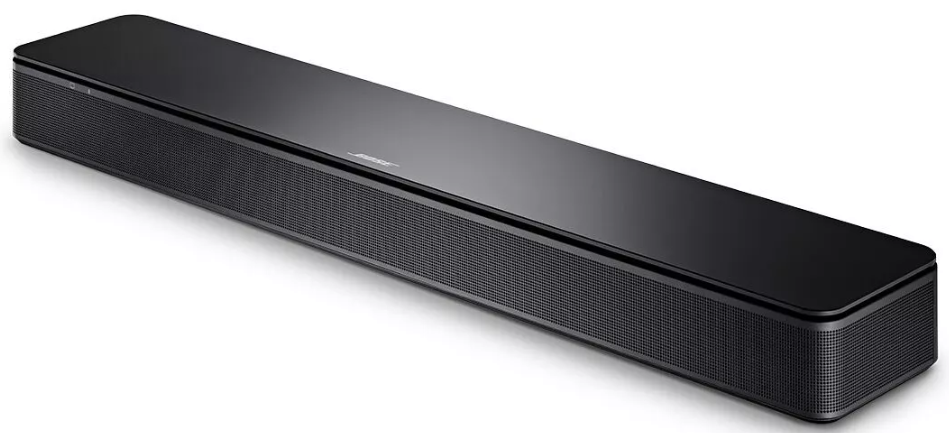
Introduction
The Bose TV Speaker is a compact, powerful soundbar designed to enhance your television audio experience by delivering clear dialogue and rich, immersive sound. Engineered with simplicity and performance in mind, this soundbar offers an elegant upgrade to your TV’s built-in speakers, making it ideal for users who want improved sound quality without complicated setups or bulky equipment.
Key benefits include its easy single-cable setup via optical or optional HDMI connection, wide spatial sound from angled full-range drivers, and a dedicated center tweeter that clarifies speech for crisp dialogue. It also supports wireless streaming through Bluetooth, enabling seamless playback of music, podcasts, and more from compatible devices. The device caters to casual TV watchers, podcast listeners, and users seeking enhanced sound clarity for movies and shows.
Available globally through major retailers and online stores, the Bose TV Speaker typically retails in the price range of approximately $250 to $300 USD, offering a mid-tier soundbar option packed with premium features. Its sleek, low-profile design fits comfortably below most TVs without obstructing the screen, making it an excellent choice for living rooms, bedrooms, and small entertainment setups.
Specifications
- Dimensions: 2.2" H x 23.4" W x 4" D (approx. 4.3 lbs)
- Drivers: 3-driver array including two full-range angled drivers and a center tweeter for dialogue clarity
- Connectivity: Optical audio cable included; HDMI ARC supported (cable sold separately); Bluetooth 4.2 wireless streaming with ~30 ft range
- Audio Enhancements: Built-in Dolby decoding, Dialogue Mode for speech clarity, adjustable bass levels (-2 to +2) via remote
- Expansion: Compatible with Bose Bass Module 500 and Bass Module 700 subwoofers (connection cable sold separately) for deeper bass
- Remote Control: Dedicated remote with pre-installed battery for Bluetooth pairing, bass boost, and dialogue mode
- Design: Sleek, low-profile shape prevents blocking the TV’s bottom edge; wall-mountable (mount bracket optional)
- Performance: Clear, balanced sound optimized for TV shows, movies, and music; louder and clearer than Bose Solo 5
Compared to similar entry-level soundbars, the Bose TV Speaker stands out for its dialogue enhancement, Bluetooth streaming, and compatibility with Bose subwoofers, delivering a richer sound experience in a compact form factor.
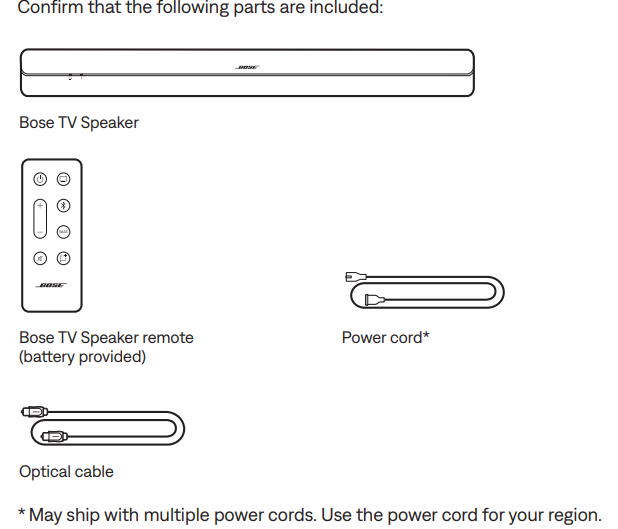
WHAT’S IN THE BOX
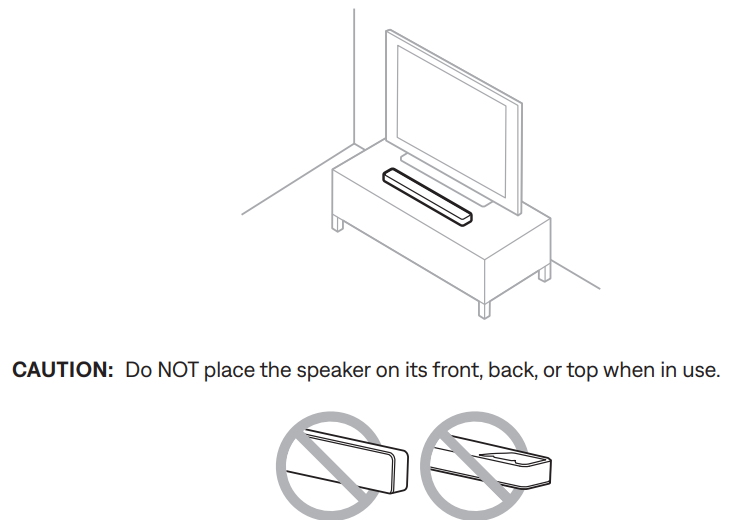
SPEAKER PLACEMENT
RECOMMENDATIONS
- Place the speaker outside of and away from metal cabinets, other audio/video components, and direct heat sources.
- Place the speaker directly below (preferred) or above your TV with the grille facing into the room.
- Place the speaker on its rubber feet on a stable and level surface. For proper support, both feet must be resting on the surface. Vibration can cause the speaker to move, particularly on smooth surfaces like marble, glass, or highly polished wood.
- If placing the speaker on a shelf or TV stand, position the front of the speaker as close as possible to the front edge of the shelf or stand for optimal sound quality.
- Keep the back side of the speaker at least 0.4 in (1 cm) from any other surface.
- Blocking the ports on this side affects sound quality.
- Make sure there is an AC (mains) outlet nearby.
- To avoid wireless interference, keep other wireless equipment 1 – 3 ft (0.3 – 0.9 m) away from the speaker.
- For best sound quality, don’t place the speaker in an enclosed cabinet or diagonally in a corner.
- Don’t place any objects on top of the speaker.
WALL MOUNT THE SPEAKER
You can mount the speaker on a wall. To purchase the Bose Soundbar Wall Bracket, contact your authorized Bose dealer.
CAUTION: Do NOT use any other hardware to mount the speaker.
Adjust audio for wall mounting
On the remote, press and hold the Dialogue mode button 5 for 5 seconds until the TV light on the speaker blinks amber
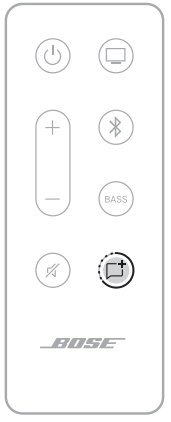
NOTE: If the speaker is taken off the wall repeat to adjust the audio again.
SET UP THE SPEAKER
CABLE OPTIONS
Connect your TV to the speaker using one of the two cable options.
- Option 1: Optical
- Option 2: HDMI ARC (not provided)
NOTES:
- Using your TV’s HDMI ARC or Audio Return Channel port allows you to use your TV remote to control the power, volume, and mute functions of the speaker.
- If your TV does not have either an Optical or HDMI port see “Alternate Setup” on page 38.
- If you switch between the cable options, power off the speaker before connecting the new cable (see page 22).
- The speaker is Roku TV Ready™. For more information about setting up the speaker with your Roku TV™, see page 38.
On the back of your TV, locate the Audio OUT (optical) or HDMI ARC IN port panels.
NOTE: Your TV’s port panel may not appear as shown. Look for the shape of the port..png)
- Choose an audio cable.
CONNECT THE SPEAKER TO YOUR TV
Option 1: Optical
Remove the protective cap from both ends of the optical cable.
.png)
CAUTION: Make sure you have removed the protective cap from both ends of the optical cable. Inserting the plug with the cap on or in the wrong orientation can damage the plug and/or the port.
- Align one end of the plug with your TV’s Optical OUT port and insert the plug carefully.
- Hold the plug at the end of the optical cable with the Bose logo facing down.
Align the plug with the speaker’s OPTICAL IN port and insert the plug carefully.
NOTE: The port has a hinged door that swings inward when inserting the plug..png)
- Firmly push the plug into the port until you hear or feel a click.
.png)
Option 2: HDMI ARC (not provided)
- Insert one end of the HDMI cable into your TV’s HDMI ARC port.
NOTE: If you don’t connect to your TV’s HDMI ARC or Audio Return Channel port, you won’t hear audio from the speaker. If your TV doesn’t have an HDMI ARC port, connect your speaker using the provided optical cable
(see page 17). - Insert the other end of the cable into the HDMI IN port on the speaker.
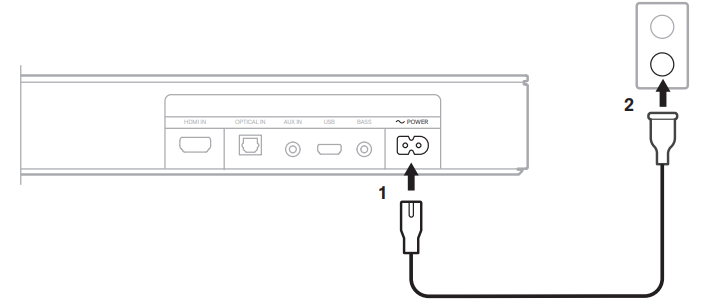
The speaker powers on, and you hear a tone.
TURN OFF YOUR TV SPEAKERS
To avoid hearing distorted sound, turn off your TV speakers. For more information, refer to your TV owner’s guide.
TIP: The audio settings are usually found in the TV menu.
CHECK FOR SOUND
- Power on your TV.
- If you are using a cable/satellite box or other secondary source:
- Power on this source.
- Select the appropriate TV input.
- Power on the speaker (see page 22).
You hear sound coming from the speaker. - Press A on the speaker remote.
You don’t hear sound coming from the TV speakers or speaker.
NOTE: If you don’t hear sound coming from the speaker or do hear sound coming from your TV speakers, see page 45.
CARE AND MAINTENANCE
CLEAN THE SPEAKER
Clean the exterior of the speaker with a soft dry cloth.
CAUTIONS:
- Do not allow liquids to spill onto the speaker or into any openings.
- Do not blow air into the speaker.
- Do not use a vacuum to clean the speaker.
- Do not use any sprays near the speaker.
- Do not use any solvents, chemicals, or cleaning solutions containing alcohol, ammonia, or abrasives.
- Do not allow objects to drop into any openings.
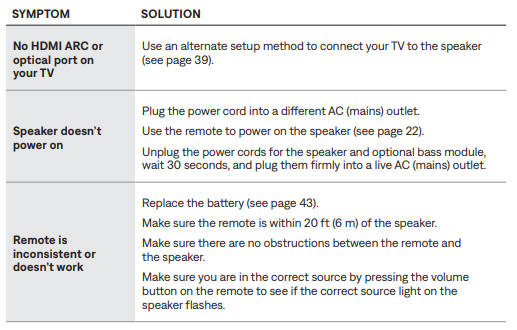
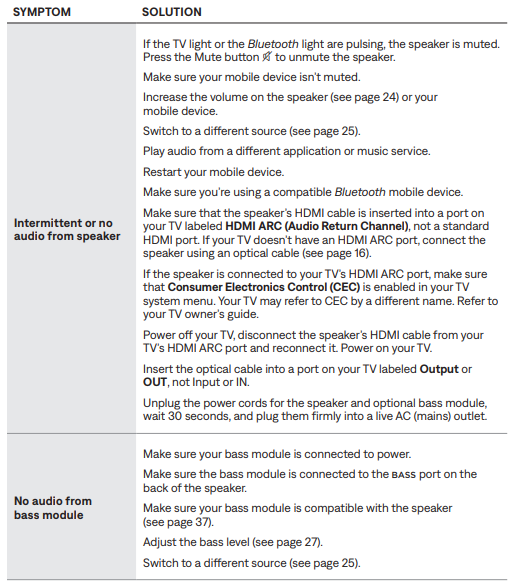
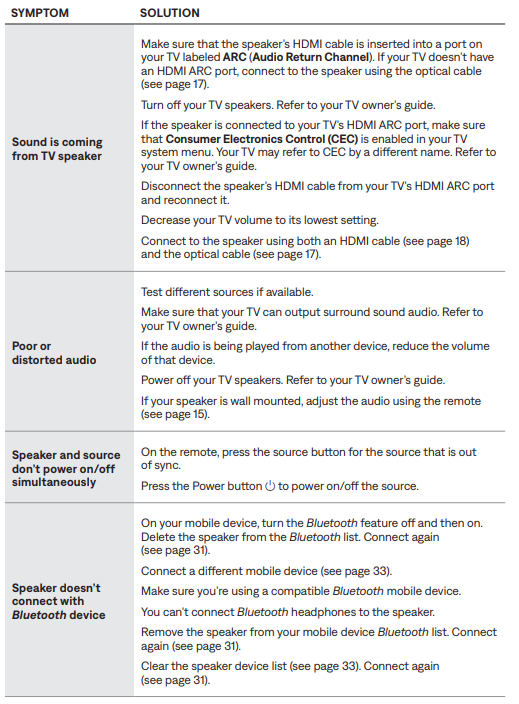
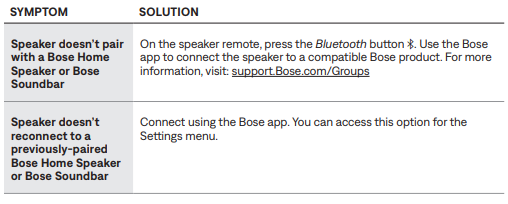
Troubleshooting Common Issues with the Bose TV Speaker
Pros & Cons of the Bose TV Speaker
- Pros:
- Clear, natural dialogue with dedicated center tweeter
- Compact and sleek design fits easily under most TVs
- Simple, one-cable setup with included optical cable
- Bluetooth streaming for music and podcasts
- Expandable with Bose Bass Modules for deeper bass
- Better sound and louder volume than Bose Solo 5
- Cons:
- Limited bass without optional subwoofer
- Does not support advanced surround sound formats like Dolby Atmos
- No built-in EQ or room correction features
- Bluetooth version 4.2 limits some wireless performance compared to newer standards
- HDMI cable sold separately, adding to initial cost
Overall, the Bose TV Speaker offers excellent value for buyers prioritizing dialogue clarity and ease of use, though audiophiles seeking immersive surround sound might consider higher-end models.
Customer Reviews and Feedback on the Bose TV Speaker
Users commonly praise the Bose TV Speaker for its crisp dialogue enhancement and straightforward setup process. Many highlight its balanced sound quality and compact design as major benefits, especially in bedrooms or small living rooms. The included remote and Bluetooth streaming capability receive positive remarks for convenience.
Some customers note that the bass can feel lacking without pairing the speaker to a Bose Bass Module, especially for action movies or bass-heavy music. A few mention occasional Bluetooth connectivity quirks and the absence of advanced sound customization options. Overall, the product holds an average rating of about 4 out of 5 stars in major retail outlets, with strong recommendations for users seeking a simple sound upgrade.
Common praises: Clear speech, easy setup, good wireless streaming
Common complaints: Limited bass on its own, no Dolby Atmos support
Faqs
How do I set up bose TV Speaker with my TV using HDMI ARC?
Why is my bose TV Speaker not producing sound after setup?
Can I use bose TV Speaker with older TVs that only have analog audio outputs?
How do I enable Dialogue mode on bose TV Speaker for clearer speech?
Is bose TV Speaker compatible with Bluetooth devices like smartphones and tablets?
How do I adjust the bass level on bose TV Speaker?
What should I do if bose TV Speaker keeps disconnecting from Bluetooth?
How do I clean and maintain my bose TV Speaker for best performance?
Tags
More bose manuals
Leave a Comment