
Setup: Bose Smart Soundbar User Manual
Content
Bose Smart Soundbar

Introduction to the Bose Smart Soundbar
The Bose Smart Soundbar represents a significant advancement in compact home theater audio, delivering cinema-quality sound in a sleek, space-saving design that fits seamlessly under any television. This innovative soundbar is engineered for customers seeking superior audio performance across movies, music, and gaming without requiring a complex multi-component setup. Measuring just 27.3 inches wide by 2.2 inches tall, the Bose Smart Soundbar combines five integrated speakers with cutting-edge spatial audio technology to create an immersive listening experience that rivals larger, more complicated systems.
The device distinguishes itself through several groundbreaking features, including Dolby Atmos support with upward-firing drivers, Bose TrueSpace spatial processing for non-Atmos content, and A.I. Dialogue Mode that automatically enhances voice clarity during movies and shows. Users can expand the soundbar's capabilities by pairing it with Bose Ultra Open Earbuds (sold separately) to create Personal Surround Sound, transforming the earbuds into wireless rear speakers for enhanced immersion.
The Bose Smart Soundbar targets home entertainment enthusiasts, movie lovers, and casual listeners who prioritize sound quality without sacrificing space or aesthetics. The soundbar is ideal for living rooms, bedrooms, and media rooms ranging from 10x12 feet to larger spaces. With built-in Amazon Alexa and Google Assistant, the Bose Smart Soundbar functions as both a premium audio device and a smart home hub. The product typically retails between $500-$600 USD, positioning it as a mid-to-premium option in the soundbar market. Availability spans major retailers, including Bose's official website, Amazon, Best Buy, and authorized electronics dealers worldwide.
Technical Specifications and Performance Metrics
Physical Dimensions and Weight:
- Height: 2.21 inches
- Width: 27.34 inches
- Depth: 4.09 inches
- Weight: 4.34 pounds
- Materials: Metal and plastic construction with no glass top
Audio Technology and Capabilities:
- Total speaker count: 5 drivers
- Channel configuration: 3.0.2 (up to 5.1.2 channel audio support)
- Dolby Atmos support with two upward-firing dipole transducers
- Bose TrueSpace spatial processing for non-Atmos content
- A.I. Dialogue Mode for enhanced vocal clarity
- Bose QuietPort technology for exceptional bass performance
Connectivity Features:
- Bluetooth 5.0 with 30-foot range
- WiFi connectivity (WiFi enabled)
- HDMI eARC support
- Apple AirPlay 2 compatibility
- Google Chromecast built-in
- Spotify Connect support
- 2 integrated microphones for voice commands
Voice Control and Smart Features:
- Amazon Alexa built-in functionality
- Google Assistant voice control
- Bose App control via smartphone
- Remote control included
- Multi-room grouping capability
WHAT’S IN THE BOX
CONTENTS
Confirm that the following parts are included:

BOSE APP SETUP
The Bose app lets you set up and control the soundbar from any mobile device, such as a smartphone or tablet.
Using the app, you can stream music, add music services, explore internet radio stations, configure Amazon Alexa, enable Google Cast, choose your voice prompt language, manage soundbar settings, and get any future updates and new features made available by Bose.
NOTE: If you have already created a Bose account for another Bose product, add the soundbar to your existing account (see page 20).
DOWNLOAD THE BOSE APP
On your device, download the Bose app.

- Follow the app instructions.
CONNECT BOSE PRODUCTS
CONNECT ACCESSORIES (OPTIONAL)
You can connect any of these accessories to your soundbar. For more information, refer to your accessory owner’s guide.
- Bose Bass Module 700: Bose.com/BM700
- Bose Bass Module 500: Bose.com/BM500
- Bose Surround Speakers 700: Bose.com/SS700
- Bose Surround Speakers: Bose.com/SS
CONNECT A BOSE SOUNDLINK BLUETOOTH SPEAKER OR BOSE HEADPHONES USING SIMPLESYNC TECHNOLOGY
With Bose SimpleSync technology, you can connect certain Bose SoundLink Bluetooth speakers or Bose headphones to the soundbar for a new way to hear your music and movies.
Benefits
- A personal TV listening experience: Listen to TV without disturbing others by connecting your Bose headphones to the soundbar. Use independent volume control on each product to lower or mute the soundbar while keeping your headphones as loud as you like.
- Another room of audio: Listen to the same song in two different rooms at the same time by connecting your Bose SoundLink Bluetooth speaker to the soundbar.
- An added layer of immersion: Access Personal Surround and add a new dimension to your movies and TV by connecting your Bose Ultra Open Earbuds to the soundbar (see page 45).
NOTE: SimpleSync technology has a Bluetooth range of up to 30 ft (9 m). Walls and construction materials can affect reception.
Compatible products
You can connect most Bose SoundLink Bluetooth speakers to the soundbar, as well as Bose headphones.
Popular compatible products include:
- Bose SoundLink Max Portable Speaker
- Bose SoundLink Flex Bluetooth Speaker
- Bose SoundLink Micro Bluetooth speaker
- Bose SoundLink Revolve+ Bluetooth speaker
- Bose Ultra Open Earbuds
- Bose QuietComfort Ultra Headphones
- Bose QuietComfort Ultra Earbuds
- Bose QuietComfort 45 headphones
New products are added periodically. For a complete list and more information.
Setup Guide: Getting Your Bose Smart Soundbar Running
- Initial Unboxing and Physical Setup:
Begin by carefully removing the Bose Smart Soundbar from its packaging and inspecting all components for damage. The box should contain the soundbar unit, power cable, HDMI eARC cable, optical audio cable, remote control, and user documentation. Position the soundbar on a stable, level surface directly beneath your television, ensuring proper ventilation around the device. The compact design allows placement on TV stands, entertainment centers, or wall-mounted shelves. Avoid placing the soundbar in enclosed spaces or against walls that could obstruct the upward-firing drivers responsible for creating Dolby Atmos overhead effects. - Audio Connection Options:
Connect your television to the Bose Smart Soundbar using one of three methods: HDMI eARC (recommended for best performance and single-cable connection), optical audio input, or Bluetooth wireless connection. HDMI eARC provides the highest quality audio transmission and enables automatic switching between the soundbar and TV speakers. For televisions without eARC capability, use the included optical cable. Insert the cable firmly into the optical input port on the soundbar's rear panel. Plug the power cable into a nearby electrical outlet and press the power button to activate the device. - WiFi and Bluetooth Configuration:
Download the Bose app on your smartphone and launch the application. The soundbar will appear in the app's device discovery menu. Select the Bose Smart Soundbar to initiate pairing. When prompted, enter your WiFi network name and password to connect the soundbar to your home network. This enables access to streaming services like Spotify Connect and Apple AirPlay. For Bluetooth connectivity without WiFi, press and hold the Bluetooth button on the remote until the LED indicator flashes blue, then select the soundbar from your device's Bluetooth settings. - Voice Assistant Setup and ADAPTiQ Calibration:
To enable Amazon Alexa or Google Assistant, access the Bose app settings and select your preferred voice assistant. Follow the on-screen prompts to link your Amazon or Google account. Once configured, you can control the soundbar, adjust volume, and manage smart home devices using voice commands. For optimal audio performance, run the ADAPTiQ audio room calibration feature through the Bose app. This proprietary technology analyzes your room's acoustics and automatically adjusts the soundbar's output to compensate for furniture placement, room size, and wall materials, ensuring personalized sound optimization. - Personal Surround Sound Pairing:
To activate Personal Surround Sound, purchase Bose Ultra Open Earbuds separately. Open the Bose app, navigate to the SimpleSync feature, and follow the pairing instructions. The earbuds will connect via Bluetooth and function as rear surround speakers, adding a spatial layer to your movies and music. This feature is particularly effective for individual viewing experiences or when traditional surround speakers are impractical.
CARE AND MAINTENANCE
UPDATE THE SOUNDBAR
After you complete the setup process in the Bose app and connect the soundbar to your Wi-Fi network, the soundbar updates automatically.
REPLACE THE REMOTE BATTERY
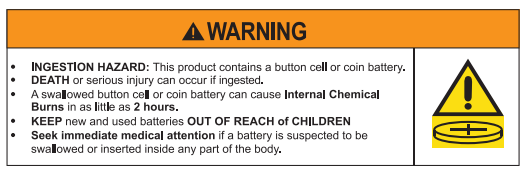
NOTE: For more information, see “WARNINGS/CAUTIONS” on page 2.
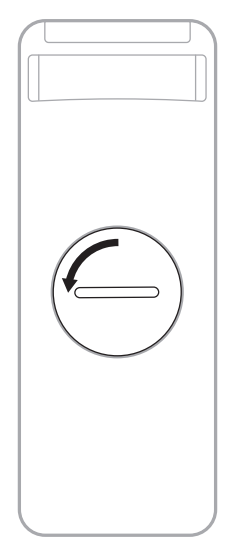
Using a coin, turn the battery compartment cover left (counter-clockwise) and remove the cover.
Insert the new battery flat side up, with the H symbol facing up.
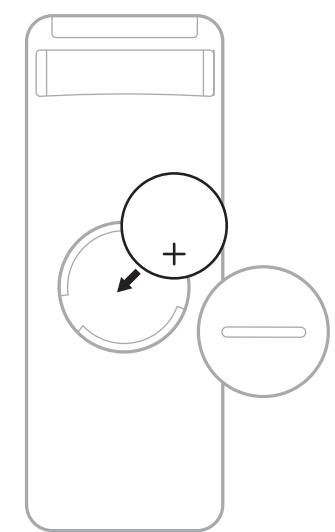
NOTE: Use only an agency-approved (e.g., UL) CR2032 or DL2032 3-volt lithium battery.
- Reset the cover and turn it right (clockwise) to lock in place.
CLEAN THE SOUNDBAR
Wipe the outside surfaces of the soundbar with a soft, dry cloth.
CAUTIONS:
- Do NOT allow liquids to spill onto the soundbar or into any openings.
- Do NOT blow air into the up-firing speakers or soundbar.
- Do NOT use a vacuum to clean the up-firing speakers or soundbar.
- Do NOT use any sprays near the up-firing speakers or soundbar.
- Do NOT use any solvents, chemicals, or leaning solutions containing alcohol, ammonia, or abrasives.
- Do NOT allow objects to drop into any openings.
REPLACEMENT PARTS AND ACCESSORIES
Replacement parts and accessories can be ordered through Bose customer service. Visit: support.Bose.com/bssb
Troubleshooting Common Issues
TRY THESE SOLUTIONS FIRST
If you experience problems with the soundbar:
- Make sure the soundbar is connected to a live AC (mains) outlet.
- Secure all cables.
- Check the state of the soundbar (see page 37).
- Download the Bose app, complete the setup process, and wait for any available software updates to download to the soundbar.
- Place the soundbar according to the placement guidelines (see page 15).
- Move the soundbar within the recommended range for your ededevice proper operation
- Make sure the soundbar is at least 1 – 3 ft (0.3 – 0.9 m) away from wireless equipment.
- Check that any Wi-Fi access points are placed up to 8 – 10 ft (2.4 – 3.0 m) away from the soundbar, optional bass module, and optional surround speakers.
OTHER SOLUTIONS
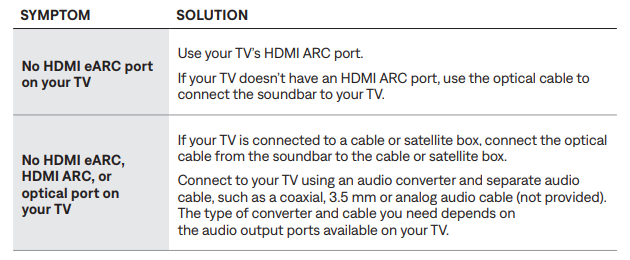
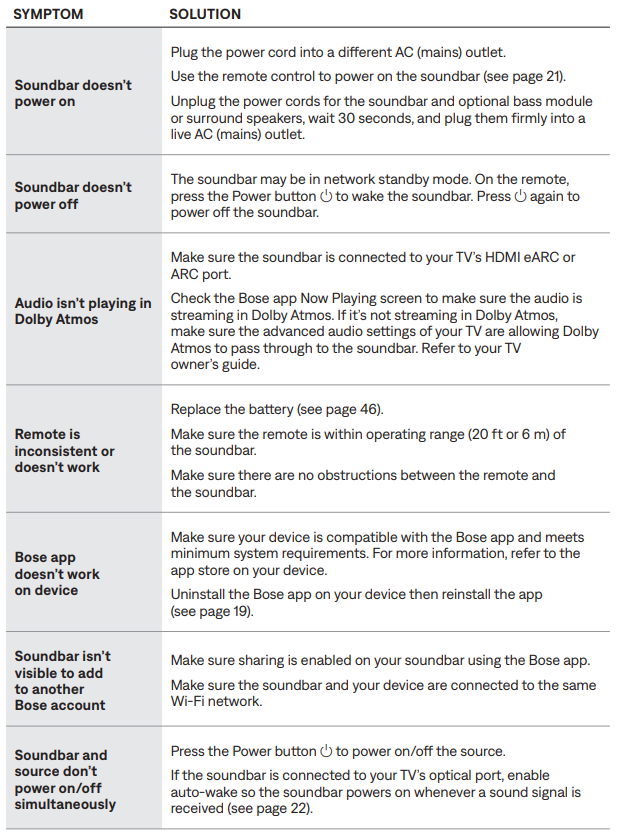
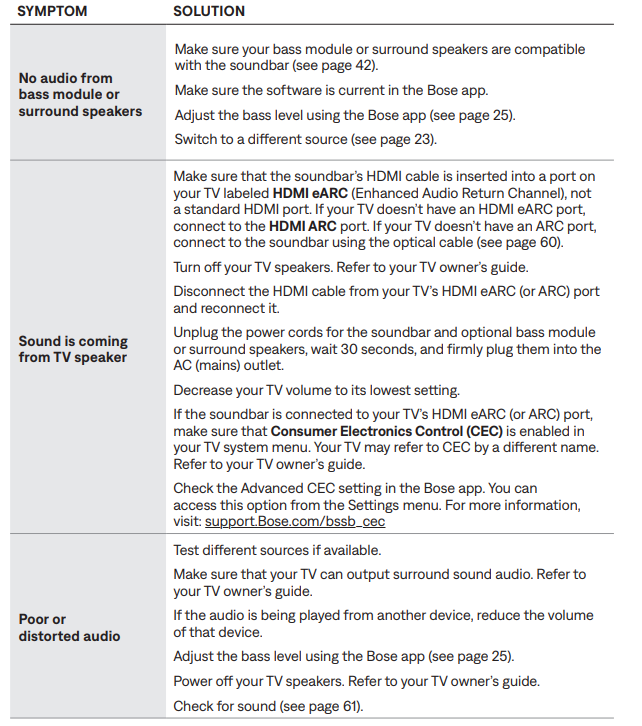
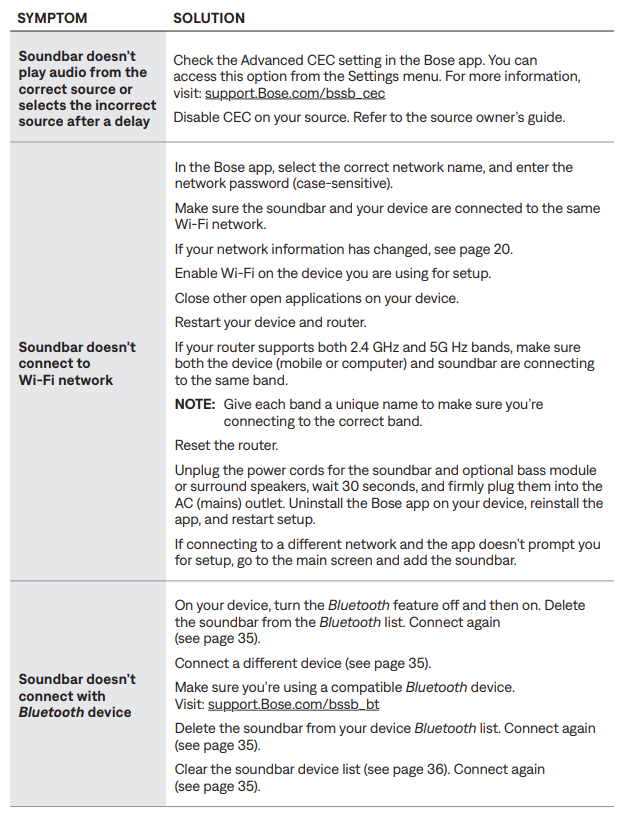
If you could not resolve your issue, see the table below to identify symptoms and solutions to common problems. You can also access troubleshooting articles, videos, and other resources.
If you are unable to resolve your issue, contact Bose customer service.
- Audio Connection Problems:
If the soundbar produces no audio, first verify that the TV's audio output is routed to the soundbar rather than the TV's internal speakers. In your TV's audio settings, select the connected HDMI eARC port or optical input as the audio output device. If using HDMI eARC, ensure your television supports this feature and that eARC is enabled in the TV's settings menu. For optical connections, gently remove and reinsert the cable to ensure a secure connection. Restart both the soundbar and television by powering them off for 30 seconds, then powering them back on. - Bluetooth Connectivity Issues:
When Bluetooth pairing fails, place the soundbar and your mobile device within 30 feet of each other. Press and hold the Bluetooth button on the remote for five seconds until the LED flashes rapidly. Clear any existing pairings by holding the button for an additional ten seconds. From your device's Bluetooth settings, forget the Bose Smart Soundbar and attempt pairing again. If problems persist, perform a factory reset by unplugging the soundbar for two minutes, then plugging it back in. - WiFi and Streaming Problems:
If the soundbar cannot connect to your WiFi network, verify that your router is functioning properly and that other devices can connect successfully. Move the soundbar closer to your WiFi router, as obstacles and distance can weaken the signal. In the Bose app, "forget" the current WiFi network and reconnect by entering your network credentials again. If Spotify Connect or Apple AirPlay fails to function, ensure that your streaming service account is properly linked in the Bose app settings and that your phone is on the same WiFi network as the soundbar. - Dialogue Mode and Sound Quality Issues:
If A.I. Dialogue Mode produces overly muffled or distorted vocals, ensure the feature is properly enabled in the Bose app. Adjust the dialogue enhancement slider to find your preferred balance between voice clarity and ambient sound. If the soundbar lacks bass response or sounds thin, run the ADAPTiQ calibration again, as room furnishings may have changed. You can also manually adjust bass levels through the Bose app's equalizer settings. - Support and Warranty Information:
The Bose Smart Soundbar includes a one-year limited warranty covering manufacturing defects and hardware failures. For technical support, contact Bose customer service through their official website, phone support line, or authorized retailer. Register your product on the Bose website immediately after purchase to activate warranty coverage and receive software updates. Extended protection plans are available for additional coverage beyond the standard warranty period.
Pros and Cons: Balanced Assessment
Advantages of the Bose Smart Soundbar:
- Compact Design: At just 27.3 inches wide and 2.2 inches tall, the soundbar fits elegantly under televisions 50 inches or larger without dominating your entertainment space.
- Dolby Atmos Performance: Two upward-firing drivers deliver convincing overhead effects that enhance movies and gaming experiences with spatial audio precision.
- A.I. Dialogue Mode: This innovative feature automatically detects dialogue and enhances vocal clarity without sacrificing immersive ambient sounds, reducing the need to constantly adjust volume during TV watching.
- TrueSpace Technology: Non-Atmos content receives spatial enhancement, ensuring impressive sound quality regardless of source material.
- Smart Home Integration: Built-in Amazon Alexa and Google Assistant enable voice control and smart home management alongside audio functions.
- Multiple Connectivity Options: WiFi, Bluetooth, HDMI eARC, optical input, AirPlay, Chromecast, and Spotify Connect provide flexibility for various audio sources.
- Personal Surround Sound: Pairing with Bose Ultra Open Earbuds transforms them into wireless rear speakers for enhanced immersion without running cables.
- Value for Money: At $500-$600, the soundbar delivers premium audio performance at a reasonable price point compared to competing systems.
Disadvantages and Limitations:
- Bass Performance: Several reviewers note that the soundbar lacks a deep, punchy bass response, potentially disappointing audiophiles and bass enthusiasts seeking powerful low-end reproduction.
- Separate Subwoofer Required: For users desiring enhanced bass, purchasing an additional Bose subwoofer (sold separately) becomes necessary, increasing the total system cost.
- Limited Channel Configuration: The 3.0.2 driver configuration limits surround sound immersion compared to larger systems with dedicated rear speakers or more drivers.
- Personal Surround Sound Cost: Bose Ultra Open Earbuds (required for Personal Surround Sound feature) are sold separately, adding $200+ to the total investment.
- No Glass Top Design: Unlike premium competitors, this model features a plastic top rather than tempered glass, potentially affecting perceived build quality and durability.
- Room Calibration Dependency: Optimal performance requires running ADAPTiQ calibration, and sound quality varies significantly based on room size, furniture placement, and acoustic properties.
- Confusing Product Naming: The "Smart Soundbar" name creates confusion among consumers comparing multiple Bose soundbar models (Smart Soundbar 900, Smart Ultra Soundbar, etc.).
Customer Reviews and User Feedback
Owners of the Bose Smart Soundbar consistently praise the device's compact form factor and impressive spatial audio capabilities for a single-unit soundbar solution.[6] Users report that the A.I. Dialogue Mode significantly improves television watching experiences, particularly for hearing dialogue clearly during action sequences or in content with variable audio levels. The integration of Amazon Alexa and Google Assistant receives positive feedback, with customers appreciating the convenience of voice control for volume adjustments and music playback.
Common praise highlights include the soundbar's ability to fill mid-sized living rooms with immersive sound, the ease of setup through the Bose app, and the flexibility provided by multiple connectivity options. Customers frequently mention that non-Atmos content sounds surprisingly impressive thanks to TrueSpace processing, eliminating concerns about limited Atmos-encoded material.
The most frequently mentioned complaint centers on bass performance, with multiple users noting that the soundbar produces a thin low-end response unsuitable for bass-heavy music genres or action movies requiring powerful explosions and rumbling effects. Several reviewers recommend pairing the soundbar with a Bose subwoofer to address this limitation, though this significantly increases the total investment. Users also express confusion about the product's name and positioning relative to other Bose soundbar models, making comparison shopping challenging.
- Recommended For: Movie enthusiasts in apartments or smaller homes, cord-cutters prioritizing space efficiency, and users seeking premium audio without complex multi-component installations. The Bose Smart Soundbar delivers exceptional value for customers prioritizing dialogue clarity and compact design over deep bass reproduction.
- Not Recommended For: Serious bass enthusiasts, users with large open-concept living spaces requiring extensive surround sound, or budget-conscious consumers seeking entry-level soundbar options at lower price points.
Tags
More bose manuals
Leave a Comment