
Setup: Bose Smart Soundbar 900 User Manual
Content
Bose Smart Soundbar 900
Introduction
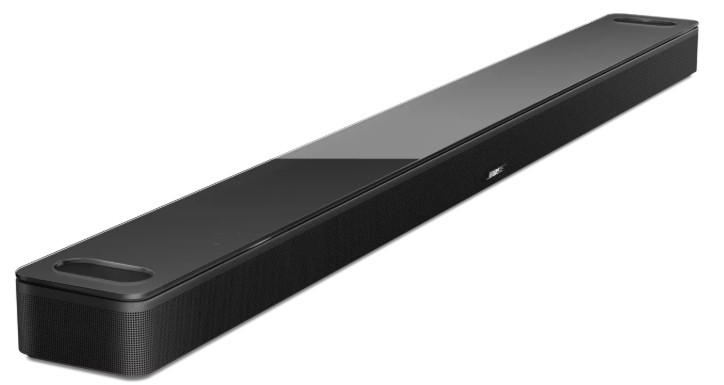
The Bose Smart Soundbar 900 is a premium home audio solution designed to deliver an immersive cinematic experience with cutting-edge sound technology. Featuring Dolby Atmos® support, this smart soundbar reproduces multidimensional audio that surrounds you from every direction, including overhead effects, making it ideal for movie enthusiasts, music lovers, and gamers seeking rich spatial sound in their living rooms. Its sleek, low-profile design, measuring just 2.3 inches in height and 41 inches in width, complements modern home entertainment setups seamlessly, fitting perfectly under TVs 50 inches or larger.
Unique selling points include Bose’s proprietary PhaseGuide™ technology that directs sound beams around the room for wide soundstage effects, and ADAPTiQ® audio calibration,, which tunes sound precisely to your room’s layout for optimal clarity and bass performance. It also incorporates QuietPort™ technology to minimize distortion for smooth bass, even at high volumes.
Equipped with Wi-Fi, Bluetooth, Chromecast built-in, Apple AirPlay 2, and Spotify Connect, the Soundbar 900 offers versatile wireless connectivity, allowing seamless streaming from multiple devices. Voice control with Google Assistant and Amazon Alexa integration enhances user convenience. The soundbar is perfect for users wanting a sophisticated, multi-use smart speaker that supports multi-room audio with other Bose smart speakers.
The estimated price range for the Bose Smart Soundbar 900 is approximately $900 to $1,000, positioning it as a high-end soundbar readily available through Bose’s official outlets and major electronics retailers worldwide.
Technical Specifications
- Dimensions: 2.3" H x 41" W x 4.1" D (58.1 x 1045 x 107 mm)
- Weight: Approximately 12.68 lbs (5.75 kg)
- Speaker Configuration: 9 full-range transducers,, including 2 upward-firing dipole transducers for height channels, delivering 5.0.2 channel Dolby Atmos sound
- Sound Technologies: Dolby Atmos, PhaseGuide™ for directional surround effects, ADAPTiQ® room calibration, QuietPort™ for distortion-free bass
- Connectivity: Wi-Fi®, Bluetooth®, HDMI eARC, Optical digital input, 3.5mm subwoofer output
- Wireless Streaming: Supports Chromecast built-in, Apple AirPlay 2, Spotify Connect
- Voice Control: Built-in Google Assistant and Amazon Alexa
- Multi-room Audio: Compatible with other Bose smart speakers over Wi-Fi for synchronized playback or separate zone control
- Performance: Real-time sound optimization adjusts audio based on content and room acoustics for an immersive experience
- Comparison: Unlike the Bose Smart Soundbar 700, the 900 model supports Dolby Atmos and features a larger speaker array for superior 3D sound placement
WHAT’S IN THE BOX
CONTENTS
Confirm that the following parts are included:

SET UP THE SOUNDBAR
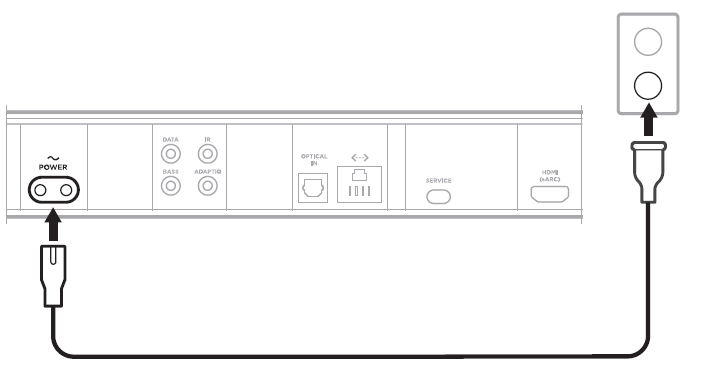
CONNECT THE SOUNDBAR TO POWER
- Connect the power cord to the B port on the back of the soundbar.
- Plug the other end of the power cord into an AC (mains) power outlet.
Step-by-Step Setup Guide foBosese Smart Soundbar 900
- Unbox the soundbar and place it under or near your television, ensuring it is centered for optimal sound distribution.
- Connect the soundbar to your TV using the included HDMI cable via the HDMI eARC port for the best audio quality.
- Plug in the power cable and turn on the soundbar using the remote or the Bose Music app.
- Download and open the Bose Music app on your smartphone or tablet to start the guided setup process.
- Follow on-screen instructions to connect the soundbar to your home Wi-Fi network for smart features and updates.
- Perform the ADAPTiQ® calibration by using the included microphone; this tunes the soundbar’s audio precisely based on your room's dimensions and furniture placement.
- Pair Bluetooth devices for wireless audio streaming by enabling Bluetooth on your device and selecting the soundbar from the list.
- Configure additional settings such as multi-room audio zones, voice assistant preferences, and sound modes through the Bose Music app.
BOSE MUSIC APP SETUP
The Bose Music app lets you set up and control the soundbar from any mobile device, such as a smartphone or tablet.
Using the app, you can stream music, set and change presets, add music services, explore internet radio stations, configure Google Assistant or Amazon Alexa, choose your voice prompt language, manage soundbar settings, and get new features.
NOTE: If you have already created a Bose Music account for another Bose product, add the soundbar to your existing account (see page 20).
DOWNLOAD THE BOSE MUSIC APP
On your mobile device, download the Bose Music app.

- Follow the app instructions.
ADD THE SOUNDBAR TO AN EXISTING ACCOUNT
To add your Bose Smart Soundbar 900, open the Bose Music app and add your soundbar.
CONNECT TO A DIFFERENT WI-FI NETWORK
Connect to a different network if your network name or password has changed, or if you want to change or add another network.
- On the remote, press and hold the TV button O and the Skip backward button J until the light bar glows amber.
- On your mobile device, open your Wi-Fi settings.
- Select Bose Smart Soundbar 900.
- Open the Bose Music app and follow the app instructions.
NOTE: If the app doesn’t prompt you for setup, go to the main screen and add the soundbar.
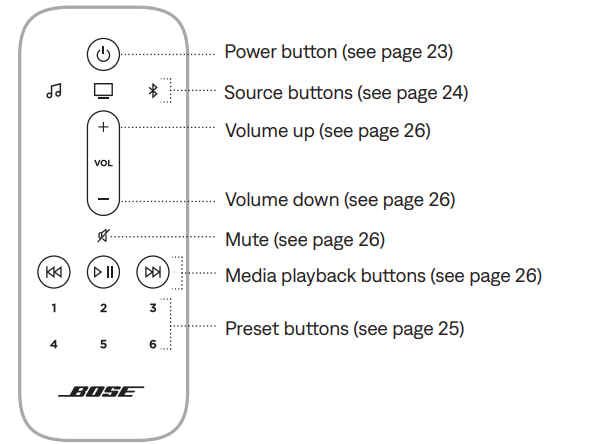
REMOTE FUNCTIONS
Use the remote to control the soundbar, Bluetooth connections, and presets.
Connect Bose Products
CONNECT ACCESSORIES (OPTIONAL)
You can connect any of these accessories to your soundbar. For more information, refer to your accessory owner’s guide.
- Bose Bass Module 700: Bose.com/BM700
- Bose Bass Module 500: Bose.com/BM500
- Bose Surround Speakers 700: Bose.com/SS700
- Bose Surround Speakers: Bose.com/SS
CONNECT A BOSE SOUNDLINK BLUETOOTH SPEAKER OR BOSE HEADPHONES USING SIMPLESYNC™ TECHNOLOGY
With Bose SimpleSync™ technology, you can connect certain Bose SoundLink Bluetooth speakers or Bose headphones to the soundbar for a new way to hear your music and movies.
Benefits
- A personal TV listening experience: Listen to TV without disturbing others by connecting your Bose headphones to the soundbar. Use independent volume controls on each product to lower or mute the soundbar while keeping your dphones as loud as you like.
- Another room of audio: Listen to the same song in two different rooms at the same time by connecting your Bose SoundLink Bluetooth speaker to the soundbar. NOTE: SimpleSync™ technology has a Bluetooth range of up to 30 ft (9 m). Walls and construction materials can affect reception.
Compatible products
You can connect most Bose SoundLink Bluetooth speakers to the soundbar, as well as Bose headphones.
Popular compatible products include:
- Bose SoundLink Revolve+ Bluetooth speaker
- Bose SoundLink Mini Bluetooth speaker
- Bose SoundLink Color Bluetooth speaker
- Bose Noise Cancelling Headphones 700
- Bose QuietComfort 35 wireless headphones
CARE AND MAINTENANCE
UPDATE THE SOUNDBAR
The soundbar updates automatically when connected to the Bose Music app and your Wi-Fi network.
INSTALL THE REMOTE BATTERIES
Slide open the battery compartment cover on the back of the remote.

Insert the two provided AAA (IEC-LR3) 1.5V batteries. Match the + and - symbols on the batteries with the + and - markings inside the compartment.
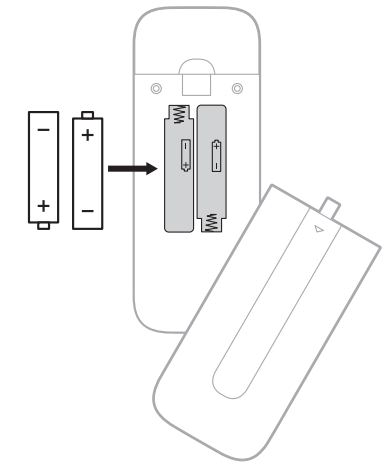
- Slide the battery compartment cover back into place.
CLEAN THE SOUNDBAR
Wipe the outside surfaces of the soundbar with a soft, dry cloth.
CAUTIONS:
- Do NOT allow liquids to spill onto the soundbar or into any openings.
- Do NOT blow air into the up-firing speakers or soundbar.
- Do NOT use a vacuum to clean the up-firing speakers or soundbar.
- Do NOT use any sprays near the up-firing speakers or soundbar.
- Do NOT use any solvents, chemicals, or cleaning solutions containing alcohol, ammonia, or abrasives.
- Do NOT allow objects to drop into any openings.
REPLACEMENT PARTS AND ACCESSORIES
Replacement parts and accessories can be ordered through Bose customer service.
Safety Precautions: Avoid placing the soundbar near heat sources or in humid areas. Use only the supplied power adapter and cables to prevent damage.
TROUBLESHOOTING
Troubleshooting tips: If the soundbar is unresponsive, power cycle it by unplugging and reconnecting the power. Ensure your TV’s HDMI-ARC port is enabled if no audio is heard. For Wi-Fi issues, verify network credentials and router compatibility.
TRY THESE SOLUTIONS FIRST
If you experience problems with the soundbar:
- Make sure the soundbar is connected to a live AC (mains) outlet.
- Secure all cables.
- Check the state of the soundbar (see page 42).
- Download the Bose Music app and run available software updates.
- Place the soundbar according to the placement guidelines (see page 16).
- Move the soundbar within the recommended range of your mobile device for proper operation.
- Make sure the soundbar is at least 1 – 3 ft (0.3 – 0.9 m) away from wireless equipment.
- Check that any Wi-Fi access points are placed up to 8 – 10 ft (2.4 – 3.0 m) away from the soundbar, optional bass module, and optional surround speakers.
OTHER SOLUTIONS
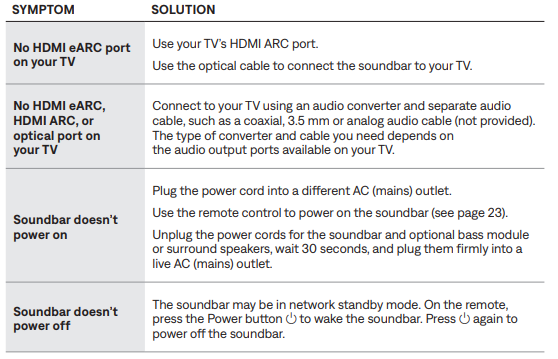
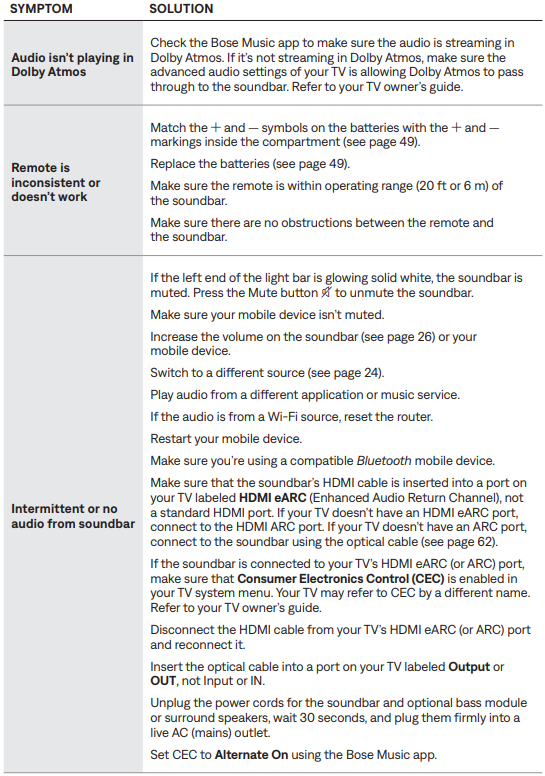
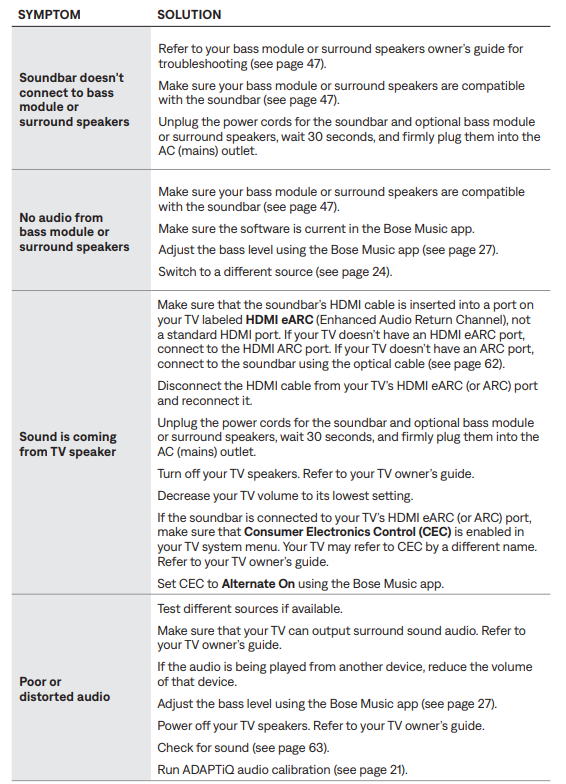
If you could not resolve your issue, see the table below to identify symptoms and solutions to common problems. If you are unable to resolve your issue, contact Bose customer service.
RESET THE SOUNDBAR
Factory reset clears all source, volume, network, and ADAPTiQ audio calibration settings from the soundbar and urns it to its original factory settings.
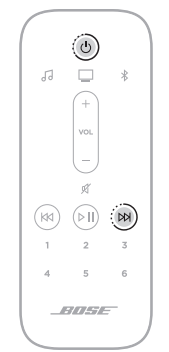
The soundbar reboots. When the reset is complete, the light bar glows solid amber.
Common Problems and Troubleshooting for Bose Smart Soundbar 900
- No Sound from TV: Confirm HDMI eARC is selected on TV and soundbar input settings match; try reconnecting the HDMI cable.
- Bluetooth Connection Drops: Move devices closer, reduce interference, or re-pair devices via the Bose Music app.
- Room Calibration Issues: Repeat ADAPTiQ® calibration in a quiet room to improve sound tuning.
- Voice Assistant Not Responding: Check Wi-Fi connectivity and microphone settings in the app.
- Software Updates: Ensure the soundbar firmware is up to date via the Bose Music app for optimal performance.
For unresolved issues, consult the warranty information included with the soundbar or visit Bose customer support. Bose offers dedicated online and phone support channels, typically reachable through their official website or app.
LIMITED WARRANTY
- TA's limited warranty covers the soundbar.. Visit our website for details of the limited warranty.
- To register your product, for the instructions.
- Failure to register will not affect your limited warranty rights.
Pros & Cons of the Bose Smart Soundbar 900
Pros
- Exceptional Dolby Atmos surround sound with precise 3D sound positioning and immersive overhead effects.
- Proprietary PhaseGuide technology delivers spacious, multi-directional audio that extends beyond speaker placement.
- Comprehensive wireless connectivity including Wi-Fi, Bluetooth, AirPlay 2, Chromecast, and Spotify Connect.
- Smart voice assistant integration with Google Assistant and Alexa built in for hands-free control.
- Elegant, slim design fits well in modern home theaters without obstructing TV screens.
- ADAPTiQ calibration optimizes sound for any room environment automatically.
Cons
- Premium price point around $900-$1,000 may be high for budget-conscious buyers.
- No included subwoofer, which may be desired for very bass-heavy listening preferences.
- Multi-room audio does not support HDMI or optical inputs, limiting some source configurations.
- Only one Bluetooth device can play at a time,, despite multiple pairings.
Customer Reviews oBosese Smart Soundbar 900
Users commonly praise the Bose Smart Soundbar 900 for its rich, immersive sound quality, especially highlighting the clarity of dialogue and dramatic overhead effects thanks to Dolby Atmos. Many reviewers note that the PhaseGuide technology creates a broad soundstage that enhances movie and music experiences. The intuitive Bose Music app and voice control features receive positive feedback for ease of use.
Some customers mention the lack of a dedicated subwoofer as a minor downside, but acknowledge that the QuietPort technology provides surprisingly deep bass for a standalone soundbar. A few users report initial setup complexity, which is generally resolved by following the app’s guided configuration steps. Overall, the product averages high star ratings (4.5/5) and is recommended for those seeking a high-end smart soundbar with multi-room capabilities and excellent surround sound performance.
Tags
More bose manuals
Leave a Comment