
Setup & Pairing: Bose SoundComm B40 Headset User Manual
Content
Bose SoundComm B40 Headset
Introduction
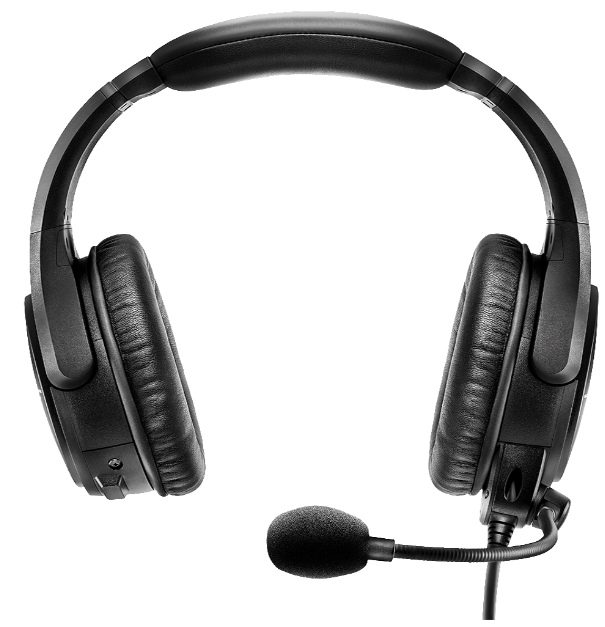
The Bose SoundComm B40 Headset represents the pinnacle of professional communication technology, engineered specifically for demanding live event production environments. This closed-back communication headset combines advanced acoustic noise cancellation with professional-grade audio clarity, making it an essential tool for event managers, production teams, and broadcast professionals. The SoundComm B40 is designed to reduce crowd noise and distractions while maintaining exceptional audio intelligibility, allowing communication teams to stay connected in the most challenging acoustic environments. Available in multiple configurations, including single-earcup and dual-earcup variants, this headset adapts to your specific operational needs.
The device features a weather-resistant dynamic noise cancellation microphone with far-field noise rejection capabilities, ensuring clear communication within live event production teams. With its lightweight design, intelligent weight distribution, and low clamping force, the SoundComm B40 delivers long-term comfort during extended use. The headset is compatible with popular intercom systems through 4-pin XLRF and 5-pin XLRM connector options. Typically priced between $400-$600, depending on configuration and retailer, the Bose SoundComm B40 represents a professional investment for organizations requiring a reliable communication infrastructure. The headset is available through authorized Bose retailers, professional audio equipment suppliers, and specialized intercom system vendors worldwide.
Technical Specifications
HEADSET SPECIFICATION
MICROPHONE SPECIFICATIONS
- 150 ohm Dynamic Noise Canceling
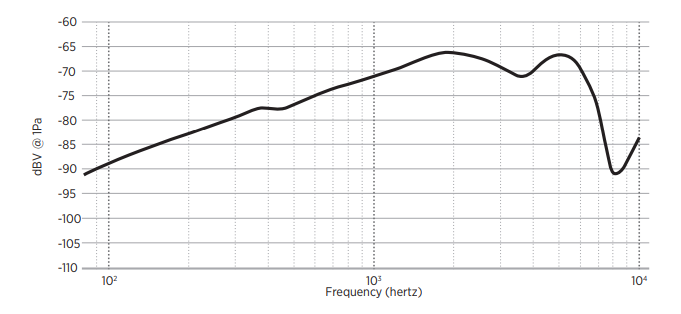
- Frequency Response is optimized for improved intelligibility in noisy environments
ON HEAD WEIGHT
- Dual earcup: 12.7 oz.
- Single earcup: 10 oz.
CABLE LENGTH
Headset to control module: 4 feet 10 inches.. Control module to XLR connector: 10 inches
HEADSET VARIANTS
Headset Configuration Options
The Bose SoundComm B40 Headset is available in three primary variants to accommodate different operational preferences:
- Single-earcup with left earcup and mic
- Single-earcup with right earcup and mic
- Dual-earcup version with side-swappable mic
Audio Performance Specifications
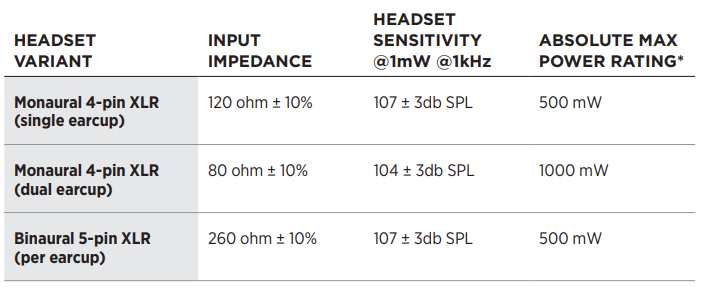
| Variant | Input Impedance | Headset Sensitivity | Max Power Rating |
|---|---|---|---|
| Monaural 4-pin XLR (single earcup) | 120 ohm ± 10% | 107 ± 3 dB SPL | 500 mW |
| Monaural 4-pin XLR (dual earcup) | 80 ohm ± 10% | 104 ± 3 dB SPL | 1000 mW |
| Binaural 5-pin XLR (per earcup) | 260 ohm ± 10% | 107 ± 3 dB SPL | 500 mW |
Microphone Specifications
The SoundComm B40 features a 150-ohm dynamic noise-canceling microphone with a microphone sensitivity rated at -71 dBV/Pa @ 1kHz. The frequency response is specifically optimized for improved intelligibility in noisy environments, ensuring your voice carries clearly through crowded venues and high-ambient-noise locations.
Physical Specifications
- Dual earcup weight: 12.7 ounces
- Single earcup weight: 10 ounces
- Headset to control module cable length: 4 feet 10 inches
- Control module to XLR connector cable length: 10 inches
- Battery requirements: Two AA batteries
- Battery life: Up to 48 hours per set
Key Features
- Proprietary acoustic noise cancellation technology
- Weather-resistant dynamic noise cancellation microphone
- Far-field noise rejection capabilities
- Side-swappable microphone boom (dual-earcup model)
- Active equalization technology
- High-performance earcup cushions
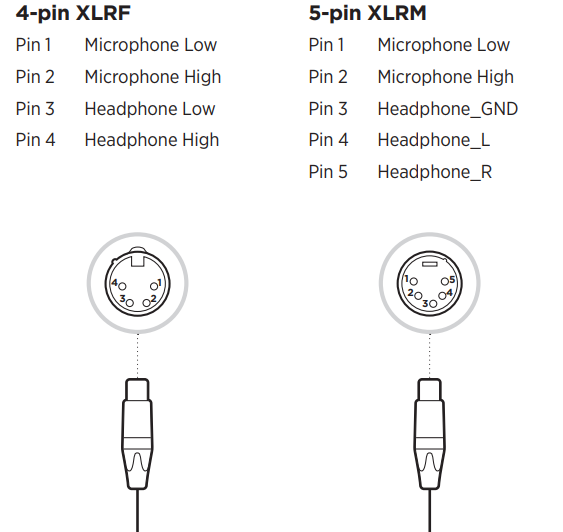
- Compatible with 4-pin XLRF and 5-pin XLRM intercom systems
- Lightweight materials with intelligent weight distribution
- Low clamping force for extended comfort
WHAT’S IN THE CARTON
CONTENTS

HEADSET COMPONENTS
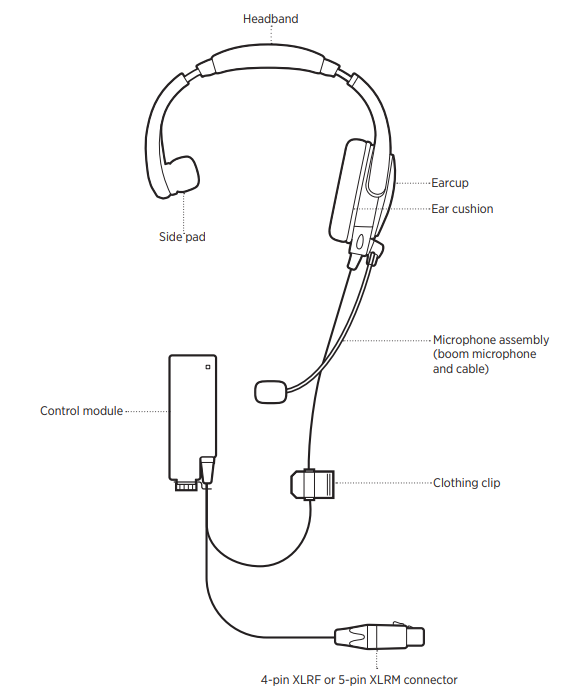
Setup and Configuration Guide
- Initial Setup Instructions
Before using your Bose SoundComm B40 Headset, verify all components are included: the headset unit, control module with battery pack, two AA batteries, cable assembly with XLR connector, and mounting options for belt clip or comms back attachment. - Battery Installation and Power Activation
Insert two AA batteries into the battery pack located on the control module. To activate the headset, push the Power switch away from the battery light on the top of the control module. The battery light will glow red for three seconds, then display your current battery status. The battery light indicates remaining charge level, allowing you to monitor power throughout your event. Active noise cancellation does not draw current when switched off, preserving battery life when the feature is disabled. - Connector Configuration
The SoundComm B40 Headset connects to your intercom system through either a 4-pin XLRF connector for monaural audio or a 5-pin XLRM connector for binaural audio, depending on your system requirements. Verify your intercom system's connector type before purchasing to ensure compatibility. The control module features an inline battery pack with dedicated mounting options: use the belt clip for portable mounting or attach directly to your existing comms back for hands-free operation. - Microphone Positioning
For dual-earcup models, the side-swappable microphone boom can be detached and repositioned to either side within minutes. Adjust the microphone boom to your preferred angle for optimal voice capture and comfort. Ensure the microphone is positioned approximately one inch from your mouth for best noise cancellation and intelligibility performance. - Acoustic Noise Cancellation Activation
Enable acoustic noise cancellation by toggling the dedicated switch on the battery pack placed inline with the cable near the comms back connection point. The active noise cancellation feature is strikingly effective at reducing crowd noise and environmental distractions while maintaining audio clarity. Remember that disabling this feature preserves battery life during quieter operational periods.
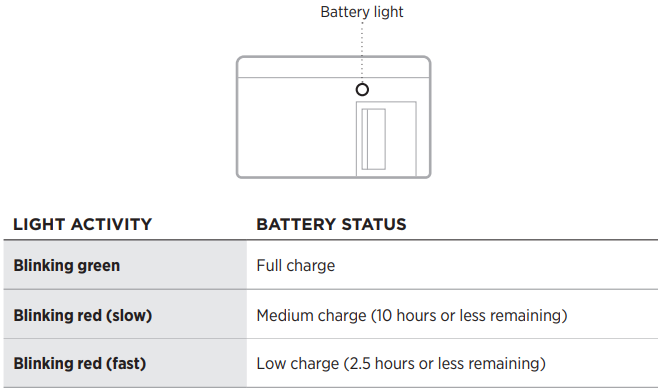
HEADSET STATUS
BATTERY STATUS
The Battery light is located on the top of the control module, next to the Power switch.
CARE AND MAINTENANCE
STORE THE HEADSET
The headset should be stored in the supplied carry case.
- Rotate the microphone assembly up, so the microphone gently rests next to the headband.
- Place the headset in the case with the cable lying across the center hinge of the case.
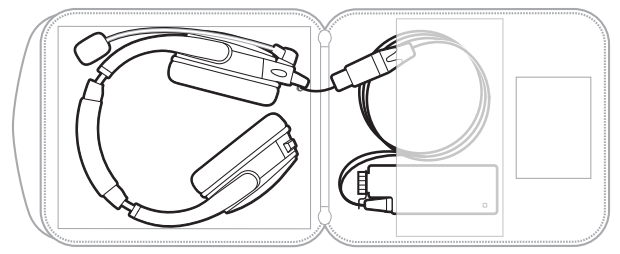
NOTE: When storing the headset for an extended period, remove the batteries.
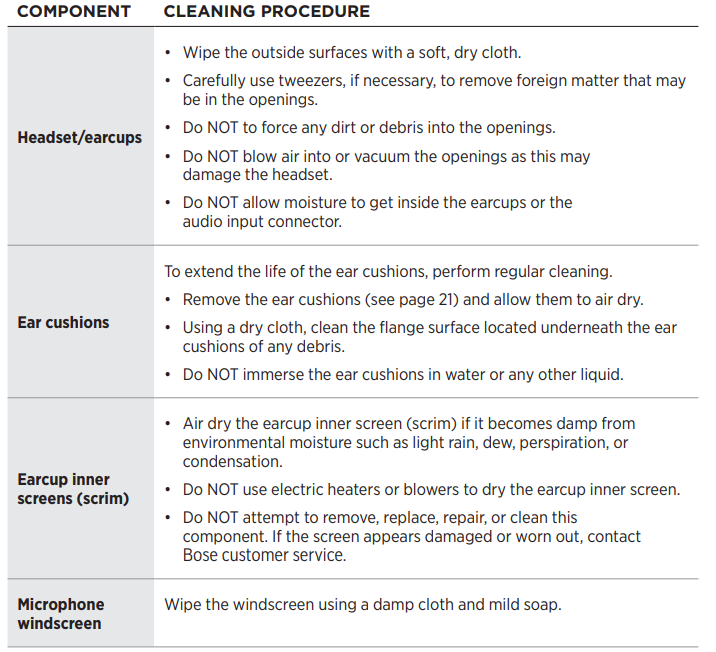
CLEAN THE HEADSET
The headset may require periodic cleaning.
WARNING: Do NOT attempt to disassemble or clean the inside of the earcups or other parts of the headset. Only the microphone windscreen, side pad (single earcup), batteries, and ear cushions are replaceable by the user.
REPLACEMENT PARTS AND ACCESSORIES
Replacement parts and accessories can be ordered through Bose customer service.
WARNING: Do NOT attempt to disassemble or service the inside of the earcups or other parts of the headset.
Replacement Instructions
Only the side pad (single earcup), microphone windscreen, batteries, and ear cushions are replaceable by the user.
Side pad (single earcup)
The side pad is attached to the headband with a dual-lock tab.
- Gently pull the old side pad away from the headband.
- Align the new side pad with the dual lock tab and firmly press until secure.
Microphone windscreen
The microphone windscreen can be removed and replaced.
- Carefully slide the windscreen off of the microphone.
- Slide the replacement windscreen on and make sure it fits completely over the microphone.
Ear cushion
Ear cushions should be replaced every 3 – 6 months. Replace the ear cushions if you see:
- Flaking of the outer covering
- Cuts or tears
- Flattening of the cushion
You may have to replace the ear cushions more often if you:
- Have a full beard or thick facial hair
- Use the headset in extreme temperatures
- Damage the cushions because of improper storage
NOTE: Replacement instructions are also provided with the ear cushion replacement kit.
Gently pull the ear cushion up and away from the earcup.
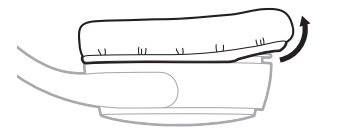
Remove the two adhesive strips from the earcup and clean the flange surface of any debris with a dry cloth.
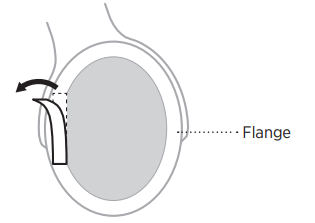
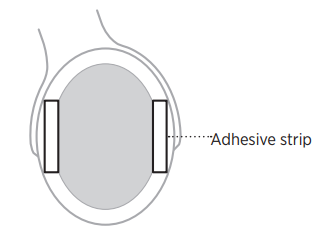
Align the new adhesive strips onto the left and right sides of the flange surface and press down.
Tuck the ear cushion skirt into the earcup groove and gently stretch the ear hion around the earcup.
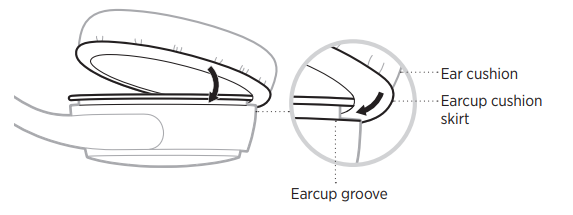
- Press the ear cushion down over the two adhesive strips.
NOTE: Make sure you remove the paper backing from the adhesive strips.
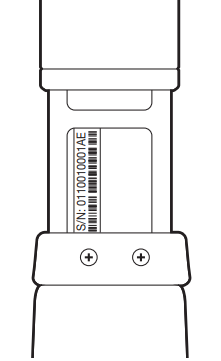
SERIAL NUMBER LOCATION
To locate the serial number, extend the left side of the headband to its largest size. The serial number is located beneath the left side of the headband.
Preventive Maintenance
Regularly inspect the earcup cushions and replace them if worn or damaged to maintain comfort and audio seal. Store the headset in a protective case when not in use. Keep the XLR connectors clean and dry. Check the microphone boom for physical damage before each use. Replace batteries every 48 hours of operation or when the battery light indicates low charge.
Troubleshooting and Support
TRY THESE SOLUTIONS FIRST
If you experience problems with the headset, try these solutions first:
- Change the batteries in the control module (see page 17)
- Make sure the microphone assembly and terminator cover are secure (see page 10)
- Check that the connection to your radio/belt pack is secure.
Audio Quality Issues
- Problem: Low volume output - Verify battery status by checking the battery light indicator. Weak batteries reduce output power. Replace with fresh AA batteries if the light indicates low charge. Confirm your intercom system volume levels are properly adjusted. Check that the headset cable is fully inserted into the XLR connector with no loose connections.
- Problem: Distorted or unclear audio - Reduce input levels on your intercom system to prevent clipping. Verify the headset sensitivity matches your system requirements (107 ± 3 dB SPL for most configurations). Clean the XLR connector contacts with a dry cloth to eliminate connection interference.
Microphone Performance
- Problem: Microphone not transmitting - Confirm the microphone boom is properly seated in its connector. Verify the control module power switch is activated. Check that your intercom system is receiving the correct impedance input (150 ohms for the SoundComm B40). Test with a different intercom channel to isolate the problem.
- Problem: Excessive background noise in the microphone signal - Enable acoustic noise cancellation if disabled. Reposition the microphone boom closer to your mouth (approximately one inch away). Verify batteries are sufficiently charged, as weak batteries reduce noise cancellation effectiveness. Check that the microphone windscreen is properly attached and undamaged.
Battery and Power
- Problem: Battery light shows red continuously - Replace both AA batteries with fresh units. The battery light indicates low charge when red. Confirm batteries are inserted with correct polarity (+ and - terminals aligned properly).
- Problem: Headset continues functioning with dead batteries - This is normal operation. The SoundComm B40 will continue to work without active noise cancellation when batteries are depleted. Replace batteries to restore full functionality and noise cancellation features.
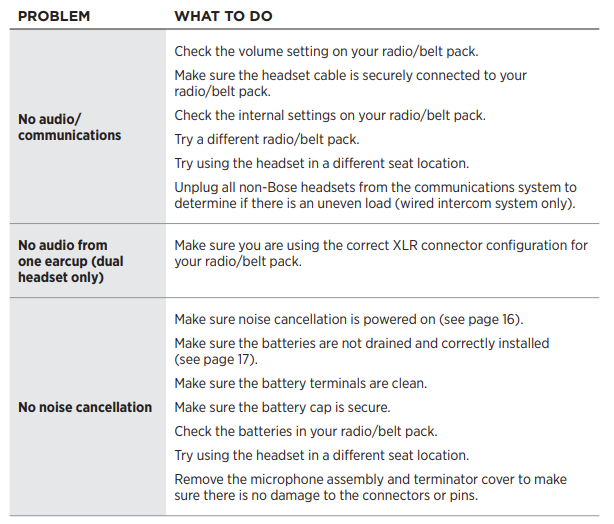
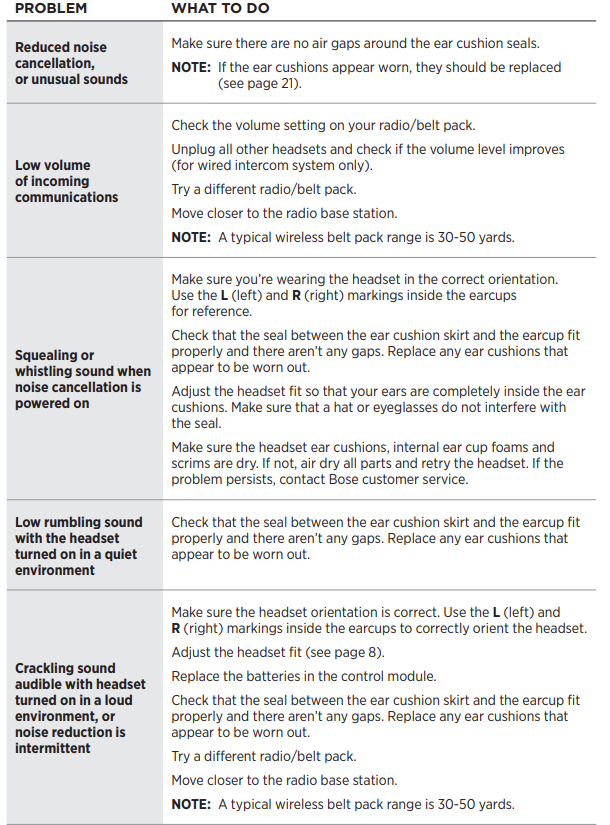
OTHER SOLUTIONS
If you could not resolve your issue, see the table below to identify symptoms and solutions to common problems. If you are unable to resolve your issue, contact Bose customer service.
Warranty and Support
The Bose SoundComm B40 Headset includes a standard manufacturer's warranty covering defects in materials and workmanship. Contact Bose professional audio support or your authorized dealer for warranty service. Professional audio retailers and intercom system providers offer technical support for configuration and integration assistance. Refer to the official Bose documentation for detailed specifications and advanced troubleshooting procedures.
Advantages and Disadvantages
Strengths of the SoundComm B40
- Exceptional noise cancellation: The proprietary acoustic noise cancellation technology effectively reduces crowd noise in high-ambient environments, allowing clear team communication during live events.
- Flexible configuration options: Available in single and dual-earcup variants, with side-swappable microphone positioning that accommodates different user preferences and operational requirements.
- Extended battery life: Up to 48 hours from two standard AA batteries provides reliable operation throughout multi-day events without frequent battery changes.
- Professional audio quality: Dynamic noise-canceling microphone with frequency response optimized for intelligibility ensures clear voice transmission in demanding environments.
- Comfortable long-term wear: Lightweight design with intelligent weight distribution and low clamping force allows extended use without fatigue.
- Weather-resistant construction: Durable design withstands diverse environmental conditions typical of outdoor event production.
- System compatibility: 4-pin XLRF and 5-pin XLRM connector options ensure compatibility with popular professional intercom systems.
Limitations and Considerations
- Premium pricing: The $400-$600 price range positions the SoundComm B40 as a significant investment compared to consumer-grade alternatives.
- Battery dependency: Requires two AA batteries for active noise cancellation, though the headset continues functioning without them at reduced capability.
- Cable length constraints: The 4-foot-10-inch headset cable may be limiting for some operational setups, requiring additional extension cables in certain configurations.
- Learning curve: Multiple configuration options and noise cancellation settings require operator training for optimal performance.
- Connector specificity: XLR connectors limit compatibility to professional intercom systems, excluding consumer-grade communication devices.
Value Assessment
The Bose SoundComm B40 Headset delivers exceptional value for professional event production teams requiring a reliable communication infrastructure. While the initial investment is substantial, the combination of advanced noise cancellation, durable construction, extended battery life, and professional-grade audio quality justifies the cost for organizations conducting frequent live events. The flexible configuration options and system compatibility make it a versatile solution for various production environments. For budget-conscious operations conducting occasional events, consumer-grade intercom headsets may suffice, but for mission-critical communication during high-stakes productions, the SoundComm B40's performance characteristics and reliability justify the premium positioning.
User Reviews and Feedback
- Professional Praise
Event production professionals consistently praise the Bose SoundComm B40 Headset for its strikingly effective noise cancellation in crowded venues. Users report that the acoustic noise cancellation technology delivers exceptional clarity even in extremely noisy environments with high crowd noise levels. Production managers appreciate the side-swappable microphone feature on dual-earcup models, noting the flexibility to quickly adjust microphone positioning during events. The extended 48-hour battery life receives frequent commendation from multi-day event coordinators who appreciate minimal battery maintenance requirements. - Common User Observations
Users frequently mention the lightweight design and low clamping force as major comfort advantages during extended 8-12 hour operational periods. The weather-resistant construction earns positive feedback from outdoor event professionals who operate in diverse environmental conditions. Several users note that the dynamic noise-canceling microphone effectively captures voice signals while rejecting background noise, improving team communication clarity. Technical support and compatibility with major intercom systems receive appreciation from integration specialists. - Frequent Considerations
Some users mention that the premium pricing requires careful budget consideration for smaller production companies. A few operators note the learning curve associated with optimizing noise cancellation settings and microphone positioning for maximum performance. Users conducting events with multiple intercom systems highlight the importance of verifying connector compatibility (4-pin XLRF vs. 5-pin XLRM) before purchase to ensure seamless integration. - Purchase Recommendations
The Bose SoundComm B40 Headset is highly recommended for professional event production teams, broadcast facilities, and live entertainment venues requiring a reliable communication infrastructure. It suits organizations conducting frequent events where communication reliability directly impacts production quality and safety. For occasional users or budget-limited operations, entry-level alternatives may provide adequate functionality at lower costs. However, for mission-critical applications where communication failure could compromise event success or safety, the SoundComm B40's professional-grade performance and proven reliability make it the preferred choice among industry professionals.
Faqs
How do I set up the Bose SoundComm B40 Headset for the first time?
What should I do if my Bose SoundComm B40 Headset is not providing noise cancellation?
Can I swap the microphone and cable from left to right on the Bose SoundComm B40 Headset?
Is the Bose SoundComm B40 Headset compatible with standard intercom systems?
How long does the battery last on the Bose SoundComm B40 Headset?
How do I maintain and clean my Bose SoundComm B40 Headset?
What makes the Bose SoundComm B40 Headset different from other communication headsets?
Can I use the Bose SoundComm B40 Headset in extreme weather conditions?
Tags
More bose manuals
Leave a Comment