
Pairing & Setup: Bose Soundbar 550 User Manual
Content
Bose Soundbar 550
Introduction
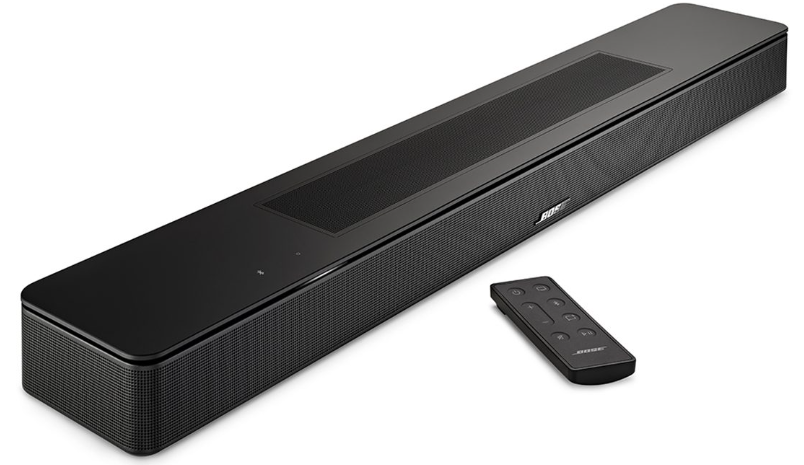
The Bose Soundbar 550 is a premium audio solution designed for home entertainment enthusiasts seeking immersive sound for movies, music, and gaming. With Dolby Atmos decoding and Bose TrueSpace spatial processing, this soundbar delivers a cinematic experience in any living room. Its compact design fits seamlessly under most TVs, while advanced up-firing and side-firing speakers create a spacious, enveloping soundscape. The Bose Soundbar 550 is ideal for users who want clear dialogue, dynamic bass, and multi-directional audio without the clutter of a full surround system.
Key benefits include Wi-Fi, Bluetooth, Apple AirPlay 2, Spotify Connect, and Chromecast built-in for seamless streaming. The soundbar also supports HDMI eARC and optical connectivity, making it compatible with a wide range of TVs. For those seeking even deeper bass, an optional wireless Bass Module can be added. The Bose Soundbar 550 is available for around $449 and is widely accessible through major retailers and online stores.
Specifications
- Model: Bose Soundbar 550
- Dimensions: 2.21" H x 27.34" W x 4.09" D
- Weight: 6.9 lbs
- Channels: 3.1 (with optional Bass Module)
- Surround Sound: Dolby Atmos, TrueSpace spatial processing
- Connectivity: HDMI eARC, Optical TOSLINK, Wi-Fi, Bluetooth 5.0
- Streaming: Apple AirPlay 2, Spotify Connect, Chromecast built-in
- Remote Control: Included
- Standby Power: Less than 0.5 watts
- Network Standby: Enabled
- Microphones: 2 for voice control
- Materials: Metal, plastic
The Bose Soundbar 550 outperforms many competitors in its price range with its immersive audio, flexible connectivity, and sleek design. Compared to similar models, it offers superior dialogue clarity and spatial sound, making it a top choice for home theater setups.
WHAT’S IN THE BOX
CONTENTS
Confirm that the following parts are included:

Set Up the Soundbar
CONNECT THE SOUNDBAR TO POWER
- Connect the power cord to the B port on the back of the soundbar.
- Plug the other end of the power cord into an AC (mains) power outlet.
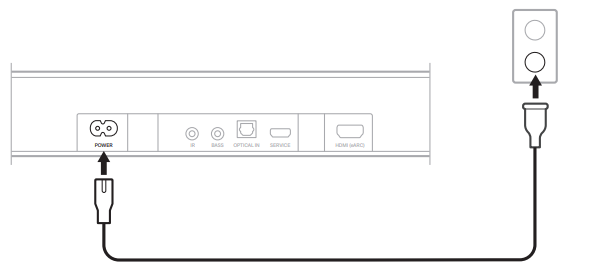
The soundbar powers on, and the light bar glows solid amber.
NETWORK STANDBY
The soundbar transitions to network standby when audio has stopped and you have not pressed any buttons or talked to your Amazon Alexa Built-In device or your Google Assistant-enabled device for 20 minutes.
To wake the soundbar from network standby:
- On the remote, press the Power button I, a source button (see page 22), or the Play/Pause button F (see page 20).
- Play or resume audio using your mobile device or using the Bose app.
- Talk to your Amazon Alexa Built-In device or your Google Assistant-enabled device.
BOSE APP SETUP
The Bose app lets you set up and control the soundbar from any mobile device, such as a smartphone or tablet.
Using the app, you can stream music, add music services, explore internet radio stations, enable Google Cast™, choose your voice prompt language, manage soundbar settings, and get new features.
NOTE: If you have already created a Bose account for another Bose product, add the soundbar to your existing account (see page 19).
DOWNLOAD THE BOSE APP
On your mobile device, download the Bose app.
- Follow the app instructions.
SOUNDBAR CONTROLS
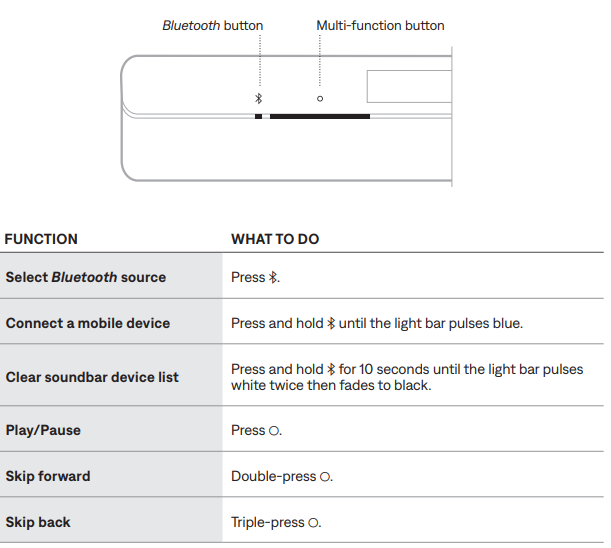
The soundbar controls are located on the top of the soundbar and on the remote.
TIP: You can also control your soundbar using the Bose app.
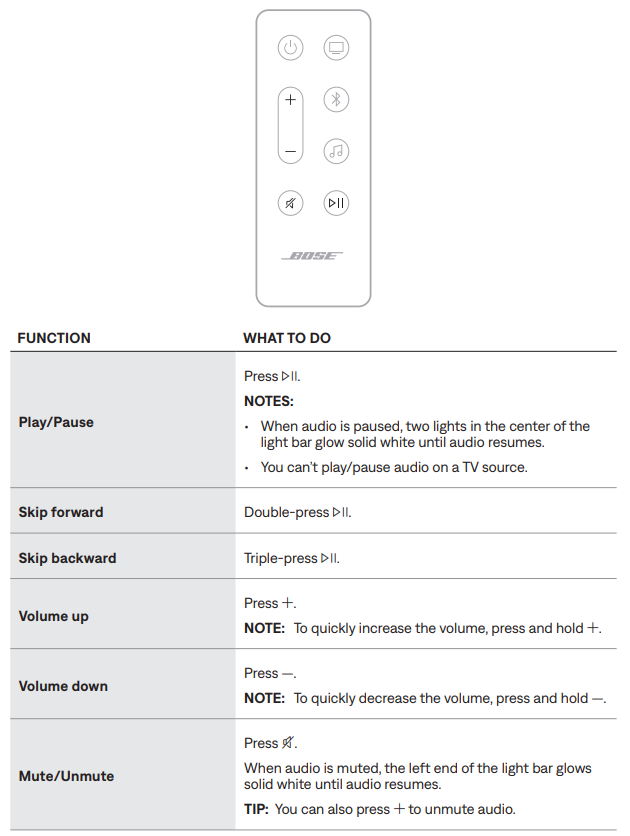
REMOTE FUNCTIONS
Use the remote to control the soundbar, select the source, and manage Bluetooth connections.
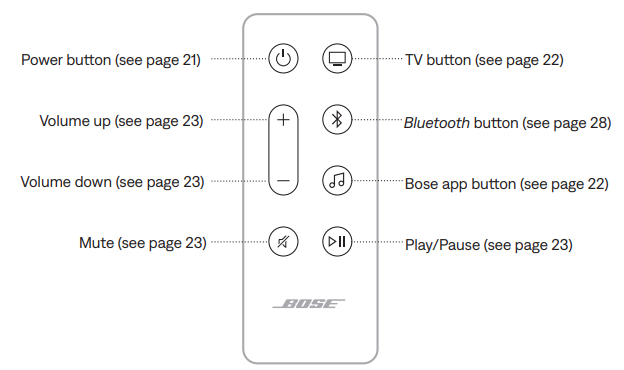
Media playback and volume
SOUNDBAR CONTROL FUNCTIONS
You can use the Multi-function button to control media playback. You use the Bluetooth button l to manage Bluetooth connections.
WORKS WITH GOOGLE ASSISTANT
ACCESS GOOGLE ASSISTANT
The soundbar is compatible with a Google Assistant-enabled device connected to your Wi-Fi network using Google Cast. With Google Cast, you can stream audio from supported apps using just your voice or by simply tapping the Cast button on your phone. Choose from millions of songs from popular music services like Pandora, Spotify, and TuneIn.
To control the soundbar using your voice, use a Google Assistant-enabled device and enable Google Cast in the Bose app. You can access this option from the Settings menu.
NOTES:
- To use Google Cast, you must have a Google Assistant-enabled device and a Wi-Fi connection.
- Support for new apps is added periodically.
- Google Assistant isn’t available in all languages and countries.
- For more information on what Google Assistant can do.
Use your voice
- Just say “Hey Google” on a Google Assistant-enabled device to get started. Then say your request on <soundbar name>.
- For example, try playing your favorite music. Just say “Hey Google, play My Workout playlist on Family Room”.
CARE AND MAINTENANCE
UPDATE THE SOUNDBAR
After you complete the setup process in the Bose app and connect the soundbar to your Wi-Fi network, the soundbar updates automatically.
REPLACE THE REMOTE BATTERY
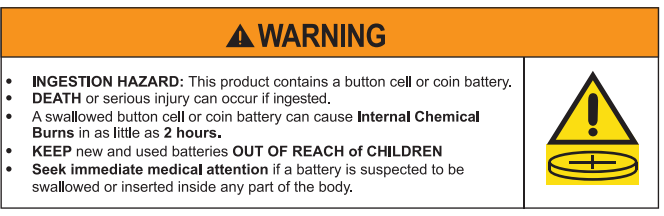
NOTE: For more information, “WARNINGS/CAUTIONS” on page 2.
Using a coin, turn the battery compartment cover left (counter-clockwise) and remove the cover.
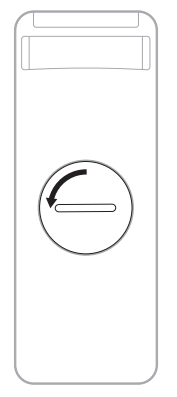
Insert the new battery flat side up, with the + symbol facing up.
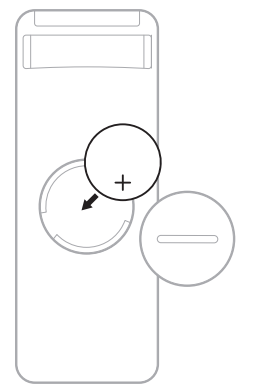
NOTE: Use only an agency-approved (e.g., UL) CR2032 or DL2032 3-volt lithium battery.
- Reset the cover and turn it right (clockwise) to lock in place.
CLEAN THE SOUNDBAR
Wipe the outside surfaces of the soundbar with a soft, dry cloth.
CAUTIONS:
- Do NOT allow liquids to spill onto the soundbar or into any openings.
- Do NOT blow air into the up-firing speakers or soundbar.
- Do NOT use a vacuum to clean the up-firing speakers or soundbar.
- Do NOT use any sprays near the up-firing speakers or soundbar.
- Do NOT use any solvents, chemicals, or cleaning solutions containing alcohol, ammonia, or abrasives.
- Do NOT allow objects to drop into any openings.
REPLACEMENT PARTS AND ACCESSORIES
Replacement parts and accessories can be ordered through Bose customer service.
Troubleshooting
TRY THESE SOLUTIONS FIRST
If you experience problems with the soundbar:
- Make sure the soundbar is connected to a live AC (mains) outlet.
- Secure all cables.
- Check the state of the soundbar (see page 30).
- Download the Bose app, complete the setup process, and wait for any available software updates to download to the soundbar.
- Place the soundbar according to the placement guidelines (see page 14).
- Move the soundbar within the recommended range of your device for per operation.
- Make sure the soundbar is at least 1 – 3 ft (0.3 – 0.9 m) away from wireless equipment.
- Check that any Wi-Fi access points are placed up to 8 – 10 ft (2.4 – 3.0 m) away from the soundbar, optional bass module, and optional surround speakers.
OTHER SOLUTIONS
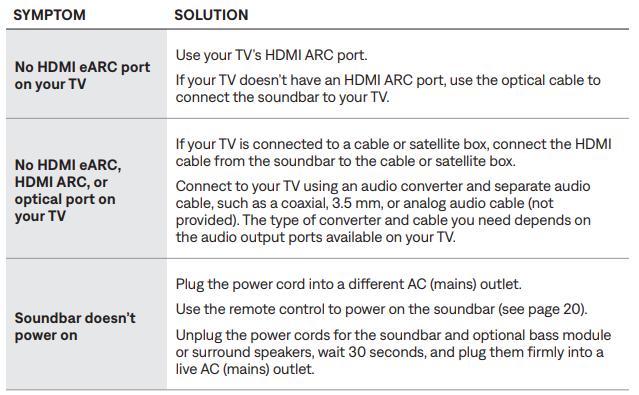
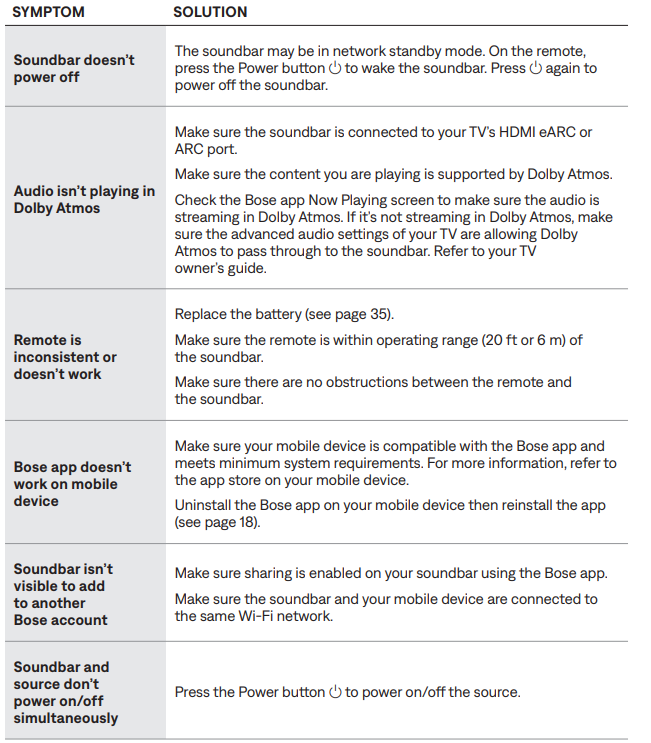
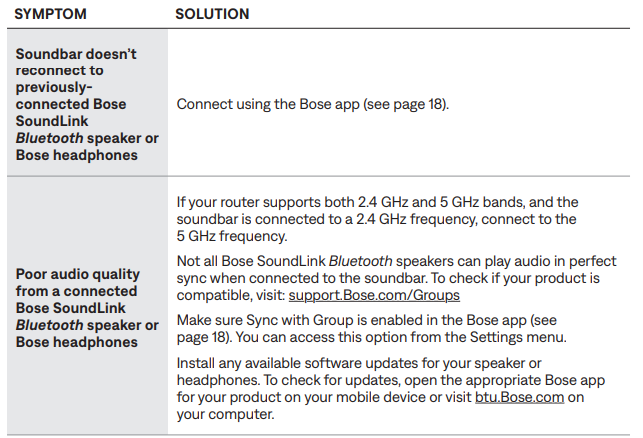
If you could not resolve your issue, see the table below to identify symptoms and solutions to common problems. You can also access troubleshooting articles, videos, and other resources at: support.Bsupport.Bose.ose.com/com/SB550SB550.. If you are unable to resolve your issue, contact Bose customer service.
LIMITED WARRANTY
- The soundbar is covered by a limited warranty. Visit our website for details of the limited warranty.
- To register your product, for the instructions. Failure to register will not affect your limited warranty rights.
Pros and Cons of the Bose Soundbar 550
- Pros:
- Immersive Dolby Atmos and TrueSpace sound
- Multiple connectivity options
- Clear dialogue and dynamic bass
- Easy setup and user-friendly app
- Optional wireless Bass Module for enhanced performance
- Cons:
- Higher price point compared to basic soundbars
- Optional Bass Module sold separately
- Limited color options
The Bose Soundbar 550 offers excellent value for money, especially for those seeking a premium audio experience without the complexity of a full surround system. It stands out from alternatives with its advanced sound processing and seamless integration with smart home devices.
Customer Reviews and Feedback
The Bose Soundbar 550 has received positive feedback from users, with an average rating of 4.5 stars. Customers praise its immersive sound, clear dialogue, and easy setup. Common complaints include the need to purchase the Bass Module separately and occasional connectivity issues. Many users recommend the Bose Soundbar 550 for its performance and reliability, making it a top choice for home theater enthusiasts. Frequent mentions highlight the soundbar’s ability to enhance movie and music experiences, with few issues reported over time.
Faqs
How do I set up the bose Soundbar 550 for the first time?
What should I do if my bose Soundbar 550 is not connecting to Wi-Fi during setup?
Can I connect the bose Soundbar 550 to my TV using both HDMI and optical cables?
How do I optimize the bose Soundbar 550 sound quality when wall mounting?
What features does the bose Soundbar 550 offer for enhancing TV sound experience?
How can I troubleshoot no audio output from my bose Soundbar 550?
Is the bose Soundbar 550 compatible with voice assistants and smart home devices?
What maintenance tips help keep the bose Soundbar 550 in good condition?
Tags
More bose manuals
Leave a Comment