
Setup : Bose Smart Soundbar 600 User Manual
Content
Bose Smart Soundbar 600

Introduction
The Bose Smart Soundbar 600 is a premium audio solution designed to elevate your home entertainment experience. With its sleek, compact design, this soundbar fits effortlessly under most TVs, making it an ideal choice for modern living rooms and home theaters. The Bose Smart Soundbar 600 delivers immersive, room-filling sound with support for Dolby Atmos, TrueSpace technology, and built-in voice control via Amazon Alexa and Google Assistant. Whether you're watching movies, streaming music, or gaming, the soundbar’s advanced audio processing ensures clear dialogue, rich bass, and a wide soundstage.
Key benefits include wireless multiroom audio, Bluetooth and Wi-Fi connectivity, and compatibility with popular streaming services. The Bose Smart Soundbar 600 is perfect for audiophiles, movie enthusiasts, and anyone seeking a hassle-free upgrade to their TV audio. Priced around $499, it’s available at major electronics retailers and directly from Bose. Its combination of cutting-edge technology, elegant design, and user-friendly features makes it a standout choice in the mid-range soundbar market.
Specifications of the Bose Smart Soundbar 600
- Model: Bose Smart Soundbar 600
- Dimensions: 694 x 104 x 56 mm (W x H x D)
- Weight: 3.13 kg
- Channels: 3.0.2 (three front, two up-firing)
- Audio Drivers: 5 full-range transducers (including side- and up-firing)
- Audio Formats: Dolby Atmos, Dolby Digital, Dolby TrueHD, Dolby Digital Plus
- Connectivity: HDMI eARC, Optical Digital, Bluetooth, Wi-Fi, Chromecast built-in
- Voice Assistants: Amazon Alexa, Google Assistant
- Multiroom Audio: Supports up to 4 zones, compatible with Bose Smart Family speakers..
- Subwoofer Output: 3.5mm jack for external subwoofer
- Remote Control: Infrared remote and Bose Music app
- EQ Controls: Bass and treble adjustment, height channel control
- Lip Sync: Adjustable audio delay for perfect picture-sound alignment
Compared to similar models like the Sonos Beam Gen 2 and Samsung HW-Q600A, the Bose Smart Soundbar 600 offers superior dialogue clarity, a more compact design, and advanced TrueSpace upmixing for non-Atmos content.
What ’s In the Box

BOSE APP SETUP
The Bose app lets you set up and control the soundbar from any mobile device, such as a smartphone or tablet.
Using the app, you can stream music, add music services, explore internet radio s stations, configure Amazon Alexa, enable Google Cast™, choose your voice prompt language, manage soundbar settings, and get new features.
NOTE: If you have already created a Bose account for another Bose product, add the soundbar to your existing account (see page 20).
DOWNLOAD THE BOSE APP
On your mobile device, download the Bose app.
- Follow the app instructions.
WORKS WITH GOOGLE ASSISTANT
ACCESS GOOGLE ASSISTANT
The soundbar is compatible with a Google Assistant-enabled device connected to your Wi-Fi network using Google Cast. With Google Cast, you can stream audio from supported apps using just your voice or by simply tapping the Cast button on your phone. Choose from millions of songs from popular music services like Pandora, Spotify, and TuneIn.
To control the soundbar using your voice, use a Google Assistant-enabled device and enable Google Cast in the Bose app. You can access this option from the Settings menu.
NOTES:
- To use Google Cast, you must have a Google Assistant-enabled device and a Wi-Fi connection.
- Support for new apps is added periodically.
- Google Assistant isn’t available in all languages and countries.
- For more information on what Google Assistant can do, visit: httttps://support.google.com/assistant
Use your phone
Your phone is your remote.
- Simply tap the Cast button from apps you already know and love. No new logins or downloads required.
- Use your phone to search, play, pause, and turn up the volume from anywhere in the home.
- While you’re streaming, you can keep using your phone for other things – scroll through social media, send a text, and even accept calls.
- Enjoy music throughout your house when you use multi-room casting with Cast-compatible speakers.
CONNECT BOSE PRODUCTS
CONNECT ACCESSORIES (OPTIONAL)
You can connect any of these accessories to your soundbar. For more information, refer to your accessory owner’s guide.
- Bose Bass Module 700: Bose.com/BM700
- Bose Bass Module 500: Bose.com/BM500
- Bose Surround Speakers 700: Bose.com/SS700
- Bose Surround Speakers: Bose.com/SS
Setup Guide for the Bose Smart Soundbar 600
- Setting up the Bose Smart Soundbar 600 is straightforward and user-friendly. Begin by placing the soundbar directly under your TV, ensuring at least a few inches of clearance on all sides for optimal airflow and sound dispersion. Connect the soundbar to your TV using the HDMI eARC port for the best audio quality, or use the optical digital input if HDMI is unavailable. Plug in the power adapter and turn on the device.
- Download the Bose Music app on your smartphone or tablet to complete the setup. Follow the in-app instructions to connect the soundbar to your Wi-Fi network, pair it with your preferred voice assistant (Alexa or Google Assistant), and customize your audio settings. You can also pair the soundbar with compatible Bose headphones or wireless rear speakers for an expanded listening experience.
Troubleshooting tip: If you experience audio sync issues, use the lip-sync adjustment feature in the Bose Music app. For safety, avoid placing the soundbar near water or in direct sunlight, and ensure all cables are securely connected.
CARE AND MAINTENANCE
UPDATE THE SOUNDBAR
After you complete the setup process in the Bose app and connect the soundbar to your Wi-Fi network, the soundbar updates automatically.
REPLACE THE REMOTE BATTERY
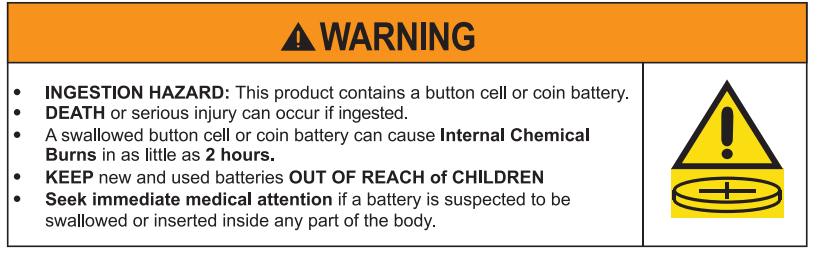
NOTE: For more information, see “WARNINGS/CAUTIONS” on page 2.
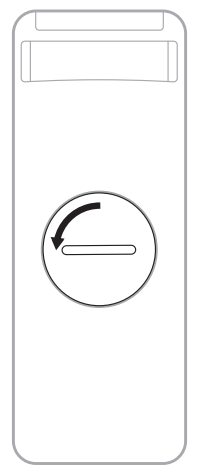
Using a coin, turn the battery compartment cover left (counter-clockwise) and remove the cover.
Insert the new battery flat side up, with the + symbol facing up.
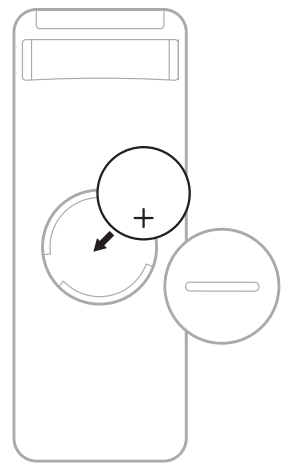
NOTE: Use only an agency-approved (e.g., UL) CR2032 or DL2032 3-volt lithium battery.
- Reset the cover and turn it right (clockwise) to lock in place.
CLEAN THE SOUNDBAR
Wipe the outside surfaces of the soundbar with a soft, dry cloth.
CAUTIONS:
- Do NOT allow liquids to spill onto the soundbar or into any openings.
- Do NOT blow air into the up-firing speakers or soundbar.
- Do NOT use a vacuum to clean the up-firing speakers or soundbar.
- Do NOT use any sprays near the up-firing speakers or soundbar.
- Do NOT use any solvents, chemicals, or cleaning solutions containing alcohol, ammonia, or abrasives.
- Do NOT allow objects to drop into any openings.
REPLACEMENT PARTS AND ACCESSORIES
Replacement parts and accessories can be ordered through Bose customer service.
Troubleshooting the Bose Smart Soundbar 600
TRY THESE SOLUTIONS FIRST
If you experience problems with the soundbar:
- Make sure the soundbar is connected to a live AC (mains) outlet.
- Secure all cables.
- Check the state of the soundbar (see page 36).
- Download the Bose app, complete the setup process, and wait for any available software updates to download to the soundbar.
- Place the soundbar according to the placement guidelines (see page 15).
- Move the soundbar within the recommended range of your bile device for proper operation.
- Make sure the soundbar is at least 1 – 3 ft (0.3 – 0.9 m) away from wireless equipment.
- Check that any Wi-Fi access points are placed up to 8 – 10 ft (2.4 – 3.0 m) away from the soundbar, optional bass module, and optional surround speakers.
OTHER SOLUTIONS
If you could not resolve your issue, see the table below to identify symptoms and solutions to common problems. If you are unable to resolve your issue, contact Bose customer service.
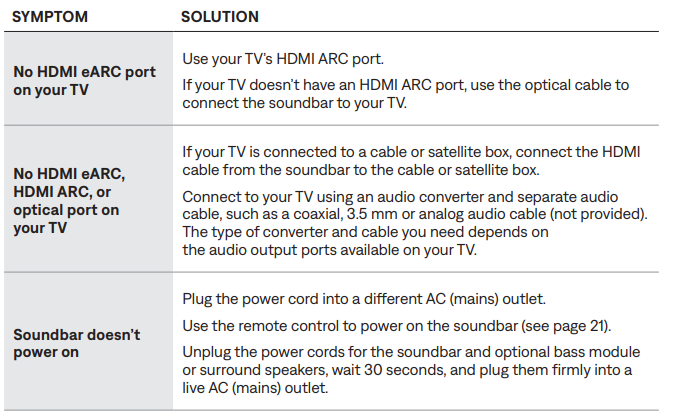
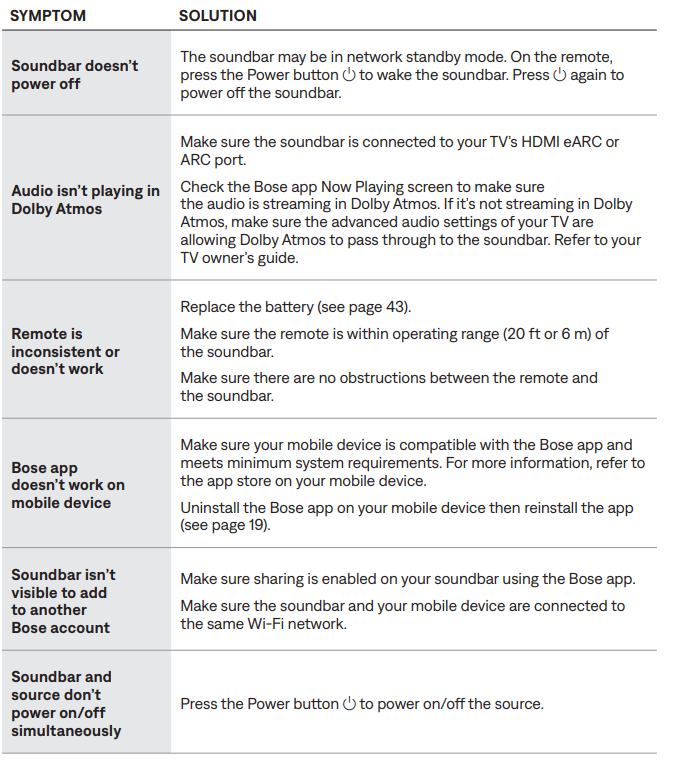
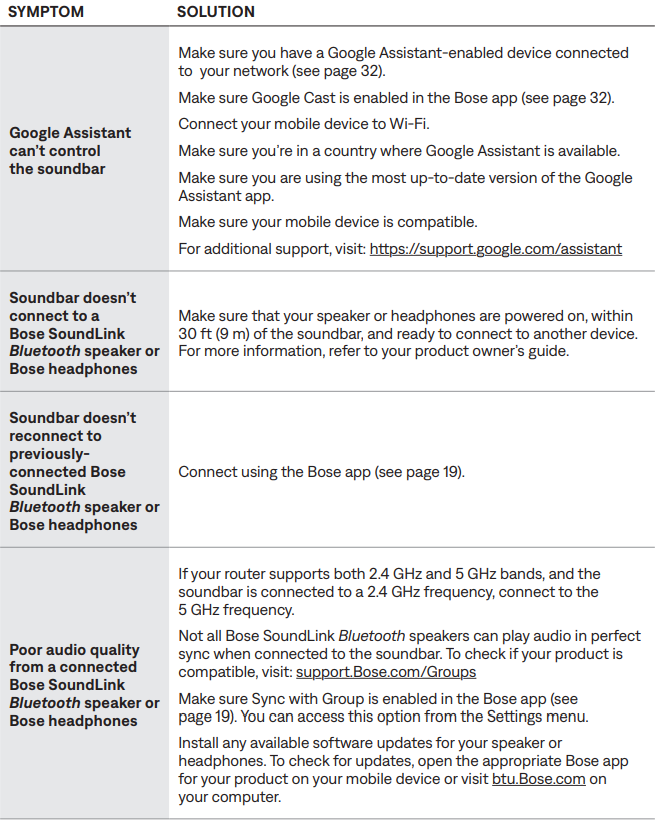
Common issues with the Bose Smart Soundbar 600 include audio dropouts, voice assistant unresponsiveness, and connectivity problems. If the soundbar disconnects from Wi-Fi, restart your router and the soundbar. For voice assistant issues, ensure your account is linked correctly in the Bose Music app. If you notice audio distortion, check for firmware updates and adjust the bass and treble settings.
Preventive measures include keeping the soundbar clean and free of dust, updating firmware regularly, and avoiding extreme temperatures. If problems persist, consult the Bose support website or contact customer service. The Bose Smart Soundbar 600 comes with a one-year limited warranty covering manufacturing defects. For further assistance, visit Bose Support or call 1-800-379-2073.
Pros and Cons of the Bose Smart Soundbar 600
Pros
- Immersive Dolby Atmos and TrueSpace sound
- Clear dialogue and balanced audio tuning
- Compact, stylish design fits under most TVs
- Easy setup and intuitive app control
- Supports multi-room audio and wireless subwoofer
- Integrated voice assistants for hands-free control
Cons
- Lacks deep bass without a subwoofer
- No DTS audio format support
- EQ options are limited compared to some competitors
- Premium price may be high for budget buyers
The Bose Smart Soundbar 600 offers excellent value for those seeking a high-quality, feature-rich soundbar with advanced audio technologies.
Customer Reviews of the Bose Smart Soundbar 600
Customers consistently praise the Bose Smart Soundbar 600 for its clear dialogue, immersive sound, and easy setup. Many users highlight the effectiveness of TrueSpace technology, noting that even stereo content feels spacious and engaging. The compact design and sleek finish receive frequent compliments, with reviewers appreciating how well it integrates into their living spaces.
Common complaints include the need for a subwoofer to achieve deep bass and the lack of DTS support. The average star rating is 4.5 out of 5, with users recommending the Bose Smart Soundbar 600 for anyone looking to upgrade their TV audio without a complex installation. Frequent mentions of reliable customer support and regular firmware updates further enhance its reputation.
Faqs
How do I set up my bose Smart Soundbar 600 for the first time?
What should I do if my bose Smart Soundbar 600 is not producing sound?
Can I connect the bose Smart Soundbar 600 to my TV wirelessly?
How do I optimize audio performance when wall-mounting the bose Smart Soundbar 600?
What features make the bose Smart Soundbar 600 stand out from other soundbars?
How can I troubleshoot Wi-Fi connectivity issues with the bose Smart Soundbar 600?
How do I maintain and clean my bose Smart Soundbar 600 to ensure longevity?
Is the bose Smart Soundbar 600 compatible with all TVs and streaming devices?
Tags
More bose manuals
Leave a Comment