
Setup: Bose Solo 5 TV Sound System User Manual
Content
Bose Solo 5 TV Sound System

Introduction: Transform Your TV Viewing Experience
The Bose Solo 5 TV Sound System is a premium one-piece soundbar designed to dramatically enhance your television audio experience. This compact yet powerful soundbar delivers noticeably better sound than your TV alone, engineered to clearly reproduce everything from dialogue to musical details with exceptional clarity. Whether you're watching dramatic programs, live concerts, suspenseful series, or sports events, the Bose Solo 5 brings professional-quality audio to your home entertainment setup.
This soundbar is engineered specifically for TV enthusiasts who want better audio without the complexity of a full surround sound system. The Bose Solo 5 TV Sound System features innovative technologies,, including Videostage and TrueSpace technologies that deliver many of the benefits of a five-speaker home theater in a single, elegant soundbar. The device includes a dialogue mode feature that makes every word easier to hear, perfect for news broadcasts, dramas, and dialogue-heavy content.
The Bose Solo 5 is ideal for anyone looking to improve their TV sound without extensive installation or multiple components. It's particularly suited for apartment dwellers, those with space constraints, and viewers who prioritize dialogue clarity. The soundbar typically retails between $350-$450 USD and is widely available through major retailers, Bose's official website, and online platforms. With its combination of elegant design, wireless connectivity, and straightforward setup, the Bose Solo 5 TV Sound System represents an excellent investment for anyone seeking quality audio enhancement without complexity.
Technical Specifications
The Bose Solo 5 TV Sound System combines compact dimensions with impressive audio performance. Understanding these specifications helps you determine if this soundbar meets your specific needs and space requirements.
Technical Information
Input rating
- Input: 20VDC, 30W MAX.
Physical Specifications:
- Soundbar dimensions: 54.8 cm W x 7.0 cm H x 8.6 cm D (21.6 x 2.6 x 3.4 inches)
- Soundbar weight: 1.69 kg (3.73 lbs)
- Remote control dimensions: 10.4 cm H x 4.0 cm W x 1.1 cm D
- Remote control weight: 141.7 g (5 oz)
Audio and Performance Specifications:
- Channel configuration: 2.0 stereo
- Output power: 36W
- Audio codec support: Dolby Digital
- Subwoofer type: Embedded full-range drivers
- Frequency response: Full-frequency range reproduction
Connectivity and Input Options:
- Optical audio input (digital TOSLINK)
- Coaxial audio input (digital S/PDIF)
- 3.5mm auxiliary jack (analog)
- Bluetooth wireless connectivity with pairing for up to 8 devices
- Active Bluetooth connection for up to 2 devices
- USB port for software updates
Power and Operating Specifications:
- Input AC voltage: 100V-240V
- Input AC frequency: 50Hz/60Hz
- Output voltage: 20V DC
- Output current: 1.8A
- Average active efficiency: 89.0%
- Efficiency at low load (10%): 88.3%
- No-load power consumption: 0.08W
- Auto-wake feature activates on audio signal detection
- Auto-shutdown after 60 minutes of inactivity
Key Features and Technologies:
- Videostage and TrueSpace technologies for spacious sound distribution
- Dialogue mode for enhanced speech intelligibility
- Bass control adjustment via remote
- Universal remote control for TV, cable/satellite box, and Bluetooth devices
- Wall-mountable design with optional mounting kit
- Mounting ring to hide the power supply behind the mounted TV
System features
- Videostage® and TrueSpace® technologies deliver many of the benefits of a 5-speaker home theater in a single soundbar.
- Sleek and elegantly designed soundbar fits easily in front of your TV.
- Connects with just one audio cable for easy setup.
- Programmable universal remote powers on/off your TV, cable/satellite box,, and system with the press of a single button.
- Stream music from Bluetooth® devices.
- Stores up to eight Bluetooth devices in its pairing list.
- Connects up to two Bluetooth devices for easy switching between devices.
- Mounting ring to hide the power supply behind your mounted TV.
- The sar can be mounted on the wall (kit available separately).
Unpacking
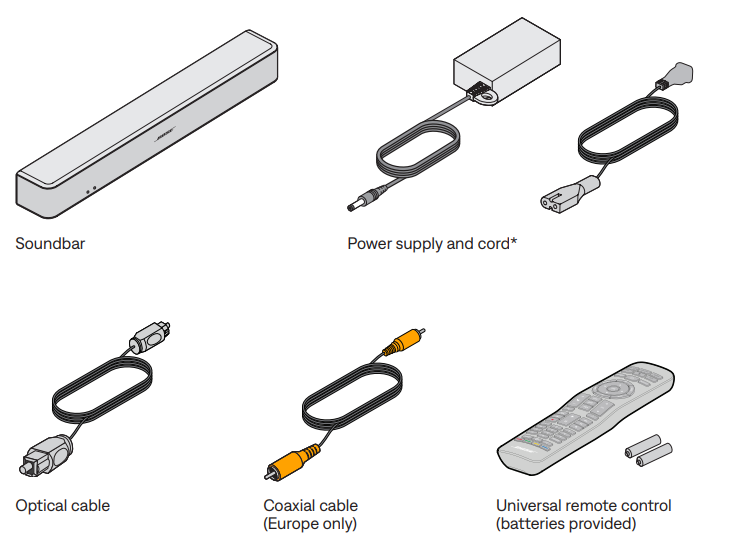
Carefully unpack the carton and confirm that the following parts are included:
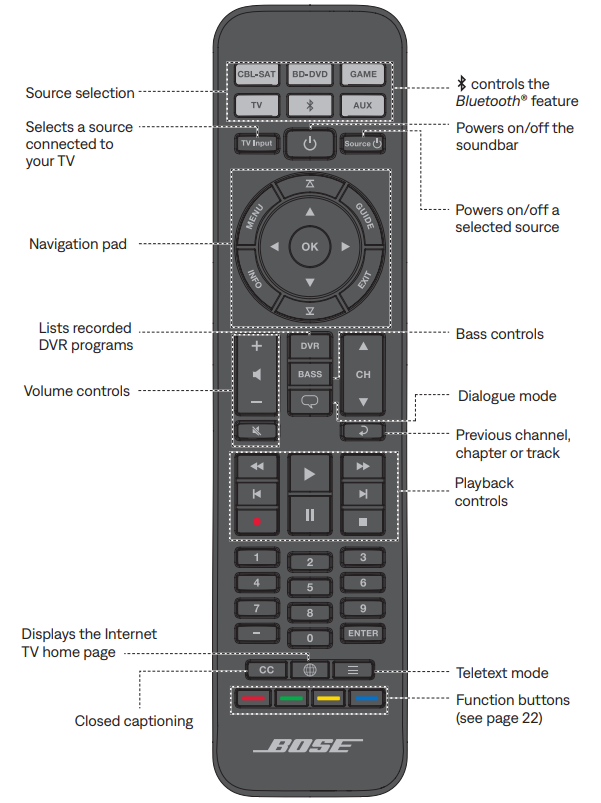
Remote control buttons
Use the remote to control sources connected to your system, adjust the system volume, change channels, use playback functions, enable cable/satellite box functions, and navigate source menus.
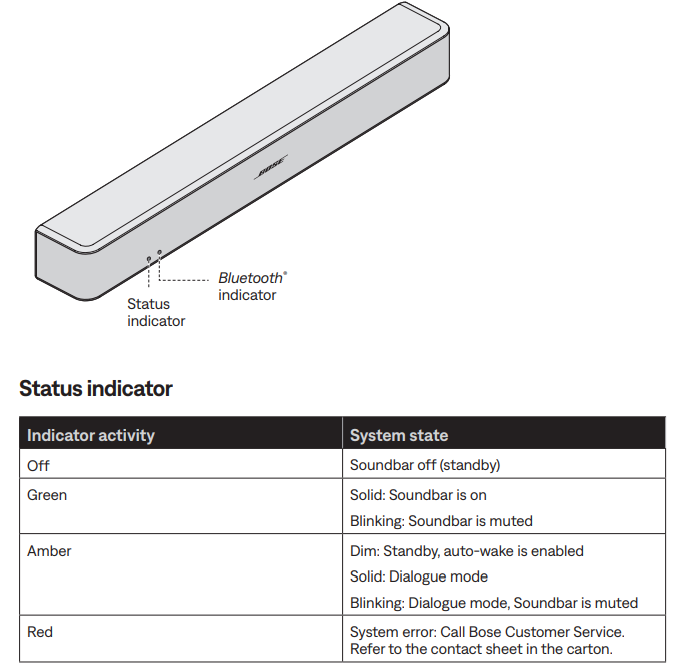
Soundbar indicators
The status and Bluetooth® indicators on the front of the soundbar provide information on soundbar activity.
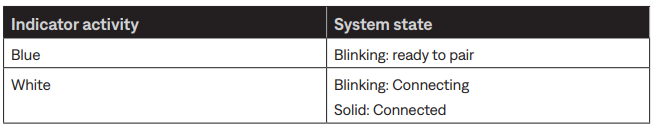
Bluetooth indicator
Setup and Installation Guide
Setting up the Bose Solo 5 TV Sound System is straightforward and requires minimal technical knowledge. The system is designed for plug-and-play operation with just one audio connection to your television.
Initial Setup Steps:
- Unpack and inspect: Remove all components from the box, including the soundbar, remote control, power cable, optical cable, and documentation. Verify all items are present and undamaged.
- Position the soundbar: Place the soundbar on a flat surface in front of your TV or use the optional wall-mounting kit. The compact design fits easily on most TV stands or shelves.
- Connect power: Plug the power cable into the soundbar and a standard electrical outlet. The system will enter standby mode, indicated by a light on the front panel.
- Select audio connection: Choose one of three connection methods: optical digital input (recommended for best quality), coaxial digital input, or 3.5mm analog auxiliary jack. Connect the appropriate cable from your TV's audio output to the soundbar.
- Power on: Press the power button on the remote control or the soundbar itself to activate the system.
Bluetooth Pairing and Configuration:
- Press and hold the Bluetooth button on the remote until the Bluetooth indicator on the soundbar begins blinking.
- On your phone, tablet, or other device, open Bluetooth settings and search for available devices.
- Select "Bose Solo 5" from the list of available Bluetooth devices.
- Complete the pairing process on your device when prompted.
- The soundbar stores up to 8 Bluetooth devices and can actively connect to 2 devices simultaneously for easy switching.
Remote Control Programming:
- The universal remote can control your TV, cable/satellite box, and the Bose Solo 5 system with a single power button press.
- Program your TV and cable box codes into the remote following the instructions in the included documentation.
- Use dedicated buttons for volume, bass adjustment, and dialogue mode activation.
Safety Precautions and Warnings:
- Keep the soundbar away from water and moisture to prevent damage.
- Do not place near heat sources or in direct sunlight for extended periods.
- Ensure adequate ventilation around the device for proper heat dissipation.
- Do not incinerate batteries; dispose of used batteries according to local regulations.
- Use only the included power adapter to avoid damage to the system.
CARE AND MAINTENANCE
Adjusting the audio for wall mounting
- After wall-mounting the soundbar, adjust the audio for better bass sound.
- Press and hold for five seconds.
Tip: If you remove the soundbar from the wall, repeat to return the soundbar to default audio settings.
Replacing the remote batteries
Replace both batteries when the remote control stops operating or its range seems reduced. Use Alkaline batteries.
- Slide open the battery compartment cover on the back of the remote.
- Remove both batteries.
- Dispose of the batteries according to the regulations in your area.
- Insert two AA (IEC-LR6) 1.5V batteries or the equivalent. Match the + and – symbols on the batteries with the + and – markings inside the compartment.
- Slide the battery compartment cover back into place.

Cleaning
- Clean the surface of the system with a soft, dry cloth.
- Do not use any sprays near the system. Do not use any solvents, chemicals,, or cleaning solutions containing alcohol, ammonia,, or abrasives.
- Do not allow liquids to spill into any openings.
Troubleshooting and Common Issues
Most issues with the Bose Solo 5 TV Sound System can be resolved through simple troubleshooting steps. If you experience problems, consult this section before contacting customer support.
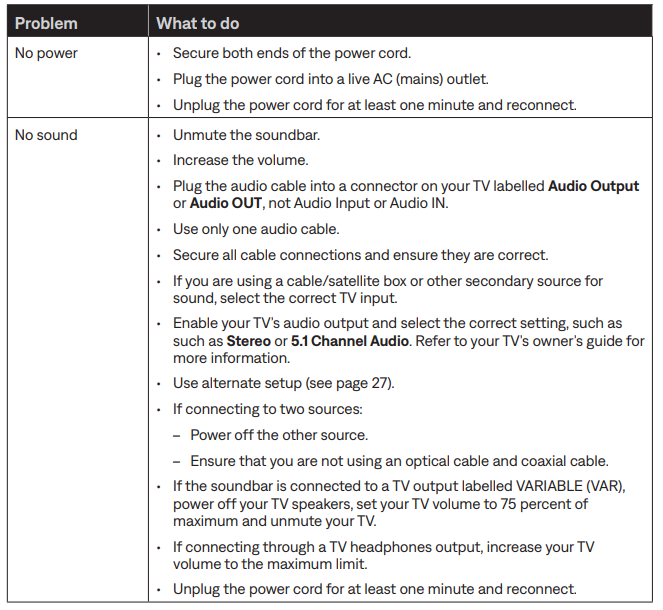
No Sound from the Soundbar:
- Verify the soundbar is powered on (check for the indicator light on the front panel).
- Confirm the audio cable is properly connected to both the soundbar and the TV audio output.
- Check TV audio settings to ensure sound is not muted or set to internal speakers.
- Try adjusting the volume using the remote control or soundbar buttons.
- If using Bluetooth, verify the device is properly paired and within range (typically 30 feet).
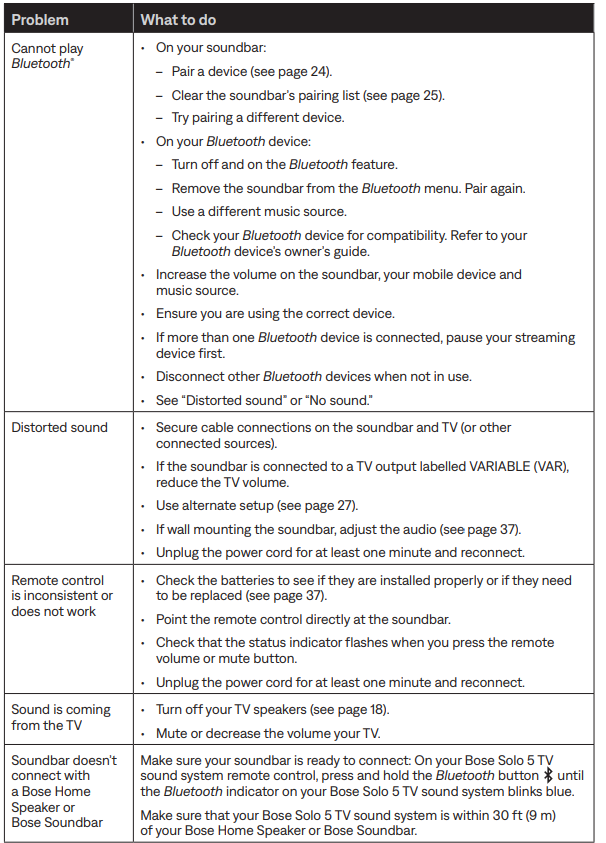
Bluetooth Connection Issues:
- Move your Bluetooth device closer to the soundbar and away from interference sources.
- Remove the soundbar from the pairing list on your device and re-pair it.
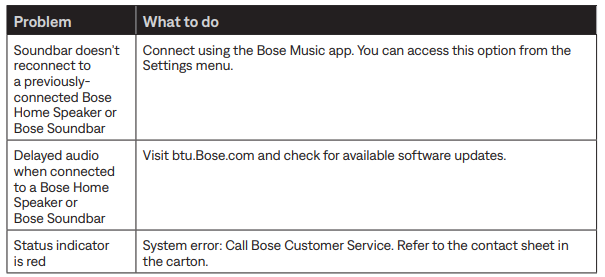
- Reset the soundbar by unplugging it for 30 seconds, then plugging it back in.
- Ensure your device's Bluetooth is enabled and discoverable.
- If multiple devices are paired, disconnect unused devices to improve connection stability.
Audio Quality Problems:
- If dialogue is unclear, activate dialogue mode using the remote control button.
- For insufficient bass, use the bass control button on the remote to increase levels.
- Check TV audio settings to ensure surround sound or special audio modes are not interfering with normal playback.
- Verify the audio source is not compressed or low-bitrate, which can affect quality.
Remote Control Issues:
- Replace remote batteries if buttons are unresponsive (use standard alkaline batteries).
- Ensure line-of-sight between the remote and the soundbar for proper signal reception.
- Remove any obstacles blocking the infrared sensor on the soundbar's front panel.
Warranty and Support:
- The Bose Solo 5 TV Sound System typically includes a one-year limited manufacturer's warranty.
- Warranty covers defects in materials and workmanship under normal use.
- For warranty service or technical support, contact Bose customer service through their official website or call the support number provided with your product documentation.
- Keep your proof of purchase for warranty claims.
Limited warranty
- A limited warranty covers your system. Visit our website at global.Bose.com/warranty for details of the limited warranty.
- To register your product, visit global.Bose.com/register for instructions. Failure to register will not affect your limited warranty rights.
Advantages and Disadvantages
Understanding the strengths and limitations of the Bose Solo 5 TV Sound System helps you make an informed purchasing decision.
Key Advantages:
- Compact and elegant design: The soundbar measures only 54.8 cm wide and 7 cm high, fitting inconspicuously in front of most flat-screen TVs without taking up significant space.[5]
- Excellent dialogue clarity: The dedicated dialogue mode significantly enhances speech intelligibility, making it ideal for news broadcasts, documentaries, and drama series.
- Wireless music streaming: Built-in Bluetooth connectivity allows you to stream music, podcasts, and audio content from your smartphone or tablet with ease.
- Simple setup and operation: The system requires just one cable connection to your TV and is designed for straightforward plug-and-play use without complicated configuration.
- Excellent build quality: Bose's reputation for quality construction is evident in the Bose Solo 5's solid materials and durability.
- Universal remote control: Control your TV, cable box, and soundbar with a single remote, simplifying your entertainment setup.
- Auto-wake and auto-shutdown features: The soundbar automatically activates when it detects an audio signal and powers down after 60 minutes of inactivity.
Notable Limitations:
- Limited bass response: The embedded subwoofer provides adequate bass for dialogue and music but lacks the deep, powerful bass found in dedicated subwoofer systems.
- Narrow soundstage: The 2.0 channel configuration creates a soundfield that matches approximately the width of the soundbar itself, without the spaciousness of larger multi-channel systems.
- Minimal improvement over TV speakers: While the Bose Solo 5 noticeably improves TV audio, the enhancement is less dramatic than larger soundbar systems or dedicated home theater setups.
- Limited audio codec support: The system supports Dolby Digital but lacks support for newer, advanced audio codecs like Dolby Atmos or DTS :X.
- No H DMI connectivity: The absence of HDMI inputs means you cannot connect directly to modern video sources and must rely on TV audio outputs.
- Lack of advanced sound modes: The Bose Solo 5 offers minimal sound customization options compared to competitors, focusing on simplicity over extensive EQ controls.
- Not ideal for music enthusiasts: While acceptable for casual listening, audiophiles seeking detailed music reproduction may find the system's performance limiting.
Value for Money Assessment:
At its typical price point of $350-$450 USD, the Bose Solo 5 TV Sound System offers solid value for consumers prioritizing simplicity, dialogue clarity, and brand reliability. It represents an excellent choice for TV-focused users who want straightforward audio improvement without the complexity of multi-piece systems. However, those seeking powerful bass, immersive surround sound, or extensive audio customization may find better value in larger soundbar systems or entry-level home theater packages. The Bose Solo 5 is best suited for buyers who value ease of use, compact design, and dependable performance over cutting-edge features or maximum audio power.
Customer Reviews and User Feedback
Real users consistently praise the Bose Solo 5 TV Sound System for specific strengths while noting particular limitations based on their viewing habits and expectations.
Commonly Praised Features:
- Exceptional dialogue clarity for TV shows and movies, with users noting that voices are projected better and with good clarity without requiring dialogue mode in most cases.
- Simple setup process that requires minimal technical knowledge or installation effort.
- Compact footprint that fits seamlessly into most living room configurations without visual obstruction.
- Reliable Bluetooth connectivity for streaming music from personal devices.
- Noticeable improvement over TV speaker audio, with better body, solidity, and reduced thin, hard sound quality.
Frequently Mentioned Concerns:
- Limited bass depth and dynamics, with users noting insufficient low-frequency thump for action movies and music with heavy bass components.
- Narrow soundstage that doesn't create immersive surround sound effects, though the focused presentation works well for dialogue.
- Modest improvement compared to higher-end soundbar competitors like the Sonos Beam, which offers a 3.0.0.0 channel configuration and greater dynamic range.
- Lack of HDMI connectivity is limiting direct connection to modern video sources.
Purchase Recommendations:
The Bose Solo 5 TV Sound System is recommended for apartment dwellers, space-conscious buyers, dialogue-focused viewers, and anyone seeking straightforward audio enhancement without complexity. It works exceptionally well for news, documentaries, dramas, and talk shows. The system is less ideal for action movie enthusiasts, bass-heavy music listeners, and those wanting immersive surround sound effects. Buyers comparing the Bose Solo 5 to the Sonos Beam should note that while the Sonos offers superior channel configuration and sound enhancement features, the Bose Solo 5 provides Bluetooth connectivity and maintains a lower price point.
Faqs
How do I set up the Bose Solo 5 TV Sound System for the first time?
Why is there no sound coming from my Bose Solo 5 TV Sound System?
Can I connect multiple Bluetooth devices to the Bose Solo 5 TV Sound System?
How do I adjust the bass level on the Bose Solo 5 TV Sound System?
Is the Bose Solo 5 TV Sound System compatible with all TVs?
How do I turn off my TV speakers when using the Bose Solo 5 TV Sound System?
Can I mount the Bose Solo 5 TV Sound System on the wall?
How do I clear paired Bluetooth devices from the Bose Solo 5 TV Sound System?
Tags
More bose manuals
Leave a Comment