
Pairing: Bose OE2 Audio Headphones User Manual
Content
Bose OE2 Audio Headphones
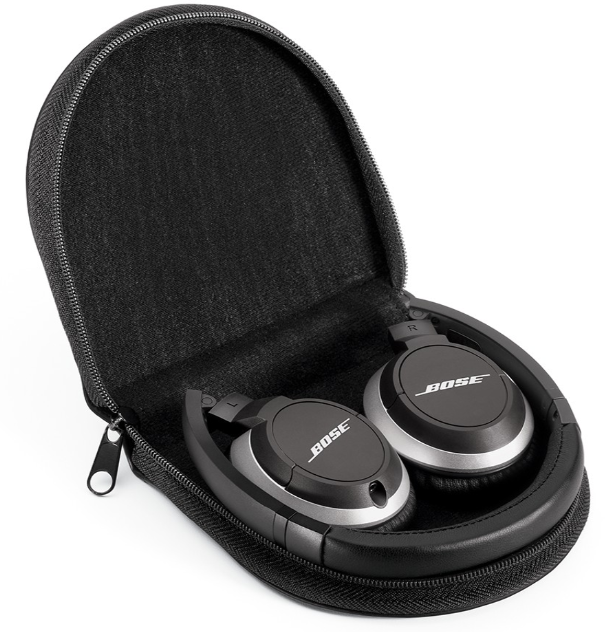
Introduction to Bose OE2 Audio Headphones
The Bose OE2 audio headphones represent the next generation of portable on-ear listening devices, designed for music enthusiasts who demand both comfort and quality sound without sacrificing portability. These lightweight headphones deliver the signature Bose sound experience with smooth, full-range audio that brings out the depth and clarity of your favorite music. The Bose OE2 audio headphones feature an advanced acoustic design combined with a slim, contoured headband and premium memory foam ear cushions, making them ideal for commuters, travelers, and everyday listeners.
What sets the Bose OE2 audio headphones apart is their exceptional portability and comfort profile. With a fold-flat, collapsible design, these headphones easily fit into the included carrying case, making them perfect for travel, commuting, or storing in your bag. The lightweight construction ensures you can wear them for extended periods without fatigue, while the closed earcup design provides surprising sound isolation for an on-ear headphone. Whether you're listening during a flight, at the gym, or during your daily commute, the Bose OE2 audio headphones deliver consistent, lifelike audio performance.
The Bose OE2 audio headphones are particularly well-suited for travelers, commuters, and music lovers who prioritize comfort and portability over active noise cancellation. Available in elegant black or white finishes, these headphones complement any style while delivering premium audio quality. With an estimated retail price of approximately $140-160, the Bose OE2 audio headphones offer excellent value for those seeking reliable, comfortable on-ear headphones from a trusted audio brand. These headphones are widely available through major retailers,, including Best Buy, Crutchfield, and authorized Bose dealers.
Technical Specifications and Features
Design and Physical Specifications:
- Fit Style: On-ear headphones with h a contoured design
- Earcup Type: Closed design for sound isolation
- Earcup Dimensions: 2.125" width x 2.75" height
- Weight: Approximately 5.05 oz (143.2 grams)
- Headband: Adjustable slim headband with memory foam ear cushions
- Impedance: Approximately 22 ohms
- Cable Connector: 3.5mm jack with 2.5mm adapter option
Audio Performance Characteristics:
- Frequency Response: Full range audio from deep lows to clear highs
- Bass Response: Strong, solid,, deep bass down to 16 Hz
- Acoustic Technology: Enhanced proprietary TriPort acoustic structure
- Sound Isolation: Excellent passive isolation for on-ear design
- Sound Leakage: Minimal leakage due to closed design with bass vent
Connectivity and Accessories:
- Bluetooth Connectivity: No (wired connection only)
- Noise Cancellation: No active noise cancellation
- Microphone: Not included on standard OE2 model (available on OE2i variant)
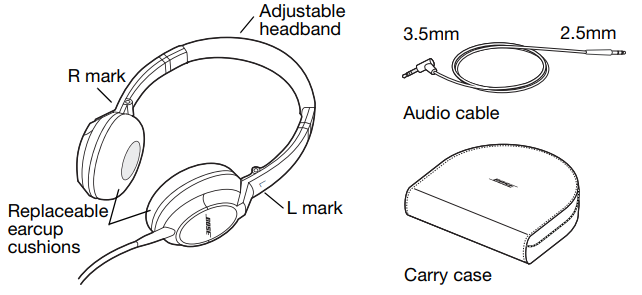
- Included Accessories: Carrying case, adjustable audio cable, replaceable earcup cushions
- Power Requirements: No batteries needed
Setup and Usage Guide
Setting up your Bose OE2 audio headphones is straightforward and requires no special configuration. Simply connect the 3.5mm audio cable to your device's headphone jack. The headphones feature L and R markings on the earcups to ensure proper left and right channel orientation. Place the headphones on your head with the adjustable headband resting gently on top, and position the earcup cushions comfortably on your ears. The memory foam cushions will conform to your ears for a secure, comfortable fit that provides good sound isolation.
For optimal audio performance, the manual recommends turning off any equalizer settings, bass boost, or other audio processing in your device, as the Bose OE2 audio headphones are already optimized for flat, accurate sound reproduction. This allows you to experience the headphones' full acoustic potential without competing signal processing.
Safety Information
Please read this owner’s guide.e
Please take the time to follow the instructions in this owner’s guide carefully. It will help you set up and properly use your new headphones. Please save this owner’s guide for future reference.
CAUTIONS:
- Long-term exposure to loud music may cause hearing damage. Please avoid extreme volume when using headphones, especially for extended periods.
- Do not use headphones when operating a motor vehicle or anywhere where the inability to hear outside sounds may present a danger to you or others. Check and follow local laws regarding headphone use.
- Sounds that you rely on as reminders or warnings may have an unfamiliar character when using headphones. Be aware of how these sounds may vary in character so you can recognize them as needed.
- Do not drop, sit on, or allow the headphones to be immersed in water.
WARNING: DO NOT use mobile phone adapters to connect headphones to airplane seat jacks, as this could result in personal injury,, such as burns or property damage due to overheating. Remove and disconnect immediately if you experience ce a warming sensation or loss of audio.
Components
Storing your headphones
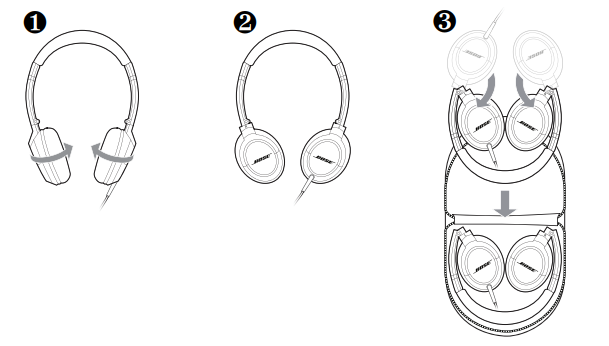
Note: Do not try to exceed the limits of the pivots or over-rotate the earcups.
Using your headphones
- Wearing the headphones
After removing the headphones from the case and unfolding them (see page 4), put on the headphones using the markings that identify the left (L) and right (R) earcups. Adjust the headband so it rests gently on top of your head,, and the earcup cushions fit comfortably on your ears. - Cleaning the headphones
The Bose® OE2 audio headphones do not require scheduled cleaning. Should cleaning be necessary, simply wipe the outside surfaces with a soft cloth. Be sure the earcup ports are kept clear, and that no moisture is allowed to get inside the earcup.\ - Replacement parts and accessories
Replacement parts and accessoriesaccessories,s, such as the carry case, earcup cushion, and the audio cable,, can be ordered through Bose® Customer Service. See the contact information for your area included in this guide.
Maintenance and Care
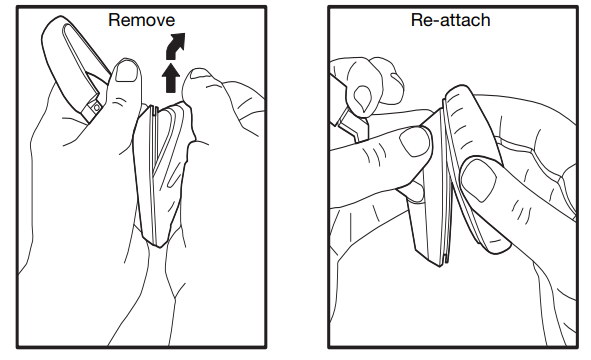
The Bose OE2 audio headphones require minimal maintenance to keep them in optimal condition. The earcup cushions are replaceable and can be removed by gently pulling up and out. To reattach them, place the edge of the earcup cushion skirt into the slot behind the earcup flange, then work the remainder of the skirt into the slot all the way around the earcup. For general cleaning, use a soft, dry cloth to wipe down the exterior surfaces. Avoid exposing the headphones to moisture, extreme heat, or direct sunlight for extended periods.
Replacing earcup cushions
Remove the earcup cushion:
- Grasp the earcup cushion securely.
- Pull up and out to remove the earcup cushion.
Re-attach earcup cushion:
- Place the edge of the earcup cushion skirt into the slot behind the earcup flange.
- Work the remainder of the skirt into the slot all the way around the earcup.
Troubleshooting Common Issues
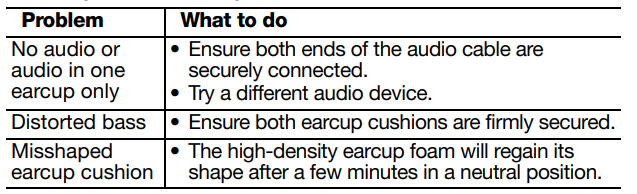
- No Sound or Muted Audio: Verify that the audio cable is fully inserted into both your device's headphone jack and the headphones' connector. Check that your device's volume is not set to mute or the minimum level. Inspect the 3.5mm connector for any debris or damage, and clean gently if necessary. Test with a different audio source to determine if the issue is with the headphones or your device.
- Poor Sound Quality or Muffled Audio: The Bose OE2 audio headphones have a warm sound signature with emphasized bass and smooth midrange. If audio sounds excessively muffled, ensure the earcup cushions are properly positioned on your ears for a good seal. Verify that no equalizer or audio processing settings are enabled on your device. Clean the earcup ports gently with a soft brush, as dust accumulation can affect sound clarity.
- Uncomfortable Fit or Ear Pressure: Adjust the headband so it rests gently on top of your head without excessive pressure. If the earcup cushions feel uncomfortable, they can be removed and replaced with fresh ones. The memory foam should conform to your ears after a short break-in period. Ensure you're not wearing the headphones too tightly on your head.
- Sound Leakage or Isolation Issues: While the closed design provides good isolation, some sound leakage is normal due to the bass vent design. Ensure the earcup cushions are properly seated on your ears to maximize the acoustic seal. Position the headphones correctly with the L and R markings properly oriented.
Warranty and Support: Your Bose OE2 audio headphones are covered by a limited warranty. For detailed warranty information and support, register your product on the Bose website or contact Bose customer service directly. The company offers technical support for setup, troubleshooting, and maintenance questions.
Limited Warranty
Your Bose® headphones are covered by a limited warranty. Details of the limited warranty are provided on the product registration card that is included in the carton. Please refer to the card for instructions on how to register. Failure to register will not affect your limited warranty rights.
What you must do to obtain Limited Warranty Service:
Return product, with proof of purchase from an authorized Bose dealer, using the following procedures:
- Contact the Bose organization in your country/region (visit Global.Bose.com/register for Bose contact information in your country/region) for specific return and shipping instructions.
- Label and ship the product, freight prepaid, to the address provided by the Bose organization in your country; and
- Place any necessary return authorization number prominently on the outside of the carton. Cartons not bearing a return authorization number, where required, will be refused.
Note: The serial number is located on the warranty card included in the carton.
Advantages and Disadvantages
Pros:
- Lightweight and comfortable desi,,gn perfect for extended listening sessions
- Excellent portability with fold-flat design and included carrying case
- Strong, deep bass response with full frequency range audio
- Good passive sound isolation for an on-ear headphone design
- Replaceable ear cushions for long-term durability
- No batteries required for operation
- Available in multiple color options (black and white)
- Reliable Bose audio quality and brand reputation
Cons:
- No Bluetooth connectivity; requires wired connection only
- No active noise cancellation technology
- No microphone for hands-free calling (standard OE2 model)
- Bass-heavy sound signature may not appeal to all listeners
- Limited high-frequency detail and sparkle in audio reproduction
- Headband construction is reported as less robust than premium alternatives
- Some sound leakage due to the bass vent design
- Higher price point compared to similar wired on-ear options
Customer Reviews and User Feedback
Users consistently praise the Bose OE2 audio headphones for their comfort and portability, with many highlighting that they can wear them for hours without discomfort thanks to the memory foam ear cushions and lightweight design. The sound isolation provided by the closed design impresses many users, who note that despite the small on-ear form factor, these headphones block out surprising amounts of ambient noise during travel and commuting.
Audio quality receives mixed feedback from customers. Many appreciate the warm, bass-forward sound signature that delivers deep, solid bass without excessive boom at normal listening levels. However, some audiophile-oriented users criticize the recessed high frequencies and lack of detail in the upper midrange, noting that the sound can feel muffled or smoothed out compared to more neutral-sounding headphones. Customers frequently recommend the Bose OE2 audio headphones for casual listening, commuting, and travel rather than for critical music production or audiophile listening.
Common praise includes the excellent value for money, reliable Bose quality, and the convenience of the included carrying case. Frequent complaints center on the lack of Bluetooth connectivity and the absence of a microphone on the standard model, which some users find limiting for modern device usage. Overall, customers recommend the Bose OE2 audio headphones for anyone seeking comfortable, portable headphones with good sound isolation and warm audio character, particularly for travel and daily commuting.
Faqs
How do I properly set up my Bose OE2 Audio Headphones for optimal sound quality?
What should I do if my Bose OE2 Audio Headphones have a loose or malfunctioning cable connection?
Can Bose OE2 Audio Headphones be used with smartphones and tablets, and do they support inline controls?
How do I maintain and clean my Bose OE2 Audio Headphones to ensure longevity?
Why do my Bose OE2 Audio Headphones sound muffled or boomy, and how can I improve audio clarity?
Are Bose OE2 Audio Headphones comfortable for long listening sessions, and what features support comfort?
How can I replace the ear cushions on my Bose OE2 Audio Headphones if they wear out?
Do Bose OE2 Audio Headphones provide noise isolation or noise cancellation for use in noisy environments?
Tags
More bose manuals
- Pairing: Bose OE2i Audio Headphones User Manual
- Setup & Pairing: Bose QuietComfort Ultra Headphones (2nd Gen) User Manual
- Setup & Pairing: Bose SoundComm B40 Headset User Manual
- Pairing: Bose QuietComfort 45 Headphones User Manual
- Pairing & Setup: Bose Soundbar 550 User Manual
- Setup: Bose Headphones 700 UC User Manual
Leave a Comment